Con la búsqueda vectorial de OSS, puede localizar archivos en conjuntos de datos masivos mediante el contenido semántico, los metadatos, las propiedades multimedia, los ETags, las etiquetas y los metadatos personalizados.
Casos de uso
Escenarios de oficina personal y empresarial
Busque archivos de oficina por su contenido semántico —por ejemplo, "cómo usar el sistema ERP", "proceso de reparación de TI" o "análisis del rendimiento comercial de 2024"— en lugar de explorar las carpetas manualmente.
Escenarios de redes sociales multimedia
En las aplicaciones de redes sociales donde los usuarios cargan imágenes, la búsqueda semántica permite encontrar fotos por su contenido. Por ejemplo, se pueden buscar términos como "excursión de primavera a las afueras" o "reunión del Festival de Primavera" sin necesidad de etiquetarlas manualmente.
Escenarios de unidades en la nube
La búsqueda vectorial mejora las unidades en la nube personales o empresariales. Esta función habilita búsquedas de archivos basadas en el contenido, como documentos específicos o fotografías dentro de un álbum.
Escenarios de videovigilancia
Encuentre grabaciones de vigilancia específicas al introducir palabras clave descriptivas, como "vigilancia exterior en un día nevado" o "huerto en un día soleado".
Límites
-
Disponibilidad por región
La función de búsqueda vectorial está disponible para los buckets de las siguientes regiones: China (Qingdao), China (Beijing), China (Zhangjiakou), China (Hangzhou), China (Shanghai), China (Shenzhen), China (Guangzhou), China (Chengdu), China (Hong Kong), Singapore, Indonesia (Jakarta) y Germany (Frankfurt).
NotaLa búsqueda de audio no es compatible con las regiones China (Hong Kong), Singapore, Indonesia (Jakarta) y Germany (Frankfurt).
-
Límites de bucket
Un bucket con la búsqueda vectorial habilitada puede contener un máximo de 5 mil millones de archivos. Si la cantidad de archivos supera este límite, el rendimiento de la búsqueda podría degradarse. Para procesar un volumen mayor de datos, póngase en contacto con Soporte técnico para solicitar una evaluación.
-
Carga multiparte
Cuando utiliza la carga multiparte, los resultados de búsqueda solo incluyen objetos ensamblados por completo con la operación CompleteMultipartUpload. Los resultados no incluyen partes de cargas iniciadas que aún no han finalizado o que se cancelaron.
Referencia de rendimiento
A continuación se muestran las métricas de rendimiento aplicables a la búsqueda vectorial de OSS.
-
Ancho de banda interno y QPS proporcionados por OSS
OSS proporciona ancho de banda interno y QPS dedicados para la búsqueda vectorial. Esta capacidad gestiona hasta 1,250 solicitudes por segundo y no consume la cuota de QoS de su bucket.
Región
Ancho de banda interno
QPS predeterminado
China (Beijing), China (Hangzhou), China (Shanghai) y China (Shenzhen)
10 Gbps
1250
Otras regiones
1 Gbps
1250
-
Tiempo estimado para indexar archivos existentes
La compilación del índice genera cargos de facturación por solicitudes de API de las operaciones List, Head y Get (API request fees). Los archivos de video, audio y documentos tardan más en indexarse que las imágenes. Estime la cantidad de archivos antes de habilitar esta función.
-
Si el bucket contiene principalmente datos estructurados e imágenes:
10 millones de archivos en un solo bucket: de 2 a 3 horas
100 millones de archivos en un solo bucket: 1 día
Mil millones de archivos en un solo bucket: aproximadamente 10 días
-
Si el bucket contiene principalmente videos, documentos y archivos de audio:
10 millones de archivos en un solo bucket: de 2 a 3 días aproximadamente
100 millones de archivos en un solo bucket: de 7 a 9 días aproximadamente
-
-
Tiempo estimado para actualizar índices de archivos incrementales
Cuando el QPS de cambios en los archivos es inferior al valor predeterminado de 1,250, estos se pueden buscar en cuestión de minutos u horas. Si su QPS supera este límite, póngase en contacto con Soporte técnico para obtener asistencia.
-
Rendimiento de respuesta en la búsqueda de archivos
Las búsquedas devuelven resultados en segundos. El tiempo de espera predeterminado es de 30 segundos.
Habilitar la búsqueda vectorial
OSS console
Inicie sesión en la consola de OSS.
Haga clic en Buckets y luego haga clic en el nombre del bucket de destino.
En el panel de navegación izquierdo, seleccione .
En la página Data Indexing, si usa la función de indexación de datos por primera vez, siga las instrucciones en pantalla para otorgar permisos al rol AliyunMetaQueryDefaultRole. Esto permite que OSS gestione los datos del bucket. Después de otorgar los permisos, haga clic en Enable Data Indexing.
-
Seleccione AISearch y haga clic en Enable.
NotaLa compilación del índice de metadatos toma un tiempo que depende de la cantidad de objetos. Actualice la página para comprobar el estado.
Alibaba Cloud SDK
Java
Solo Java SDK 3.18.2 y versiones posteriores admiten la búsqueda vectorial. Para obtener más información, consulte Vector search (Java SDK V1).
Python
Para obtener más información, consulte Vector search.
import argparse import alibabacloud_oss_v2 as oss # Create a command-line argument parser and add a description. parser = argparse.ArgumentParser(description="open meta query sample") # Add the required command-line argument --region to specify the region where the bucket is located. parser.add_argument('--region', help='The region in which the bucket is located.', required=True) # Add the required command-line argument --bucket to specify the name of the bucket to operate on. parser.add_argument('--bucket', help='The name of the bucket.', required=True) # Add the optional command-line argument --endpoint to specify the domain name used to access OSS. parser.add_argument('--endpoint', help='The domain names that other services can use to access OSS') def main(): # Parse command-line arguments. args = parser.parse_args() # Load authentication information from environment variables. credentials_provider = oss.credentials.EnvironmentVariableCredentialsProvider() # Use the default configurations provided by the SDK. cfg = oss.config.load_default() # Set the authentication information provider. cfg.credentials_provider = credentials_provider # Set the region based on command-line arguments. cfg.region = args.region # If an endpoint is provided, update the endpoint in the configuration. if args.endpoint is not None: cfg.endpoint = args.endpoint # Create an OSS client. client = oss.Client(cfg) # Build an OpenMetaQueryRequest to enable the AISearch feature for the bucket. result = client.open_meta_query(oss.OpenMetaQueryRequest( bucket=args.bucket, mode='semantic',# Set to "semantic" to select AISearch. )) # Print the status code and request ID of the request. print(f'status code: {result.status_code},' f' request id: {result.request_id},' ) # Call the main function when running as the main program. if __name__ == "__main__": main()
Go
Para obtener más información, consulte Vector search (Go SDK V2).
package main import ( "context" "flag" "log" "github.com/aliyun/alibabacloud-oss-go-sdk-v2/oss" "github.com/aliyun/alibabacloud-oss-go-sdk-v2/oss/credentials" ) var ( region string bucketName string ) func init() { // Set a command-line flag to specify the region. flag.StringVar(®ion, "region", "", "The region in which the bucket is located.") // Set a command-line flag to specify the bucket name. flag.StringVar(&bucketName, "bucket", "", "The name of the bucket.") } func main() { flag.Parse() // Check if the bucket name is provided. if len(bucketName) == 0 { flag.PrintDefaults() log.Fatalf("invalid parameters, bucket name required") } // Check if the region is provided. if len(region) == 0 { flag.PrintDefaults() log.Fatalf("invalid parameters, region required") } // Create a client configuration and use credentials from environment variables. cfg := oss.LoadDefaultConfig(). WithCredentialsProvider(credentials.NewEnvironmentVariableCredentialsProvider()). WithRegion(region) client := oss.NewClient(cfg) // Create an OSS client. // Create a request to enable AISearch for the specified bucket. request := &oss.OpenMetaQueryRequest{ Bucket: oss.Ptr(bucketName), Mode: oss.Ptr("semantic"), // Set mode to "semantic" to enable semantic search capabilities. } result, err := client.OpenMetaQuery(context.TODO(), request) if err != nil { log.Fatalf("failed to open meta query %v", err) } log.Printf("open meta query result:%#v\n", result) }
PHP
Para obtener más información, consulte Vector search (PHP SDK V2).
<?php // Include the autoload file to load dependencies. require_once __DIR__ . '/../vendor/autoload.php'; use AlibabaCloud\Oss\V2 as Oss; // Define and describe command-line parameters. $optsdesc = [ "region" => ['help' => 'The region in which the bucket is located.', 'required' => True], // (Required) The region in which the bucket resides. "endpoint" => ['help' => 'The domain names that other services can use to access OSS.', 'required' => False], // (Optional) The endpoint that other services can use to access OSS. "bucket" => ['help' => 'The name of the bucket', 'required' => True], // (Required) The name of the bucket. ]; // Convert the descriptions to a list of long options required by getopt. // Add a colon (:) to the end of each parameter to indicate that a value is required. $longopts = \array_map(function ($key) { return "$key:"; }, array_keys($optsdesc)); // Parse the command-line parameters. $options = getopt("", $longopts); // Check whether the required parameters are configured. foreach ($optsdesc as $key => $value) { if ($value['required'] === True && empty($options[$key])) { $help = $value['help']; // Obtain help information for the parameters. echo "Error: the following arguments are required: --$key, $help" . PHP_EOL; exit(1); // Exit the program if a required parameter is missing. } } // Assign the values parsed from the command-line parameters to the corresponding variables. $region = $options["region"]; // The region in which the bucket resides. $bucket = $options["bucket"]; // The name of the bucket. // Load access credentials from environment variables. // Use EnvironmentVariableCredentialsProvider to retrieve the AccessKey ID and AccessKey secret from environment variables. $credentialsProvider = new Oss\Credentials\EnvironmentVariableCredentialsProvider(); // Use the default configuration of the SDK. $cfg = Oss\Config::loadDefault(); $cfg->setCredentialsProvider($credentialsProvider); // Specify the credential provider. $cfg->setRegion($region); // Specify the region in which the bucket resides. if (isset($options["endpoint"])) { $cfg->setEndpoint($options["endpoint"]); // Specify the endpoint if one is provided. } // Create an OSSClient instance. $client = new Oss\Client($cfg); // Enable the AISearch feature. $request = new Oss\Models\OpenMetaQueryRequest($bucket,'semantic'); $result = $client->openMetaQuery($request); printf( 'status code:' . $result->statusCode . PHP_EOL . 'request id:' . $result->requestId );
ossutil
El siguiente comando muestra un ejemplo de cómo habilitar la búsqueda vectorial para un bucket llamado examplebucket:
ossutil api open-meta-query --bucket examplebucket --meta-query-mode semanticPara obtener más información sobre cómo usar ossutil para ejecutar búsquedas vectoriales, consulte open-meta-query.
Iniciar una búsqueda vectorial
OSS console
Esta sección muestra un ejemplo de cómo buscar archivos que contienen "edificios iluminados", están en formato JPG y tienen dimensiones menores a 800 × 1,200 píxeles. El resultado esperado es la imagen "Night view by the river.jpg" que se muestra en la siguiente figura.

Inicie sesión en la consola de OSS.
Haga clic en Buckets y luego haga clic en el nombre del bucket de destino.
En el panel de navegación izquierdo, seleccione .
-
Configure los Search Criteria. Mantenga la configuración predeterminada para los demás parámetros.
En la sección Search Content, introduzca una descripción de la imagen, por ejemplo, glowing buildings.

-
En Multimedia Type, seleccione Image.
Establezca Image Format en JPG/JPEG.
Establezca Image Width en menos de 800px.
Establezca Image Height en menos de 1200px.
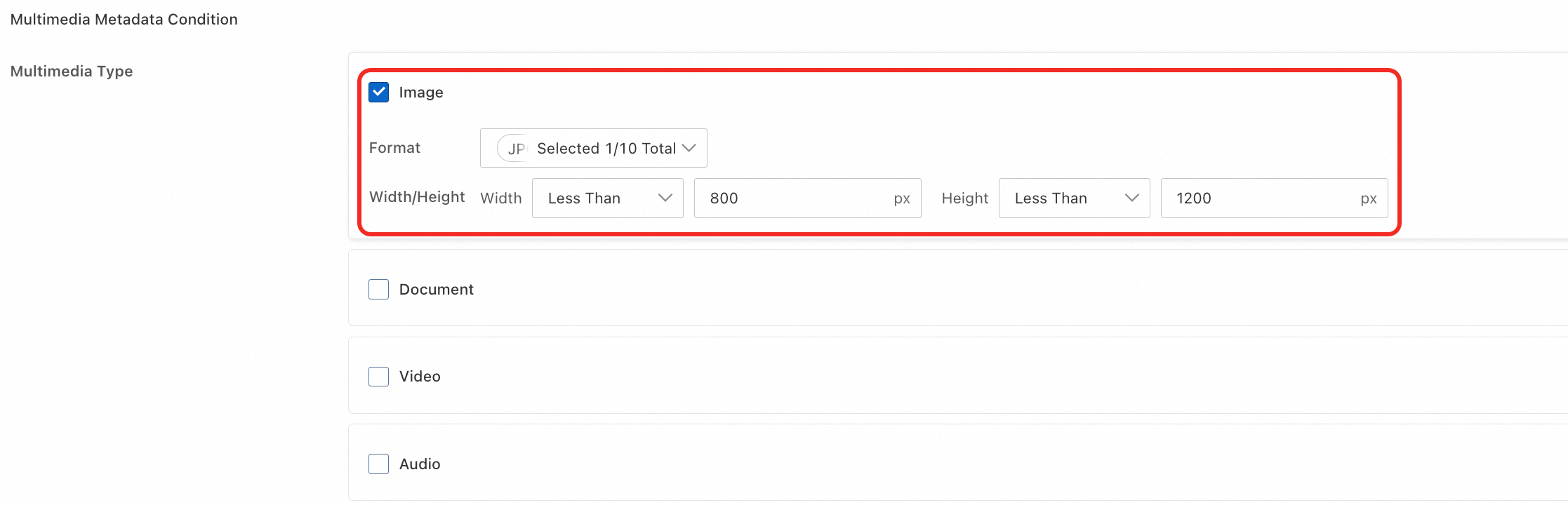
-
Haga clic en Query Now. Los resultados de búsqueda coinciden con lo esperado. El archivo se encontró correctamente según la descripción de sus características.

Para obtener información sobre todos los criterios de búsqueda y la configuración de salida, consulte Search criteria and output settings.
Alibaba Cloud SDK
Java
Solo Java SDK 3.18.2 y versiones posteriores admiten la búsqueda vectorial. Para obtener más información, consulte Vector search (Java SDK V1).
Python
Para obtener más información, consulte Vector search.
import argparse import alibabacloud_oss_v2 as oss # Create a command-line argument parser to process command-line input. parser = argparse.ArgumentParser(description="do meta query semantic sample") # Add the necessary command-line arguments. parser.add_argument('--region', help='The region in which the bucket is located.', required=True) # The region where the bucket is located. parser.add_argument('--bucket', help='The name of the bucket.', required=True) # The name of the bucket. parser.add_argument('--endpoint', help='The domain names that other services can use to access OSS') # The OSS domain name, which is optional. def main(): # Parse command-line arguments. args = parser.parse_args() # Load access credentials from environment variables. # Before running, you need to set the environment variables: OSS_ACCESS_KEY_ID and OSS_ACCESS_KEY_SECRET. credentials_provider = oss.credentials.EnvironmentVariableCredentialsProvider() # Load the default SDK configurations. cfg = oss.config.load_default() # Set the credential provider. cfg.credentials_provider = credentials_provider # Set the region. cfg.region = args.region # If an endpoint is provided, update the endpoint in the configuration. if args.endpoint is not None: cfg.endpoint = args.endpoint # Create an OSS client instance. client = oss.Client(cfg) # Initiate a metadata query request in AISearch mode. result = client.do_meta_query(oss.DoMetaQueryRequest( bucket=args.bucket, mode='semantic', meta_query=oss.MetaQuery( max_results=1000, query='An aerial view of a snow-covered forest', order='desc', media_types=oss.MetaQueryMediaTypes( media_type=['image'] ), simple_query='{"Operation":"gt", "Field": "Size", "Value": "30"}', ), )) # Print the retrieval results. print(vars(result)) if __name__ == "__main__": main()
Go
Para obtener más información, consulte Vector search (Go SDK V2).
package main import ( "context" "flag" "log" "github.com/aliyun/alibabacloud-oss-go-sdk-v2/oss" "github.com/aliyun/alibabacloud-oss-go-sdk-v2/oss/credentials" ) var ( region string bucketName string ) func init() { // Set a command-line flag to specify the region. flag.StringVar(®ion, "region", "", "The region in which the bucket is located.") // Set a command-line flag to specify the bucket name. flag.StringVar(&bucketName, "bucket", "", "The name of the bucket.") } func main() { flag.Parse() // Check if the bucket name is provided. if len(bucketName) == 0 { flag.PrintDefaults() log.Fatalf("invalid parameters, bucket name required") } // Check if the region is provided. if len(region) == 0 { flag.PrintDefaults() log.Fatalf("invalid parameters, region required") } // Create a client configuration and use credentials from environment variables and the specified region. cfg := oss.LoadDefaultConfig(). WithCredentialsProvider(credentials.NewEnvironmentVariableCredentialsProvider()). WithRegion(region) client := oss.NewClient(cfg) // Create an OSS client. // Perform an AISearch operation. request := &oss.DoMetaQueryRequest{ Bucket: oss.Ptr(bucketName), Mode: oss.Ptr("semantic"), MetaQuery: &oss.MetaQuery{ MaxResults: oss.Ptr(int64(99)), Query: oss.Ptr({"Operation":"match","Field":"Filename","Value":"snow"}), // The Query parameter must be in JSON format (for example, {"Operation":"match","Field":"Filename","Value":"snow"}). MediaTypes: &oss.MetaQueryMediaTypes{ MediaTypes: []string{"image"}, // Specify the media types to search. In this example, "image". }, SimpleQuery: oss.Ptr({"Operation":"gt", "Field": "Size", "Value": "30"}), }, } result, err := client.DoMetaQuery(context.TODO(), request) if err != nil { log.Fatalf("failed to do meta query %v", err) } log.Printf("do meta query result:%#v\n", result) }
PHP
Para obtener más información, consulte Vector search (PHP SDK V2).
<?php // Import the autoloader file to ensure that dependency libraries are correctly loaded. require_once __DIR__ . '/../vendor/autoload.php'; use AlibabaCloud\Oss\V2 as Oss; // Define the description of command line arguments. $optsdesc = [ "region" => ['help' => 'The region in which the bucket is located.', 'required' => True], // The region where the bucket is located. This parameter is required. "endpoint" => ['help' => 'The domain names that other services can use to access OSS.', 'required' => False], // The endpoint that other services can use to access OSS. This parameter is optional. "bucket" => ['help' => 'The name of the bucket', 'required' => True], // The name of the bucket. This parameter is required. ]; // Convert the argument description to the long option format required by getopt. // A colon (:) after each argument indicates that the argument requires a value. $longopts = \array_map(function ($key) { return "$key:"; }, array_keys($optsdesc)); // Parse the command line arguments. $options = getopt("", $longopts); // Check whether required arguments are specified. foreach ($optsdesc as $key => $value) { if ($value['required'] === True && empty($options[$key])) { $help = $value['help']; // Obtain the help information of the argument. echo "Error: the following arguments are required: --$key, $help" . PHP_EOL; exit(1); // If a required argument is not specified, exit the program. } } // Extract values from the parsed arguments. $region = $options["region"]; // The region where the bucket is located. $bucket = $options["bucket"]; // The name of the bucket. // Load the credential information from environment variables. // Use EnvironmentVariableCredentialsProvider to read the Access Key ID and Access Key Secret from environment variables. $credentialsProvider = new Oss\Credentials\EnvironmentVariableCredentialsProvider(); // Use the default configurations of the SDK. $cfg = Oss\Config::loadDefault(); $cfg->setCredentialsProvider($credentialsProvider); // Set the credential provider. $cfg->setRegion($region); // Set the region where the bucket is located. if (isset($options["endpoint"])) { $cfg->setEndpoint($options["endpoint"]); // If an endpoint is provided, set the endpoint. } // Create an OSS client instance. $client = new Oss\Client($cfg); // Perform an AISearch query for objects that meet the specified conditions. $request = new Oss\Models\DoMetaQueryRequest($bucket, new Oss\Models\MetaQuery( maxResults: 99, query: "Overlook the snow-covered forest", mediaTypes: new Oss\Models\MetaQueryMediaTypes('image'), simpleQuery: '{"Operation":"gt", "Field": "Size", "Value": "30"}', ), 'semantic'); $result = $client->doMetaQuery($request); printf( 'status code:' . $result->statusCode . PHP_EOL . 'request id:' . $result->requestId . PHP_EOL . 'result:' . var_export($result, true) );
ossutil
El siguiente comando muestra un ejemplo de cómo consultar archivos que cumplen condiciones específicas en un bucket llamado examplebucket.
ossutil api do-meta-query --bucket examplebucket --meta-query "{\"Query\":\"Overlooking the snow covered forest\",\"MediaTypes\":{\"MediaType\":\"image\"},\"SimpleQuery\":\"{\\\"Operation\\\":\\\"gt\\\", \\\"Field\\\": \\\"Size\\\", \\\"Value\\\": \\\"1\\\"}\"}" --meta-query-mode semanticPara obtener más información sobre este comando, consulte do-meta-query.
Deshabilitar la búsqueda vectorial
Deshabilitar la búsqueda vectorial no afecta los datos almacenados. Si la vuelve a habilitar, se desencadenará un nuevo análisis completo y se reconstruirá el índice. Este proceso toma un tiempo que depende de la cantidad de archivos.
La facturación se detiene en un plazo de una hora después de deshabilitar la función. La generación de facturas podría presentar retrasos.
OSS console
Inicie sesión en la consola de OSS. En la página Data Indexing, haga clic en Disable junto a Vector Search y confirme la acción según las indicaciones.

Alibaba Cloud SDK
Java
Solo Java SDK 3.18.2 y versiones posteriores admiten la búsqueda vectorial. Para obtener más información, consulte Vector search (Java SDK V1).
Python
Para obtener más información, consulte Vector search.
import argparse import alibabacloud_oss_v2 as oss # Create a command-line argument parser to process command-line arguments. parser = argparse.ArgumentParser(description="close meta query sample") parser.add_argument('--region', help='The region in which the bucket is located.', required=True) parser.add_argument('--bucket', help='The name of the bucket.', required=True) parser.add_argument('--endpoint', help='The domain names that other services can use to access OSS') def main(): # Parse command-line arguments. args = parser.parse_args() # Load credential information from environment variables. credentials_provider = oss.credentials.EnvironmentVariableCredentialsProvider() # Use the default configurations of the SDK. cfg = oss.config.load_default() # Set the credential provider to the credentials obtained from environment variables. cfg.credentials_provider = credentials_provider # Set the region information in the configuration. cfg.region = args.region # If an endpoint is provided, set the endpoint in the configuration. if args.endpoint is not None: cfg.endpoint = args.endpoint # Create an OSS client. client = oss.Client(cfg) # Call the close_meta_query method to disable the retrieval feature for the bucket. result = client.close_meta_query(oss.CloseMetaQueryRequest( bucket=args.bucket, )) # Print the status code and request ID of the response. print(f'status code: {result.status_code}, request id: {result.request_id}') # Execute the main function when this script is run directly. if __name__ == "__main__": main()
Go
Para obtener más información, consulte Vector search (Go SDK V2).
package main import ( "context" "flag" "log" "github.com/aliyun/alibabacloud-oss-go-sdk-v2/oss" "github.com/aliyun/alibabacloud-oss-go-sdk-v2/oss/credentials" ) var ( region string bucketName string ) func init() { // Set a command-line flag to specify the region. flag.StringVar(®ion, "region", "", "The region in which the bucket is located.") // Set a command-line flag to specify the bucket name. flag.StringVar(&bucketName, "bucket", "", "The name of the bucket.") } func main() { flag.Parse() // Check if the bucket name is provided. if len(bucketName) == 0 { flag.PrintDefaults() log.Fatalf("invalid parameters, bucket name required") } // Check if the region is provided. if len(region) == 0 { flag.PrintDefaults() log.Fatalf("invalid parameters, region required") } // Create a client configuration and use credentials from environment variables and the specified region. cfg := oss.LoadDefaultConfig(). WithCredentialsProvider(credentials.NewEnvironmentVariableCredentialsProvider()). WithRegion(region) client := oss.NewClient(cfg) // Create an OSS client. // Create a request to disable AISearch for the specified bucket. request := &oss.CloseMetaQueryRequest{ Bucket: oss.Ptr(bucketName), // Specify the target bucket. } result, err := client.CloseMetaQuery(context.TODO(), request) if err != nil { log.Fatalf("failed to close meta query %v", err) } log.Printf("close meta query result:%#v\n", result) }
PHP
Para obtener más información, consulte Vector search (PHP SDK V2).
<?php // Import the autoloader file to ensure that dependency libraries are correctly loaded. require_once __DIR__ . '/../vendor/autoload.php'; use AlibabaCloud\Oss\V2 as Oss; // Define the description of command line arguments. $optsdesc = [ "region" => ['help' => 'The region in which the bucket is located.', 'required' => True], // The region where the bucket is located. This parameter is required. "endpoint" => ['help' => 'The domain names that other services can use to access OSS.', 'required' => False], // The endpoint that other services can use to access OSS. This parameter is optional. "bucket" => ['help' => 'The name of the bucket', 'required' => True], // The name of the bucket. This parameter is required. ]; // Convert the argument description to the long option format required by getopt. // A colon (:) after each argument indicates that the argument requires a value. $longopts = \array_map(function ($key) { return "$key:"; }, array_keys($optsdesc)); // Parse the command line arguments. $options = getopt("", $longopts); // Check whether required arguments are specified. foreach ($optsdesc as $key => $value) { if ($value['required'] === True && empty($options[$key])) { $help = $value['help']; // Obtain the help information of the argument. echo "Error: the following arguments are required: --$key, $help" . PHP_EOL; exit(1); // If a required argument is not specified, exit the program. } } // Extract values from the parsed arguments. $region = $options["region"]; // The region where the bucket is located. $bucket = $options["bucket"]; // The name of the bucket. // Load the credential information from environment variables. // Use EnvironmentVariableCredentialsProvider to read the Access Key ID and Access Key Secret from environment variables. $credentialsProvider = new Oss\Credentials\EnvironmentVariableCredentialsProvider(); // Use the default configurations of the SDK. $cfg = Oss\Config::loadDefault(); $cfg->setCredentialsProvider($credentialsProvider); // Set the credential provider. $cfg->setRegion($region); // Set the region where the bucket is located. if (isset($options["endpoint"])) { $cfg->setEndpoint($options["endpoint"]); // If an endpoint is provided, set the endpoint. } // Create an OSS client instance. $client = new Oss\Client($cfg); // Create a CloseMetaQueryRequest object to disable the retrieval feature for the bucket. $request = new \AlibabaCloud\Oss\V2\Models\CloseMetaQueryRequest( bucket: $bucket ); // Execute the operation to disable the retrieval feature. $result = $client->closeMetaQuery($request); // Print the result of disabling the retrieval feature. printf( 'status code:' . $result->statusCode . PHP_EOL . // The HTTP status code. For example, 200 indicates that the request is successful. 'request id:' . $result->requestId . PHP_EOL // The request ID, which is used for debugging or request tracking. );
ossutil
El siguiente comando muestra un ejemplo de cómo deshabilitar la función de búsqueda vectorial para un bucket llamado examplebucket:
ossutil api close-meta-query --bucket examplebucketPara obtener más información sobre este comando, consulte close-meta-query.
Criterios de búsqueda y configuración de resultados
Criterios de búsqueda
Establezca uno o más de los siguientes criterios de búsqueda.
Configuración de salida de resultados
Cuando realiza una búsqueda por contenido semántico, no es posible especificar un método de ordenamiento ni utilizar la agregación de datos.
Ordene los resultados y ejecute agregaciones básicas.
Object Sorting Method: ordene los resultados por fecha de última modificación, nombre de archivo o tamaño de archivo, en orden ascendente o descendente.
Data Aggregation: ejecute cálculos sobre los resultados de búsqueda, como contar valores distintos, agrupar conteos y calcular el valor máximo, mínimo, promedio y la suma.
Referencia de API
Estas operaciones utilizan API REST. Para invocar las API directamente, escriba código que calcule las firmas.
Habilite la búsqueda vectorial: OpenMetaQuery.
Consulte archivos: DoMetaQuery.
Deshabilite la búsqueda vectorial: CloseMetaQuery.
Facturación
-
Los cargos por búsqueda vectorial constan de dos partes principales:
-
Cargos por la función de búsqueda vectorial
Esta parte cubre la gestión de metadatos de objetos y se cobra a las tarifas de indexación de datos de OSS. Data indexing fees.
-
Cargos por solicitudes de API
Los cargos por solicitudes de API se generan durante la compilación de índices y las actualizaciones incrementales. Se le cobra según la cantidad de llamadas a la API:
Acciones
API
Compilar índices para los archivos del bucket.
HeadObject y GetObject
El bucket contiene archivos con etiquetas.
GetObjectTag
El bucket contiene archivos con metadatos personalizados.
GetObjectMeta
El bucket contiene archivos de enlaces simbólicos.
GetSymlink
Analizar archivos del bucket.
ListObjects
-
Si desea dejar de generar cargos relacionados, disable vector search de manera oportuna.
Preguntas frecuentes
¿Por qué no encuentro un archivo inmediatamente después de cargarlo?
La generación del índice toma tiempo después de la carga. Si un archivo no aparece de inmediato en los resultados, espere unos momentos y vuelva a buscar.