Puede establecer una comunicación basada en Thing Specification Language (TSL) entre los dispositivos e IoT Platform mediante el protocolo Alink. Los dispositivos envían propiedades o eventos a IoT Platform, y esta plataforma envía comandos a los dispositivos para configurar propiedades o invocar servicios. Este tema proporciona código de ejemplo en Java que describe cómo establecer la comunicación basada en TSL.
Requisitos previos
IoT Platform está activado.
Se instaló un entorno de desarrollo de Java.
Crear un producto y un dispositivo
Cree un producto y un dispositivo, y defina las funciones de TSL para el producto.
Inicie sesión en la consola de IoT Platform.
En la página Overview, busque la instancia que desea gestionar y haga clic en su ID o nombre.
En el panel de navegación izquierdo, elija .
-
En la página Products, haga clic en Create Product. En la página Create Product, especifique un nombre personalizado para el producto y seleccione Custom Category. Mantenga los valores predeterminados en los demás parámetros y haga clic en OK.
-
En la página Product Details del producto, haga clic en Define Feature. En la pestaña Define Feature, defina un modelo TSL.
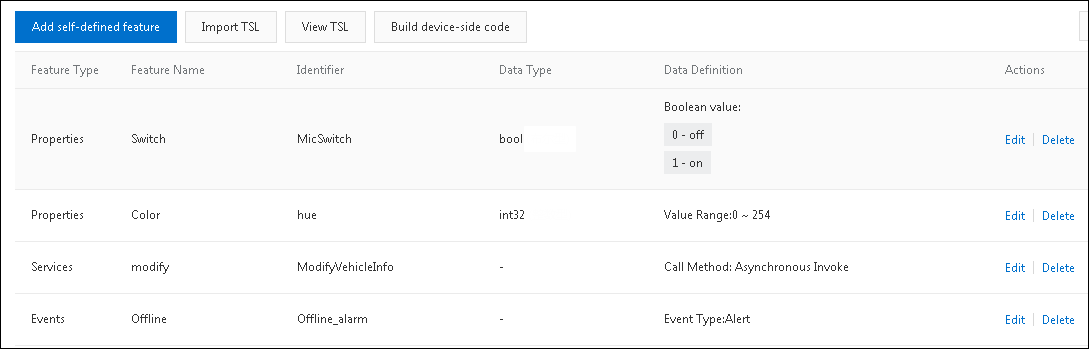
En este ejemplo se agregan un evento, un servicio y dos propiedades en la sección Default Module, como se muestra en la siguiente figura.
Este tema proporciona un modelo TSL de ejemplo que puede importar. Para obtener más información sobre cómo importar un modelo TSL, consulte Import a TSL model.
-
En el panel de navegación izquierdo, haga clic en Devices. En la página Devices, haga clic en Add Device para crear un dispositivo.
Con el código de ejemplo puede configurar propiedades de dispositivos por lotes e invocar servicios de dispositivos por lotes. Cree como mínimo dos dispositivos. Para obtener más información, consulte
Create multiple devices at a time
.
Descargar e instalar una demostración del SDK
La demostración del SDK incluye el código de ejemplo del lado del servidor y el código de ejemplo del lado del dispositivo.
Haga clic en iotx-api-demo para descargar el paquete iotx-api-demo y descomprímalo.
Abra la herramienta de desarrollo de Java e importe la carpeta iotx-api-demo descomprimida.
-
Agregue las siguientes dependencias de Maven al archivo pom.xml para importar el SDK de IoT Platform y un Link SDK:
<!-- https://mvnrepository.com/artifact/com.aliyun/aliyun-java-sdk-iot --> <dependency> <groupId>com.aliyun</groupId> <artifactId>aliyun-java-sdk-iot</artifactId> <version>7.33.0</version> </dependency> <dependency> <groupId>com.aliyun</groupId> <artifactId>aliyun-java-sdk-core</artifactId> <version>3.5.1</version> </dependency> <dependency> <groupId>com.aliyun.alink.linksdk</groupId> <artifactId>iot-linkkit-java</artifactId> <version>1.2.0</version> <scope>compile</scope> </dependency> -
En el directorio java/src/main/resources/, abra el archivo config y especifique la información obligatoria para la inicialización.
user.accessKeyID = <your accessKey ID>
user.accessKeySecret = <your accessKey Secret>
iot.regionId = <regionId>
iot.productCode = Iot
iot.domain = iot.<regionId>.aliyuncs.com
iot.version = 2018-01-20
Parámetro
Descripción
accessKeyID
El AccessKey ID de su cuenta de Alibaba Cloud.
Para crear o consultar su par de claves de acceso, siga estos pasos: inicie sesión en la consola de administración de Alibaba Cloud, coloque el puntero sobre su foto de perfil y haga clic en AccessKey Management para ir a la página AccessKey Pair.
accessKeySecret
La clave secreta de acceso de su cuenta de Alibaba Cloud. Puede obtenerla de la misma manera que obtiene el AccessKey ID.
regionId
El ID de la región donde residen sus dispositivos de IoT. Para obtener más información sobre los identificadores de región, consulte Regions and zones.
Enviar propiedades y eventos con Link SDK
Configure Link SDK para conectarse a IoT Platform y enviar propiedades y eventos.
El archivo ThingTemplate, ubicado en el directorio java/src/main/com.aliyun.iot.api.common.deviceApi, contiene el código de ejemplo.
-
Especifique la información de conexión.
Reemplace los valores de los parámetros productKey, deviceName y deviceSecret del código de ejemplo con la información del certificado de su dispositivo. Sustituya el valor del parámetro url por su endpoint de MQTT. Para obtener más información sobre cómo obtener un endpoint, consulte Manage instance endpoints. El endpoint debe incluir el puerto 1883.
public static void main(String[] args) { /** * The information about the device certificate. */ String productKey = "your productKey"; String deviceName = "your deviceName"; String deviceSecret = "your deviceSecret"; /*TODO: Replace the following endpoint with the endpoint of your instance. */ String url = "iot-6d***ql.mqtt.iothub.aliyuncs.com:1883"; /** * The information about the MQTT connection. */ ThingTemplate manager = new ThingTemplate(); DeviceInfo deviceInfo = new DeviceInfo(); deviceInfo.productKey = productKey; deviceInfo.deviceName = deviceName; deviceInfo.deviceSecret = deviceSecret; /** * The Java HTTP client supports TSLv1.2. */ System.setProperty("https.protocols", "TLSv2"); manager.init(deviceInfo, url); } -
Inicialice los parámetros de conexión.
public void init(final DeviceInfo deviceInfo, String url) { LinkKitInitParams params = new LinkKitInitParams(); /** * Configure the parameters for MQTT initialization. */ IoTMqttClientConfig config = new IoTMqttClientConfig(); config.productKey = deviceInfo.productKey; config.deviceName = deviceInfo.deviceName; config.deviceSecret = deviceInfo.deviceSecret; config.channelHost = url; /** * Specify whether to receive offline messages. * The cleanSession field that corresponds to the MQTT connection. */ config.receiveOfflineMsg = false; params.mqttClientConfig = config; ALog.setLevel(LEVEL_DEBUG); ALog.i(TAG, "mqtt connetcion info=" + params); /** * Configure the initialization parameters and specify the certificate information about the device. */ params.deviceInfo = deviceInfo; /** Establish a connection. **/ LinkKit.getInstance().init(params, new ILinkKitConnectListener() { public void onError(AError aError) { ALog.e(TAG, "Init Error error=" + aError); } public void onInitDone(InitResult initResult) { ALog.i(TAG, "onInitDone result=" + initResult); List<Property> properties = LinkKit.getInstance().getDeviceThing().getProperties(); ALog.i(TAG, "The device properties" + JSON.toJSONString(properties)); List<Event> getEvents = LinkKit.getInstance().getDeviceThing().getEvents(); ALog.i(TAG, "List of device events" + JSON.toJSONString(getEvents)); /* Submit properties. TODO: Make sure that the properties that you want to submit are defined in the TSL model of the product. Example: MicSwitch. Otherwise, an error message is returned. */ handlePropertySet("MicSwitch", new ValueWrapper.IntValueWrapper(1)); /* Submit events. TODO: Make sure that the events that you want to submit are defined in the TSL model of the product. Example: Offline_alarm. Otherwise, an error message is returned. */ Map<String,ValueWrapper> values = new HashMap<>(); values.put("eventValue",new ValueWrapper.IntValueWrapper(0)); OutputParams outputParams = new OutputParams(values); handleEventSet("Offline_alarm",outputParams); } }); }NotaLos identificadores de propiedades y eventos del código deben coincidir con los definidos en el modelo TSL.
-
Configure Link SDK para enviar propiedades.
/** * The device submits properties in the Alink JSON format. * @param identifier: the identifier of the property. * @param value: the value of the property. * @return */ private void handlePropertySet(String identifier, ValueWrapper value ) { ALog.i(TAG, "Identifier of the property=" + identifier); Map<String, ValueWrapper> reportData = new HashMap<>(); reportData.put(identifier, value); LinkKit.getInstance().getDeviceThing().thingPropertyPost(reportData, new IPublishResourceListener() { public void onSuccess(String s, Object o) { // The property is submitted. ALog.i(TAG, "Submitted. onSuccess() called with: s = [" + s + "], o = [" + o + "]"); } public void onError(String s, AError aError) { // The property value failed to be submitted. ALog.i(TAG, "Failed to submit. onError() called with: s = [" + s + "], aError = [" + JSON.toJSONString(aError) + "]"); } }); } -
Configure Link SDK para enviar eventos.
/**
     * The device submits events in the Alink JSON format.
     * @param identifier: the identifier of the event.
     * @param params: the parameters of the event.
     * @return
     */
    private void handleEventSet(String identifyID, OutputParams params ) {
        ALog.i(TAG, "Identifier of the event=" + identifyID + "  params=" + JSON.toJSONString(params));

        LinkKit.getInstance().getDeviceThing().thingEventPost( identifyID,  params, new IPublishResourceListener() {

            public void onSuccess(String s, Object o) {
                // The event is submitted.
                ALog.i(TAG, "Submitted. onSuccess() called with: s = [" + s + "], o = [" + o + "]");
            }

            public void onError(String s, AError aError) {
                // Failed to submit the event.
                ALog.i(TAG, "Failed to submit. onError() called with: s = [" + s + "], aError = [" + JSON.toJSONString(aError) + "]");
            }
        });
    }
Enviar comandos para configurar propiedades e invocar servicios con un SDK de IoT Platform
-
Inicialice un cliente.
El archivo IotClient, ubicado en el directorio java/src/main/com.aliyun.iot.client, contiene el código de ejemplo.
public class IotClient { private static String accessKeyID; private static String accessKeySecret; private static String regionId; private static String domain; private static String version; public static DefaultAcsClient getClient() { DefaultAcsClient client = null; Properties prop = new Properties(); try { prop.load(Object.class.getResourceAsStream("/config.properties")); accessKeyID = prop.getProperty("user.accessKeyID"); accessKeySecret = prop.getProperty("user.accessKeySecret"); regionId = prop.getProperty("iot.regionId"); domain = prop.getProperty("iot.domain"); version = prop.getProperty("iot.version"); IClientProfile profile = DefaultProfile.getProfile(regionId, accessKeyID, accessKeySecret); DefaultProfile.addEndpoint(regionId, regionId, prop.getProperty("iot.productCode"), prop.getProperty("iot.domain")); // Initialize the client. client = new DefaultAcsClient(profile); } catch (Exception e) { LogUtil.print("Failed to initialize the client. exception:" + e.getMessage()); } return client; } public static String getRegionId() { return regionId; } public static void setRegionId(String regionId) { IotClient.regionId = regionId; } public static String getDomain() { return domain; } public static void setDomain(String domain) { IotClient.domain = domain; } public static String getVersion() { return version; } public static void setVersion(String version) { IotClient.version = version; } } -
Inicialice la clase pública CommonRequest.
El archivo AbstractManager, ubicado en el directorio java/src/main/com.aliyun.iot.api.common.openApi, encapsula la clase pública CommonRequest.
public class AbstractManager { private static DefaultAcsClient client; static { client = IotClient.getClient(); } /** * Initialize the CommonRequest class. action: the name of the API operation. * domain: the endpoint. * version: the API version. */ public static CommonRequest executeTests(String action) { CommonRequest request = new CommonRequest(); request.setDomain(IotClient.getDomain()); request.setMethod(MethodType.POST); request.setVersion(IotClient.getVersion()); request.setAction(action); return request; } -
Invoque las operaciones de API de IoT Platform para configurar propiedades e invocar servicios.
El archivo ThingManagerForPopSDk, ubicado en el directorio java/src/main/com.aliyun.iot.api.common.openApi, contiene el código de ejemplo.
-
Invoque la operación SetDeviceProperty para configurar una propiedad del dispositivo.
public static void SetDeviceProperty(String InstanceId, String IotId, String ProductKey, String DeviceName , String Items) { SetDevicePropertyResponse response =null; SetDevicePropertyRequest request=new SetDevicePropertyRequest(); request.setDeviceName(DeviceName); request.setIotId(IotId); request.setItems(Items); request.setProductKey(ProductKey); request.setIotInstanceId(InstanceId); try { response = client.getAcsResponse(request); if (response.getSuccess() != null && response.getSuccess()) { LogUtil.print("The device property is configured."); LogUtil.print(JSON.toJSONString(response)); } else { LogUtil.print("Failed to configure the device property."); LogUtil.error(JSON.toJSONString(response)); } } catch (ClientException e) { e.printStackTrace(); LogUtil.error("Failed to configure the device property." + JSON.toJSONString(response)); } } -
Invoque la operación SetDevicesProperty para configurar propiedades de dispositivos por lotes.
/** * Batch configure device properties. * * @param ProductKey: the ProductKey of the product to which the devices whose properties you want to configure belong. * @param DeviceNames: the DeviceNames of the devices whose properties you want to configure. * @param Items: the property information that consists of multiple pairs of key-value JSON strings. This parameter is required. * * @Des: the description. */ public static void SetDevicesProperty(String InstanceId, String ProductKey, List<String> DeviceNames, String Items) { SetDevicesPropertyResponse response = new SetDevicesPropertyResponse(); SetDevicesPropertyRequest request = new SetDevicesPropertyRequest(); request.setDeviceNames(DeviceNames); request.setItems(Items); request.setProductKey(ProductKey); request.setIotInstanceId(InstanceId); try { response = client.getAcsResponse(request); if (response.getSuccess() != null && response.getSuccess()) { LogUtil.print("The properties are batch configured."); LogUtil.print(JSON.toJSONString(response)); } else { LogUtil.print("Failed to batch configure the device properties."); LogUtil.error(JSON.toJSONString(response)); } } catch (ClientException e) { e.printStackTrace(); LogUtil.error("Failed to batch configure the device properties." + JSON.toJSONString(response)); } } -
Invoque la operación InvokeThingService para llamar a un servicio del dispositivo.
/** * @param Identifier: the identifier of the service. This parameter is required. * @param Args: the input parameters that are required to start the service. This parameter is required. */ public static InvokeThingServiceResponse.Data InvokeThingService(String InstanceId, String IotId, String ProductKey, String DeviceName, String Identifier, String Args) { InvokeThingServiceResponse response =null; InvokeThingServiceRequest request = new InvokeThingServiceRequest(); request.setArgs(Args); request.setDeviceName(DeviceName); request.setIotId(IotId); request.setIdentifier(Identifier); request.setProductKey(ProductKey); request.setIotInstanceId(InstanceId); try { response = client.getAcsResponse(request); if (response.getSuccess() != null && response.getSuccess()) { LogUtil.print("The service is executed."); LogUtil.print(JSON.toJSONString(response)); } else { LogUtil.print("Failed to execute the service."); LogUtil.error(JSON.toJSONString(response)); } return response.getData(); } catch (ClientException e) { e.printStackTrace(); LogUtil.error("Failed to execute the service." + JSON.toJSONString(response)); } return null; }NotaSi desea invocar servicios de forma síncrona, establezca el parámetro
Invoking Method
como
Synchronization
al definir los modelos TSL. Durante el desarrollo de los dispositivos, debe escribir el código para procesar las llamadas síncronas a servicios.
-
Invoque la operación InvokeThingsService para llamar a servicios de dispositivos por lotes.
     /**
     * @param Identifier: the identifier of the service. This parameter is required.
     * @param Args: the input parameters that are required to start the service. This parameter is required.
     */
    public static void InvokeThingsService(String InstanceId, String IotId, String ProductKey, List<String> DeviceNames,
                                           String Identifier, String Args) {
        InvokeThingsServiceResponse response =null;
        InvokeThingsServiceRequest request = new InvokeThingsServiceRequest();
        request.setArgs(Args);
        request.setIdentifier(Identifier);
        request.setDeviceNames(DeviceNames);
        request.setProductKey(ProductKey);
        request.setIotInstanceId(InstanceId);

        try {
            response = client.getAcsResponse(request);

            if (response.getSuccess() != null && response.getSuccess()) {
                LogUtil.print("The services are called.");
                LogUtil.print(JSON.toJSONString(response));
            } else {
                LogUtil.print("Failed to batch call the services.");
                LogUtil.error(JSON.toJSONString(response));
            }

        } catch (ClientException e) {
            e.printStackTrace();
            LogUtil.error("Failed to batch call the services." + JSON.toJSONString(response));
        }
    }
-
Solicitud de ejemplo:
public static void main(String[] args) {
        /** The DeviceName of the online device and the Productkey of the product to which the online device belongs. */
        String deviceName = "2pxuAQB2I7wGPmqq***";
        String deviceProductkey = "a1QbjI2***";

        /** If you use an Enterprise Edition instance or a public instance of the new version, specify the instance ID for the InstanceId parameter. To obtain the instance ID, log on to the IoT Platform console and view the instance ID on the Overview page.
         * If you use a public instance of the old version, leave the InstanceId parameter empty"".
         */
        String InstanceId = "iot-***tl02";

        //1. Configure a device property.
        SetDeviceProperty(InstanceId, null, deviceProductkey, deviceName,"{\"hue\":0}");
        //2. Batch configure device properties.
        List<String>  deviceNames = new ArrayList<>();
        deviceNames.add(deviceName);
        SetDevicesProperty(InstanceId, deviceProductkey, deviceNames, "{\"hue\":0}");
        //3. Call a device service.
        InvokeThingService(InstanceId, null, deviceProductkey, deviceName, "ModifyVehicleInfo", "{}");
        //4. Batch call device services.
        List<String>  deviceNamesService = new ArrayList<>();
        deviceNamesService.add(deviceName);
        InvokeThingsService(null, deviceProductkey, deviceNamesService, "ModifyVehicleInfo", "{}");
    }
Depurar los SDK
Una vez configurados Link SDK y el SDK de IoT Platform, ejecute ambos SDK.
Compruebe los resultados:
-
Consulte los registros locales.
2022-04-08 05:29:41.165 - [ThingManagerForPopSDk.java] - SetDeviceProperty(35):The device property is configured. 2022-04-08 05:29:41.250 - [ThingManagerForPopSDk.java] - SetDeviceProperty(36):{"code":"","data":{"messageId":"1703383434"},"requestId":"049ED108-B2BB-50F5-8D70-FD3158AF794E","success":true} 2022-04-08 05:29:41.671 - [ThingManagerForPopSDk.java] - SetDevicesProperty(69):The properties are batch configured. 2022-04-08 05:29:41.675 - [ThingManagerForPopSDk.java] - SetDevicesProperty(70):{"code":"","requestId":"31B3D707-71E8-5F18-A8E8-349CB92C013F","success":true} 2022-04-08 05:29:41.777 - [ThingManagerForPopSDk.java] - InvokeThingService(107):The service is executed. 2022-04-08 05:29:41.784 - [ThingManagerForPopSDk.java] - InvokeThingService(108):{"code":"","data":{"messageId":"1708568778"},"requestId":"63995E46-FE04-5F84-AF40-8F11873B253B","success":true} 2022-04-08 05:29:41.851 - [ThingManagerForPopSDk.java] - InvokeThingsService(148):The services are called. 2022-04-08 05:29:41.854 - [ThingManagerForPopSDk.java] - InvokeThingsService(149):{"code":"","requestId":"A9BE6716-B1F5-5916-8DBA-1D17CB651659","success":true} -
En la página Device DetailsDefault Module
de la instancia
del dispositivo, haga clic en
.
La pestaña Status muestra los valores de propiedad enviados más recientemente por el dispositivo.
La pestaña Events muestra los eventos enviados más recientemente por el dispositivo.
La pestaña Invoke Service muestra los registros de las llamadas a servicios.