Flow provides common Kubernetes deployment capabilities. You can use the built-in kubectl tool to deploy Kubernetes YAML files to any cluster. In addition to the capabilities provided by the native kubectl, Flow provides built-in dynamic templates to help you quickly build and release applications in Kubernetes. This topic describes how to use Flow to add and configure a Kubernetes release job and how to view the logs after the deployment.
Solution overview
Add a deployment job
You can add a deployment job by using one of the following methods.
-
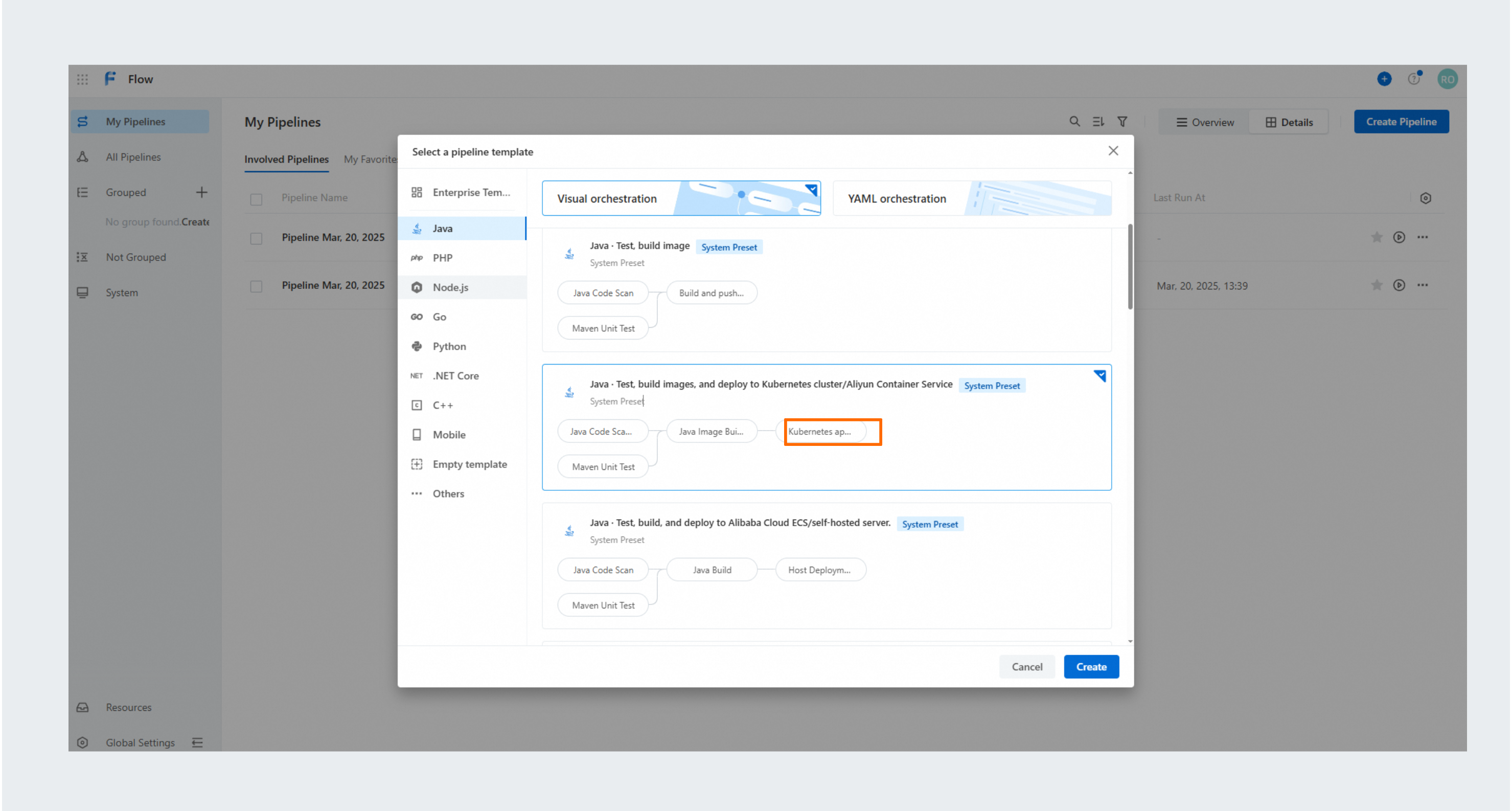
When you create a pipeline, select a template that includes a Kubernetes apply step.
On the Visual Orchestration tab, select the Java category from the left pane. Choose the Java · Test, build image and deploy to Kubernetes cluster/Alibaba Cloud Container Service template, and then click Create.
-
Add a new job to a pipeline and then add a Kubernetes apply step.
From the job panel, select the Deploy category on the left, and then choose Kubernetes apply on the right.
Configure a deployment job
For the Kubectl Apply step, configure the following settings:
-
Select an existing or create a new Kubernetes cluster connection. For more information about how to create a Kubernetes cluster connection, see Manage Kubernetes clusters.
Configure the other parameters for the Kubernetes apply step: Set the Kubectl version (for example,
v1.16.4), Namespace (for example,default), and YAML path (for example,app-configs/manifest2). If needed, select options such as Use Replace mode, Skip TLS Verification, and Skip template validation. Then, in the Variables section, configure parameters like the image. -
Enter the target Namespace for the deployment.
-
Enter the YAML path for the current deployment and add the necessary variables.
-
In the Kubernetes YAML file, use the ${IMAGE} placeholder to define the Docker image as a dynamic variable.
apiVersion: apps/v1 kind: Deployment metadata: labels: run: spring-boot-sample name: spring-boot-sample spec: replicas: 4 selector: matchLabels: run: spring-boot-sample template: metadata: labels: run: spring-boot-sample spec: containers: image: ${image} name: nginx -
In the Kubernetes apply step, you can pass variables to the YAML file. In the step configuration, click Add to define each variable and its source. These variables dynamically replace the placeholders in your YAML file during deployment. In the Kubernetes apply step's variables section, set the value of the
imagevariable to the output of the image build step (which is the image URL produced by the Build image and push to Alibaba Cloud Container Registry step). This replaces the ${image} placeholder in the YAML file with the actual image URL at deployment time. The deployment will use the configured cluster connection (for example,corefile-test), Kubectl version (for example,v1.16.4), namespace (for example,default), and YAML path (for example,app-configs/manifest2).
NoteFor use cases of YAML files in Kubernetes, see References to Kubernetes YAML specifications.
-
View deployment logs
After the configuration is complete, run the pipeline to run the deployment job. The YAML file in the source code is deployed to the specified Kubernetes cluster.
-
During the deployment, click Logs to view its progress and related logs.
-
The log output includes all scanned YAML files, the standard output from
kubectl apply, and a summary of all resource changes after the deployment.For example, the
kubectl applycommand outputsdeployment.apps/spring-boot-sample configured. The resource summary shows thatspring-boot-samplehas been running for 105m. Finally, the message[SUCCESS] Step executed successfullyconfirms that the application was successfully deployed to the Kubernetes cluster.
References to Kubernetes YAML specifications
Workloads
Resource type | References |
Deployments | https://kubernetes.io/docs/concepts/workloads/controllers/deployment/ |
StatefulSets | https://kubernetes.io/docs/concepts/workloads/controllers/statefulset/ |
DaemonSet | https://kubernetes.io/docs/concepts/workloads/controllers/daemonset/ |
Service discovery and networks
Resource type | References |
Service | https://kubernetes.io/docs/concepts/services-networking/service/ |
Ingress | https://kubernetes.io/docs/concepts/services-networking/ingress/ |