You can create organizations in Alibaba Cloud DevOps and manage their instances, collaboration modes, security settings, and network configurations.
Create an organization
-
Log on to the Alibaba Cloud DevOps console with your Alibaba Cloud account or a RAM user that has administrative permissions for Alibaba Cloud DevOps.
The RAM user must have the AliyunRDCFullAccess permission.
-
In the left-side navigation pane, choose .
-
Click Create Organization and configure the following parameters:
For more information about permissions and billing, see Billing for the Region-based edition.
-
Region: Select the region where the organization is located.
-
Organization name: Enter a name for the organization. You can change this name after creation.
-
organization ID: A unique identifier that generates the organization's access endpoint and member account ID suffix. This ID cannot be changed after creation.
-
Collaboration mode: Choose between Enterprise Collaboration Mode and Personal Mode. For more information about the differences, see Choose a collaboration mode.
-
Administrator account password: The initial password for the organization's root account.
-
-
After the organization is created, click its name on the instance list page to open the details page.
-
Click Access instance to open the organization's logon page. For more information about how to log on, see Accounts and logon.
Collaboration modes
The Region-based edition offers two collaboration modes. Choose a mode based on your team size and security requirements before creating an organization.
Mode comparison
|
Feature |
Personal Mode |
Enterprise Collaboration Mode |
|
Target users |
For startup development teams or individual developers. |
For enterprise development teams with high requirements for data security and standardized development processes. |
|
Logon method |
Username and password |
Username and password, or single sign-on (SSO) |
|
Integration with corporate identity providers |
Not supported. |
Supports Alibaba Cloud RAM, SAML, Feishu, DingTalk, WeCom, and CAS. Enterprise Collaboration Mode supports configuring multiple identity providers. Administrators can select and configure the identity provider type based on their enterprise's identity system. |
|
Virtual Private Cloud (VPC) access |
Not supported. |
Supports private endpoints and integration with your enterprise VPC. |
|
Development asset backup |
Not supported. |
Supports code repository backups. |
|
IP address whitelist |
Not supported. |
Supports configuring an IP address whitelist. |
|
Audit log |
Not supported. |
Supports pushing operation logs to ActionTrail. |
How to choose a collaboration mode
Personal Mode is free for up to five user accounts. Enterprise Collaboration Mode requires per-user licensing and unlocks advanced enterprise features.
-
If you are an individual developer or part of a small startup team and want to quickly try Alibaba Cloud DevOps without complex security controls and enterprise integrations, choose Personal Mode.
-
Choose Enterprise Collaboration Mode if your enterprise team requires the following features:
-
Unified logon with a corporate identity system (SSO)
-
VPC access for code management and pipelines
-
Operation auditing and security compliance
-
Development asset backup
-
Mode upgrade and downgrade
Upgrade to Enterprise Mode
-
Log on to the Alibaba Cloud DevOps console with your Alibaba Cloud account or a RAM user that has administrative permissions for Alibaba Cloud DevOps.
-
In the left-side navigation pane, choose .
-
On the instance list page, click the organization name to go to the details page.
-
Click Upgrade collaboration mode to complete the upgrade.
Downgrade to Personal Mode
To downgrade, you must meet the following conditions:
-
Reduce the number of users in the organization to five or fewer. Delete or disable any extra users.
-
Remove all corporate identity provider integrations from Alibaba Cloud DevOps.
-
Disable the VPC access mode and remove all associated VPCs.
-
No other organization in the current region can be in Personal Mode.
Procedure:
-
Log on to the Alibaba Cloud DevOps console with your Alibaba Cloud account or a RAM user that has administrative permissions for Alibaba Cloud DevOps.
-
In the left-side navigation pane, choose .
-
On the instance list page, click the organization name to go to the details page.
-
Click . After you confirm that the downgrade requirements are met, select the confirmation checkbox, and click OK.
Organization instance management
On the organization details page, you can view and manage the organization's basic information, resource usage, security configurations, and network settings.
Organization overview
The Overview tab contains the following information:
-
Basic Information:
-
Instance Name: The display name of the organization. This can be changed.
-
Instance ID: The unique ID of the organization. This cannot be changed.
-
Region: The region where the organization is located.
-
Description: A description of the organization. This can be changed.
-
Creation Time: The time when the organization was created. This cannot be changed.
-
Collaboration mode: The collaboration mode of the organization.
-
-
Instance Information:
-
Public endpoint: The public access endpoint of the organization.
-
Private endpoint: The private access endpoint of the organization.
-
Root account status: The ID (generated as root_<organization ID>) and status of the root account. You can disable the root account in the security settings.
-
IP address whitelist: Shows the status of the whitelist, which can be configured in the security settings.
-
Domain IP addresses
-
Egress IP
-
-
Service Information: View DevOps service orders and license status. (Available only in Enterprise Collaboration Mode).
Resource usage
View the resource usage of the current organization instance, including:
-
Code storage resources
-
Pipeline build resources
Resource usage statistics are not real-time and are typically delayed by up to an hour.
Security settings
Root account management
-
Enable or disable the root account.
-
Change the root account password. This option is available only when the root account is enabled.
IP address whitelist
An IP address whitelist restricts access to your organization instance from specific source IP addresses for enhanced security.
-
You can enable or disable the IP address whitelist control.
-
Group management is supported to define IP ranges for different access scenarios.
-
When you first enable this feature, the system automatically populates the whitelist with
0.0.0.0/0, which allows access from all IP addresses by default. -
You can manually edit the whitelist to include only the IP addresses or CIDR blocks that you want to allow.
Audit log
Operation logs for your organization are automatically sent to ActionTrail under the purchaser's Alibaba Cloud account. By default, logs from the last 90 days are queryable.
In ActionTrail, you can perform the following configurations:
-
Store logs in Simple Log Service (SLS) or Object Storage Service (OSS).
-
Enable long-term retention, query, analysis, and compliance auditing.
Network settings
Public access mode
-
Public access mode is enabled by default for new organizations.
-
The system assigns a public endpoint to the organization, which you can access only over the public internet.
VPC access mode
To access the private endpoint from your Virtual Private Cloud (VPC), enable VPC access mode:
-
Go to the organization details page and switch to the Network settings tab.
-
Select the Enable VPC access mode checkbox.
-
After enabling this mode, a private endpoint is assigned to your organization. This endpoint is not accessible from the public internet and can only be reached from an associated VPC. Therefore, you must associate your VPC.
-
Click Add VPC, select a VPC, and associate a security group and at least one vSwitch. You can add multiple VSwitches to ensure network availability.
-
After the VPC is associated, Alibaba Cloud DevOps automatically adds a private DNS record. This allows endpoints in your VPC to resolve the Alibaba Cloud DevOps private endpoint and connect to the service.
If you want to disable the Alibaba Cloud DevOps public endpoint after enabling the private endpoint, you can configure an IP address whitelist. First, go to the Virtual Private Cloud console, view the details of the VPC associated with Alibaba Cloud DevOps, and copy its CIDR block. Then, return to the Security settings tab on the organization details page and add the CIDR block to the whitelist.
Reverse access IP
The previous steps allow your VPC to access Alibaba Cloud DevOps. To allow Alibaba Cloud DevOps to access services inside your VPC (such as self-hosted repositories or Kubernetes clusters for CI/CD), configure reverse access:
-
Go to the organization details page and switch to the Network settings tab.
-
In the list of associated VPCs, locate the VPC for which you want to enable reverse access. In the Reverse access IP column, click Manage. In the dialog box that appears, add the internal IP address and port of the endpoint within your VPC.
-
After the internal IP address is added, Alibaba Cloud DevOps automatically generates a mapped IP address. This allows the Alibaba Cloud DevOps service to access the internal endpoint in your VPC through the mapping.
-
When you configure code sources or Kubernetes clusters, you can select the reverse access IP address that you added to allow Alibaba Cloud DevOps to access systems within your VPC.
Restrict public access with VPC
To make your organization accessible only from within a VPC and not from the public internet, follow these steps:
-
Go to the organization details page and switch to the Network settings tab.
-
Select the Enable VPC access mode checkbox.
-
Click Add VPC, select a VPC, and associate a security group and a vSwitch.
-
Go to the Virtual Private Cloud console to find the IP address information for the VPC you configured in the previous step.
-
On the Security settings tab of the organization details page, add the IP address that you obtained to the IP address whitelist.
Delete an organization
Deleting an organization permanently erases all its data, including all code repositories, pipelines, departments, and members. This action is irreversible. Proceed with caution.
Notes on deletion:
-
You cannot delete an organization if it has an active, paid subscription.
-
An organization can be deleted only after its subscription is canceled or expires. At that point, the organization instance is stopped and becomes inaccessible. The deletion is irreversible.
Procedure:
-
Log on to the Alibaba Cloud DevOps console. In the left-side navigation pane, choose .
-
On the instance list page, click the organization name to go to the details page.
-
Click .
-
In the dialog box that appears, enter the organization name and click OK.
Upgrade to the latest version
Only organizations created before October 30, 2025, require an upgrade.
Organizations created before October 30, 2025, belong to the global edition, which is not associated with a specific region. In the global edition, all Alibaba Cloud DevOps services and development workflows are accessible only over the public internet. We strongly recommend upgrading to a Region-based edition, which supports private endpoints and VPC-based build clusters. This allows you to clone code, run builds, and deploy applications entirely within your VPC for improved data security.
The upgrade does not affect normal use. The domain name and features of Alibaba Cloud DevOps remain unchanged. The private endpoint and VPC-based build cluster are optional features that must be configured and enabled by an organization administrator after the upgrade.
The upgrade process is as follows:
-
In the Alibaba Cloud DevOps console, switch the region from "Global" to "Singapore". Then, activate Alibaba Cloud DevOps by purchasing a new pay-as-you-go order. After activation, you can use a Region-based organization.
-
In the Alibaba Cloud DevOps console, submit a ticket to request an upgrade of your organization to a Region-based edition and provide your organization ID. Schedule a specific upgrade time with the technical support team and wait for the upgrade to be completed. We recommend scheduling the upgrade outside of peak working hours.
-
After the upgrade is complete, refresh the Alibaba Cloud DevOps console. The organization instance now appears in the organization list for the Singapore region. Access the Alibaba Cloud DevOps service and verify that core features such as logon, code management, and pipelines are functioning correctly.
-
After verification, unsubscribe from the orders of the old organization:
-
Standard Edition (Subscription): This order always exists. Request a refund from technical support through your ticket. The refund amount is prorated based on the remaining subscription time.
-
Resources (Pay-As-You-Go): This order may exist. If you have not enabled pay-as-you-go billing, skip this step. If you have, go to the organization details page in the console and click Unsubscribe from Pay-As-You-Go.
-
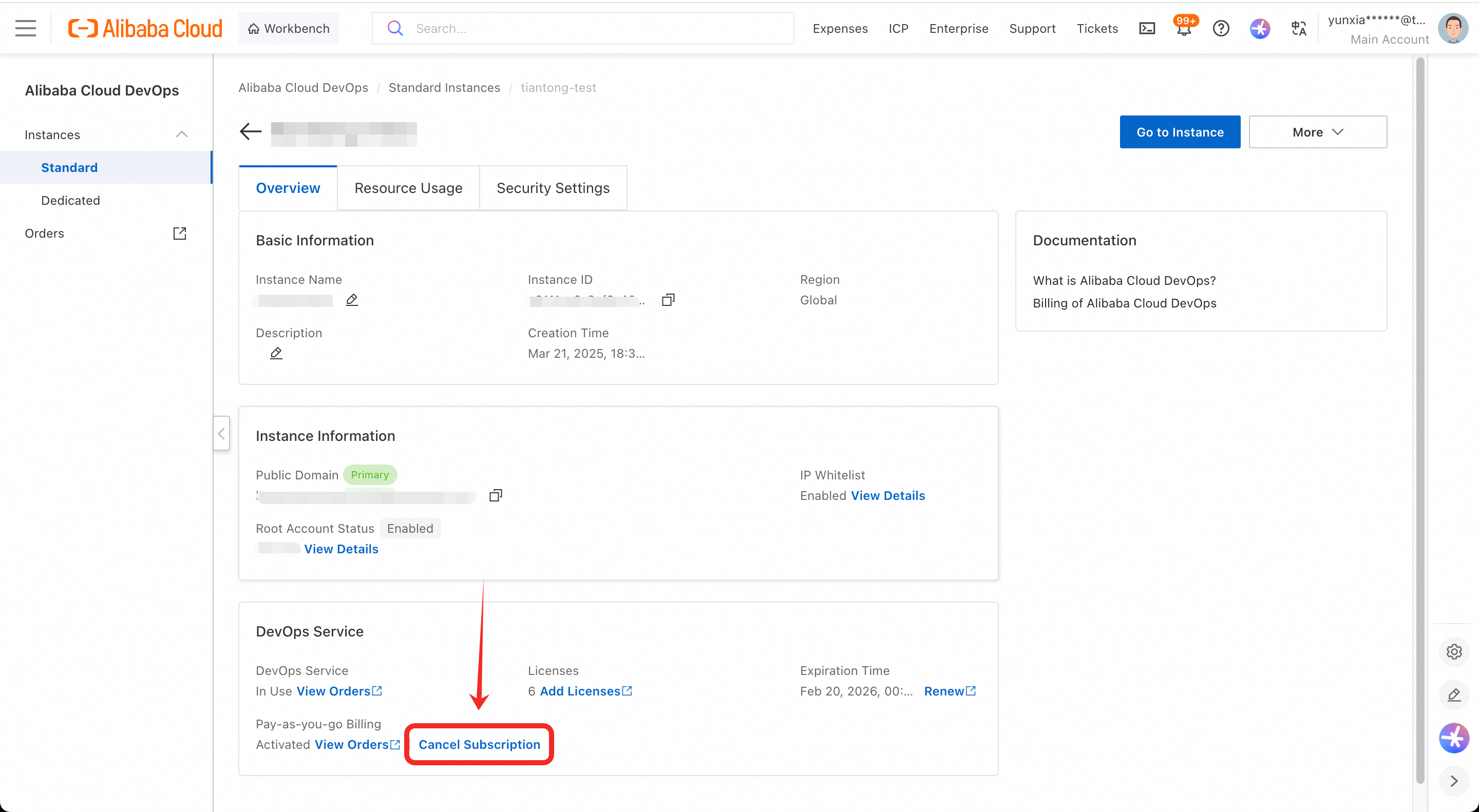
After you upgrade to a Region-based organization, the billing method for user licenses changes. The global edition uses a subscription model, which requires you to modify the order when the number of users changes. The Region-based edition uses a pay-as-you-go model with daily billing, and charges are automatically adjusted when the number of users changes. For more information, see Billing for the Region-based edition.