Elastic Desktop Service (Enterprise Edition) is built for enterprise teams. Administrators provision and manage cloud computers from a central console, while end users access those cloud computers through Alibaba Cloud Workspace terminals.
Roles
End users are the individuals who use cloud computers — for example, Jack, a designer at a design company.
Administrators are the IT staff who set up and manage the service — for example, Steven, the IT administrator at Jack's company. Their responsibilities include:
Purchasing and renewing resources
Creating and assigning cloud computers
Creating and binding policies
Monitoring and operations and maintenance (O&M)
Managing end users
How it works
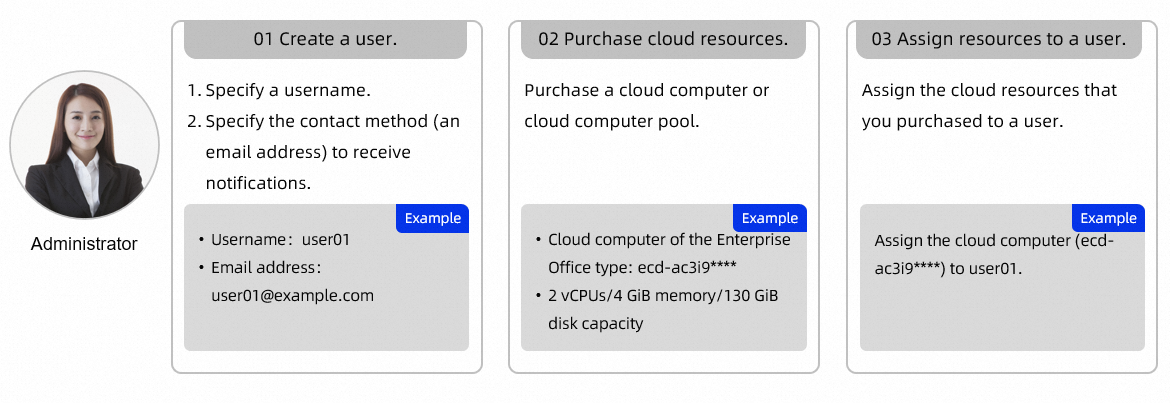
Administrator: set up the cloud computer The administrator creates an account for the end user and assigns a cloud computer to that account.
System: send access credentials After the assignment, the system sends logon credentials to the end user's email address.
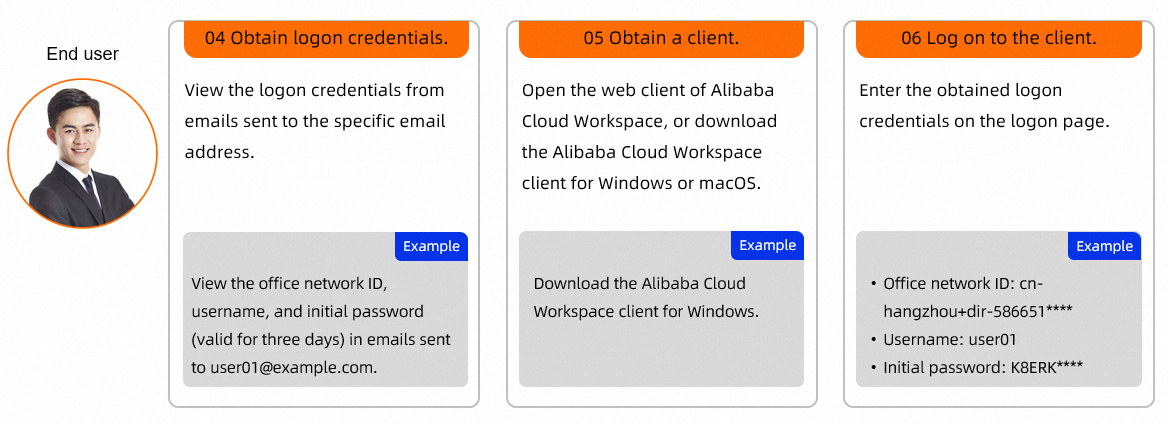
End user: log on The end user uses the logon credentials to log on to an Alibaba Cloud Workspace terminal and connect to the cloud computer.
Account systems
Elastic Desktop Service (Enterprise Edition) supports two account systems. Choose based on whether your organization uses Active Directory (AD).
| Convenience account | Enterprise AD account | |
|---|---|---|
| Best for | Organizations without an existing AD setup | Organizations with an existing AD infrastructure |
| User type | Convenience users | AD users |
| Management | Create and manage users directly in the EDS console | Connect to your AD system via AD connectors and AD domain controllers |
If you connect Elastic Desktop Service (Enterprise Edition) to an enterprise AD system, you are charged for AD connectors. For more information about the billing on AD connectors, see Billable items.
Convenience user naming requirements
When creating a convenience user, the username must meet the following requirements:
3 to 25 characters, starting with a lowercase letter or digit
Can contain only lowercase letters, digits, hyphens (
-), and underscores (_)Cannot consist entirely of digits
Cannot match a built-in operating system (OS) name
The following table lists the reserved built-in names by OS.
| OS | Built-in names (reserved) |
|---|---|
| Windows (not case-sensitive) | administrator, administrators, anonymous, batch, builtin, defaultaccount, dialup, everyone, guest, guests, iis_iusrs, interactive, iusr, local, localservice, network, networkservice, none, proxy, replicator, restricted, self, service, system, users, wdagutilityaccount |
| Linux (case-sensitive) | _apt, _chrony, avahi, avahi-autoipd, backup, bin, colord, cups-pk-helper, daemon, dnsmasq, fwupd-refresh, games, gdm, geoclue, gnats, gnome-initial-setup, irc, kernoops, list, lp, mail, man, messagebus, news, nm-openvpn, nobody, ntp, proxy, pulse, root, rtkit, saned, speech-dispatcher, sshd, sync, sys, syslog, systemd-coredump, systemd-network, systemd-resolve, systemd-timesync, tcpdump, tss, usbmux, uucp, uuidd, whoopsie, www-data |