How is application protection different from WAF?
Application protection uses Runtime Application Self-Protection (RASP) technology and runs from inside your application — it's deployed directly on your servers and injected into the application process. Web Application Firewall (WAF) sits at the network edge, filtering attack traffic before it reaches your servers.
The two complement each other. RASP catches zero-day vulnerabilities and encrypted traffic that evade network-level inspection. WAF handles volumetric attacks, HTTP flood attacks, and bot traffic at the perimeter. For comprehensive protection, use both together.
| Application protection | WAF | |
|---|---|---|
| Focus | Ensures application security regardless of traffic source | Filters attack traffic at the network layer |
| General protection scope | SQL injection, remote code execution, file inclusion, webshells | |
| Specialized protection scope | Zero-day vulnerabilities, complex encoded or encrypted traffic, in-memory webshells, non-HTTP protocols, lateral movement over internal networks | DoS attacks (HTTP flood attacks), crawler attacks, scan attacks, access control and API security |
| Detection method | Detects attacks. | Matches and filters traffic based on attack characteristics |
| Deployment location | Deployed on servers, injected into applications | Deployed at a border gateway or in front of servers; does not touch applications |
| Performance impact | Consumes server resources | Consumes WAF resources; no impact on applications or origin servers |
| Vulnerability fixing | Virtual patching; locates the execution code exploiting the vulnerability | Virtual patching; reports the exploitable traits of the vulnerability |
| Zero-day vulnerability prevention | Supported by default | Mitigates via rules created based on known exploit methods |
What application types does application protection support?
Application protection supports Java and PHP applications only. Python, Go, and .NET are not currently supported. The runtime environment must meet specific requirements. For details, see Enable application protection.
Does application protection affect application performance?
The performance impact is minimal. After enabling application protection on a server:
CPU utilization increases by less than 1%
Memory usage increases by less than 50 MB
Application latency increases by less than 1 millisecond
Application protection also includes a soft fuse escape mechanism as a safeguard. For details, see Enable application protection.
How do I choose between Monitor mode and Block mode?
Start with Monitor mode, which is the default. Application protection detects attacks that represent actual security threats — the false positive rate is lower than traditional traffic-based detection. After your application has run stably in Monitor mode for a period, switch to Block mode.
What does the manager.key parameter do for containerized Java applications?
The manager.key parameter in the startup command associates a containerized Java application with the application protection feature. Security Center's vulnerability management feature marks applications where vulnerabilities are detected. If a RASP agent is installed on an asset linked to a detected vulnerability, that asset must be marked as protected — manager.key enables this association.
Why is there no data on the Attack Statistics page?
Work through these checks in order:
1. Confirm the application is added to application protection
Re-add your application process to the feature if needed. For instructions, see Enable application protection.
2. Understand what application protection records
Unlike traditional firewalls, application protection records only real attacks — where an attacker has broken through the outer defense and can execute risky operations inside your application. A traditional firewall flags requests containing malicious characteristics, but those characteristics don't always indicate a real attack. For example, requests exploiting PHP vulnerabilities have no effect in a Java environment and aren't recorded. An application may go long periods without real attacks, but act immediately when one is detected.
What is the difference between weakness detection and the weak password baseline check?
Weakness detection analyzes application behavior and memory status during runtime to identify risks.
Weak password baseline check scans system configurations using static analysis. It covers three areas: a baseline check based on internationally agreed best practices, a classified protection compliance check, and static file detection.
Why did I fail to add my application to application protection?
Check for these two common causes:
Anti-virus software is installed on the server. The software may be blocking the RASP agent or Security Center agent. Check the software's blocking results.
The root user password on the Linux system has expired. Renew it and try again.
How do I identify a blocked threat?
Look for a runtime exception named AliCloudRaspSecurityException in your business logs. This exception means application protection detected a potential security threat and blocked the related process.
To allow a specific process behavior, add it to the whitelist. For instructions, see Create whitelist rules.
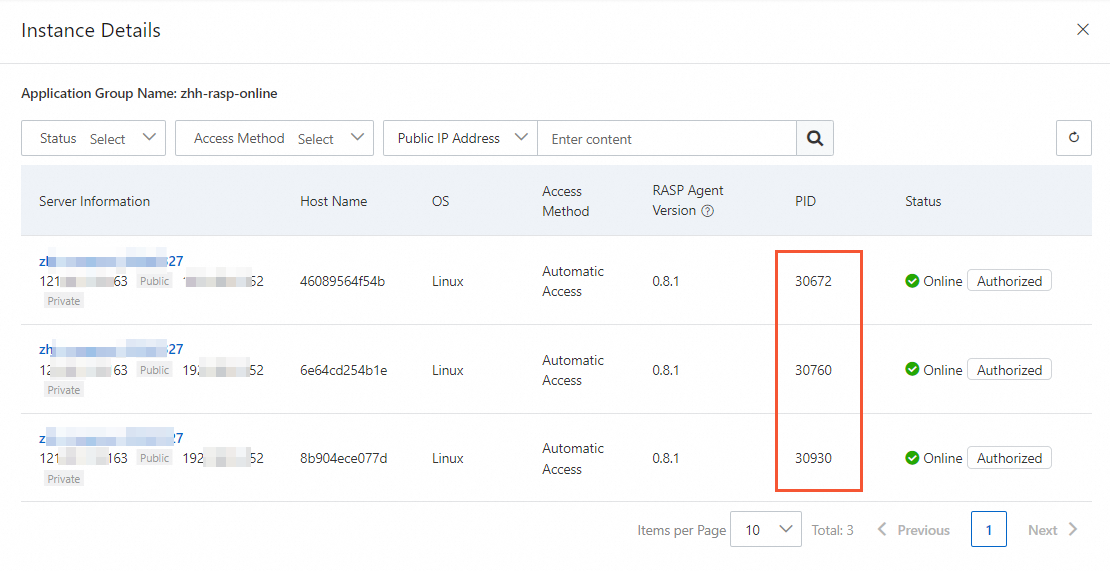
How do I verify that an application was added to application protection?
Log on to the Web Application Firewall 3.0 console. From the top menu bar, select the resource group and region (Chinese Mainland or Outside Chinese Mainland) for the WAF instance.
In the left navigation pane, choose Protection Config > RASP.
On the RASP page, click the Application Configurations tab. Click the number in the Authorized Process column for the target application group.
In the instance details panel, view the list of added applications. If the PID (Process ID) of the application process on the target server appears in the list, the application has been successfully added.