SSL-VPN lets clients securely access virtual private clouds (VPCs) on Alibaba Cloud over the internet. Depending on your network topology, you can use SSL-VPN alone or combine it with IPsec-VPN to extend access to on-premises networks.
This page covers two scenarios:
Access a VPC from a client
Use this configuration when clients need secure remote access to resources inside a single VPC — for example, to support remote work regardless of location or time.
SSL-VPN allows clients to securely connect to a VPC over the internet, regardless of time and location.
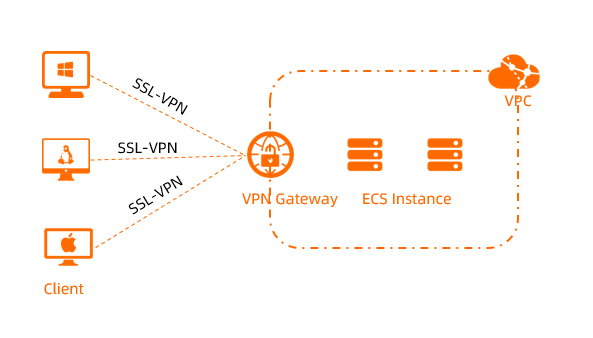
For setup instructions, see Connect a client to a VPC using an SSL-VPN connection.
Access a VPC and an on-premises network from a client
Use this configuration when clients need to access both a VPC and an on-premises network, and the client and on-premises network also need to communicate with each other.
Enable both IPsec-VPN and SSL-VPN on the same VPN gateway to connect the VPN gateway with an on-premises network and a client at the same time. With both features enabled, clients and the on-premises network can access the specified VPC and communicate with each other.
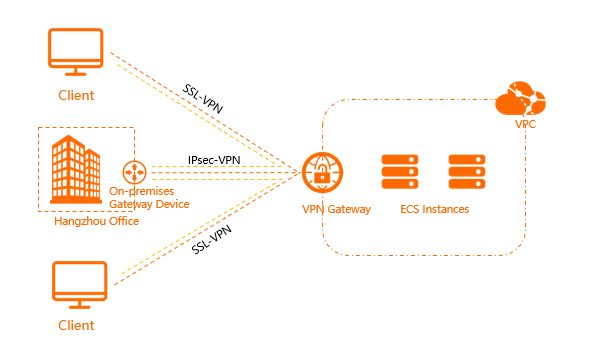
For more information, see What is IPsec-VPN?.