This topic explains how to configure an H3C firewall to establish an IPsec-VPN connection between your data center and a virtual private cloud (VPC) on Alibaba Cloud. It covers both dual-tunnel mode and single-tunnel mode.
Device at a glance
| Attribute | Value |
|---|---|
| Device vendor | H3C |
| Tested model | H3C SecPath vFW1000 E1185 |
| IKE version | IKEv2 |
| Modes covered | Dual-tunnel (static routing, BGP dynamic routing); Single-tunnel (static routing) |
| Routing options | Static routing, Border Gateway Protocol (BGP) dynamic routing |
Commands may differ across H3C models and firmware versions. Consult your H3C documentation or contact the manufacturer if your device differs from the tested model.
Dual-tunnel mode (recommended)
We recommend that you add VPN configurations to an H3C firewall in dual-tunnel mode. For background on dual-tunnel mode, see [Upgrade notice] IPsec-VPN connections support the dual-tunnel mode.
Scenario

An enterprise connects its data center to Alibaba Cloud using IPsec-VPN in dual-tunnel mode:
The data center uses the CIDR block 10.34.0.0/24 for communication with Alibaba Cloud.
The VPC on Alibaba Cloud uses the CIDR block 192.168.0.0/16, with applications running on an Elastic Compute Service (ECS) instance.
The enterprise plans to establish an IPsec-VPN connection in dual-tunnel mode between the data center and the VPC on Alibaba Cloud to enable communication between the data center and the VPC.
IP address plan
This topic covers two sub-scenarios based on how many Internet egresses the H3C firewall has. Use the plan that matches your setup.
Single egress
| Location | Configuration item | Example |
|---|---|---|
| Data center | GigabitEthernet (GE) interface 2 (Internet egress) | 10.32.0.175 |
| Next hop | 10.32.0.173 | |
| Mapped public IP address | 8.XX.XX.3 | |
| GE interface 4 (private interface) | 10.34.0.20 | |
| Private CIDR block | 10.34.0.0/24 | |
| Server IP address | 10.34.0.21 | |
| Alibaba Cloud | VPN gateway active tunnel IP | 39.XX.XX.17 |
| VPN gateway standby tunnel IP | 39.XX.XX.10 | |
| VPC CIDR block | 192.168.0.0/16 | |
| vSwitch CIDR block (Zone J) | 192.168.1.0/24 | |
| vSwitch CIDR block (Zone K) | 192.168.2.0/24 | |
| ECS instance IP address | 192.168.1.11 |
Dual egresses
| Location | Configuration item | Example |
|---|---|---|
| Data center | GE interface 2 (Internet Egress 1) | 10.32.0.175 |
| Next hop (Egress 1) | 10.32.0.173 | |
| Mapped public IP address (Egress 1) | 8.XX.XX.3 | |
| GE interface 3 (Internet Egress 2) | 10.33.0.238 | |
| Next hop (Egress 2) | 10.33.0.236 | |
| Mapped public IP address (Egress 2) | 116.XX.XX.68 | |
| GE interface 4 (private interface) | 10.34.0.20 | |
| Private CIDR block | 10.34.0.0/24 | |
| Server IP address | 10.34.0.21 | |
| Alibaba Cloud | VPN gateway active tunnel IP | 39.XX.XX.17 |
| VPN gateway standby tunnel IP | 39.XX.XX.10 | |
| VPC CIDR block | 192.168.0.0/16 | |
| vSwitch CIDR block (Zone J) | 192.168.1.0/24 | |
| vSwitch CIDR block (Zone K) | 192.168.2.0/24 | |
| ECS instance IP address | 192.168.1.11 |
BGP plan
Skip this section if you are using static routing instead of BGP dynamic routing.
Each tunnel on a VPN gateway must use a unique BGP CIDR block.
| Resource | Tunnel | BGP tunnel CIDR block | BGP IP address | BGP local ASN |
|---|---|---|---|---|
| Alibaba Cloud VPN gateway | Tunnel 1 | 169.254.10.0/30 | 169.254.10.1 | 65535 |
| Tunnel 2 | 169.254.20.0/30 | 169.254.20.1 | 65535 | |
| H3C firewall | Tunnel 1 | 169.254.10.0/30 | 169.254.10.2 | 65500 |
| Tunnel 2 | 169.254.20.0/30 | 169.254.20.2 | 65500 |
IPsec-VPN connection configuration plan
Both tunnels use the same cryptographic parameters. The values on the H3C firewall must exactly match those configured on the Alibaba Cloud side.
| Configuration item | Example | |
|---|---|---|
| Pre-shared key | ChangeMe**** | |
| Internet Key Exchange (IKE) | Version | ikev2 |
| Negotiation mode | main | |
| Encryption algorithm | aes256 | |
| Authentication algorithm | sha256 | |
| Diffie-Hellman (DH) group | group14 | |
| Security association (SA) lifetime (seconds) | 86400 | |
| IPsec | Encryption algorithm | aes256 |
| Authentication algorithm | sha256 | |
| DH group | group14 | |
| SA lifetime (seconds) | 86400 |
Prerequisites
Before you begin, ensure that you have:
A VPN gateway, a customer gateway, and an IPsec-VPN connection created on Alibaba Cloud, with routes added on the VPN gateway
For static routing, see Connect a VPC to a data center in dual-tunnel mode
For BGP dynamic routing, see Connect a VPC to a data center in dual-tunnel mode and enable BGP dynamic routing
Customer gateway requirements differ by egress configuration:
Single egress: Create one customer gateway. Assign it to both the active and standby tunnels when creating the IPsec-VPN connection.
Dual egresses: Create two customer gateways. Assign one to the active tunnel and the other to the standby tunnel.
Configuration procedures
Choose the procedure that matches your egress count and routing type:
Single egress and static routing
With a single Internet egress, bind that egress to two tunnel interfaces and assign a separate IPsec profile to each — one for the active tunnel and one for the standby.
In this example, H3C SecPath vFW1000 E1185 is used. The firewall configurations may vary with different models and versions. You can refer to the relevant documentation or consult the firewall manufacturer to configure the firewall based on the version of the firewall that you use.
Step 1: Configure interfaces and networking
Assign IP addresses and security zones to the public and private interfaces, then add the required routes.
# Configure a public interface.
interface GigabitEthernet 2/0
 ip addr 10.32.0.175 24
 quit

# Configure a private interface.
interface GigabitEthernet 4/0
 ip addr 10.34.0.10 24
 quit

# Add the public and private interfaces to their respective security zone.
security-zone name Untrust
 import interface GigabitEthernet 2/0
 quit
security-zone name Trust
 import interface GigabitEthernet 4/0
 quit

# Configure routes for peer VPN gateway public IPs (Internet egress).
ip route-static 39.XX.XX.17 32 10.32.0.173
ip route-static 39.XX.XX.10 32 10.32.0.173
# Configure a route for the local internal network CIDR block.
ip route-static 10.0.0.0 8 10.34.0.253
Step 2: Configure tunnels
Create two tunnel interfaces — one for the active tunnel and one for the standby.
# Configure the tunnel interfaces and apply IPsec to the tunnel interfaces.
interface tunnel 1 mode ipsec
 ip address unnumbered interface GigabitEthernet 2/0
 quit
interface tunnel 2 mode ipsec
 ip address unnumbered interface GigabitEthernet 2/0
 quit

# Add the tunnel interfaces to the Untrust security zone.
security-zone name Untrust
 import interface Tunnel 1
 import interface Tunnel 2
 quit
Step 3: Configure IPsec and IKEv2
Configure an IPsec transform set, an IKEv2 proposal and policy, keychains, profiles, and IPsec profiles. All cryptographic parameters must match the Alibaba Cloud side.
# Configure an IPsec transform set.
ipsec transform-set to-ali-trans
 encapsulation-mode tunnel
 protocol esp
 esp authentication-algorithm sha256
 esp encryption-algorithm aes-cbc-256
 pfs dh-group14
 quit

# Configure an IKEv2 proposal and policy.
ikev2 proposal to-ali-prop
 dh group14
 encryption aes-cbc-256
 integrity sha256
 prf sha256
 quit
ikev2 policy to-ali-policy
 priority 1
 proposal to-ali-prop
 quit

# Configure IKEv2 keychains — one per tunnel, pointing to the active and standby tunnel IPs.
ikev2 keychain to_ali_key1
 peer to-ali-peer1
  address 39.XX.XX.17 32
  identity address 39.XX.XX.17
  pre-shared-key plaintext ChangeMe****
  quit
 quit
ikev2 keychain to_ali_key2
 peer to-ali-peer2
  address 39.XX.XX.10 32
  identity address 39.XX.XX.10
  pre-shared-key plaintext ChangeMe****
  quit
 quit

# Configure IKEv2 profiles — one per tunnel.
ikev2 profile to-ali-profile1
 authentication-method local pre-share
 authentication-method remote pre-share
 keychain to_ali_key1
 identity local address 8.XX.XX.3
 match remote identity address 39.XX.XX.17 32
 sa duration 86400
 dpd interval 30 periodic
 quit

ikev2 profile to-ali-profile2
 authentication-method local pre-share
 authentication-method remote pre-share
 keychain to_ali_key2
 identity local address 8.XX.XX.3
 match remote identity address 39.XX.XX.10 32
 sa duration 86400
 dpd interval 30 periodic
 quit

# Configure IPsec profiles and reference the IKEv2 profiles above.
# We recommend that you specify only the time-based SA lifetime. If you specify the traffic-based SA lifetime, set it to the maximum value.
ipsec profile to-ali-profile1 isakmp
 transform-set to-ali-trans
 ikev2-profile to-ali-profile1
 sa duration time-based 86400
 quit

ipsec profile to-ali-profile2 isakmp
 transform-set to-ali-trans
 ikev2-profile to-ali-profile2
 sa duration time-based 86400
 quit

# Configure the tunnel interfaces and apply the IPsec profiles to the tunnel interfaces.
interface tunnel 1 mode ipsec
 ip address unnumbered interface GigabitEthernet 2/0
 tunnel protection ipsec profile to-ali-profile1
 source 10.32.0.175
 destination 39.XX.XX.17
 quit
interface tunnel 2 mode ipsec
 ip address unnumbered interface GigabitEthernet 2/0
 tunnel protection ipsec profile to-ali-profile2
 source 10.32.0.175
 destination 39.XX.XX.10
 quit

# Configure routes for peer VPC CIDR block to tunnel interfaces.
ip route-static 192.168.0.0 16 Tunnel 1 preference 10
ip route-static 192.168.0.0 16 Tunnel 2 preference 20
Step 4: Configure an ACL
Configure an access control list (ACL) to permit IKE negotiation and IPsec data traffic.
The ACL below is intentionally permissive for simplicity. Tighten the rules to match your security requirements.
To connect multiple data center CIDR blocks to the VPC, configure the H3C firewall in destination-based routing mode. See the "Recommended solutions" section of Configuration suggestions and FAQ about enabling communication among CIDR blocks.
# Configure an ACL to allow IKE negotiation packets and IPsec data packets between the Untrust security zone and any other zone. In this example, the configurations are simplified. You can configure a fine-grained ACL based on your business requirements.
acl advanced 3001
 rule 0 permit ip
 quit
zone-pair security source any destination any
 packet-filter 3001
 quit
Step 5: Verify results
After adding routes from the server in the data center to the H3C firewall, verify connectivity and failover behavior.
Test connectivity
Log on to an ECS instance in the VPC. See Connection method overview.
Ping a server in the data center. A successful reply confirms the tunnels are up.
ping <Private IP address of a server in the data center>Test failover
Log on to an ECS instance in the VPC.
Send a continuous stream of packets to the data center:
ping <Private IP address of a server in the data center> -c 10000Simulate an active tunnel failure by changing its pre-shared key. The active tunnel is closed when the two sides of the tunnel use different pre-shared keys.
Observe the traffic on the ECS instance. If the traffic is interrupted and then resumed, it indicates that the standby tunnel automatically takes over after the active tunnel is down.
Single egress and BGP dynamic routing
The interface and tunnel setup is identical to the static routing scenario. Follow Steps 1–4 from Single egress and static routing, then replace the static routes with BGP dynamic routing as described below.
Step 1: Configure interfaces and networking
# Configure a public interface.
interface GigabitEthernet 2/0
 ip addr 10.32.0.175 24
 quit

# Configure a private interface.
interface GigabitEthernet 4/0
 ip addr 10.34.0.10 24
 quit

# Add the public and private interfaces to their respective security zone.
security-zone name Untrust
 import interface GigabitEthernet 2/0
 quit
security-zone name Trust
 import interface GigabitEthernet 4/0
 quit

# Configure routes for peer VPN gateway public IPs (Internet egress).
ip route-static 39.XX.XX.17 32 10.32.0.173
ip route-static 39.XX.XX.10 32 10.32.0.173
# Configure a route for the local internal network CIDR block.
ip route-static 10.0.0.0 8 10.34.0.253
Step 2: Configure tunnels
# Configure the tunnel interfaces and apply IPsec to the tunnel interfaces.
interface tunnel 1 mode ipsec
 ip address unnumbered interface GigabitEthernet 2/0
 quit
interface tunnel 2 mode ipsec
 ip address unnumbered interface GigabitEthernet 2/0
 quit

# Add the tunnel interfaces to the Untrust security zone.
security-zone name Untrust
 import interface Tunnel 1
 import interface Tunnel 2
 quit
Step 3: Configure IPsec and IKEv2
# Configure an IPsec transform set.
ipsec transform-set to-ali-trans
 encapsulation-mode tunnel
 protocol esp
 esp authentication-algorithm sha256
 esp encryption-algorithm aes-cbc-256
 pfs dh-group14
 quit

# Configure an IKEv2 proposal and policy.
ikev2 proposal to-ali-prop
 dh group14
 encryption aes-cbc-256
 integrity sha256
 prf sha256
 quit
ikev2 policy to-ali-policy
 priority 1
 proposal to-ali-prop
 quit

# Configure IKEv2 keychains — one per tunnel.
ikev2 keychain to_ali_key1
 peer to-ali-peer1
  address 39.XX.XX.17 32
  identity address 39.XX.XX.17
  pre-shared-key plaintext ChangeMe****
  quit
 quit
ikev2 keychain to_ali_key2
 peer to-ali-peer2
  address 39.XX.XX.10 32
  identity address 39.XX.XX.10
  pre-shared-key plaintext ChangeMe****
  quit
 quit

# Configure IKEv2 profiles — one per tunnel.
ikev2 profile to-ali-profile1
 authentication-method local pre-share
 authentication-method remote pre-share
 keychain to_ali_key1
 identity local address 8.XX.XX.3
 match remote identity address 39.XX.XX.17 32
 sa duration 86400
 dpd interval 30 periodic
 quit

ikev2 profile to-ali-profile2
 authentication-method local pre-share
 authentication-method remote pre-share
 keychain to_ali_key2
 identity local address 8.XX.XX.3
 match remote identity address 39.XX.XX.10 32
 sa duration 86400
 dpd interval 30 periodic
 quit

# Configure IPsec profiles. We recommend that you specify only the time-based SA lifetime. If you specify the traffic-based SA lifetime, set it to the maximum value.
ipsec profile to-ali-profile1 isakmp
 transform-set to-ali-trans
 ikev2-profile to-ali-profile1
 sa duration time-based 86400
 quit

ipsec profile to-ali-profile2 isakmp
 transform-set to-ali-trans
 ikev2-profile to-ali-profile2
 sa duration time-based 86400
 quit

# Configure the tunnel interfaces and apply the IPsec profiles to the tunnel interfaces.
interface tunnel 1 mode ipsec
 ip address unnumbered interface GigabitEthernet 2/0
 tunnel protection ipsec profile to-ali-profile1
 source 10.32.0.175
 destination 39.XX.XX.17
 quit
interface tunnel 2 mode ipsec
 ip address unnumbered interface GigabitEthernet 2/0
 tunnel protection ipsec profile to-ali-profile2
 source 10.32.0.175
 destination 39.XX.XX.10
 quit

# Configure routes for the peer VPC CIDR block to point to the tunnel interfaces.
ip route-static 192.168.0.0 16 Tunnel 1 preference 10
ip route-static 192.168.0.0 16 Tunnel 2 preference 20
Step 4: Configure an ACL
The ACL below is intentionally permissive for simplicity. Tighten the rules to match your security requirements.
To connect multiple data center CIDR blocks to the VPC, configure the H3C firewall in destination-based routing mode. See the "Recommended solutions" section of Configuration suggestions and FAQ about enabling communication among CIDR blocks.
# Configure an ACL to allow IKE negotiation packets and IPsec data packets between the Untrust security zone and any other zone. In this example, the configurations are simplified. You can configure a fine-grained ACL based on your business requirements.
acl advanced 3001
 rule 0 permit ip
 quit
zone-pair security source any destination any
 packet-filter 3001
 quit
Step 5: Configure BGP dynamic routing
Assign IP addresses to the tunnel interfaces for BGP peering, remove the static tunnel routes, and configure BGP.
# Configure IP addresses for the tunnel interfaces to establish BGP peering with the VPN gateway on Alibaba Cloud.
interface tunnel 1 mode ipsec
 ip address 169.254.10.2 30
 quit
interface tunnel 2 mode ipsec
 ip address 169.254.20.2 30
 quit

# Delete the static routes that point to the tunnels in the static routing scenario.
undo ip route-static 192.168.0.0 16 Tunnel 1 preference 10
undo ip route-static 192.168.0.0 16 Tunnel 2 preference 20

# Configure BGP dynamic routing. The H3C firewall advertises 10.0.0.0/8 to the VPN gateway on Alibaba Cloud.
bgp 65500
peer 169.254.10.1 as-number 65535
peer 169.254.20.1 as-number 65535
address-family ipv4 unicast
peer 169.254.10.1 enable
peer 169.254.20.1 enable
network 10.0.0.0 8  # Advertise the CIDR block 10.0.0.0/8.
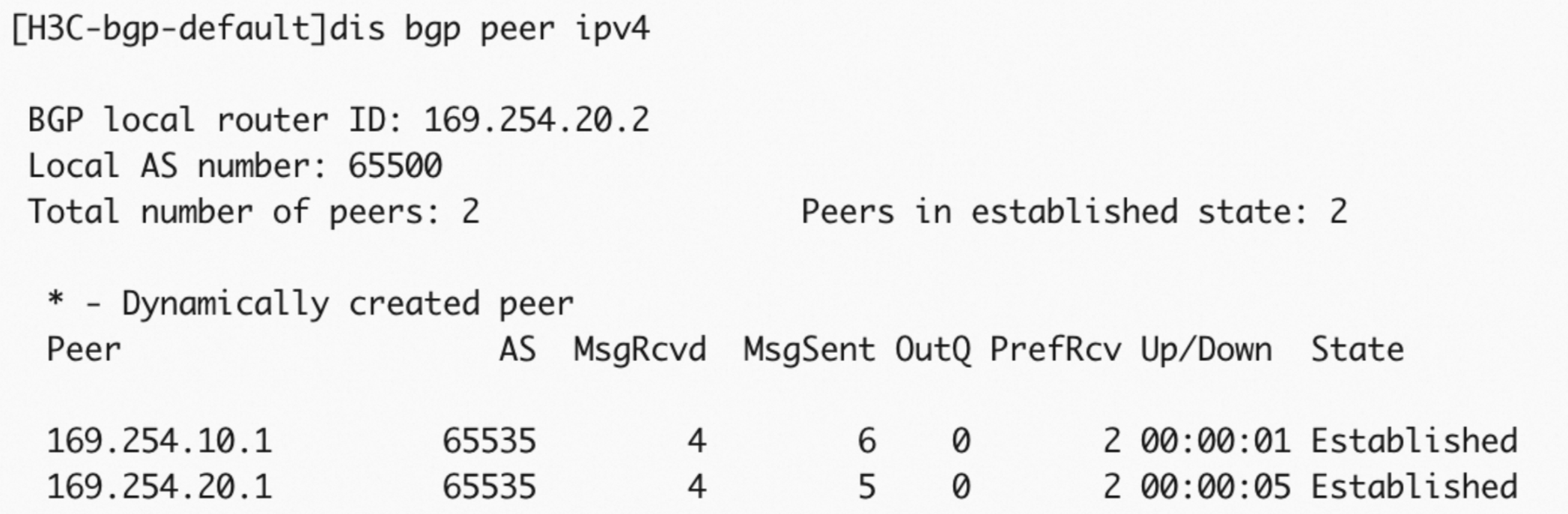
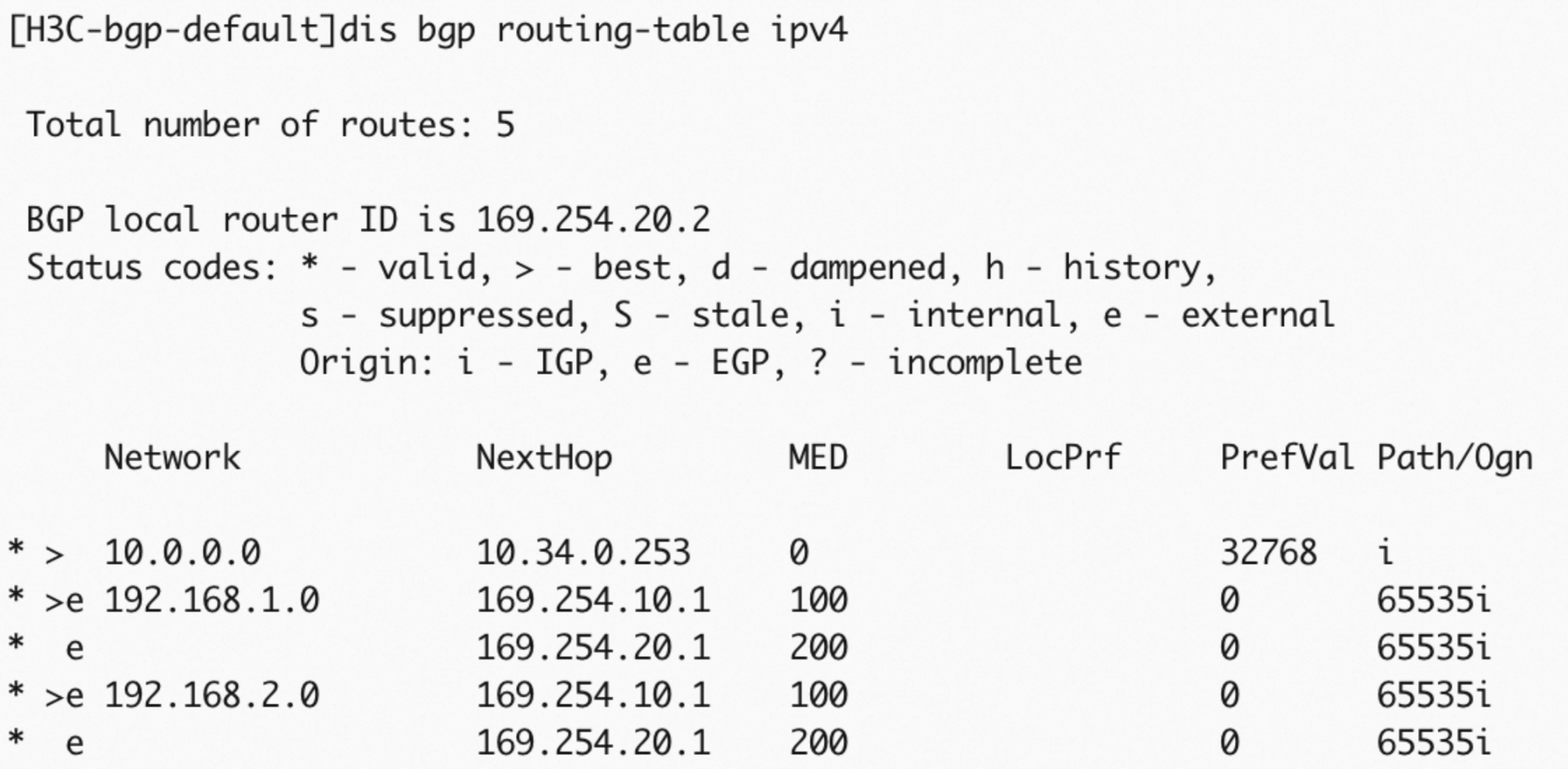
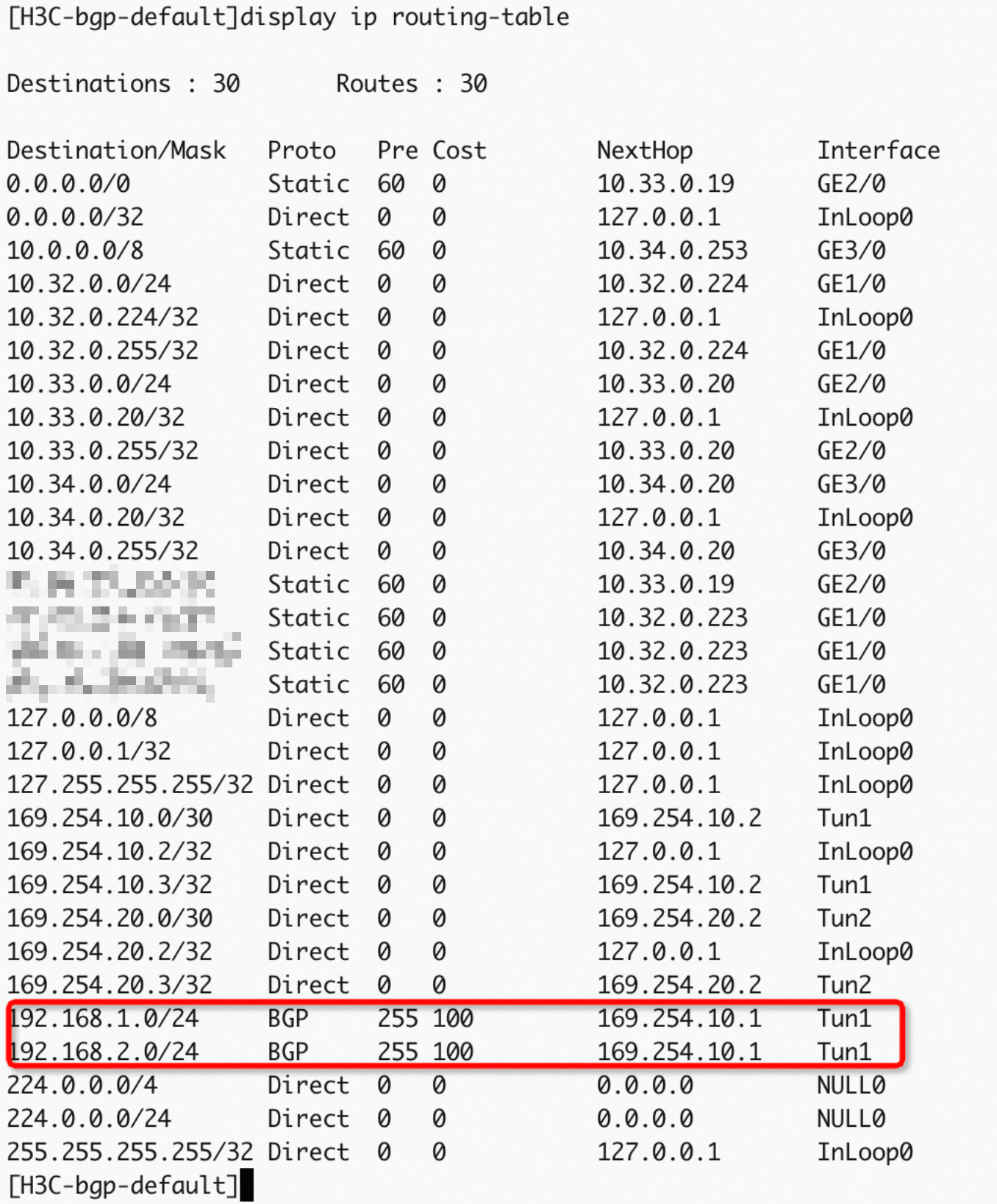
After configuration, verify the BGP state:
Check the BGP connection.
Check the BGP dynamic routing.
Check the route table.
Step 6: Verify results
After adding routes from the data center to the H3C firewall, verify connectivity and failover behavior.
Test connectivity
Log on to an ECS instance in the VPC. See Connection method overview.
Ping a server in the data center. A successful reply confirms the tunnels are up.
ping <Private IP address of a server in the data center>Test failover
Log on to an ECS instance in the VPC.
Send a continuous stream of packets to the data center:
ping <Private IP address of a server in the data center> -c 10000Simulate an active tunnel failure by changing its pre-shared key. The active tunnel is closed when the two sides of the tunnel use different pre-shared keys.
Observe the traffic on the ECS instance. If the traffic is interrupted and then resumed, it indicates that the standby tunnel automatically takes over after the active tunnel is down.
Dual egresses and static routing
With two Internet egresses, bind each egress to a separate tunnel interface and assign a distinct IPsec profile to each tunnel.
In this example, H3C SecPath vFW1000 E1185 is used. The firewall configurations may vary with different models and versions. You can refer to the relevant documentation or consult the firewall manufacturer to configure the firewall based on the version of the firewall that you use.
Step 1: Configure interfaces and networking
# Configure Public Interface 1.
interface GigabitEthernet 2/0
 ip addr 10.32.0.175 24
 quit

# Configure Public Interface 2.
interface GigabitEthernet 3/0
 ip addr 10.33.0.238 24
 quit

# Configure a private interface.
interface GigabitEthernet 4/0
 ip addr 10.34.0.10 24
 quit

# Add the public and private interfaces to their respective security zone.
security-zone name Untrust
 import interface GigabitEthernet 2/0
 import interface GigabitEthernet 3/0
 quit
security-zone name Trust
 import interface GigabitEthernet 4/0
 quit

# Configure 32-bit routes for peer VPN gateway public IPs (Internet).
ip route-static 39.XX.XX.17 32 10.32.0.173
ip route-static 39.XX.XX.10 32 10.33.0.236
# Configure a route for the local internal network CIDR block.
ip route-static 10.0.0.0 8 10.34.0.253
Step 2: Configure tunnels
# Configure the tunnel interfaces and apply IPsec to the tunnel interfaces.
interface tunnel 1 mode ipsec
 ip address unnumbered interface GigabitEthernet 2/0
 quit
interface tunnel 2 mode ipsec
 ip address unnumbered interface GigabitEthernet 3/0
 quit

# Add the tunnel interfaces to the Untrust security zone.
security-zone name Untrust
 import interface Tunnel 1
 import interface Tunnel 2
 quit
Step 3: Configure IPsec and IKEv2
The key difference from the single-egress scenario: to-ali-profile2 uses the mapped public IP of Egress 2 (116.XX.XX.68) as the local identity.
# Configure an IPsec transform set.
ipsec transform-set to-ali-trans
 encapsulation-mode tunnel
 protocol esp
 esp authentication-algorithm sha256
 esp encryption-algorithm aes-cbc-256
 pfs dh-group14
 quit

# Configure an IKEv2 proposal and policy.
ikev2 proposal to-ali-prop
 dh group14
 encryption aes-cbc-256
 integrity sha256
 prf sha256
 quit
ikev2 policy to-ali-policy
 priority 1
 proposal to-ali-prop
 quit

# Configure IKEv2 keychains for active and standby tunnels.
ikev2 keychain to_ali_key1
 peer to-ali-peer1
  address 39.XX.XX.17 32
  identity address 39.XX.XX.17
  pre-shared-key plaintext ChangeMe****
  quit
 quit
ikev2 keychain to_ali_key2
 peer to-ali-peer2
  address 39.XX.XX.10 32
  identity address 39.XX.XX.10
  pre-shared-key plaintext ChangeMe****
  quit
 quit

# Configure IKEv2 profiles. Specify the active and standby tunnels on Alibaba Cloud as the two peers.
# profile1 uses the mapped public IP of Egress 1; profile2 uses the mapped public IP of Egress 2.
ikev2 profile to-ali-profile1
 authentication-method local pre-share
 authentication-method remote pre-share
 keychain to_ali_key1
 identity local address 8.XX.XX.3
 match remote identity address 39.XX.XX.17 32
 sa duration 86400
 dpd interval 30 periodic
 quit

ikev2 profile to-ali-profile2
 authentication-method local pre-share
 authentication-method remote pre-share
 keychain to_ali_key2
 identity local address 116.XX.XX.68
 match remote identity address 39.XX.XX.10 32
 sa duration 86400
 dpd interval 30 periodic
 quit

# Configure IPsec profiles and reference the preceding IKEv2 profiles.
# We recommend that you specify only the time-based SA lifetime. If you specify the traffic-based SA lifetime, set it to the maximum value.
ipsec profile to-ali-profile1 isakmp
 transform-set to-ali-trans
 ikev2-profile to-ali-profile1
 sa duration time-based 86400
 quit

ipsec profile to-ali-profile2 isakmp
 transform-set to-ali-trans
 ikev2-profile to-ali-profile2
 sa duration time-based 86400
 quit

# Configure the tunnel interfaces and apply the IPsec profiles to the tunnel interfaces.
interface tunnel 1 mode ipsec
 ip address unnumbered interface GigabitEthernet 2/0
 tunnel protection ipsec profile to-ali-profile1
 source 10.32.0.175
 destination 39.XX.XX.17
 quit
interface tunnel 2 mode ipsec
 ip address unnumbered interface GigabitEthernet 3/0
 tunnel protection ipsec profile to-ali-profile2
 source 10.33.0.238
 destination 39.XX.XX.10
 quit

# Configure routes for peer VPC CIDR block to tunnel interfaces.
ip route-static 192.168.0.0 16 Tunnel 1 preference 10
ip route-static 192.168.0.0 16 Tunnel 2 preference 20
Step 4: Configure an ACL
The ACL below is intentionally permissive for simplicity. Tighten the rules to match your security requirements.
To connect multiple data center CIDR blocks to the VPC, configure the H3C firewall in destination-based routing mode. See the "Recommended solutions" section of Configuration suggestions and FAQ about enabling communication among CIDR blocks.
# Configure an ACL to allow IKE negotiation packets and IPsec data packets between the Untrust security zone and any other zone. In this example, the configurations are simplified. You can configure a fine-grained ACL based on your business requirements.
acl advanced 3001
 rule 0 permit ip
 quit
zone-pair security source any destination any
 packet-filter 3001
 quit
Step 5: Verify results
After adding routes from the data center to the H3C firewall, verify connectivity and failover behavior.
Test connectivity
Log on to an ECS instance in the VPC. See Connection method overview.
Ping a server in the data center. A successful reply confirms the tunnels are up.
ping <Private IP address of a server in the data center>Test failover
Log on to an ECS instance in the VPC.
Send a continuous stream of packets to the data center:
ping <Private IP address of a server in the data center> -c 10000Simulate an active tunnel failure by changing its pre-shared key. The active tunnel is closed when the two sides of the tunnel use different pre-shared keys.
Observe the traffic on the ECS instance. If the traffic is interrupted and then resumed, it indicates that the standby tunnel automatically takes over after the active tunnel is down.
Dual egresses and BGP dynamic routing
The interface and tunnel setup is identical to the dual-egress static routing scenario. Follow Steps 1–4 from Dual egresses and static routing, then replace the static routes with BGP dynamic routing as described below.
Step 1: Configure interfaces and networking
# Configure Public Interface 1.
interface GigabitEthernet 2/0
 ip addr 10.32.0.175 24
 quit

# Configure Public Interface 2.
interface GigabitEthernet 3/0
 ip addr 10.33.0.238 24
 quit

# Configure a private interface.
interface GigabitEthernet 4/0
 ip addr 10.34.0.10 24
 quit

# Add the public and private interfaces to their respective security zone.
security-zone name Untrust
 import interface GigabitEthernet 2/0
 import interface GigabitEthernet 3/0
 quit
security-zone name Trust
 import interface GigabitEthernet 4/0
 quit

# Configure 32-bit routes for peer VPN gateway public IPs (Internet).
ip route-static 39.XX.XX.17 32 10.32.0.173
ip route-static 39.XX.XX.10 32 10.33.0.236
# Configure a route for the local internal network CIDR block.
ip route-static 10.0.0.0 8 10.34.0.253
Step 2: Configure tunnels
# Configure the tunnel interfaces and apply IPsec to the tunnel interfaces.
interface tunnel 1 mode ipsec
 ip address unnumbered interface GigabitEthernet 2/0
 quit
interface tunnel 2 mode ipsec
 ip address unnumbered interface GigabitEthernet 3/0
 quit

# Add the tunnel interfaces to the Untrust security zone.
security-zone name Untrust
 import interface Tunnel 1
 import interface Tunnel 2
 quit
Step 3: Configure IPsec and IKEv2
# Configure an IPsec transform set.
ipsec transform-set to-ali-trans
 encapsulation-mode tunnel
 protocol esp
 esp authentication-algorithm sha256
 esp encryption-algorithm aes-cbc-256
 pfs dh-group14
 quit

# Configure an IKEv2 proposal and policy.
ikev2 proposal to-ali-prop
 dh group14
 encryption aes-cbc-256
 integrity sha256
 prf sha256
 quit
ikev2 policy to-ali-policy
 priority 1
 proposal to-ali-prop
 quit

# Configure IKEv2 keychains for active and standby tunnels.
ikev2 keychain to_ali_key1
 peer to-ali-peer1
  address 39.XX.XX.17 32
  identity address 39.XX.XX.17
  pre-shared-key plaintext ChangeMe****
  quit
 quit
ikev2 keychain to_ali_key2
 peer to-ali-peer2
  address 39.XX.XX.10 32
  identity address 39.XX.XX.10
  pre-shared-key plaintext ChangeMe****
  quit
 quit

# Configure IKEv2 profiles. Specify the active and standby tunnels on Alibaba Cloud as the two peers.
# profile1 uses the mapped public IP of Egress 1; profile2 uses the mapped public IP of Egress 2.
ikev2 profile to-ali-profile1
 authentication-method local pre-share
 authentication-method remote pre-share
 keychain to_ali_key1
 identity local address 8.XX.XX.3
 match remote identity address 39.XX.XX.17 32
 sa duration 86400
 dpd interval 30 periodic
 quit

ikev2 profile to-ali-profile2
 authentication-method local pre-share
 authentication-method remote pre-share
 keychain to_ali_key2
 identity local address 116.XX.XX.68
 match remote identity address 39.XX.XX.10 32
 sa duration 86400
 dpd interval 30 periodic
 quit

# Configure IPsec profiles and reference the preceding IKEv2 profiles.
# We recommend that you specify only the time-based SA lifetime. If you specify the traffic-based SA lifetime, set it to the maximum value.
ipsec profile to-ali-profile1 isakmp
 transform-set to-ali-trans
 ikev2-profile to-ali-profile1
 sa duration time-based 86400
 quit

ipsec profile to-ali-profile2 isakmp
 transform-set to-ali-trans
 ikev2-profile to-ali-profile2
 sa duration time-based 86400
 quit

# Configure the tunnel interfaces and apply the IPsec profiles to the tunnel interfaces.
interface tunnel 1 mode ipsec
 ip address unnumbered interface GigabitEthernet 2/0
 tunnel protection ipsec profile to-ali-profile1
 source 10.32.0.175
 destination 39.XX.XX.17
 quit
interface tunnel 2 mode ipsec
 ip address unnumbered interface GigabitEthernet 3/0
 tunnel protection ipsec profile to-ali-profile2
 source 10.33.0.238
 destination 39.XX.XX.10
 quit

# Configure routes for the peer VPC CIDR block to point to the tunnel interfaces.
ip route-static 192.168.0.0 16 Tunnel 1 preference 10
ip route-static 192.168.0.0 16 Tunnel 2 preference 20
Step 4: Configure an ACL
The ACL below is intentionally permissive for simplicity. Tighten the rules to match your security requirements.
To connect multiple data center CIDR blocks to the VPC, configure the H3C firewall in destination-based routing mode. See the "Recommended solutions" section of Configuration suggestions and FAQ about enabling communication among CIDR blocks.
# Configure an ACL to allow IKE negotiation packets and IPsec data packets between the Untrust security zone and any other zone. In this example, the configurations are simplified. You can configure a fine-grained ACL based on your business requirements.
acl advanced 3001
 rule 0 permit ip
 quit
zone-pair security source any destination any
 packet-filter 3001
 quit
Step 5: Configure BGP dynamic routing
# Configure IP addresses for the tunnel interfaces to establish BGP peering with the VPN gateway on Alibaba Cloud.
interface tunnel 1 mode ipsec
 ip address 169.254.10.2 30
 quit
interface tunnel 2 mode ipsec
 ip address 169.254.20.2 30
 quit

# Delete the static routes that point to the tunnels in the static routing scenario.
undo ip route-static 192.168.0.0 16 Tunnel 1 preference 10
undo ip route-static 192.168.0.0 16 Tunnel 2 preference 20

# Configure BGP dynamic routing. The H3C firewall advertises 10.0.0.0/8 to the VPN gateway on Alibaba Cloud.
bgp 65500
peer 169.254.10.1 as-number 65535
peer 169.254.20.1 as-number 65535
address-family ipv4 unicast
peer 169.254.10.1 enable
peer 169.254.20.1 enable
network 10.0.0.0 8  # Advertise the CIDR block 10.0.0.0/8.
After configuration, verify the BGP state:
Check the BGP connection.
Check the BGP dynamic routing.
Check the route table.
Step 6: Verify results
After adding routes from the data center to the H3C firewall, verify connectivity and failover behavior.
Test connectivity
Log on to an ECS instance in the VPC. See Connection method overview.
Ping a server in the data center. A successful reply confirms the tunnels are up.
ping <Private IP address of a server in the data center>Test failover
Log on to an ECS instance in the VPC.
Send a continuous stream of packets to the data center:
ping <Private IP address of a server in the data center> -c 10000Simulate an active tunnel failure by changing its pre-shared key. The active tunnel is closed when the two sides of the tunnel use different pre-shared keys.
Observe the traffic on the ECS instance. If the traffic is interrupted and then resumed, it indicates that the standby tunnel automatically takes over after the active tunnel is down.
Single-tunnel mode
Scenario

An enterprise connects its data center to Alibaba Cloud using IPsec-VPN in single-tunnel mode:
The data center uses the CIDR block 10.34.0.0/24 for communication with Alibaba Cloud.
The VPC on Alibaba Cloud uses the CIDR block 192.168.0.0/16, with applications running on an ECS instance.
This section covers static routing only.
IP address plan
| Location | Configuration item | Example |
|---|---|---|
| Data center | GE interface 2 (Internet egress) | 10.32.0.175/24 |
| Next hop | 10.32.0.173 | |
| Mapped public IP address | 8.XX.XX.3 | |
| GE interface 4 (private interface) | 10.34.0.20/24 | |
| Server IP address | 10.34.0.21 | |
| Alibaba Cloud | VPN gateway IP address | 39.XX.XX.17 |
| VPC CIDR block | 192.168.0.0/16 | |
| vSwitch CIDR block | 192.168.1.0/24 | |
| ECS instance IP address | 192.168.1.11 |
IPsec-VPN connection configuration plan
The values on the H3C firewall must exactly match those configured on the Alibaba Cloud side.
| Configuration item | Example | |
|---|---|---|
| Pre-shared key | ChangeMe**** | |
| IKE | Version | ikev2 |
| Negotiation mode | main | |
| Encryption algorithm | aes256 | |
| Authentication algorithm | sha256 | |
| DH group | group14 | |
| SA lifetime (seconds) | 86400 | |
| IPsec | Encryption algorithm | aes256 |
| Authentication algorithm | sha256 | |
| DH group | group14 | |
| SA lifetime (seconds) | 86400 |
Prerequisites
Before you begin, ensure that you have:
A VPN gateway, a customer gateway, and an IPsec-VPN connection created on Alibaba Cloud, with routes added on the VPN gateway. See Connect a VPC to a data center in single-tunnel mode
Procedure
In this example, H3C SecPath vFW1000 E1185 is used. The firewall configurations may vary with different models and versions. You can refer to the relevant documentation or consult the firewall manufacturer to configure the firewall based on the version of the firewall that you use.
Step 1: Configure interfaces and networking
# Configure a public interface.
interface GigabitEthernet 2/0
 ip addr 10.32.0.175 24
 quit

# Configure a private interface.
interface GigabitEthernet 4/0
 ip addr 10.34.0.10 24
 quit

# Add the public and private interfaces to their respective security zone.
security-zone name Untrust
 import interface GigabitEthernet 2/0
 quit
security-zone name Trust
 import interface GigabitEthernet 4/0
 quit

# Configure a route for peer VPN gateway public IP (Internet egress).
ip route-static 39.XX.XX.17 32 10.32.0.173
# Configure a route for the local internal network CIDR block.
ip route-static 10.0.0.0 8 10.34.0.253
Step 2: Configure a tunnel
# Configure the tunnel interface and apply IPsec to the tunnel interface.
interface tunnel 1 mode ipsec
 ip address unnumbered interface GigabitEthernet 2/0
 quit

# Add the tunnel interface to the Untrust security zone.
security-zone name Untrust
 import interface Tunnel 1
 quit
Step 3: Configure IPsec and IKEv2
# Configure an IPsec transform set.
ipsec transform-set to-ali-trans
 encapsulation-mode tunnel
 protocol esp
 esp authentication-algorithm sha256
 esp encryption-algorithm aes-cbc-256
 pfs dh-group14
 quit

# Configure an IKEv2 proposal and policy.
ikev2 proposal to-ali-prop
 dh group14
 encryption aes-cbc-256
 integrity sha256
 prf sha256
 quit
ikev2 policy to-ali-policy
 priority 1
 proposal to-ali-prop
 quit

# Configure an IKEv2 keychain. Specify the tunnel on Alibaba Cloud as the peer. Set the address parameter to the public IP address of the tunnel on Alibaba Cloud.
ikev2 keychain to_ali_key1
 peer to-ali-peer1
  address 39.XX.XX.17 32
  identity address 39.XX.XX.17
  pre-shared-key plaintext ChangeMe****
  quit
 quit

# Configure an IKEv2 profile. Specify the tunnel on Alibaba Cloud as the peer.
ikev2 profile to-ali-profile1
 authentication-method local pre-share
 authentication-method remote pre-share
 keychain to_ali_key1
 identity local address 8.XX.XX.3
 match remote identity address 39.XX.XX.17 32
 sa duration 86400
 dpd interval 30 periodic
 quit

# Configure an IPsec profile and reference the preceding IKEv2 profile.
# We recommend that you specify only the time-based SA lifetime. If you specify the traffic-based SA lifetime, set it to the maximum value.
ipsec profile to-ali-profile1 isakmp
 transform-set to-ali-trans
 ikev2-profile to-ali-profile1
 sa duration time-based 86400
 quit

# Configure the tunnel interface and apply the IPsec profile to the tunnel interface.
interface tunnel 1 mode ipsec
 ip address unnumbered interface GigabitEthernet 2/0
 tunnel protection ipsec profile to-ali-profile1
 source 10.32.0.175
 destination 39.XX.XX.17
 quit

# Configure a route for the peer VPC CIDR block to point to the tunnel interface.
ip route-static 192.168.0.0 16 Tunnel 1 preference 10
Step 4: Configure an ACL
The ACL below is intentionally permissive for simplicity. Tighten the rules to match your security requirements.
To connect multiple data center CIDR blocks to the VPC, configure the H3C firewall in destination-based routing mode. See the "Recommended solutions" section of Configuration suggestions and FAQ about enabling communication among CIDR blocks.
# Configure an ACL to allow IKE negotiation packets and IPsec data packets between the Untrust security zone and any other zone. In this example, the configurations are simplified. You can configure a fine-grained ACL based on your business requirements.
acl advanced 3001
 rule 0 permit ip
 quit
zone-pair security source any destination any
 packet-filter 3001
 quit
Step 5: Verify results
After adding routes from the server in the data center to the H3C firewall, verify connectivity.
Log on to an ECS instance that is not assigned a public IP address in the VPC. See Connection method overview.
Run the ping command to ping a server in the data center to test the network connectivity.
ping <Private IP address of a server in the data center>If you can receive echo reply packets, the connection is established.