You can set the UserData parameter in the ApsaraVideo VOD API or SDK to specify multiple HTTP or Simple Message Queue (formerly MNS) callback URLs. This is useful when you want to send event notifications to multiple servers or deliver callback messages to different environments, such as development, testing, and production.
Description
ApsaraVideo VOD allows you to configure only one callback method and one callback URL for each region, and the setting takes effect globally. When multiple services share the same ApsaraVideo VOD instance, you can specify different callback URLs in MessageCallback of UserData for each service. These callbacks do not affect each other. To specify multiple callback URLs for multi-environment services, use the UserData parameter.
Configure global event notifications
Limits
If you want to use Simple Message Queue (formerly MNS) callbacks, you must go to the page to authorize ApsaraVideo VOD to access Simple Message Queue (formerly MNS).
Usage notes
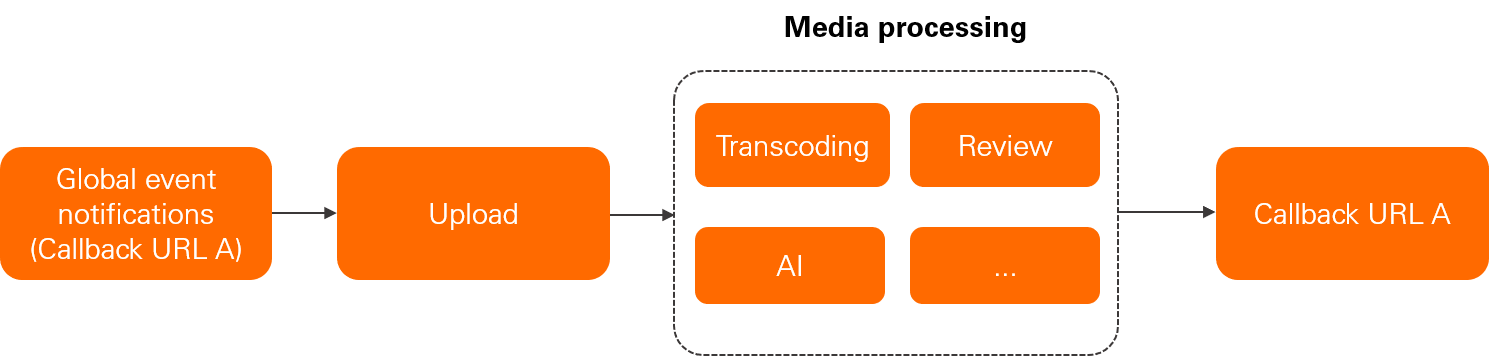
ApsaraVideo VOD supports HTTP callbacks and Simple Message Queue (formerly MNS) callbacks for global event notifications. You can configure only one callback method and one callback URL for each region. When events such as uploading audio, video, or image files, or submitting media processing jobs like transcoding and review are triggered, ApsaraVideo VOD sends event notifications based on the callback settings for that region.
Configuration method
You can configure global event notifications by using the ApsaraVideo VOD console, SDK, or API. For more information about the procedure and limits, see HTTP callbacks and SMQ callbacks. To configure in the console, log on to the ApsaraVideo VOD console and choose Configuration Management > Media Processing Configuration > Callback Settings. Then select a callback method and configure the callback URL and event types.
Specify callback URLs in UserData during upload
Limits
-
You can specify the UserData parameter only by using the ApsaraVideo VOD SDK or API.
-
You must enable the global notification feature and specify the events for which you want to configure callbacks. Otherwise, the callback URLs that you specify in UserData do not take effect.
Usage notes
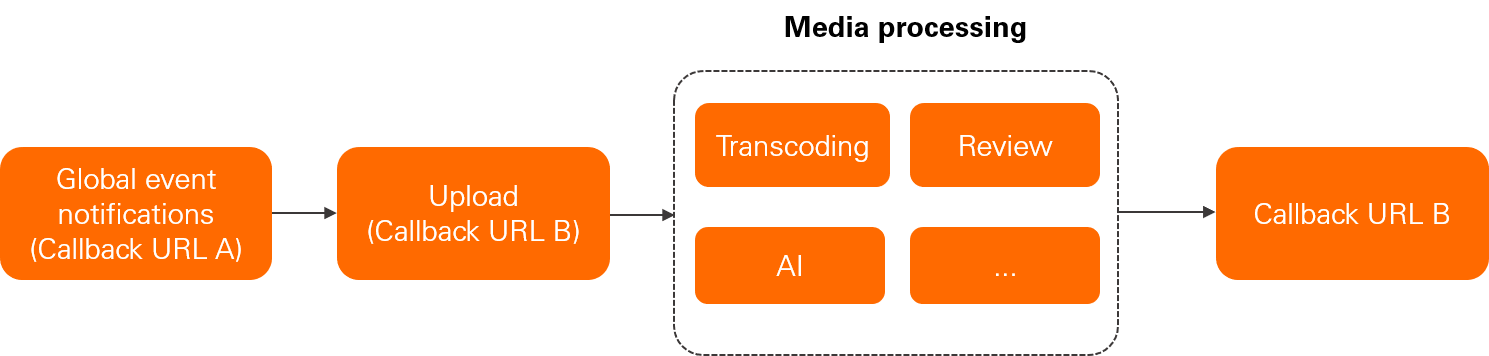
You can specify callback URLs in UserData for media files uploaded to ApsaraVideo VOD by using the server operation SDK or upload SDK. The callback URL is bound to the media source file, and event notifications are sent to this URL when you submit media processing jobs such as transcoding and review jobs. The events for which callbacks are configured are specified in the global callback settings. If you delete the media resource file, subsequent event notifications are sent to the callback URL specified in the global callback settings.
Related operations
For more information about how to use the server operation SDK or upload SDK, see Usage notes and Overview.
You can specify the UserData parameter when you call the following operations to upload media files:
Specify callback URLs in UserData during media processing
Limits
-
You can specify the UserData parameter only by using the ApsaraVideo VOD SDK or API.
-
You must enable the global notification feature and specify the events for which you want to configure callbacks. Otherwise, the callback URLs that you specify in UserData do not take effect.
Usage notes
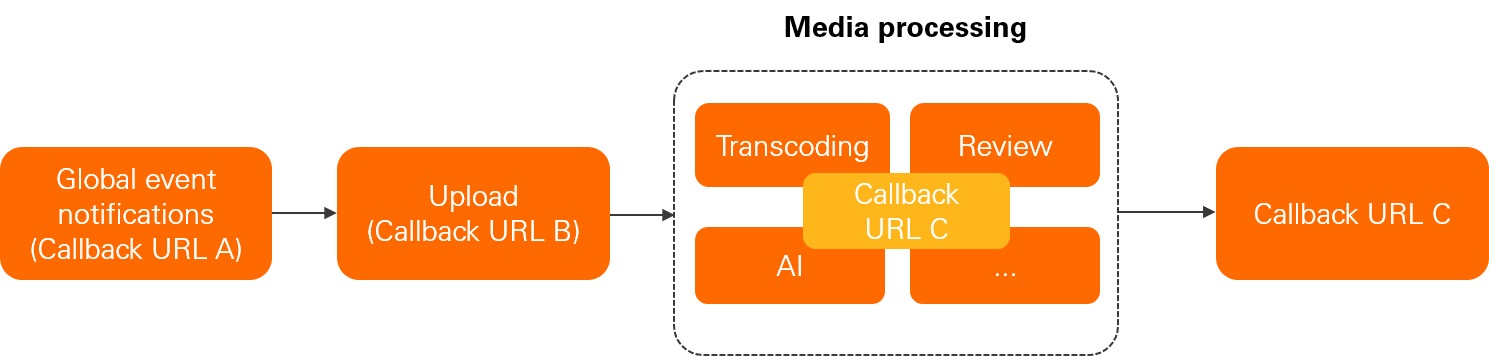
You can specify callback URLs in UserData when you submit media processing jobs such as transcoding jobs by using the ApsaraVideo VOD SDK or API.
The callback URL specified in UserData during media processing takes effect only for a single event. If you do not specify callback URLs during media processing, the callback URLs specified in UserData during upload are preferentially used before the callback URLs specified in the global callback settings are used.
Related operations
You can specify the UserData parameter when you call the following operations to submit media processing jobs:
Sample code
For more information about the structure of the UserData parameter, see Request parameters. The following example shows the structure of UserData:
{
    "Extend":{
        "width":1280,
        "id":"028a8e56b*****1ebf6bb7afc74",
        "height":720
    },
    "AccelerateConfig":{
        "Type":"oss",
        "Domain":"https://oss-accelerate.aliyuncs.com"
    },
    "MessageCallback":{
        "CallbackURL":"https://xxxxx.com/2016-08-15/proxy/httpcallback/testcallback/",
        "CallbackType":"http",
        "EventTypeList":["TranscodeComplete","StreamTranscodeComplete"]
    }
}
The following example shows how to build UserData:
public static String buildUserData() {

        JSONObject userData = new JSONObject();
        // Configure message callbacks.
        JSONObject messageCallback = new JSONObject();
        messageCallback.put("CallbackType", "http");
        messageCallback.put("CallbackURL", "https://xxxxx.com/2016-08-15/proxy/httpcallback/testcallback/");
        messageCallback.put("EventTypeList", new JSONArray().put("TranscodeComplete").put("StreamTranscodeComplete"));
        userData.put("MessageCallback", messageCallback);

        // The fields that you want to pass to UserData. You can pass custom parameters.
        JSONObject extend = new JSONObject();
        extend.put("id", "028a8e56b*****1ebf6bb7afc74");
        extend.put("width", 1280);
        extend.put("height", 720);
        userData.put("Extend", extend);

        // Configure upload acceleration if the acceleration service is needed. Before you can use upload acceleration, apply to enable the acceleration feature.
        JSONObject accelerateConfig = new JSONObject();
        accelerateConfig.put("Type", "oss");
        accelerateConfig.put("Domain", "https://oss-accelerate.aliyuncs.com");
        userData.put("AccelerateConfig", accelerateConfig);

        return userData.toJSONString();
    }