The short video SDK offers basic video recording with effects like background music, speed ramping, and face stickers.
Supported editions
Edition | Supported |
Professional | Yes |
Standard | Yes |
Basic | Yes |
Related classes
Class | Description |
The core class for recording. Use it to record videos, configure previews, apply effects, and set callbacks. | |
The clip manager. Use it to get information about video clips and delete them. | |
The delegate protocol for handling recorder callbacks. |
Recording workflow
The recording feature requires camera and microphone permissions. Without them, recording will fail.
The following figure shows the workflow for basic recording.
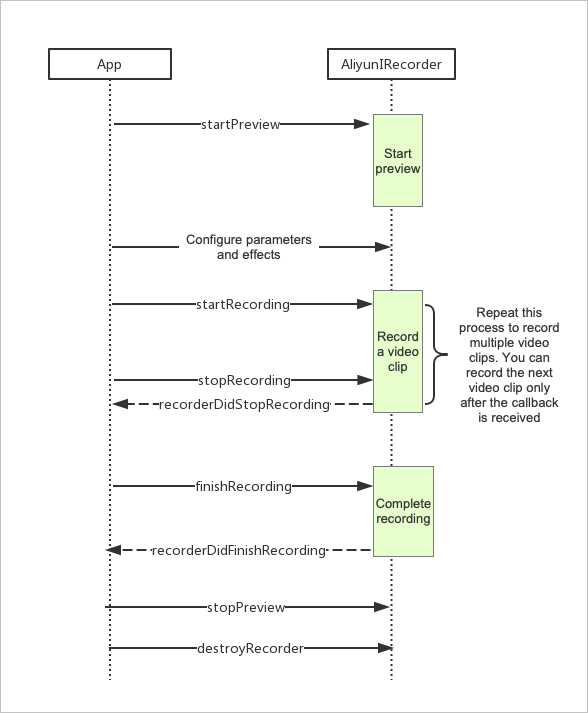
Stage | Step | Description | Sample code |
Basic configurations | 1 | Initialize the | |
2 | Start and stop the preview. | ||
3 | Start and stop recording video clips. | ||
4 | Stop recording and process the final output. | ||
Advanced configurations | 5 | Optionally, manage clips by setting minimum or maximum durations, deleting clips, or retrieving the clip count. | |
6 | Optionally, configure recording effects such as advanced retouching, filters, and background music. | ||
7 | Handle common callbacks and system events like screen locks, incoming calls, or the app entering the background. |
Initialize the class
Initialize the AliyunIRecorder class, create a recorder instance, and configure recording parameters. For more information about the code parameters, see the API reference in Related classes.
The
taskPathparameter specifies the directory path to store recording-related configuration files.The aspect ratio of the
previewview must match that ofvideoSize.
CGSize resolution = CGSizeMake(720, 1280);           // 720p resolution
AliyunIRecorder *recorder = [[AliyunIRecorder alloc] initWithDelegate:self videoSize:resolution];
recorder.taskPath = taskPath;// Set the directory path for the task.
recorder.preview = self.videoView;// Set the preview view.
recorder.recordFps = 30;
recorder.GOP = recorder.recordFps * 3;  // Recommended to set one keyframe every 3 seconds.
recorder.outputPath = [taskPath stringByAppendingPathComponent:@"output.mp4"];// Set the output path for the recorded video.
recorder.frontCaptureSessionPreset = AVCaptureSessionPreset1280x720;
recorder.backCaptureSessionPreset = AVCaptureSessionPreset1280x720;

// Clip settings
recorder.clipManager.deleteVideoClipsOnExit = YES; // Automatically delete all clips on exit. You can also manually delete the taskPath directory after recording.
recorder.clipManager.maxDuration = 15;
recorder.clipManager.minDuration = 3;

self.aliyunRecorder = recorder;
Configure preview
For more information about the code parameters, see the API reference in Related classes.
Enable preview
// Use AliyunIRecorderCameraPositionFront to start the preview with the front camera.
// Use AliyunIRecorderCameraPositionBack to start the preview with the rear camera.
[self.aliyunRecorder startPreviewWithPositon:AliyunIRecorderCameraPositionFront];
Configure preview parameters
After you enable the preview, you can adjust preview parameters as needed.
// Turn the flashlight on or off. The flashlight is available only for the rear camera.
AliyunIRecorderTorchMode torchMode = self.aliyunRecorder.cameraPosition == AliyunIRecorderCameraPositionBack ? AliyunIRecorderTorchModeOn : AliyunIRecorderTorchModeOff;
[self.aliyunRecorder switchTorchWithMode:torchMode];

// Switch between the front and rear cameras.
[self.aliyunRecorder switchCameraPosition];

// Adjust the zoom factor.
self.aliyunRecorder.videoZoomFactor = 30.0;

// Adjust the camera rotation angle.
self.aliyunRecorder.cameraRotate = 270;

// Change the video resolution.
[self.aliyunRecorder reStartPreviewWithVideoSize:CGSizeMake(720, 720)];
Stop preview
Typically, you stop the preview after you finish recording.
[self.aliyunRecorder stopPreview];Start recording
The startRecording and stopRecording methods must be called in pairs. You can call this pair multiple times. Each pair generates a temporary video file within the SDK. For more information about the code parameters, see the API reference in Related classes.
// Start recording a video clip.
[self.aliyunRecorder startRecording];

// Stop recording a video clip.
[self.aliyunRecorder stopRecording];
Stop recording
When you stop a recording session, you can either generate a single video by merging all clips or generate only the configuration information for the clips. For more information about the code parameters, see the API reference in Related classes.
finishRecording: Merges all video clips into a single, complete video. Use this method if no further editing is required.finishRecordingForEdit: Does not merge video clips. Use this method if you plan to perform further editing on the recorded video clips. You can initialize an editor instance by using the outputtaskPath. For more information, see Initialize an editor.
// Finish recording and merge all clips into a complete video.
[self.aliyunRecorder finishRecording];

// Finish recording without merging clips. This generates a taskPath for the editor.
NSString *taskPath = [self.aliyunRecorder finishRecordingForEdit];
AliyunEditor *editor = [[AliyunEditor alloc] initWithPath:taskPath preview:preview];
...
Manage video clips
You can configure parameters such as the maximum and minimum recording duration, delete video clips, and retrieve the number of clips. For more information about the code parameters, see the API reference in Related classes.
// Delete the last video clip.
[self.aliyunRecorder.clipManager deletePart];

// Delete all video clips.
[self.aliyunRecorder.clipManager deleteALLPart];

// Get the total number of clips.
[self.aliyunRecorder.clipManager partCount];
Configure effects
You can configure various recording effects, such as advanced retouching, filters, and background music, based on your requirements. For more information about the code parameters, see the API reference in Related classes.
Filters
You can create custom filters. For more information about how to create filters, see Filters and transitions.
// Add a filter.
NSString *filterDir = [self.class resourcePath:@"Filter/Jiaopian"];
AliyunEffectFilter *filter = [[AliyunEffectFilter alloc] initWithFile:filterDir];
[self.aliyunRecorder applyFilter:filter];

// Remove the filter.
[self.aliyunRecorder deleteFilter];
Animated filters
// Add an animated filter.
NSString *filterDir = [self.class resourcePath:@"AnimationEffect/split_screen_3"];
AliyunEffectFilter *animationFilter =[[AliyunEffectFilter alloc] initWithFile:filterDir];
[self.aliyunRecorder applyAnimationFilter:animationFilter];

// Remove the animated filter.
[self.aliyunRecorder deleteAnimationFilter];
Face stickers
Add a face sticker with built-in facial recognition
// Add a face sticker by using the built-in facial recognition.
self.aliyunRecorder.useFaceDetect = YES;// Enable facial recognition to automatically track faces.
self.aliyunRecorder.faceDetectCount = 3;// Set the maximum number of faces to detect. Valid values: 1 to 3. To disable facial recognition, set useFaceDetect to NO.
self.aliyunRecorder.faceDectectSync = YES;// Enable synchronous face tracking. This provides better sticker adherence but may cause stuttering on low-performance devices. Asynchronous tracking is smoother but less precise.
NSString *parsterDir = [self.class resourcePath:@"Gif/hanfumei-800"];
AliyunEffectPaster *paster = [[AliyunEffectPaster alloc] initWithFile:parsterDir];
[self.aliyunRecorder applyPaster:paster];// Add the face sticker.

// Remove the face sticker.
[self.aliyunRecorder deletePaster:paster];
Custom facial recognition
// Step 1: Disable the built-in facial recognition.
self.aliyunRecorder.useFaceDetect = NO;
// Step 2: Use a third-party facial recognition library in the callback to detect faces and return the results.

- (void)recorderOutputVideoRawSampleBuffer:(CMSampleBufferRef)sampleBuffer {
    NSArray<AliyunFacePoint *> *facePoints = ...; // Detect faces by using a third-party library.
    if (self.aliyunRecorder.faceNumbersCallback) {
        int num = (int)facePoints.count;
        self.aliyunRecorder.faceNumbersCallback(num);
    }
    [self.aliyunRecorder faceTrack:facePoints];
}
Watermarks
A watermark is a rendered image. The applyImage API adds static images, which you can use to create watermarks or effects like photo frames.
// Add a watermark.
NSString *watermarkPath = [self.class resourcePath:@"Image/watermark.png"];
AliyunEffectImage *watermark = [[AliyunEffectImage alloc] initWithFile:watermarkPath];
CGSize size = CGSizeMake(280, 200);
CGFloat centerx = 44 + size.width / 2.0;
CGFloat centery = 44 + size.height / 2.0;
watermark.frame = CGRectMake(centerx, centery, size.width, size.height); // Note: The origin of the frame specifies the center point.
[self.aliyunRecorder applyImage:watermark];

// Remove the watermark.
[self.aliyunRecorder deleteImage:watermark];
Music
Adding background music prevents you from muting the video or recording microphone audio.
// Add background music.
AliyunEffectMusic *effectMusic =[[AliyunEffectMusic alloc] initWithFile:[self.class resourcePath:@"bgm.aac"]];
effectMusic.startTime = 3.0; // Start playback from the 3-second mark of the music file.
effectMusic.duration = 5.0;  // Play for 5 seconds. If not set, the music plays for its remaining duration, up to 360 seconds.
[self.aliyunRecorder applyMusic:effectMusic];

// Remove the background music.
[self.aliyunRecorder applyMusic:nil];
Advanced retouching
The video recording module provides a basic built-in retouching feature. It also supports external retouching SDKs, such as Alibaba Cloud Queen SDK and the FaceUnity SDK. The built-in retouching feature is basic and only allows you to set a beauty level. External SDKs typically offer more advanced features, including retouching, face shaping, makeup effects, filters, and stickers.
Built-in retouching
// Enable
self.aliyunRecorder.beautifyStatus = YES;
self.aliyunRecorder.beautifyValue = 80;

// Disable
self.aliyunRecorder.beautifyStatus = NO;
self.aliyunRecorder.beautifyValue = 0;
External retouching SDKs
To use effects from an external retouching SDK, you must first obtain the required permissions for the SDK and integrate it into the short video SDK.
The short video SDK uses the AliyunIRecorderDelegate callback to pass raw video frames (
CMSampleBufferRef) to your app. You can then use an external retouching SDK for custom rendering. After processing, return the data (CVPixelBufferRef) to the short video SDK for preview and final composition. Note: Ensure that the GL environments of the external retouching SDK and the short video SDK do not conflict.// AliyunIRecorderDelegate - (CVPixelBufferRef)customRenderedPixelBufferWithRawSampleBuffer:(CMSampleBufferRef)sampleBuffer { if (!self.enableBeauty) { return CMSampleBufferGetImageBuffer(sampleBuffer); // If custom rendering is not enabled, return the raw buffer directly. } // Perform custom rendering. You can integrate a retouching SDK here and return the processed CVPixelBufferRef. ... }
Photo capture
 // Asynchronously capture a photo.
 // image: The final, rendered image after processing.
 // rawImage: The original, unprocessed image.
[self.aliyunRecorder takePhoto:^(UIImage *image, UIImage *rawImage) {

}];
Handle events
This section describes how to handle common callbacks and special system events such as screen locks, incoming calls, and the app entering the background. For more information about the code parameters, see the API reference in Related classes.
Callbacks
// The following code shows how to handle common event callbacks.
- (void)recorderDeviceAuthorization:(AliyunIRecorderDeviceAuthor)status {
    dispatch_async(dispatch_get_main_queue(), ^{
        if (status == AliyunIRecorderDeviceAuthorAudioDenied) {
            [DeviceAuthorization openSetting:@"Microphone access denied."];
        } else if (status == AliyunIRecorderDeviceAuthorVideoDenied) {
            [DeviceAuthorization openSetting:@"Camera access denied."];
        }
    });
}

- (void)recorderVideoDuration:(CGFloat)duration {
    // Update the recording progress.
    NSLog(@"Record Video Duration: %f", duration);
}

- (void)recorderDidStopRecording {
    NSLog(@"Record Stop Recording");
    if (self.recordState == RecorderStateFinish) {
        if (self.aliyunRecorder.clipManager.duration >= self.aliyunRecorder.clipManager.minDuration) {
            [self.aliyunRecorder finishRecording];
        }
        else {
            self.recordState = RecorderStatePreviewing;
        }
    }
}

- (void)recorderWillStopWithMaxDuration {
    NSLog(@"Record Will Stop Recording With Max Duration");
    [self.aliyunRecorder stopPreview];
}

- (void)recorderDidStopWithMaxDuration {
    NSLog(@"Record Did Recording With Max Duration");
    [self.aliyunRecorder finishRecording];
}

- (void)recorderDidFinishRecording {
    NSLog(@"Record Did Finish Recording");
    [self.aliyunRecorder stopPreview];
    self.recordState = RecorderStateInit;
}

- (void)recoderError:(NSError *)error {
    NSLog(@"Record Occurs Error: %@", error);
}
Other events
You must handle system events like screen locks, incoming calls, or the app entering the background. Listen for the UIApplicationWillResignActiveNotification event. Before the app becomes inactive, call stopRecording and stopPreview. Then, listen for the UIApplicationDidBecomeActiveNotification event. After the app becomes active, call startPreview to resume the preview.