After you submit a request for an SSL certificate, you must complete domain ownership validation with the certification authority (CA). The Certificate Management Service console provides a feature to assist with this validation. This feature helps you identify and resolve issues early to prevent validation failures. This topic describes common issues that may occur during the domain validation process and provides solutions.
FAQ for DV certificate validation
Domain Validated (DV) certificates can be validated in three ways: manual DNS validation, file validation, and automatic validation. The following sections describe common issues and solutions for each method.
Manual DNS validation
How to check if a DNS record is effective?
Alibaba Cloud provides the Network Detect Tool to help you check whether a DNS record is in effect. To use the tool:
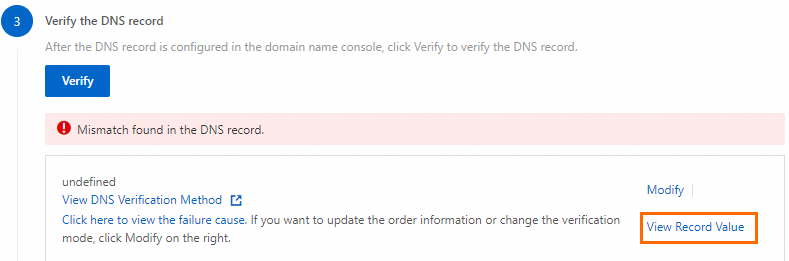
In the Apply for Certificate panel, click View Record Value.
On the DNS tab, click OK.

If the resolution result in the Probe Check Result list matches the value of the DNS record that you configured, the DNS record is in effect.
What should I do if the console prompts No DNS record found.?
This error occurs for one of the following reasons:
The DNS record is missing: You haven't added the required TXT record at your DNS provider. Refer to Manual DNS authentication and add the record.
Console verification is delayed: DNS propagation takes time. If you're sure the record is correct, wait a few minutes and click Verify again.
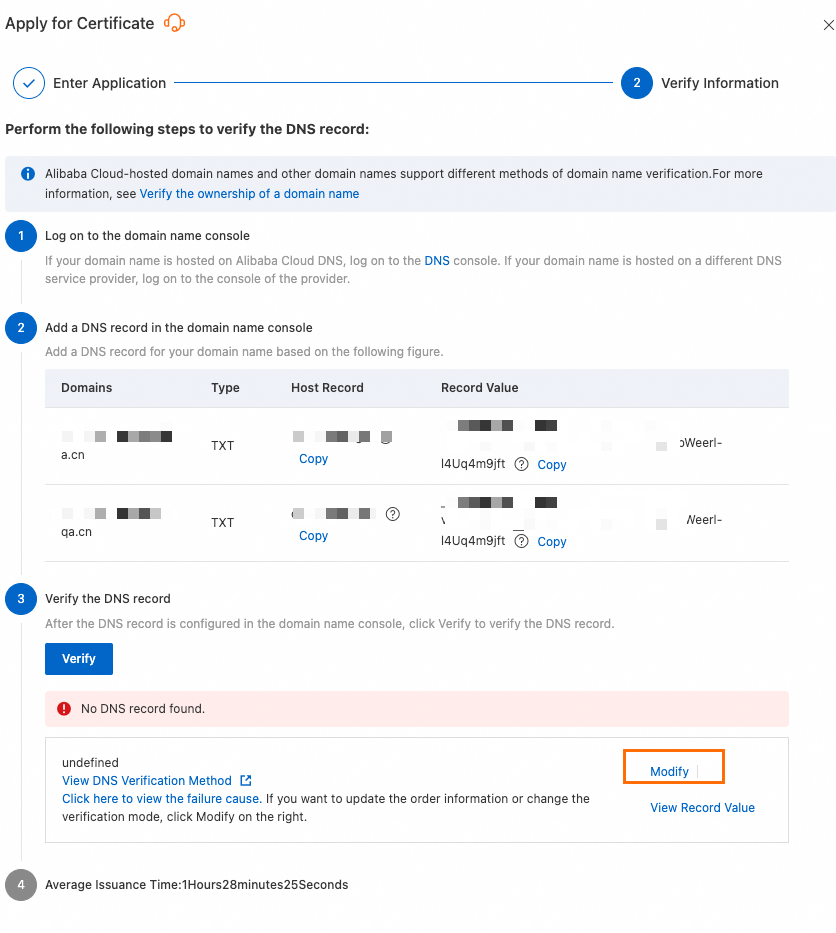
The domain names do not match: The domain bound to the certificate application must exactly match the domain where you created the DNS record. If they differ, click Modify on the verification page, correct the domain, and resubmit the application.
NoteIf you do not use Alibaba Cloud DNS, you can go to your DNS provider's console to confirm the domain name.
Confirm that the domain names match.

On the SSL certificate validation page, you can click Modify, re-enter the domain name to bind to the certificate, and then submit it for review again.
What to do if the console prompts 'DNS Record Value Does Not Match'?
The following list describes common causes and solutions:
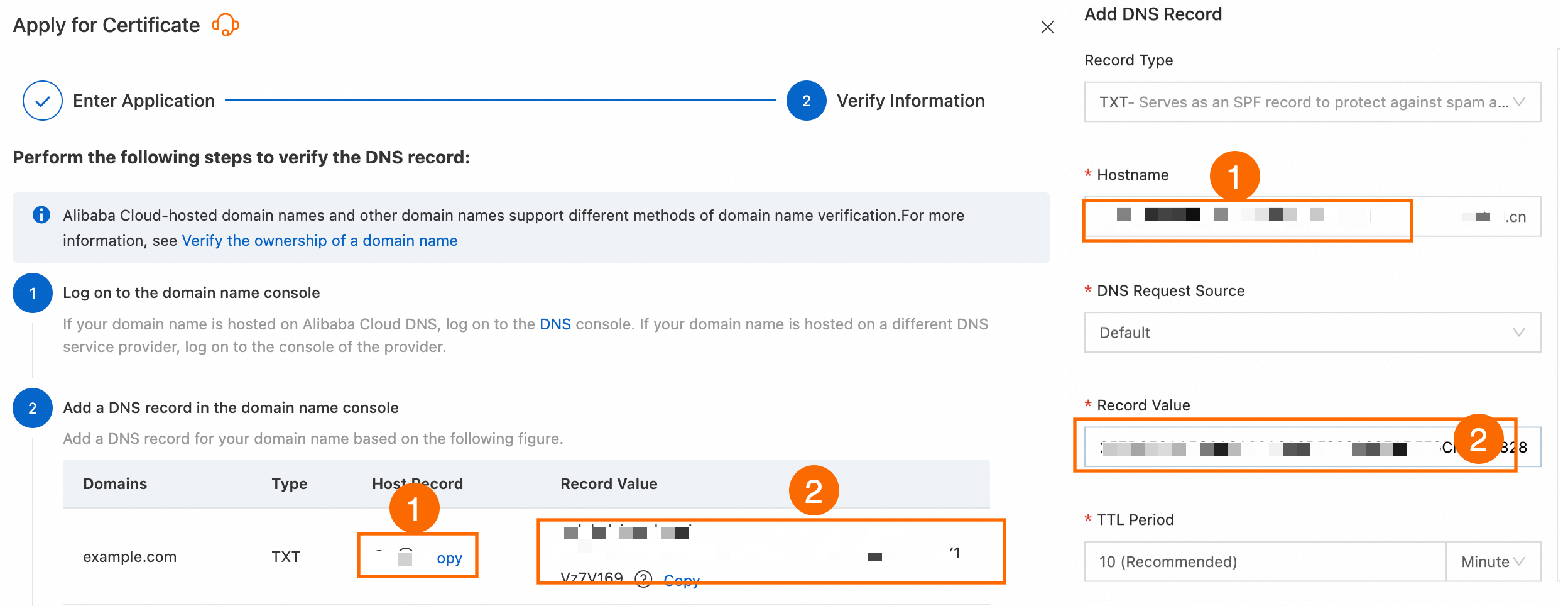
Incorrect DNS record value: This is often a copy-paste error. Carefully copy the Host Record and Record Value from the certificate application panel again and update them in your DNS configuration.
Using a third-party DNS provider (such as DNSPod): The Alibaba Cloud console check might report an error even if the record is set up correctly with your provider. You can safely ignore the console error and wait for the CA to complete its own verification process.
Expired TXT record for a DigiCert DV certificate: The TXT record for a DigiCert DV certificate is only valid for 24 hours.
Delete the old TXT record from your DNS provider.
In the Certificate Management Service console, reapply for the target certificate, and get a new TXT record value.
Add the new TXT record to your DNS configuration.
NoteThis time limit does not apply to GeoTrust DV certificates; their timestamps remain valid.
Record has not propagated to overseas DNS servers: A delay in dynamic DNS synchronization can prevent the CA's overseas servers from seeing the latest record. Ensure your dynamic DNS service is working correctly and allow more time for propagation.
How do I fix a Verification timed out. Try again. error during DNS validation?
File validation
What to do if the console prompts "File Not Detected"?
What to do if the console displays 'Validation timed out. Please retry.'?
The following list describes common causes and solutions:
Port 80 or 443 on the server is not open.
Currently, the CA only supports accessing HTTPS Address and HTTP Address (port 443 and port 80) to verify that the content of the validation file is accessible.
Solution 1: You can open port 80 or 443.
Linux
Run the following command in the server terminal to check whether port 443 is open:
RHEL/CentOS
command -v nc > /dev/null 2>&1 || sudo yum install -y nc
# Replace <your_server_public_ip> with the public IP address of your server.
sudo ss -tlnp | grep -q ':443 ' || sudo nc -l 443 & sleep 1; nc -w 3 -vz <your_server_public_ip> 443
If the output is
Ncat: Connected to <your_server_public_ip>:443, port 443 is open. Otherwise, open port 443 in the security group and firewall.Debian/Ubuntu
command -v nc > /dev/null 2>&1 || sudo apt-get install -y netcat
# Replace <your_server_public_ip> with the public IP address of your server.
sudo ss -tlnp | grep -q ':443 ' || sudo nc -l -p 443 & sleep 1; nc -w 3 -vz <your_server_public_ip> 443
If the output is
Connection to <your_server_public_ip> port [tcp/https] succeeded!or[<your_server_public_ip>] 443 (https) open, port 443 is open. Otherwise, open port 443 in the security group and firewall.Open port 443 in your security group configuration.
ImportantIf your server is deployed on a cloud platform, make sure that its security group allows inbound traffic on TCP port 443. Otherwise, the service will be inaccessible. The following steps use Alibaba Cloud ECS as an example. For other cloud platforms, refer to their official documentation.
Go to the Elastic Compute Service (ECS) instances page and click the target instance name to go to the instance details page. For more information, see Add a security group rule to add a rule in the Security Group Details section with Action set to Allow, Protocol to Custom TCP, Destination (Current Instance) to HTTPS (443), and Source to 0.0.0.0/0 (anywhere).
Open port 443 in your firewall.
Run the following command to identify the active firewall service on your system:
if command -v systemctl >/dev/null 2>&1 && systemctl is-active --quiet firewalld; then
    echo "firewalld"
elif command -v ufw >/dev/null 2>&1 && sudo ufw status | grep -qw active; then
    echo "ufw"
elif command -v nft >/dev/null 2>&1 && sudo nft list ruleset 2>/dev/null | grep -q 'table'; then
    echo "nftables"
elif command -v systemctl >/dev/null 2>&1 && systemctl is-active --quiet iptables; then
    echo "iptables"
elif command -v iptables >/dev/null 2>&1 && sudo iptables -L 2>/dev/null | grep -qE 'REJECT|DROP|ACCEPT'; then
    echo "iptables"
else
    echo "none"
fi
If the output is
none, no further action is required. Otherwise, run the corresponding command below based on the output (firewalld,ufw,nftables, oriptables) to open port 443:firewalld
sudo firewall-cmd --permanent --add-port=443/tcp && sudo firewall-cmd --reloadufw
sudo ufw allow 443/tcpnftables
sudo nft add table inet filter 2>/dev/null
sudo nft add chain inet filter input '{ type filter hook input priority 0; }' 2>/dev/null
sudo nft add rule inet filter input tcp dport 443 counter accept 2>/dev/null
iptables
sudo iptables -A INPUT -p tcp --dport 443 -j ACCEPTTo make sure that the iptables rules persist after a system reboot, run the following commands:
RHEL/CentOS sudo yum install -y iptables-services sudo service iptables saveDebian/Ubuntu sudo apt-get install -y iptables-persistent sudo iptables-save | sudo tee /etc/iptables/rules.v4 >/dev/null
Windows
Log on to the Windows server, click the Start menu in the lower-left corner, and open Control Panel.
Click .
If the firewall is off, as shown in the following figure, no further action is required.
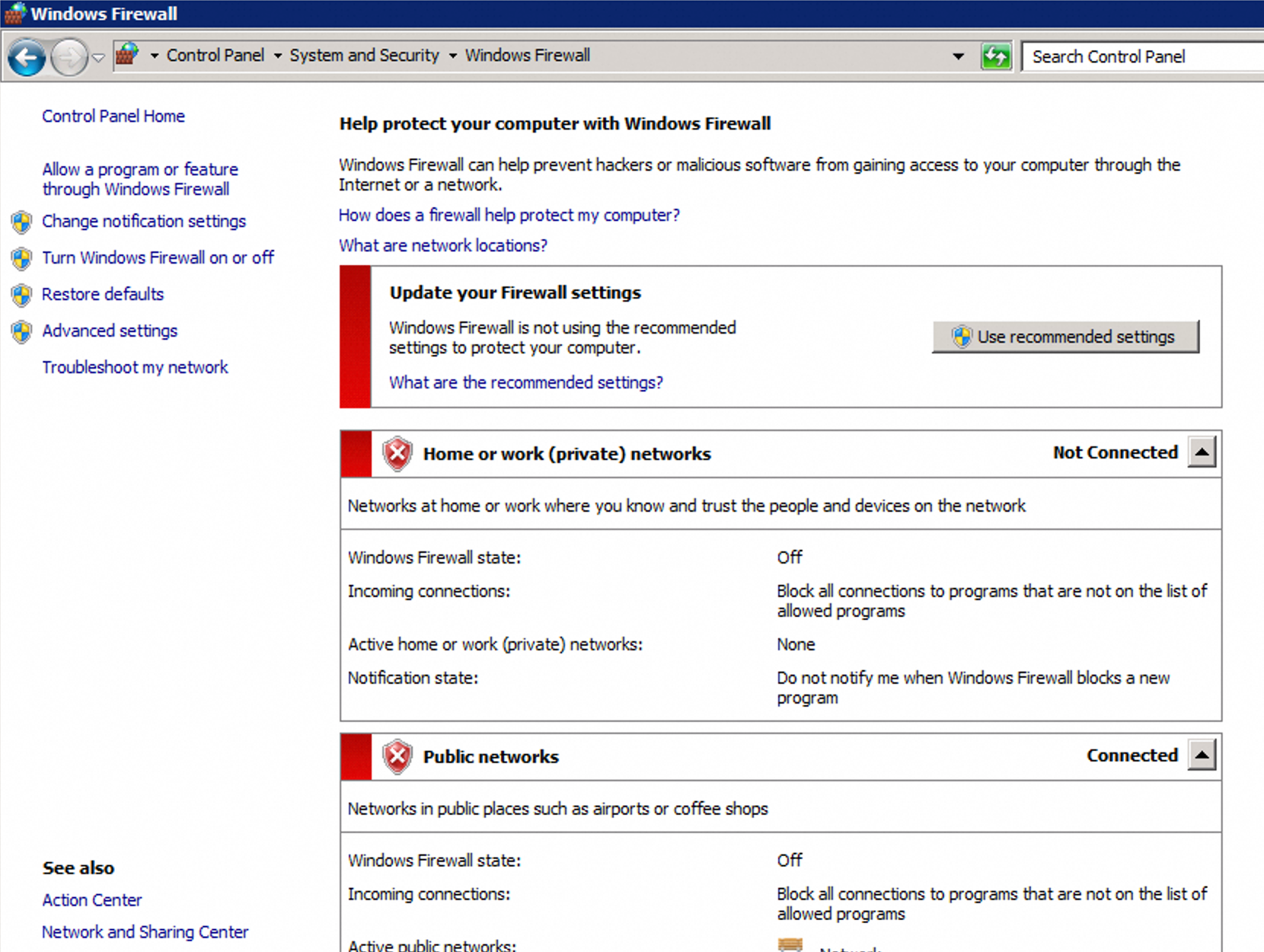
If the firewall is on, follow these steps to allow the HTTPS rule.
In the left navigation pane, click , and check for an inbound rule where the Protocol is TCP, the Local Port is 443, and the Action is Block.
If such a rule exists, right-click it and select Properties. On the General tab, change the setting to Allow the connection and click Apply.
Solution 2: In the Apply for Certificate panel, you can click Cancel Application, and change the domain validation method to Manual DNS Verification.
A 301 or 302 redirection is configured.
You can use the
wget -S <URL address>command to check whether the validation URL is redirected. If the response isHTTP/1.1 301 Moved PermanentlyorHTTP/1.1 302 Found, a redirection exists.wget -S http://<your_domain_name>/.well-known/pki-validation/<validation_file_name>You can delete the redirection configuration. The following code provides examples of 301 and 302 configurations in the Nginx configuration file `nginx.conf`.
301 configuration
server {
    listen 80;
    server_name <your_primary_domain_name> <your_www_subdomain>;
    return 301 redirection_domain$request_uri;
}
302 configuration
location /.well-known/ {
    return 302 <redirection_address>
}
The DNS server has a network issue.
You can contact your domain name provider to check and fix the network connection.
The domain name for a personal test certificate contains sensitive words.
Solution 1: You can replace special words (such as edu, gov, org, jp (country code), pay, bank, live, or nuclear) and submit the request again.
Solution 2: If you cannot change the domain name, you can purchase OV, EV, certificates.
What to do if the console displays 'Incorrect file content'?
The following list describes common causes and solutions:
An old file on the DNS server is not deleted.
In the Apply for Certificate panel, you can click View Detected File, and record information about the detected files.
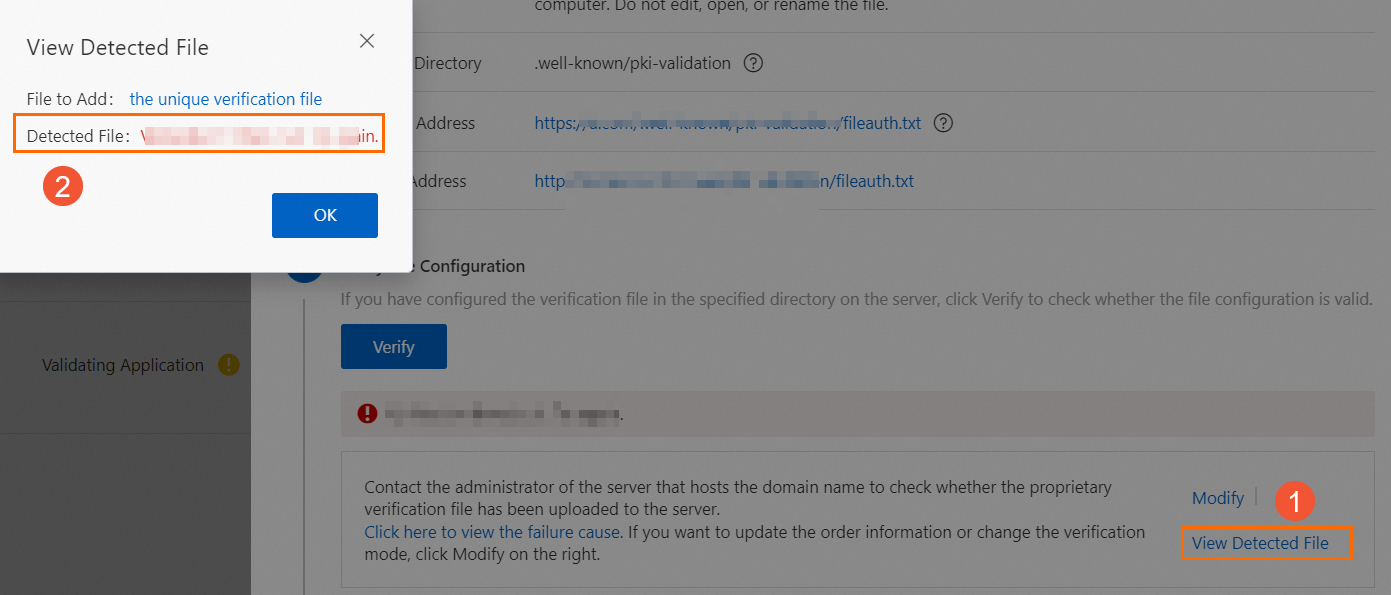
You can go to your DNS server and delete the detected file.
NoteTypically, the old file is in the site's root directory/.well-known/pki-validation directory.
For more information, see File Verification. You can re-download the latest validation file and upload it to the DNS server.
The HTTPS service path is not deployed.
Some site pages have HTTPS access enabled, but the validation file is deployed only in the HTTP service path, not the HTTPS service path. This causes an error.
Solution 1: You can deploy the validation file in both the HTTP and HTTPS service paths, and confirm that the HTTPS protocol can be accessed normally.
Solution 2: You can temporarily disable the HTTPS service for the relevant pages on the site.
CDN is enabled, but data synchronization to CDN points of presence (POPs) outside China is not complete.
Solution 1: You can synchronize the validation file to the CDN POPs outside China, or temporarily disable the CDN acceleration service outside China.
Solution 2: If you cannot make changes to the CDN point of presence servers, on the Apply for Certificate panel, you can click Cancel Application and change the domain validation method to Manual DNS Verification.
The validation file timestamp has expired.
You can access the Certificate Management Service console, re-download the latest validation file, and upload it to the specified folder on your website.
Other reasons for file validation failure
Does a wildcard domain name support file validation?
Automatic validation
Can the automatic validation method be changed?
No, it cannot. To change the validation method, you must switch to another Alibaba Cloud account and repurchase the certificate. After the purchase is complete, see Domain Name Ownership Verification to complete the domain name ownership validation.
FAQ for OV and EV certificates
After the CA receives your Organization Validated (OV) or Extended Validation (EV) certificate request, it sends a domain validation email to your contact's mailbox or calls your contact for validation. The following list describes common questions:
Can I complete the validation by email only, without answering the phone call?
Yes, you can, but you must reply to the email to explain the situation.
What do the verification emails typically contain? Who receives them?
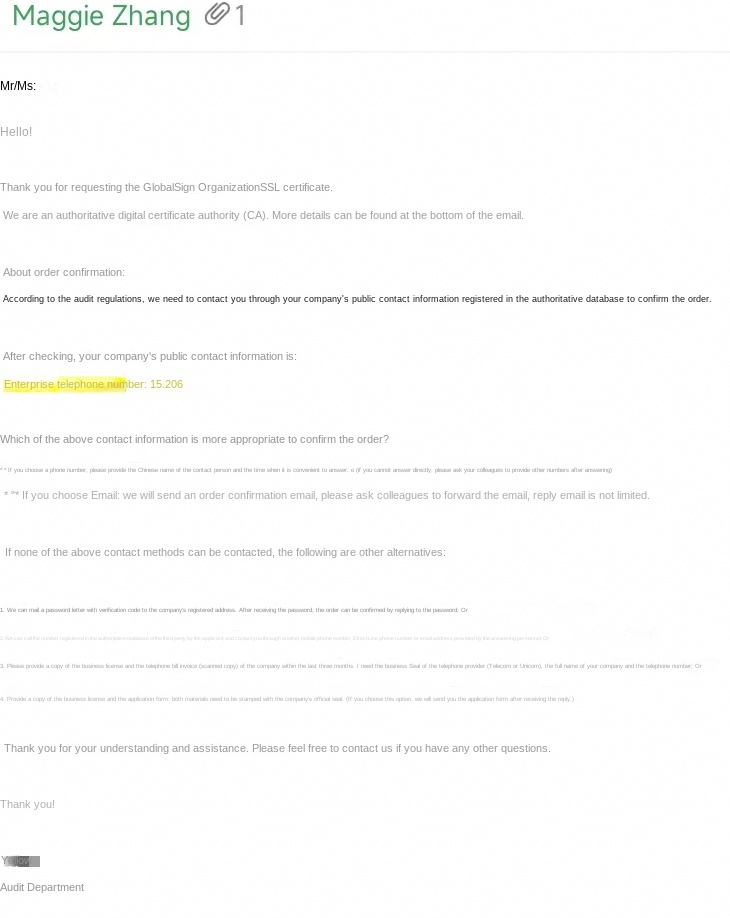
The Certificate Authority (CA) sends an email for domain validation and order confirmation to the email address that you specified for the contact during certificate application. For more information about contact management, see Managing Contacts. The email content varies based on the certificate brand.
The following email content is for reference only. The actual email you receive prevails.
GlobalSign
Other questions
The console shows that domain validation passed, but the certificate has not been issued. Why?
The validation result in the console is for reference only. A 'passed' status in the console does not mean that the CA has completed validation and issued the certificate. The actual validation and issuance result is subject to the CA's review. Typically, DV certificates are issued in 1 to 15 minutes, while EV or OV certificates are issued in about 5 business days. In some cases, the review process may take longer. The following list describes common causes and solutions:
The domain has a CAA DNS record
Solution 1: You can go to the Alibaba Cloud DNS console. On the domain's DNS settings page, delete the DNS record of the 'CAA' type. After the operation is complete, you can request the certificate again.
Solution 2: You can Add the Certificate Authority to the CAA DNS record, and then request the certificate again.
ImportantIf you use the GitHub Pages service and CNAME your domain to a github.io domain, the CAA policy of github.io is inherited, which can affect certificate issuance. For this situation, you can pause the CNAME record before the certificate is issued, or add trust-provider.com, globalsign.com, and sectigo.com to the CAA record.
The domain name contains sensitive words
If your domain name contains certain sensitive words, it may trigger a manual review, which takes longer. You must wait for the manual review result. If the review fails, you can change the domain name and request the certificate again.
Firewalls or other security devices interfere with CA validation
In highly isolated network environments, such as those in government agencies or state-owned enterprises, network restrictions may interfere with the CA's domain ownership validation. This can cause the certificate to remain in the 'reviewing' state for a long time. To ensure the certificate can be issued, you must add the CA's IP addresses to the whitelist of your firewall or other security devices.
The primary domain name and its www subdomain are not mutually covered.
According to the validation specifications of the certification authority (CA), the CA checks both the primary domain name (such as
example.com) and its www subdomain (such aswww.example.com), regardless of which one you are applying for. You must make sure that the validation file can be publicly accessed for both domain names. Otherwise, the validation will fail.
My DNS record is effective, but the validation in the console still fails. Why?
There is a delay in the console's validation of DNS records for both file validation and DNS validation. No action is required. You can wait for the process to complete.
The console shows that domain validation passed, but the certificate review failed. Why?
The validation result in the console is for reference only. A successful validation in the console does not mean that the Certificate Authority (CA) validation is complete and the certificate has been issued. For more information, see Reasons for and solutions to SSL certificate review failures.
Can I apply for an Alibaba Cloud SSL certificate if my DNS provider is not Alibaba Cloud?
Yes, you can. You only need to complete the domain ownership validation. This is independent of your DNS provider.
Solution | Method | Advantage |
Configure the record at your current provider. | Log on to your current domain name platform and add the SSL certificate validation record (TXT) from Alibaba Cloud. Note Contact your provider's support if you need assistance. | Fast and direct. No domain name transfer is required. |
Transfer your domain to Alibaba Cloud. | Follow the steps to transfer a domain name to Alibaba Cloud. Once complete, you can manage all DNS records in the Alibaba Cloud DNS console. Important Transferring a domain requires paying a one-year renewal fee. | Convenient for future certificate renewals and unified domain name management. |
Can I use an SSL Certificate on an internal network?
Yes, you can. However, when you apply for a new certificate, the CA must validate the domain name over the Internet. Therefore, you must grant Internet access permissions during the validation process. After the validation is passed, you can revoke the permissions. The issued certificate can be used in any environment.