When you use services such as certificate deployment and certificate hosting in the Certificate Management Service console, you must authorize the Certificate Management Service role. This allows Certificate Management Service to access your resources in other cloud products.
RAM role description
A Resource Access Management (RAM) role is a virtual user that can be granted a set of access policies. Unlike a RAM user, a RAM role does not have permanent identity credentials, such as a logon password or an AccessKey pair. A RAM role must be assumed by a trusted entity. After the role is assumed, the trusted entity obtains a temporary identity credential for the RAM role, which is a Security Token Service (STS) token. The trusted entity can then use the STS token to access authorized resources as the RAM role.
When you use the following features, Certificate Management Service needs to obtain access permissions for other cloud products using the AliyunCASDefaultRole RAM role.
Deployment to cloud products, including Elastic Compute Service instances:
Using the cloud product deployment feature.
Synchronizing cloud product resources with the Certificate Management Service console.
After you grant the authorization, cloud product resources are synchronized in real time when you open the Certificate Management Service console. When you create a cloud product deployment task, resource synchronization is triggered manually.
Hosting service:
You can use managed services to automatically deploy cloud products.
Automatically adding DNS records using the hosting service.
For more information about deploying SSL certificates, see Deploy an SSL certificate to a cloud product such as SLB, CDN, or WAF or Deploy an SSL certificate to an Alibaba Cloud ECS instance from the console.
To enable the SSL Certificate hosting service, see Enable certificate hosting.
Create and authorize a RAM role for Certificate Management Service
The first time you use services such as cloud product deployment, cloud server deployment, or certificate hosting, Alibaba Cloud prompts you to grant authorization. Complete the authorization as prompted. After the authorization is successful, the AliyunCASDefaultRole RAM role is automatically created. Certificate Management Service uses this role by default to access your resources in other cloud products.
The following steps show an example of how to grant permissions to Certificate Management Service:
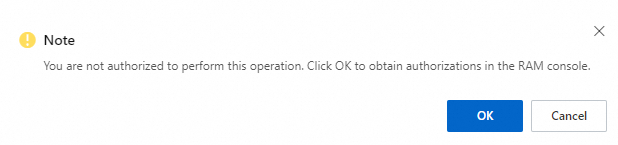
When you deploy a certificate to a cloud product in the console, an authorization message is displayed. Click OK.
On the Cloud Resource Access Authorization page, click Authorize.
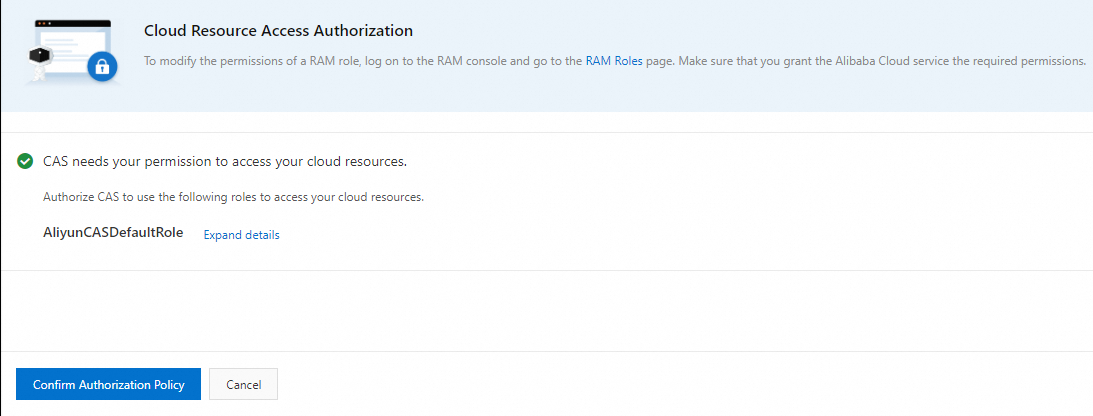
After the authorization is successful, you can use services such as cloud product deployment, cloud server deployment, and certificate hosting.
View the authorized RAM role
After the authorization is successful, you can view the RAM role. For more information, see View a RAM role. The following figure shows the created RAM role.

View the operation logs of the authorized RAM role
Certificate Management Service is integrated with the Alibaba Cloud ActionTrail service. You can query the operation records of the AliyunCASDefaultRole role in the ActionTrail console. For more information, see Query events in the ActionTrail console.
