Receive SMS delivery receipts through Simple Message Queue (formerly MNS).
Prerequisites
An Alibaba Cloud account and an AccessKey pair are created. For more information, see Create an AccessKey pair.
The MNS queue can access the following domain names: dybaseapi.ap-southeast-1.aliyuncs.com and 1493622401794734.mns.ap-southeast-1.aliyuncs.com.
Delivery receipts are not guaranteed to be idempotent. Take appropriate measures to ensure data correctness and consistency.
Request parameters
Parameter | Type | Example | Description |
To | String | 8521234**** | Recipient phone number. |
Status | String | 1 | Message delivery status. Valid values:
|
MessageId | String | 123456789**** | Delivery receipt ID. |
SmsSize | String | 1 | Number of messages. Long messages are split into multiple messages. |
SendDate | String | Thu, 25 Nov 2021 10:27:00 +0800 | Time the message was sent to the carrier. |
ReceiveDate | String | Thu, 25 Nov 2021 10:27:33 +0800 | Time the receipt was received from the carrier. |
ErrorCode | String | success | Error code. |
ErrorDescription | String | success | Error description. |
Example
{
    "To" : "8521234****",
    "SendDate" : "Thu, 25 Nov 2021 10:27:00 +0800",
    "ReceiveDate" : "Thu, 25 Nov 2021 10:27:33 +0800",
    "Status" : "1",
    "SmsSize":"1",
    "ErrorCode" : "success",
    "ErrorDescription" : "success",
    "MessageId" : "123456789****"
  }
Download the demo
Download the demo and SDK for your preferred language from the Simple Message Queue consumer demo. The following example uses Java.
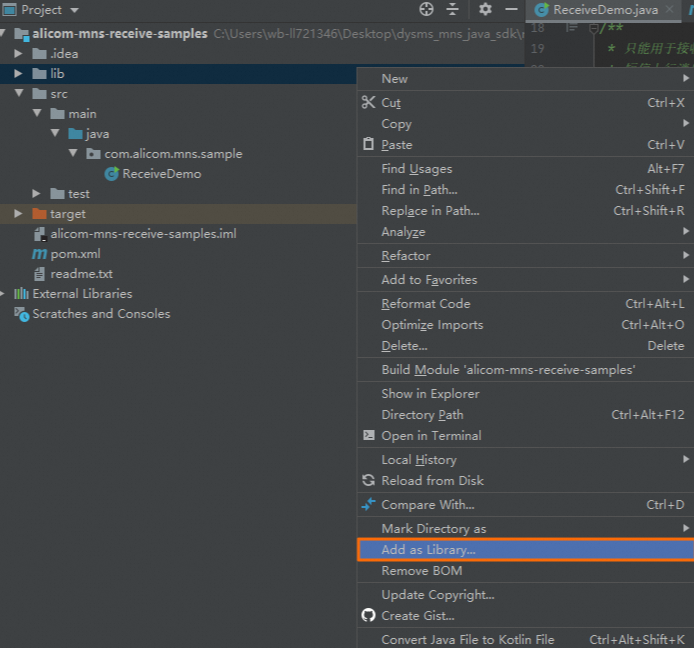
After downloading, add the JAR files in the
libdirectory as a library: right-click and select Add as Library.Maven dependencies are listed in
pom.xml.
Parameter configuration
Configure these parameters before running the sample code.
Configure AccessKey pair
Configure queue name
Set queueName to your queue name. Find it in the SMS console by navigating to .
String queueName="<QUEUE_NAME>";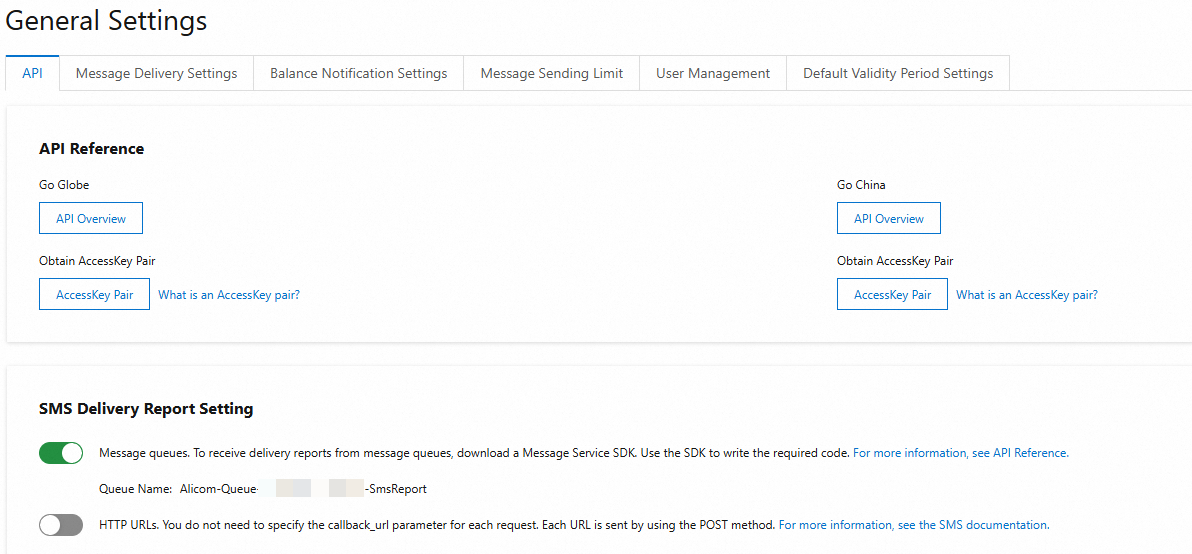
Sample code
Delivery receipts are processed by the dealMessage method. Add your business logic in this method.
// Parse the message body according to the specific format in the documentation
String arg = (String) contentMap.get("arg");
// Add your business logic herearg is a field in the callback message body. Possible values: To, Status, MessageId, SmsSize, SendDate, ReceiveDate, ErrorCode, ErrorDescription.
package com.alicom.mns.sample;
import java.text.ParseException;
import java.text.SimpleDateFormat;
import java.util.Date;
import java.util.HashMap;
import java.util.Map;
import org.apache.commons.logging.Log;
import org.apache.commons.logging.LogFactory;
import com.alicom.mns.tools.DefaultAlicomMessagePuller;
import com.alicom.mns.tools.MessageListener;
import com.aliyun.mns.model.Message;
import com.google.gson.Gson;
/**
* This is for receiving messages from Alibaba Cloud Communications services only and cannot be used for other services
*/
public class ReceiveDemo {
private static Log logger=LogFactory.getLog(ReceiveDemo.class);
static class MyMessageListener implements MessageListener{
private Gson gson=new Gson();
@Override
public boolean dealMessage(Message message) {
SimpleDateFormat format = new SimpleDateFormat("yyyy-MM-dd HH:mm:ss");
// Key values from the message
System.out.println("message receiver time from mns:" + format.format(new Date()));
System.out.println("message handle: " + message.getReceiptHandle());
System.out.println("message body: " + message.getMessageBodyAsString());
System.out.println("message id: " + message.getMessageId());
System.out.println("message dequeue count:" + message.getDequeueCount());
System.out.println("Thread:" + Thread.currentThread().getName());
try{
Map<String,Object> contentMap=gson.fromJson(message.getMessageBodyAsString(), HashMap.class);
// Parse the message body according to the specific format in the documentation
String arg = (String) contentMap.get("arg");
// Add your business logic here
}catch(com.google.gson.JsonSyntaxException e){
logger.error("error_json_format:"+message.getMessageBodyAsString(),e);
// In theory, format errors should not occur. If you encounter a malformed message, delete it to prevent it from being redelivered and causing repeated errors.
return true;
} catch (Throwable e) {
// If an exception is caused by your own code, you should return false. This prevents the message from being deleted and allows it to be redelivered according to the retry policy.
return false;
}
// If the message is processed successfully, return true. The SDK will then call the MNS delete method to remove the message from the queue.
return true;
}
}
public static void main(String[] args) throws Exception, ParseException {
DefaultAlicomMessagePuller puller=new DefaultAlicomMessagePuller();
// Set the size of the async thread pool, task queue, and the sleep time for threads when there is no data.
puller.setConsumeMinThreadSize(6);
puller.setConsumeMaxThreadSize(16);
puller.setThreadQueueSize(200);
puller.setPullMsgThreadSize(1);
// Enable this for server-side debugging. It should be disabled during normal operation as it impacts performance.
puller.openDebugLog(false);
// Obtain the AccessKey ID and AccessKey Secret from local environment variables.
String accessKeyId = System.getenv("ALIBABA_CLOUD_ACCESS_KEY_ID");
String accessKeySecret = System.getenv("ALIBABA_CLOUD_ACCESS_KEY_SECRET");
/*
* Replace messageType and queueName with the required message type and corresponding queue name.
* Supported callback message types:
* 1: SmsReport: SMS delivery receipts
* 2: SmsUp: Mobile Originated messages
* 3: GlobeSmsReport: International SMS delivery receipts
*/
String messageType="<MESSAGE_TYPE>"; // Replace this with the message type. SmsReport is supported.
String queueName="<QUEUE_NAME>"; // After enabling the feature in the console, you can find the corresponding queueName on the page. For example: Alicom-Queue-******-SmsReport.
puller.startReceiveMsg(accessKeyId,accessKeySecret,messageType,queueName,new MyMessageListener());
}
}Sample output:
