After sending messages through the API, configure a Simple Message Queue (SMQ) queue or HTTP URL to receive delivery receipts and track message delivery status.
-
Network errors or response timeouts may cause duplicate or missing delivery receipts.
-
The configuration may take up to 3 minutes to take effect.
-
Delivery receipts are not idempotent. Take appropriate measures to ensure the correctness and consistency of your data.
Delivery receipt endpoints
Short Message Service offers two modes for receiving message receipts: Simple Message Queue (formerly MNS) consumption mode and HTTP batch push mode.
-
SMQ queue
Configure an SMQ queue to receive delivery receipts from a specified region. SMQ supports all SMS message types. After you enable SMQ subscription for a message type in the SMS console, a queue is generated automatically. Use SMS SDKs to pull receipts by message type and queue name.
-
HTTP URL
Set up an HTTP URL to receive delivery receipts or MO messages. SMS pushes receipts to your callback URL via HTTP POST. Configure the callback URL in the SMS console.
Types of delivery receipts
Select the delivery receipt types you want to receive.
|
Type |
Description |
SMQ queue |
HTTP URL |
|
MT delivery report (SmsReport) |
An MT delivery report confirms the delivery status of a message sent from carriers to recipients, such as notifications or business messages. |
Configure delivery receipts
Configure delivery receipt settings in the SMS console:
-
Log on to the SMS console.
-
In the left navigation pane, choose .
-
Click the API tab.
-
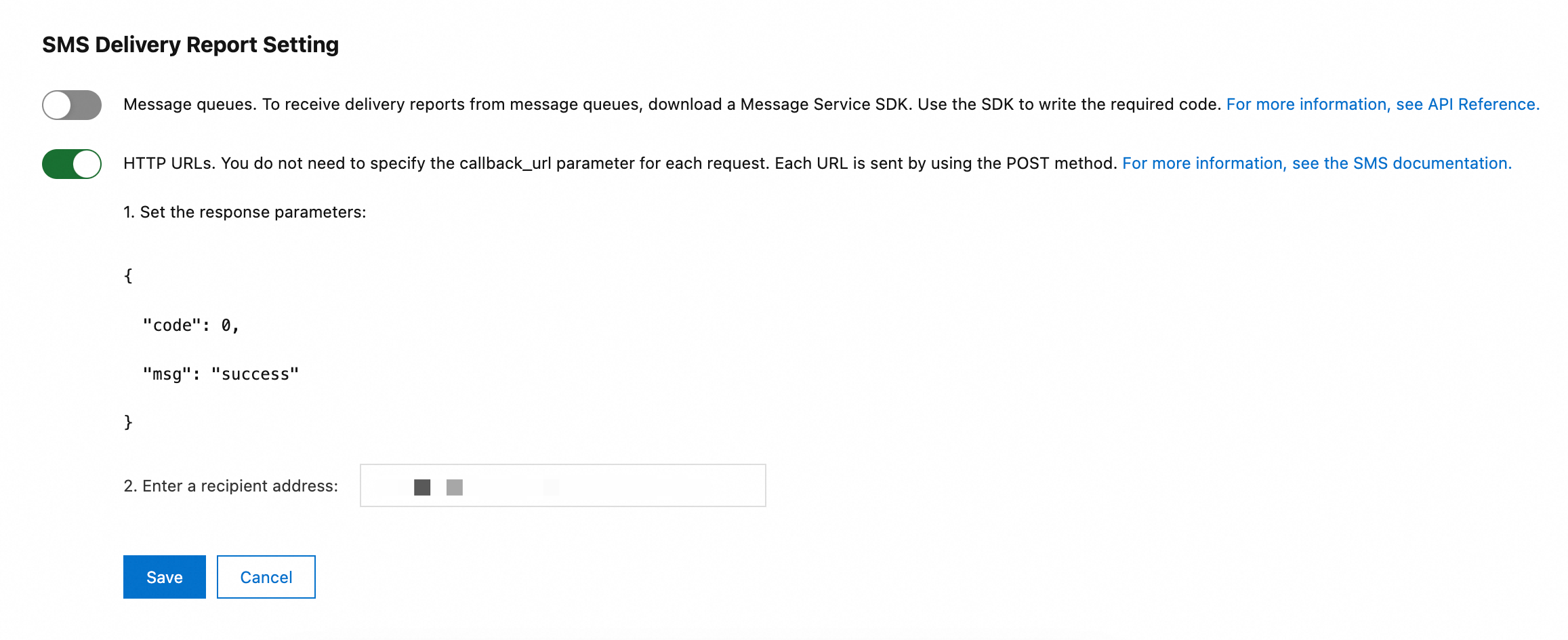
In the SMS Delivery Report Setting section, configure one or more endpoints for delivery receipts.
Message queue
Enable the SMQ queues option.

HTTP URL
-
Enable the HTTP URLs option.
-
Enter an HTTP URL. Example: http://push.example.com/contextpath/receive.do.
-
Click Save.
-
Request parameters of SMQ queues
|
Parameter |
Type |
Required |
Example |
Description |
|
MessageType |
String |
Yes |
SmsReport |
Message type. Set to SmsReport. |
|
QueueName |
String |
Yes |
Alicom-Queue-*****-SmsReport |
Queue name. To find the queue name, log on to the SMS console, and then choose . |