Answers common questions about log queries in Simple Log Service, such as identifying source machines, searching IP addresses, querying with multiple conditions, and handling field value truncation.
Identify the source machine of a log
-
Logtail configurations are applied to a machine group. If the machine group is an IP address-based machine group, use internal IP addresses to distinguish machines.
-
After you create an index, Simple Log Service indexes
__tag__:__hostname__by default. Query by entering__tag__:__hostname__:XXX. The__tag__field is a reserved field. Example: count occurrences of each hostname.* | select '__tag__:__hostname__' , count(1) as count group by '__tag__:__hostname__'
Search for IP addresses in logs
-
To query a specific IP address:
__tag__:__client_ip__:192.0.2.1 -
To query logs from IP addresses that start with 192.0.2:
__source__:192.0.2.* -
To query logs containing an IP address matching
192.168.XX.XX. You can also use regular expressions for a fuzzy query.* | select * from log where key like '192.168.%.%'
Query with multiple conditions
Combine query statements to filter with multiple conditions.
For example, to exclude logs with status OK or Unknown, search for not OK not Unknown.
Log query methods
Simple Log Service supports three log query methods:
-
Query and analyze logs in the console. Quick start for query and analysis.
-
Query logs by using an SDK. SDK reference overview.
-
Query logs by using the RESTful API. Query logs in a Logstore.
Troubleshoot SQL analysis timeout or failure
A network firewall on the client side may block requests containing SQL analysis keywords.
Try switching the service endpoint to HTTPS.
Field value truncation
Simple Log Service limits field value length as follows:
-
For queries, the maximum field value length is 512 KB (524,288 bytes). Content beyond this limit is excluded from query results.
-
For analysis, the default maximum field value length is 2 KB (2,048 bytes), configurable up to 16 KB (16,384 bytes).
Set the maximum length for a field
This change applies only to new log data. Existing data is not affected.
Log on to the Simple Log Service console.
In the Projects section, click the one you want.

On the tab, click the logstore you want.
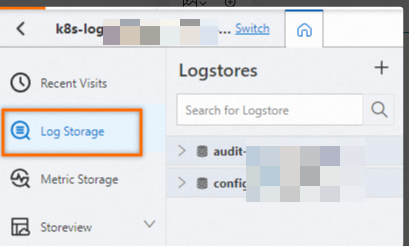
-
Click .
-
At the bottom of the Query & Analysis page, set Maximum Length for Statistical Fields (text) to a value between 64 and 16,384 bytes.
View complete field contents in historical logs
In query and analysis, changing the maximum length for statistical fields applies only to new log data. You cannot restore field values that were truncated in historical logs. To view complete field contents in historical logs, use one of the following methods:
-
Raw Logs: On the LogStore query page, click the Raw Logs tab. Raw Logs does not truncate field contents. For a long field value, click Expand to view the complete
contentandattributefield values. -
Log export: In the SQL query results, click Download Logs to export logs as a CSV or JSON file. The exported file contains complete field contents.
-
Scan mode: Query logs in scan mode to avoid field truncation. For an API call, set the
scanparameter totrue. In the console, use the scan feature. For instructions, see scan-based analysis and Scan logs.
Analyze non-indexed fields
To analyze a non-indexed field, use one of the following methods:
-
Create or reindex data
-
To analyze new logs, create an index for the target field and enable statistics.
-
To analyze historical logs, reindex the data and enable statistics.
-
-
Enable scan mode
If you cannot create an index, use scan-based analysis to query logs without indexes. Scan logs.
Change the number of returned rows
Simple Log Service appends limit 100 by default. Use the LIMIT clause to change the number of returned rows.
What are the differences between SLS indexes and database indexes? Can SLS automatically identify user information?
Differences between SLS indexes and database indexes
SLS indexes and database indexes (such as those in MySQL or PostgreSQL) serve similar purposes but differ in implementation and use cases:
-
SLS indexes: Used to accelerate log queries and analysis. SLS provides FullText Index for tokenized search across all content and Key/Value Index for structured field retrieval, supporting keyword search and SQL analysis.
-
Database indexes: Typically based on B-tree data structures, designed to speed up the lookup of specific records in database tables. They are not suited for full-text search and real-time analysis of large-scale log data.
Can SLS automatically identify and correlate user information in logs?
SLS does not automatically identify or correlate user information in logs. User information must exist as a log field for SLS to query, analyze, or download by that field. If no field containing user information exists in the logs, SLS cannot determine which user the logs belong to.
If you need to query logs by user, include user information as a log field when collecting logs. Then create an index for the field and enable analytics in the index configuration.