This topic primarily describes the steps to upgrade from data transformation (old version) to data transformation (new version).
Upgrade overview
If you have existing data transformation (old version) tasks, upgrade to the new version. The upgrade process includes the following steps:
-
To preserve data integrity, the data transformation service automatically transfers the current data consumption point to the new version. Post-upgrade, data consumption will resume from this point.
-
To upgrade your existing data processing logic, utilize the SPL (Structured Process Language) to meet the current data processing requirements. For more information, see SPL Rule Syntax Comparison for Upgrade.
-
Once the task upgrade is complete, observe and monitor the running status of the new version data transformation tasks. For more information, see Observe and Monitor Data Transformation (New Version) Tasks.
-
Once upgraded to the new version, it is not possible to revert to the old version.
-
The upgrade process involves translating old DSL scripts into SPL rules and thoroughly verifying the processing results before finalizing the upgrade.
-
Following the upgrade, the task's gauge will show only the metrics from after the upgrade. To see metrics from before the upgrade, refer to Data Transformation Gauge.
-
Refresh the page after completing the task upgrade to view the overview of the data transformation (new version) task.
Simple Log Service Console Upgrade
Log on to the Simple Log Service console.
In the Projects section, click the one you want.

-
In the left-side navigation pane, choose .
-
Find and click the desired job in the data transformation job list.
-
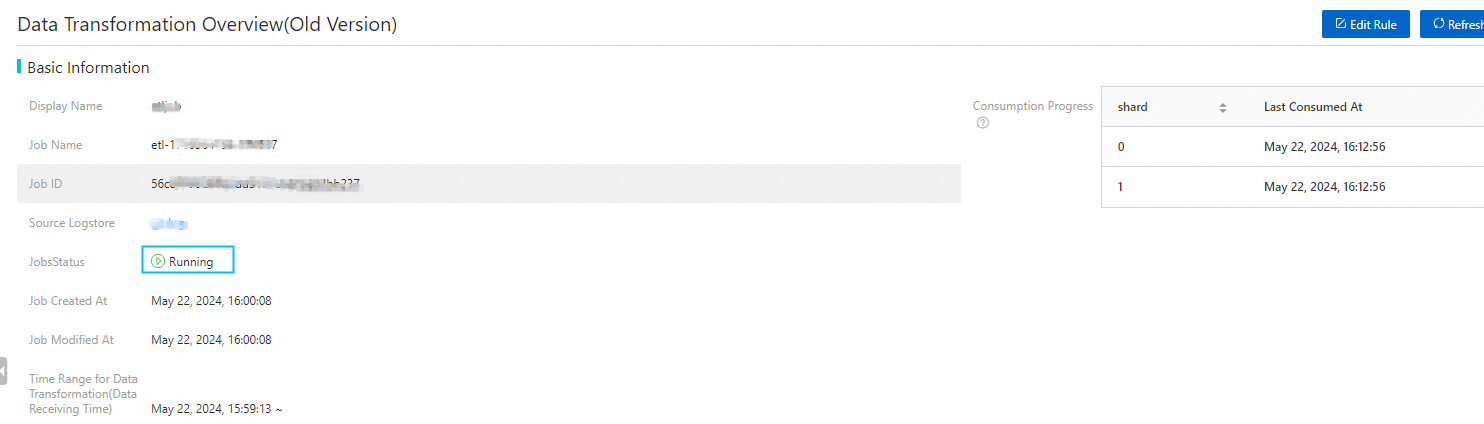
On the Data Transformation Overview (Old Version) tab, review the details of the data transformation job to ensure it is operating correctly.
-
Click Edit Rule to access the edit page and review the data transformation DSL script from the previous version.
-
Click Switch to Data Transformation (new Version) to access the updated editing interface, where you can specify data processing requirements using SPL.
Switch between versions by clicking the Switch to Data Transformation (New Version) button or the Switch to Data Transformation (Old Version) button. In the code editor, enter the appropriate SPL rules for the New Version or SDL for the Old Version.

-
Click Modify Data Transformation (New Version), and then click Confirm.
Data Transformation API Upgrade
To update existing data transformation tasks with the Simple Log Service API, refer to UpdateETL - Update Data Transformation Task.
Python
For instructions on installing the Simple Log Service OpenAPI SDK, please refer to SDK Installation. Below is a Python SDK-based script designed to upgrade tasks to the new version of data transformation. Running this script will refresh and restart the data transformation task.
import os
import sys
from typing import List
from alibabacloud_sls20201230.client import Client as Sls20201230Client
from alibabacloud_tea_openapi import models as open_api_models
from alibabacloud_sls20201230 import models as sls_20201230_models


class EtlUpgrade:
    @staticmethod
    def create_client() -> Sls20201230Client:
        config = open_api_models.Config(
            # Required. Make sure that the ALIBABA_CLOUD_ACCESS_KEY_ID environment variable is configured.,
            access_key_id=os.environ['ALIBABA_CLOUD_ACCESS_KEY_ID'],
            # Required. Make sure that the ALIBABA_CLOUD_ACCESS_KEY_SECRET environment variable is configured.,
            access_key_secret=os.environ['ALIBABA_CLOUD_ACCESS_KEY_SECRET']
        )
        # For more information about endpoints, see https://api.aliyun.com/product/Sls
        config.endpoint = f'cn-chengdu.log.aliyuncs.com'
        return Sls20201230Client(config)

    @staticmethod
    def upgrade(args: List[str]) -> None:
        client = EtlUpgrade.create_client()
        try:
            resp = client.get_etl('my-project', 'etl-1715564059-320063')
        except Exception as error:
            print(error)
            raise

        # Update data transformation configuration and upgrade to the new version
        # SPL rules. Thoroughly check that the updated SPL rules meet the processing requirements
        job = resp.to_map()
        req = sls_20201230_models.UpdateETLRequest().from_map(job["body"])
        req.configuration.lang = "SPL"
        req.configuration.script = "* | where cast(Status as bigint)=200"
        for sink in req.configuration.sinks:
            sink.datasets = ["__UNNAMED__"]

        try:
            # Update and restart the data transformation task
            client.update_etl('my-project', 'etl-1715564059-320063', req)
        except Exception as error:
            print(error)
            raise


if __name__ == '__main__':
    EtlUpgrade.upgrade(sys.argv[1:])
Go
To install the Simple Log Service OpenAPI SDK, refer to SDK Installation. Below is a Go SDK-based script designed to upgrade tasks to the new version of data transformation. By running this script, update and restart the data transformation task.
package main

import (
	"fmt"
	openapi "github.com/alibabacloud-go/darabonba-openapi/v2/client"
	sls20201230 "github.com/alibabacloud-go/sls-20201230/v6/client"
	"github.com/alibabacloud-go/tea/tea"
	"os"
)

// Create SLS client
func createClient(accessKeyId, accessKeySecret, endpoint string) (_result *sls20201230.Client, _err error) {
	config := &openapi.Config{
		Endpoint:        tea.String(endpoint),
		AccessKeyId:     tea.String(accessKeyId),
		AccessKeySecret: tea.String(accessKeySecret),
		Protocol:        tea.String("http"),
	}

	_result, _err = sls20201230.NewClient(config)
	return _result, _err
}

// Upgrade ETL job
func upgrade(client *sls20201230.Client, project, etlJobName string) (_err error) {
	// Retrieve ETL job information
	getETLResp, _err := client.GetETL(tea.String(project), tea.String(etlJobName))
	if _err != nil {
		fmt.Println(_err)
		return _err
	}

	// Prepare update ETL job request
	updateETLReq := sls20201230.UpdateETLRequest{
		Configuration: getETLResp.Body.Configuration,
		DisplayName:   tea.String(fmt.Sprint(etlJobName, "-update")),
		Description:   tea.String("this is update"),
	}

	// Update language and script
	updateETLReq.Configuration.Lang = tea.String("SPL")
	updateETLReq.Configuration.Script = tea.String("* | where cast(Status as bigint)=200")

	// Update sink datasets
	for _, sink := range updateETLReq.Configuration.Sinks {
		sink.Datasets = []*string{tea.String("__UNNAMED__")}
	}

	// Update ETL job
	_, _err = client.UpdateETL(tea.String(project), tea.String(etlJobName), &updateETLReq)
	if _err != nil {
		fmt.Println(_err)
		return _err
	}
	return nil
}

func main() {
	// Retrieve necessary configuration from environment variables
	accessKeyId, _ := os.LookupEnv("ALIBABA_CLOUD_ACCESS_KEY_ID")
	accessKeySecret, _ := os.LookupEnv("ALIBABA_CLOUD_ACCESS_KEY_SECRET")
	endpoint := "cn-chengdu.log.aliyuncs.com"

	// Create SLS client
	client, err := createClient(accessKeyId, accessKeySecret, endpoint)
	if err != nil {
		fmt.Println("Failed to create client:", err)
		return
	}

	// Upgrade ETL job
	err = upgrade(client, "my-project", "etl-1715564059-320063")
	if err != nil {
		fmt.Println("ETL upgrade failed:", err)
		return
	}
	fmt.Println("ETL upgrade successful")
}