Simple Log Service (SLS) supports rule-based consumption, which uses server-side SPL statements to preprocess log data before delivery to your consumer.
How it works
Rule-based consumption applies server-side SPL statements to preprocess semi-structured log data — row filtering, column pruning, regex-based extraction, and JSON field extraction — and delivers clean, structured data to your client. SPL syntax.
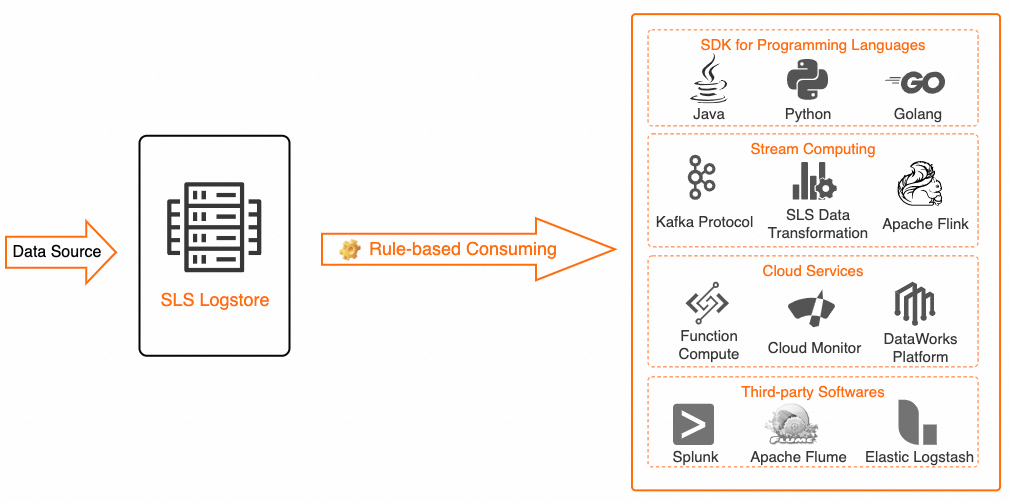
Both rule-based consumption and query and analysis read data. Differences between log consumption and log query.
Use cases
Rule-based consumption suits stream and real-time computing scenarios that require data preprocessing — such as row filtering, column pruning, or regex/JSON-path extraction — before consumption. It delivers low latency, typically within seconds, and supports custom data retention periods.
Benefits
-
Lower internet traffic costs.
-
Server-side filtering removes unnecessary data before transmission, reducing network traffic.
-
-
Save local CPU resources and accelerate processing.
-
Offload complex calculations to SLS, freeing local resources and speeding up the overall workflow.
-
Billing
-
If your Logstore uses the pay-by-ingested-data billing mode, rule-based consumption is free of charge. However, pulling data from a public SLS endpoint incurs internet read traffic fees based on the compressed data size. Billable items of the pay-by-ingested-data mode.
-
If your Logstore uses the pay-by-feature billing mode, you are charged for server-side computation and may also incur internet traffic fees when using a public SLS endpoint. Billable items of the pay-by-feature mode.
Consumers
The following table lists the supported consumers.
|
Type |
Consumer |
Description |
|
Multi-language applications |
Multi-language applications |
Java, Python, and Go applications can consume SLS data through a rule-based consumer group. Consume data by using an API and Consume logs by using a consumer group. Best practice: Use an SDK to consume logs based on a consumption processor (SPL) |
|
Cloud service |
Realtime Compute for Apache Flink |
Realtime Compute for Apache Flink can consume SLS data in real time. Simple Log Service. Best practices: |
|
Stream computing |
Kafka |
To request this integration, submit a ticket. |
Usage notes
-
Server-side SPL processing may add 10–100 ms of read latency per 5 MB, depending on query complexity and data characteristics. However, end-to-end latency — from data pull to completed local computation — is typically lower.
-
SPL syntax errors or missing source fields may cause incomplete results or failures. Error handling.
-
The maximum length of an SPL statement is 4 KB.
-
Shard read limits are the same for rule-based and regular consumption. Read traffic is calculated based on the raw data size before SPL processing. Data reads and writes.
FAQ
-
How do I resolve the
ShardReadQuotaExceederror during rule-based consumption?-
Resolution:
-
Configure your consumer client to wait and retry when this error occurs.
-
Manually split the shard to reduce the read speed per shard for new data.
-
-
-
How is traffic throttled for rule-based consumption?
-
The throttling policy is the same as regular consumption. Traffic is calculated based on the raw data size before SPL processing. Data reads and writes.
-
For example, if the compressed raw data is 100 MB and the SPL statement
* | where method = 'POST'returns 20 MB to the client, read traffic is still calculated based on the original 100 MB.
-
-
-
Why is the outflow traffic low in the Traffic/min chart on the Project Monitoring page after enabling rule-based consumption?
-
The Traffic/min chart shows the data size after SPL processing. If your SPL statement filters rows or prunes columns, the outflow is lower than the inflow.
-