Learn the syntax and usage of map functions and operators in SLS.
SLS supports the following map functions and operators.
|
Function name |
Syntax |
Description |
SQL |
SPL |
|
[x] |
Returns the value for a specified key from a map. |
√ |
× |
|
|
cardinality(x) |
Returns the cardinality (size) of a map. |
√ |
× |
|
|
element_at(x, key) |
Returns the value for a specified key from a map. |
√ |
√ |
|
|
histogram(x) |
Groups query and analysis results into a map. |
√ |
× |
|
|
histogram_u(x) |
Groups results in a multi-row, multi-column format. |
√ |
× |
|
|
map() |
Returns an empty map. |
√ |
√ |
|
|
map(x, y) |
Creates a map from two arrays. |
√ |
√ |
|
|
map_agg(x, y) |
Creates a map with x as key and y as value. If y has multiple values, one is randomly selected. |
√ |
× |
|
|
map_concat(x, y...) |
Merges multiple maps into a single map. |
√ |
√ |
|
|
map_filter(x, lambda_expression) |
Filters entries in a map based on a lambda expression. |
√ |
√ |
|
|
map_keys(x) |
Extracts all keys from a map and returns them as an array. |
√ |
√ |
|
|
map_values(x) |
Extracts all values from a map and returns them as an array. |
√ |
√ |
|
|
multimap_agg(x, y) |
Creates a map with x as key and y as value array. If y has multiple values, all are collected. |
√ |
× |
Subscript operator
The subscript operator returns the value of a specified key from a map.
Syntax
[x]Parameters
|
Parameter |
Description |
|
x |
The key to access. Must be a varchar. |
Return value type
The data type of the result is the same as the value type of the map.
Examples
In SLS data transformation logs, the etl_context field is of the map type. Use the subscript operator to retrieve the project value from etl_context.
-
Sample field
etl_context: { project:"datalab-148****6461-cn-chengdu" logstore:"internal-etl-log" consumer_group:"etl-83****4d1965" consumer:"etl-b2d40ed****c8d6-291294" shard_id:"0" } -
Query and analysis statement
* | SELECT try_cast(json_parse(etl_context) AS map(varchar, varchar))['project'] -
The
_col0column returnsdatalab-148****6461-cn-chengdu, the project value extracted from etl_context.
cardinality function
The cardinality function returns the cardinality (size) of a map.
Syntax
cardinality(x)Parameters
|
Parameter |
Description |
|
x |
The input map. |
Return value type
bigint
Examples
Count requests by method with histogram, then count unique methods with cardinality.
-
Query and analysis statement
* | SELECT histogram(request_method) AS request_method, cardinality(histogram(request_method)) AS "kinds" -
Query and analysis results: The
request_methodcolumn returns{"DELETE":5,"POST":7,"GET":41,"PUT":4}, and thekindscolumn returns4, indicating four request methods.
element_at function
The element_at function returns the value for a specified key from a map.
Syntax
element_at(x, key)Parameters
|
Parameter |
Description |
|
x |
The parameter must be a map. |
|
key |
A key in the map. |
Return value type
The data type of the result is the same as the value type of the map.
Examples
Count requests by method with histogram, then retrieve the DELETE count with element_at.
-
Query and analysis statement
* | SELECT histogram(request_method) AS request_method, element_at(histogram(request_method),'DELETE') AS "count" -
Query and analysis results: The request_method column returns
{"HEAD":686,"DELETE":13619,"POST":34365,"GET":138097,"PUT":34056}, and the count column returns13619(the DELETE request count).
histogram function
The histogram function groups results as a JSON map, similar to * | SELECT count(*) GROUP BY x.
Syntax
histogram(x)Parameters
|
Parameter |
Description |
|
x |
The parameter can be of any data type. |
Return value type
map
Examples
Count requests by method with histogram.
-
Query and analysis statement
* | SELECT histogram(request_method) AS request_method -
The result is
{"HEAD":30,"DELETE":564,"POST":1382,"GET":5420,"PUT":1334}. GET has the highest count at 5,420.
histogram_u function
The histogram_u function groups data and returns the results in a multi-row, multi-column format.
Syntax
histogram_u(x)Parameters
|
Parameter |
Description |
|
x |
The parameter can be of any data type. |
Return value type
bigint
Examples
Count requests by method with histogram_u and display the results as a column chart.
-
Query and analysis statement
*|SELECT histogram_u(request_method) as request_method -
Query and analysis results
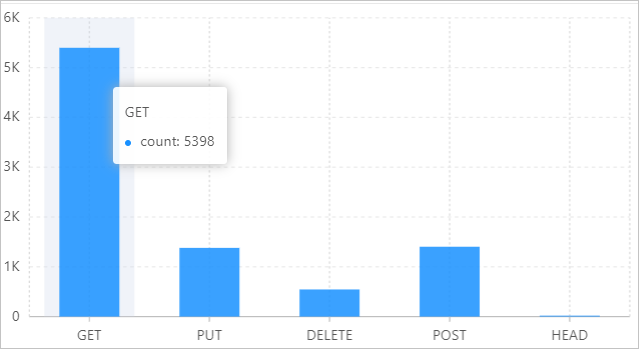
map function
The map function either returns an empty map or creates a map from two arrays.
Syntax
-
Returns an empty map.
map() -
Creates a map from two arrays.
map(x,y)
Parameters
|
Parameter |
Description |
|
x |
The parameter must be an array. |
|
y |
The parameter must be an array. |
Return value type
map
Examples
-
Example 1: The class and number fields are arrays. Use the map function to create a key-value mapping between each class and its student count.
-
Sample fields
class:["class01","class02","class03","class04","class05"] number:[49,50,45,47,50] -
Query and analysis statement
* | SELECT map(try_cast(json_parse(class) AS array(varchar)) ,try_cast(json_parse(number) AS array(bigint))) -
The query and analysis results are
{"class01":49,"class03":45,"class02":50,"class05":50,"class04":47}.
-
-
Example 2: Return an empty map.
-
Query and analysis statement
*| SELECT map() -
The result is
{}, an empty map.
-
map_agg function
The map_agg function maps x and y into a map, where x is the key and y is the value. If multiple values exist for y, one value is randomly selected.
Syntax
map_agg(x, y)Parameters
|
Parameter |
Description |
|
x |
The parameter can be of any data type. |
|
y |
The parameter can be of any data type. |
Return value type
map
Examples
Map request_method (key) and request_time (value) into a map.
-
Sample fields
request_method:POST request_time:80 -
Query and analysis statement
* | SELECT map_agg(request_method,request_time) -
The query and analysis results are
{"HEAD":47.0,"DELETE":26.0,"POST":80.0,"GET":51.0,"PUT":49.0}.
map_concat function
The map_concat function merges multiple maps into a single map.
Syntax
map_concat(x, y)Parameters
|
Parameter |
Description |
|
x |
The parameter must be a map. |
|
y |
The parameter must be a map. |
Return value type
map
Examples
In SLS data transformation logs, both etl_context and progress are map types. Use map_concat to merge them.
-
Sample fields
etl_context: { project:"datalab-148****6461-cn-chengdu" logstore:"internal-etl-log" consumer_group:"etl-83****4d1965" consumer:"etl-b2d40ed****c8d6-291294" shard_id:"0" } progress: { accept:3 dropped:0 delivered:3 failed:0 } -
Query and analysis statement
* | SELECT map_concat( cast ( json_parse(etl_context) AS map(varchar, varchar) ), cast (json_parse(progress) AS map(varchar, varchar)) ) -
Query and analysis results
null
{"consumer_group":"etl-83d5****071d1911974d1965","shard_id":"1","dropped":"0","project":"atalab-14****66461-cn-chengdu","delivered":"2","failed":"0","logstore":"internal-etl-log","consumer":"etl-b****510a8ee7a9532c8d6-291294","accept":"2"}
map_filter function
The map_filter function filters a map based on a lambda expression.
Syntax
map_filter(x, lambda_expression)Parameters
|
Parameter |
Description |
|
x |
The parameter must be a map. |
|
lambda_expression |
The lambda expression. Lambda expressions. |
Return value type
map
Examples
Map two arrays to a new map, filtering out null values. The expression (k, v) -> v is not null is a lambda expression.
-
Query and analysis statement
* | SELECT map_filter(map(array[10, 20, 30], array['a', NULL, 'c']), (k, v) -> v is not null) -
The query and analysis results are
{"10":"a","30":"c"}.
map_keys function
The map_keys function extracts all keys from a map and returns them as an array.
Syntax
map_keys(x)Parameters
|
Parameter |
Description |
|
x |
The parameter must be a map. |
Return value type
array
Examples
In SLS data transformation logs, the etl_context field is of the map type. Use map_keys to extract all keys from etl_context.
-
Sample field
etl_context: { project:"datalab-148****6461-cn-chengdu" logstore:"internal-etl-log" consumer_group:"etl-83****4d1965" consumer:"etl-b2d40ed****c8d6-291294" shard_id:"0" } -
Query and analysis statement
* | SELECT map_keys(try_cast(json_parse(etl_context) AS map(varchar, varchar))) -
The query and analysis result is
["consumer","consumer_group","logstore","project","shard_id"].
map_values function
The map_values function extracts all values from a map and returns them as an array.
Syntax
map_values(x)Parameters
|
Parameter |
Description |
|
x |
The parameter must be a map. |
Return value type
array
Examples
In SLS data transformation logs, the etl_context field is of the map type. Use map_values to extract all values from etl_context.
-
Sample field
etl_context: { project:"datalab-148****6461-cn-chengdu" logstore:"internal-etl-log" consumer_group:"etl-83****4d1965" consumer:"etl-b2d40ed****c8d6-291294" shard_id:"0" } -
Query and analysis statement
* | SELECT map_values(try_cast(json_parse(etl_context) AS map(varchar, varchar))) -
The result is an array of all values in
etl_context:["datalab-148****6461-cn-chengdu", "internal-etl-log", "etl-83****4d1965", "etl-b2d40ed****c8d6-291294", "0"].
multimap_agg function
The multimap_agg function maps x and y to a map. In this map, x is the key and y is the value, which is an array. If multiple y values exist for the same key, all of them are collected into the array.
Syntax
multimap_agg(x, y)Parameters
|
Parameter |
Description |
|
x |
The parameter can be of any data type. |
|
y |
The parameter can be of any data type. |
Return value type
map
Examples
Map request_method (key) to request_time (value array) using multimap_agg.
-
Sample fields
request_method:POST request_time:80 -
Query and analysis statement
* | SELECT multimap_agg(request_method,request_time) -
The result maps each HTTP method to an array of
request_timevalues. For example, DELETE maps to [28.0, 80.0, 21.0, 54.0, ...], POST maps to [77.0, 27.0, 52.0, 25.0, ...], and so on.