Simple Log Service lets developers retrieve logs using keywords and perform contextual queries in raw log files with Scan syntax, enabling access to logs without server login.
Scan syntax with context fields returned
{Index Search Query} | {Scan Query} | with_pack_metaPrerequisite
Procedure
Java SDK
Sample code
Add the following dependencies to your pom.xml file.
<!-- https://mvnrepository.com/artifact/com.aliyun.openservices/aliyun-log -->
<dependency>
    <groupId>com.aliyun.openservices</groupId>
    <artifactId>aliyun-log</artifactId>
    <version>0.6.120</version>
</dependency>
Run the following code. Specify
project,logStore,endpoint,accessKeyId, andaccessKeySecret. For more information, see Endpoints and Create an AccessKey pair.import com.aliyun.openservices.log.Client; import com.aliyun.openservices.log.common.QueriedLog; import com.aliyun.openservices.log.exception.LogException; import com.aliyun.openservices.log.response.GetLogsResponse; public class DoScanTest { // In this example, the AccessKey ID and AccessKey secret are obtained from environment variables. static String accessKeyId = System.getenv("ALIBABA_CLOUD_ACCESS_KEY_ID"); static String accessKeySecret = System.getenv("ALIBABA_CLOUD_ACCESS_KEY_SECRET"); // Specify a Simple Log Service endpoint. static String host = "ap-southeast-1.log.aliyuncs.com"; // Initialize the Simple Log Service client. static Client client = new Client(host, accessKeyId, accessKeySecret); public static void main(String[] args) throws LogException { String project = "test-project"; String logStore = "test-logstore"; int fromTime = 1740985125; // event-time, [from, to) int toTime = 1740985125 + 7200; // event-time, [from, to) // String query = "Status:404 | where http_host = 'www.yt.mock.com'"; // Context information is not returned String query = "Status:404 | where http_host = 'www.yt.mock.com' | with_pack_meta"; // Context information is returned int totalCount = 0; // boolean reverse = false; // Search from front to back boolean reverse = true; // Search from back to front boolean forward = true; int offset = 0; while (true) { GetLogsResponse resp = client.GetLogs(project, logStore, fromTime, toTime, "", query, 100, offset, reverse, forward, "mode=scan;"); for (QueriedLog log : resp.getLogs()) { System.out.println(log.GetLogItem().ToJsonString()); } System.out.println("[response of this scan]\tbegin offset: " + resp.GetBeginOffset() + "\tend offset: " + resp.GetEndOffset() + "\tresult logs: " + resp.getLogs().size() + "\tis finished: " + resp.IsScanAll()); totalCount += resp.getLogs().size(); if (resp.IsScanAll()) { break; } offset = forward ? (int) resp.GetEndOffset() : (int) resp.GetBeginOffset(); } System.out.println("totally scanned logs\t: " + totalCount); } }The returned results are similar to the following:
{
    "referer": "www.xxx.xxx.xxx",
    "slbid": "slb-01",
    "scheme": "https",
    "vpc_id": "8c093000-9f68-2c0f-a904-5c612483505a",
    "upstream_addr": "125.36.xx.xx",
    "owner_id": "owner-01",
    "body_bytes_sent": "1733",
    "request_method": "GET",
    "http_host": "www.yt.mock.com",
    "http_user_agent": "Mozilla/4.0 (Windows NT 6.3; Win64; x64) AppleWebKit/537.36 (KHTML, like Gecko) Chrome/11.0.1245.0 Safari/537.36",
    "remote_user": "0iu9d",
    "upstream_status": "200",
    "vip_addr": "139.207.xxx.xxx",
    "request_time": "24",
    "__pack_meta__": "0|MTczNjkzNzIxNzg2NDA5NT****==|287|277",
    "__tag__:__pack_id__":"5253859C5169****-3",
    "host": "www.xxx.xxx.xxx",
    "client_ip": "58.19.XXX.XX",
    "user_agent": "Mozilla/5.0 (Windows NT 7.1) AppleWebKit/534.30 (KHTML, like Gecko) Chrome/12.0.742.112 Safari/534.30",
    "remote_addr": "183.70.XX.XXX",
    "__topic__": "nginx_access_log",
    "instance_name": "instance-01",
    "time_local": "03/Mar/2025:08:02:34",
    "request_uri": "/request/path-2/file-4",
    "instance_id": "i-01",
    "request_length": "4458",
    "http_x_forwarded_for": "103.96.xxx.xxx",
    "upstream_response_time": "30",
    "network_type": "vlan",
    "region": "ap-southeast-1",
    "logtime": 1740988954,
    "server_protocol": "HTTP/2.0",
    "status": "404"
}
[response of this scan]	begin offset: 0	end offset: 1	result logs: 1	is finished: true
totally scanned logs	: 1

Process finished with exit code 0
View the context Information.
If the Scan syntax is
{Index Search Query} | {Scan Query}, the returned log information will not include context fields. To include context fields, use the syntax{Index Search Query} | {Scan Query} | with_pack_meta.In the provided sample code, the returned log context fields are as follows:
__pack_meta__: 0|MTczNjkzNzIxNzg2NDA5NT****==|287|277
__tag__:__pack_id__: 5253859C5169****-3
With this context information, you can use the GetContextLogs operation to retrieve the previous and following logs from the raw log file.
Console
On the Simple Log Service console, click the target project and logstore, and enter the following Scan query statement in the search box.
with_pack_metawill be automatically appended to the scan statement by default for backend requests.Status:404 | where http_host = 'www.yt.mock.com'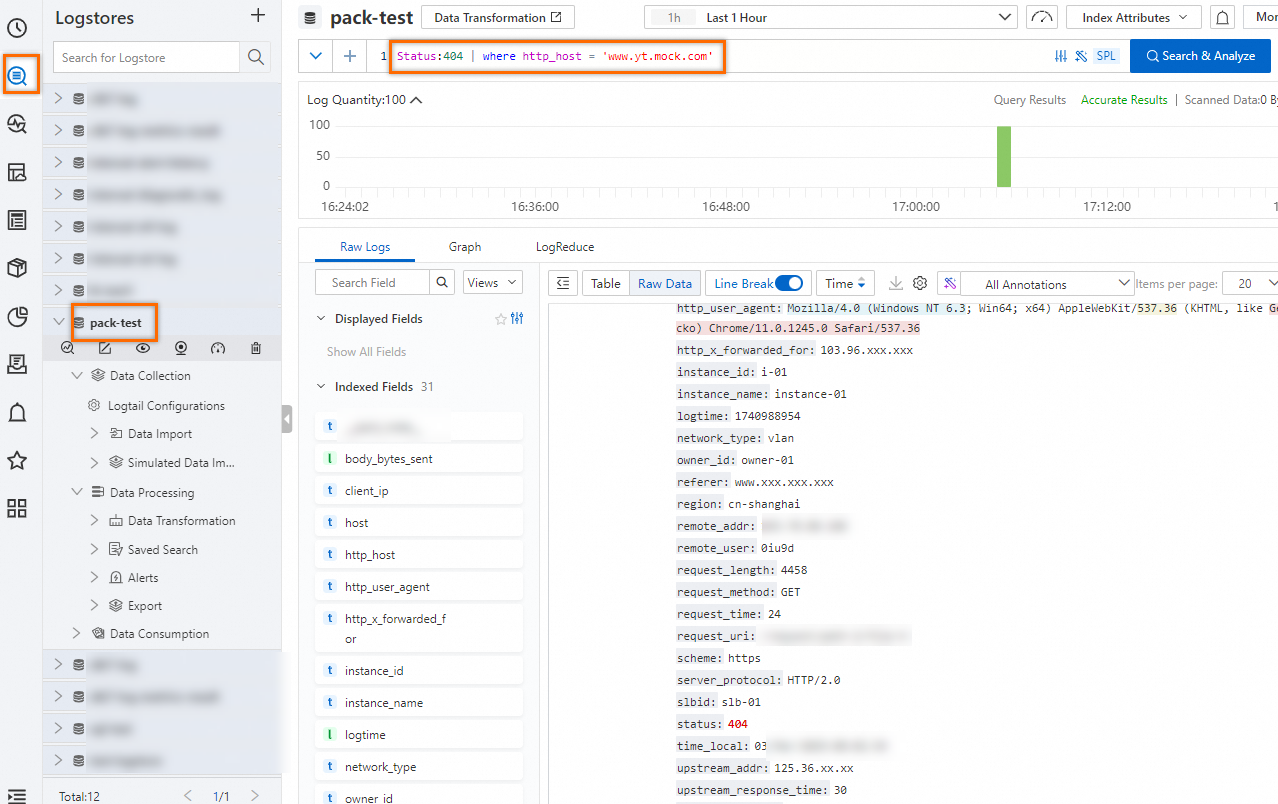
On the tab, find the target log and click the
 icon.
icon.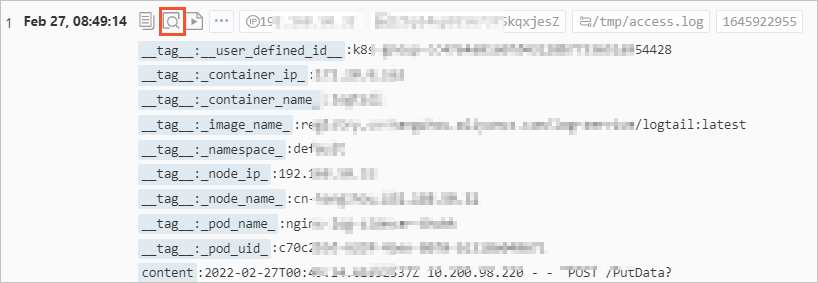
Scroll up or down on the page to view the context of the specified log.
Click Old to scroll to earlier content.
Click New to scroll down.
Click All Fields to show the list of field names. By default, all fields are displayed. Click a field name to toggle its visibility.
In the Filter text box, enter a filter string. The log list then displays only the logs that contain the specified string.
To highlight a string in yellow, enter it in the Highlight text box.
