Cloud Shell lets you batch-download log files and upload them to Object Storage Service (OSS).
Prerequisites
If you use a Resource Access Management (RAM) user, grant the following permissions:
-
Read-only access to SLS (AliyunLogReadOnlyAccess). Create a RAM user and grant permissions.
-
Permissions to use Cloud Shell. Grant a RAM user permissions to use Cloud Shell.
Procedure
Log on to the Simple Log Service console.
In the Projects section, click the one you want.

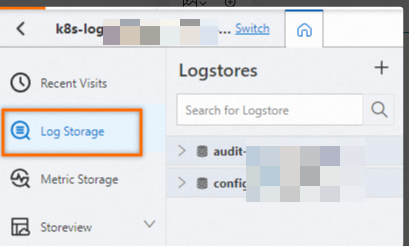
On the tab, click the logstore you want.
-
In the search and analysis box, enter a search statement, select a time range, and then click Search/Analyze.
After logs are retrieved, you can download them in batch via Cloud Shell and save them to OSS.
-
In the upper-right corner of the page, click the
 icon.
icon. -
Follow the on-screen instructions to complete the authentication.
-
To persist common scripts and files, click Create and Attach in the Attach Storage Space dialog box.
Attaching a NAS file system provides persistent storage for scripts and files. Without it, files are deleted when the Cloud Shell instance releases. Cloud Shell creates a pay-as-you-go, performance-optimized General-purpose NAS file system, which may incur a small fee. Billing of General-purpose NAS file systems.
Note-
On first connection, Cloud Shell creates a VM for you (up to 30 seconds). Multiple Cloud Shell windows share the same VM.
-
Cloud Shell is located in the China (Shanghai) region. Downloading logs from Logstores in other regions incurs data transfer costs. Pricing.
The Cloud Shell terminal opens.
Welcome to Alibaba Cloud Shell! Type "help" to learn about Cloud Shell Type "aliyun" to use Alibaba Cloud CLI You may be interested in these tutorials below. --------------------------- | --------------------------- Download SLS logs | cloudshell://tutorial/sls-download-log Use Aliyun CLI to manage cloud resources | cloudshell://tutorial/aliyun-cli For more tutorials, visit https://api.aliyun.com/#/lab shell@Alicloud:~$ -
-
Run the get_log_all command to download logs to download_data.txt.
aliyunlog log get_log_all --project="aliyun-test-project" --logstore="aliyun-test-logstore" --from_time="2024-07-01 00:00:00+8:00" --to_time="2024-07-02 15:40:00+8:00" --query="your sql" --format-output=json >>download_data.txtget_log_all command reference.
-
Upload the downloaded log file to OSS, and then download the file from OSS.
-
Run the following command to list accessible OSS buckets and confirm the destination path.
aliyun oss lsSample output:
CreationTime Region StorageClass BucketName 2021-09-24 02:03:08 +0000 UTC oss-cn-beijing Standard oss://fyytset 2021-09-26 03:27:10 +0000 UTC oss-cn-hangzhou Standard oss://demo Bucket Number is: 2 -
Run
llto locate the downloaded log file.The downloaded log file is
download_data.txt. -
Run the following command to upload the log file to your OSS bucket.
aliyun oss cp download_data.txt oss://demo --region cn-hangzhouSuccessful upload output:
Succeed: Total num: 1, size: 3,198,090. OK num: 1(upload 1 files). average speed 12792000(byte/s) 0.250823(s) elapsed -
Log on to the Object Storage Service console to download the download_data.txt log file.
You have successfully used Cloud Shell to download logs in batch.
-