CLB uses health checks to determine the availability of backend servers. If a backend server becomes unhealthy, CLB stops sending requests to it and distributes them to healthy servers instead. When the server recovers, CLB resumes forwarding traffic to it. This health check mechanism improves overall service availability by preventing failures of individual servers from affecting your application.
If your service is sensitive to load, frequent health checks can impact normal service traffic. You can reduce this impact by lowering the health check frequency, increasing the health check interval, or switching from Layer 7 to Layer 4 health checks. However, to ensure continuous service availability, we recommend that you do not disable health checks.
Health check process
Health checks confirm server status by sending periodic requests.
CLB is deployed in a cluster. The nodes within this cluster perform both data forwarding and health checks. If a backend server fails a health check, CLB stops distributing new client requests to that unhealthy server.
CLB uses the 100.64.0.0/10 CIDR block for health checks. Your backend servers must not block traffic from this address range. You do not need to add an allow rule in your ECS security group, but if you have configured other security policies such as iptables, you must allow traffic from this CIDR block. The 100.64.0.0/10 range is a reserved Alibaba Cloud address space and poses no security risk.
Best practices for backend ECS security group protection
To prevent attackers from bypassing CLB and directly accessing the public IP of a backend ECS instance, we recommend that you configure inbound rules for the ECS security group. These rules should allow traffic to your service ports only from necessary CIDR blocks and reject direct requests from the internet. We recommend the following configuration:
-
The 100.64.0.0/10 CIDR block, used for CLB health checks and traffic forwarding, is not restricted by the inbound rules of the backend ECS security group. You do not need to add a specific allow rule for this CIDR block, as traffic from CLB to backend ECS instances is always permitted.
-
In the inbound rules for the ECS security group, allow access to your service ports (such as 80 and 443) only from your VPC's CIDR block. Do not allow access to your service ports from the internet (0.0.0.0/0).
-
After this configuration is complete, the security group blocks direct requests from the internet to the service ports of the ECS instance. Normal traffic forwarded by CLB is not affected.

HTTP and HTTPS health checks
Layer 7 listeners (HTTP/HTTPS) perform health checks using HEAD or GET requests.
For HTTPS listeners, certificates are managed by CLB. CLB uses HTTP for data exchange with backend servers to improve performance.

A Layer 7 listener health check works as follows:
-
CLB sends an HTTP HEAD request to the backend server.
-
The backend server returns an HTTP status code.
-
If CLB does not receive a response within the response timeout, the health check fails.
-
If CLB receives a response within the response timeout, it compares the status code with the configured healthy status codes. If the code matches, the check is successful. Otherwise, it fails.
By default, CLB health checks consider only HTTP 2xx and 3xx status codes healthy. If a backend server returns a 4xx (such as 400, 403, 404, or 429) or 5xx (such as 500, 502, or 503) status code, the health check fails.
We recommend creating a dedicated health check endpoint, such as /health, that returns an HTTP 200 status code, rather than adding 4xx or 5xx codes to the list of healthy status codes.
TCP health checks
For Layer 4 TCP listeners, CLB uses customized TCP probes to check server status, as shown in the following figure.

A TCP listener health check works as follows:
-
A node in the Layer 4 cluster sends a TCP SYN packet to the internal IP and health check port of the backend server.
-
After receiving the request, if the server is correctly listening on the port, it returns a SYN+ACK packet.
-
If the Layer 4 cluster node receives no response from the backend server within the response timeout, the health check fails. The node then sends an RST packet to terminate the TCP connection.
-
If the Layer 4 cluster node receives a response from the backend server within the response timeout, the health check is successful. The node then sends an RST packet to terminate the TCP connection.
This mechanism may cause the backend server to consider the TCP connections abnormal and log errors, such as Connection reset by peer, in its application logs.
Workarounds:
-
For TCP listeners, use HTTP-based health checks.
-
After you configure the backend server to obtain the real client IP, ignore connection errors from the CLB service address block.
UDP health checks
For Layer 4 UDP listeners, health checks use UDP packet probes to check server status, as shown in the following figure.

A UDP listener health check works as follows:
-
A node in the Layer 4 cluster sends a UDP packet to the internal IP and health check port of the backend server.
-
If the backend server is not listening on the port, its operating system returns an ICMP error message such as
port XX unreachable. Otherwise, the server does not respond. -
If the node in the Layer 4 cluster receives this error message from the backend server within the response timeout, the health check fails.
-
If the node in the Layer 4 cluster does not receive any response from the backend server within the response timeout, the health check is successful.
For UDP services, the health check status may not always match the actual service status.
If the backend server is a Linux server, high-concurrency scenarios can trigger Linux's ICMP flood protection mechanism, which limits the rate at which the server sends ICMP messages. In this case, even if the service is down, the server might be unable to return a port XX unreachable ICMP error. As a result, when CLB does not receive an ICMP response, it incorrectly marks the health check as successful. This leads to a mismatch between the reported health status and the actual service status.
Workaround:
Configure the load balancer to send a specific string to the backend server and consider the check successful only after receiving a specific response. This mechanism requires support from your backend application.
Health check time window
The health check mechanism improves service availability. However, to prevent system instability from frequent status changes, CLB changes a server's status only after it passes or fails a specified number of consecutive health checks within a health check time window. This time window is determined by the following three factors:
-
health check interval (how often a health check is performed)
-
response timeout (the time to wait for a server to respond to a health check)
-
check threshold (the number of consecutive successful or failed checks required for a status change)
The health check time window is calculated as follows:
-
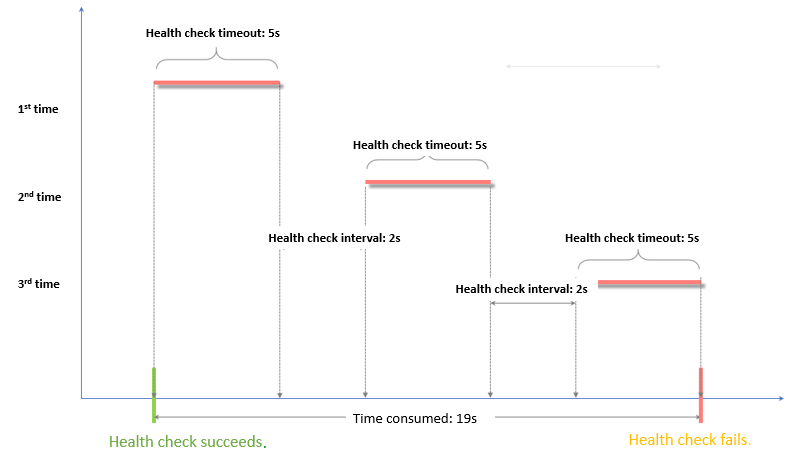
Health check failure window = response timeout × unhealthy threshold + health check interval × (unhealthy threshold - 1)
-
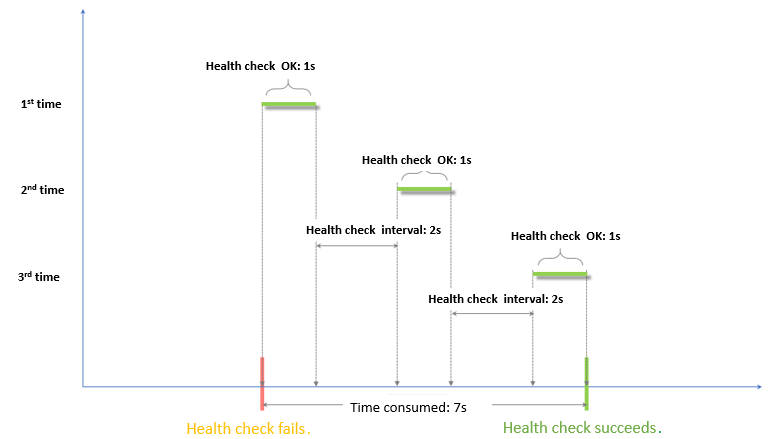
Health check success window = (health check success response time × healthy threshold) + health check interval × (healthy threshold - 1)
NoteThe health check success response time is the duration from sending a health check request to receiving a response. For TCP health checks, this time is negligible. For HTTP health checks, this time depends on the performance and load of the server, but is typically within one second.
The health check status affects request forwarding as follows:
-
If a target backend server fails a health check, new requests are no longer distributed to it. This redirection is transparent to new clients.
-
If a target backend server passes a health check, new requests are distributed to it, and client access is normal.
-
If a backend server is failing its health checks but has not yet met the unhealthy threshold (three consecutive failures by default), CLB continues to send requests to it. This can cause client requests to fail.

Health check configuration example
This example uses the following health check configuration:
-
response timeout: 5 seconds
-
health check interval: 2 seconds
-
healthy threshold: 3
-
unhealthy threshold: 3
The health check failure window is calculated as: response timeout × unhealthy threshold + health check interval × (unhealthy threshold - 1). With the given values, this is 5 × 3 + 2 × (3 - 1) = 19 seconds. This is the total time from the start of the first failed health check until the server is marked unhealthy.
The health check success window is calculated as: (health check success response time × healthy threshold) + health check interval × (healthy threshold - 1). Assuming a success response time of 1 second, this is (1 × 3) + 2 × (3 - 1) = 7 seconds. This is the total time from the start of the first successful health check until the server is marked healthy.
The health check success response time is the duration from sending a health check request to receiving a response. For TCP health checks, this time is negligible because they only probe whether a port is alive. For HTTP health checks, this time depends on the performance and load of the application server, but is typically within one second.
Domain names in HTTP health checks
When you configure an HTTP health check, you can optionally specify a domain name. Some application servers require the host header to be present in requests. If your server has this requirement, you must configure a domain name. CLB adds this domain name to the host header of the health check request. If this header is missing, the server might reject the request, causing the health check to fail.
Therefore, if your application server validates the host field, configure the domain name to ensure that health checks pass.
References
-
Configure health checks when you add a listener. For specific steps, see Configure and manage CLB health checks.
-
For common questions about health checks, see CLB health check FAQ.