Learn about ALB billing methods, billable items, billing cycles, and overdue payment policies.
Billing methods
ALB supports the following billing methods:
-
Pay-as-you-go: Billed based on actual usage. Use first, pay later. Best for variable traffic.
-
Resource plans: Purchase capacity upfront. Usage is deducted from the plan first at settlement. Pay first, use later. Best for predictable, steady traffic.
-
Resource plans offer discounted rates compared to pay-as-you-go pricing.
-
Excess usage beyond the plan quota is automatically billed at pay-as-you-go rates. Match your plan to expected usage to avoid unexpected charges.
-
For an ALB instance with ALB LCU reservation configured, the fees for the reserved LCU capacity cannot be offset by an ALB resource plan. Only the portion of actual LCU consumption that exceeds the reserved LCU capacity can be offset by a resource plan.
Billable items
Pay-as-you-go ALB fees include the following components:
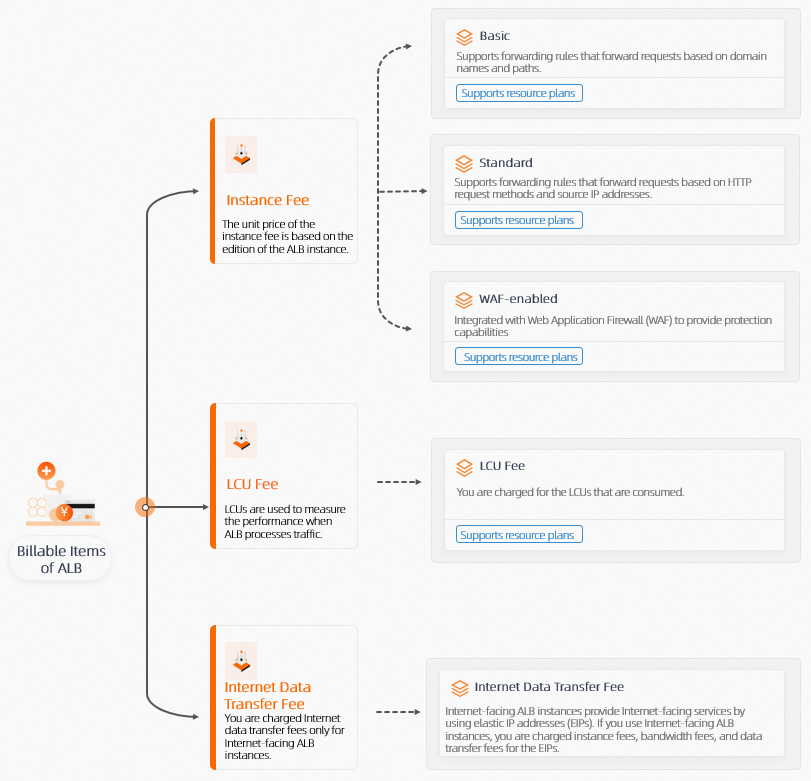
Billing cycle
ALB instance fees and LCU fees are billed hourly based on actual usage. Bills are typically issued within one hour after each billing cycle ends.
For Internet-facing ALB instances, Internet data transfer fees are charged through the associated EIPs. The billing cycle, deduction, and bill issuance time follow the same schedule as pay-as-you-go EIP. EIP billing overview.
Pricing
ALB list prices are detailed in ALB billing rules and ALB resource plans. For actual prices, visit the ALB buy page.
Estimate LCU consumption with the ALB LCU Calculator.
More Information
Overdue payments
Causes
Your account may become overdue if:
-
No resource plan is purchased and your account balance is insufficient.
-
A resource plan is purchased but does not cover all fees.
Overdue payment policy
|
Status |
Resource status |
Action |
|
Overdue warning |
The system calculates the average payable amount from the past 7 hours to determine whether your account balance can cover 3 billing periods. If not, the system sends an SMS or email notification. Warning
After your account becomes overdue, your instances may be stopped. Top up your account promptly to avoid service disruption. |
Top up your Alibaba Cloud account. The instance resumes immediately. |
|
After overdue |
After your account becomes overdue, all pay-as-you-go instances under the account enter the overdue state. Instances continue to run for 15 days after the overdue event, then they are locked and stopped immediately. Billing stops when instances are stopped. You cannot release instances during the overdue period. If you top up and clear the overdue amount within 15 days of the instance being stopped, ALB service resumes automatically. |
Top up your Alibaba Cloud account. The instance resumes immediately. |
|
15 days after stoppage |
The ALB instance is released. All configurations and data associated with the instance are permanently deleted and cannot be recovered. |
Unrecoverable. |
View the overdue amount
-
Log on to the Expenses and Costs console.
-
On the Billing Account page, view the overdue amount.
View usage details
-
Log on to the Expenses and Costs console. In the left-side navigation pane, choose .
-
Click View Usage Details in the upper-right corner. Set Commodity Name to Application Load Balancer and Billable Item to Application Load Balancer. Configure the Time Period and Time Unit, then click Export CSV.
The exported file shows detailed LCU usage by time range, instance ID, and other dimensions.
Query bills and consumption details
-
On the Bill Details page, view consumption and billing information. For more information, see View and analyze bills.