If your Linux simple application server is unreachable and the secure log contains the following error, the cause is a misconfigured Pluggable Authentication Modules (PAM) path. Specifically, pam_limits.so is referenced at the wrong location.
login: Module is unknown.
login: PAM unable to dlopen(/lib/security/pam_limits.so): /lib/security/pam_limits.so: cannot open shared object file: No such file or directory.
Before you begin
Determine which PAM configuration file is affected, then decide how to proceed:
| File | Controls | Action |
|---|---|---|
/etc/pam.d/sshd | SSH logon | Fix it yourself using the steps below |
/etc/pam.d/system-auth | System-wide authentication | Fix it yourself using the steps below |
/etc/pam.d/login | Console (management terminal) | Submit a ticket to contact Alibaba Cloud technical support |
Because SSH is blocked, you cannot log in through a normal connection. Use the rescue feature instead.
The rescue feature uses a recovery connection that allows access even when normal logon is completely blocked.
Fix the PAM configuration path
Connect to your server using the rescue feature. For details, see Connect to a Linux server by using the rescue feature.
View the PAM configuration file to confirm the incorrect path. Replace
[$File_Name]with the absolute path of the configuration file — for example,/etc/pam.d/sshd:cat [$File_Name]Look for a line that references
pam_limits.so. The configuration resembles: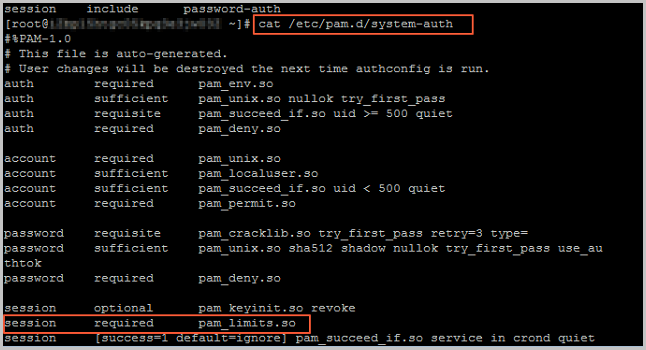
Find the actual location of
pam_limits.soon your system:ll /lib/security/pam_limits.soOn 64-bit Linux instances, the correct path is
/lib64/security.Open the configuration file and update the
pam_limits.sopath:vi [$File_Name]Change the
pam_limits.soline to the correct path. For 64-bit instances:session required /lib64/security/pam_limits.soSave the file and exit.
Connect to your server again to verify the fix. For details, see Connect to a Linux server.