When scheduled jobs fail or produce unexpected results, you need centralized, searchable logs to identify the root cause -- especially for distributed jobs that run across multiple workers. Simple Log Service in SchedulerX 2.0 collects execution logs from all job types, including distributed jobs, and makes them searchable in the SchedulerX console. To set up the integration, add a SchedulerX appender to your Log4j2, Log4j, or Logback configuration.
Before you begin
Make sure that you have:
A job
SchedulerX 2.0 Professional Edition with Simple Log Service activated
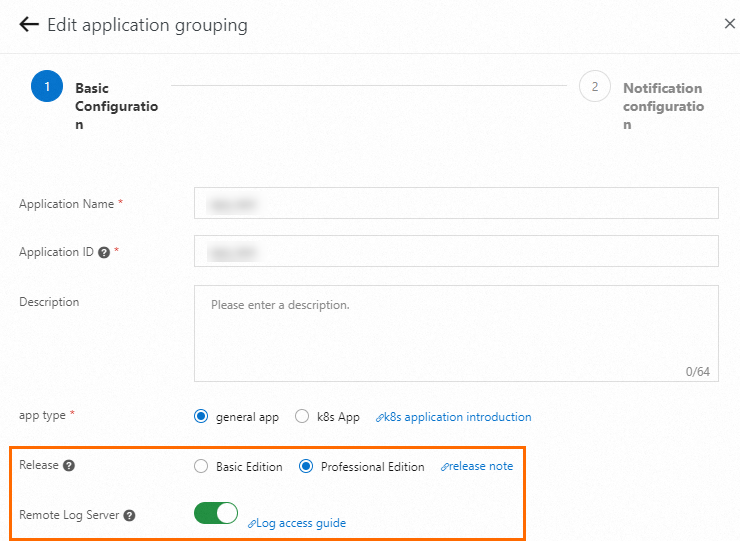
Logs are retained for up to two weeks after activation. Expired logs are deleted automatically.
Step 1: Update the SchedulerX agent
Update the SchedulerX agent to the latest version. For version details, see Release notes.
If your application uses Spring Boot Starter, add the following dependency to pom.xml:
<dependency>
    <groupId>com.aliyun.schedulerx</groupId>
    <artifactId>schedulerx2-spring-boot-starter</artifactId>
    <version>${Latest version of the SchedulerX client}</version>
</dependency>
Step 2: Configure a log appender
SchedulerX provides appenders for Log4j2, Log4j, and Logback. Choose the section that matches your logging framework.
Two collection strategies are available:
Strategy | Scope | Trade-off |
Job-only logs | Logs written to the | Keeps job logs separate from application logs. Recommended for most use cases. |
All application logs | All logs via the root logger | Captures everything, but mixes job logs with general application output and reduces query efficiency. |
Log4j2
Collect job-only logs (recommended)
Add the SchedulerX appender and a dedicated
schedulerxlogger to your Log4j2 configuration file:<?xml version="1.0" encoding="UTF-8"?> <Configuration status="off"> <Appenders> <Console name="Console" target="SYSTEM_OUT"> <PatternLayout pattern="%d{yyyy-MM-dd HH:mm:ss.SSS} [%t] %-5level %logger{36} - %m%n" /> </Console> <SchedulerxLog4j2Appender name="schedulerxLog" timeFormat="yyyy-MM-dd'T'HH:mmZ" timeZone="UTC" ignoreExceptions="true"> <PatternLayout pattern="%d %-5level [%thread] %logger{0}: %msg"/> </SchedulerxLog4j2Appender> </Appenders> <Loggers> <Root level="info"> <AppenderRef ref="Console" /> </Root> <Logger name="schedulerx" level="info" additivity="false"> <AppenderRef ref="schedulerxLog" /> </Logger> </Loggers> </Configuration>In your job processor, create a logger named
schedulerxand use it to write logs:package com.hxm.test.processor; import com.alibaba.schedulerx.worker.domain.JobContext; import com.alibaba.schedulerx.worker.processor.JavaProcessor; import com.alibaba.schedulerx.worker.processor.ProcessResult; import org.slf4j.Logger; import org.slf4j.LoggerFactory; import org.springframework.stereotype.Component; @Component public class HelloWorldJob3 extends JavaProcessor { // Use the "schedulerx" logger to send logs to Simple Log Service private static final Logger logger = LoggerFactory.getLogger("schedulerx"); @Override public ProcessResult process(JobContext context) throws Exception { logger.info("hello HelloWorldJob3"); return new ProcessResult(true); } }
Collect all application logs
To collect all logs, add the schedulerxLog appender to the root logger instead of a dedicated logger:
<?xml version="1.0" encoding="UTF-8"?>
<Configuration status="off">
    <Appenders>
        <Console name="Console" target="SYSTEM_OUT">
            <PatternLayout
                pattern="%d{yyyy-MM-dd HH:mm:ss.SSS} [%t] %-5level %logger{36} - %m%n" />
        </Console>
        <SchedulerxLog4j2Appender name="schedulerxLog"
            timeFormat="yyyy-MM-dd'T'HH:mmZ"
            timeZone="UTC"
            ignoreExceptions="true">
            <PatternLayout pattern="%d %-5level [%thread] %logger{0}: %msg"/>
        </SchedulerxLog4j2Appender>
    </Appenders>

    <Loggers>
        <Root level="info">
            <AppenderRef ref="Console" />
            <AppenderRef ref="schedulerxLog" />
        </Root>
    </Loggers>
</Configuration>
Log4j
Collect job-only logs (recommended)
Add the appender and a dedicated
schedulerxlogger tolog4j.properties:log4j.rootLogger = INFO,console log4j.logger.schedulerx=schedulerxLog log4j.appender.schedulerxLog=com.alibaba.schedulerx.worker.log.appender.SchedulerxLog4jAppenderIn your job processor, create a logger named
schedulerxand use it to write logs:package com.hxm.test.processor; import com.alibaba.schedulerx.worker.domain.JobContext; import com.alibaba.schedulerx.worker.processor.JavaProcessor; import com.alibaba.schedulerx.worker.processor.ProcessResult; import org.slf4j.Logger; import org.slf4j.LoggerFactory; import org.springframework.stereotype.Component; @Component public class HelloWorldJob3 extends JavaProcessor { // Use the "schedulerx" logger to send logs to Simple Log Service private static final Logger logger = LoggerFactory.getLogger("schedulerx"); @Override public ProcessResult process(JobContext context) throws Exception { logger.info("hello HelloWorldJob3"); return new ProcessResult(true); } }
Collect all application logs
To collect all logs, add the schedulerxLog appender to the root logger in log4j.properties:
log4j.rootLogger = INFO,console,schedulerxLog
log4j.appender.schedulerxLog=com.alibaba.schedulerx.worker.log.appender.SchedulerxLog4jAppender
Logback
SchedulerxLogbackAppender is packaged in schedulerx2-worker.jar. Make sure you have updated the SchedulerX agent to the latest version before configuring this appender. For version details, see Release notes.
Collect job-only logs (recommended)
Add the appender and a dedicated
schedulerxlogger tologback.xml:<appender name="schedulerxLog" class="com.alibaba.schedulerx.worker.log.appender.SchedulerxLogbackAppender"> <timeFormat>yyyy-MM-dd'T'HH:mmZ</timeFormat> <timeZone>UTC</timeZone> </appender> <root level="INFO"> <appender-ref ref="CONSOLE" /> </root> <logger name="schedulerx" level="INFO"> <appender-ref ref="schedulerxLog"/> </logger>In your job processor, create a logger named
schedulerxand use it to write logs:package com.hxm.test.processor; import com.alibaba.schedulerx.worker.domain.JobContext; import com.alibaba.schedulerx.worker.processor.JavaProcessor; import com.alibaba.schedulerx.worker.processor.ProcessResult; import org.slf4j.Logger; import org.slf4j.LoggerFactory; import org.springframework.stereotype.Component; @Component public class HelloWorldJob3 extends JavaProcessor { // Use the "schedulerx" logger to send logs to Simple Log Service private static final Logger logger = LoggerFactory.getLogger("schedulerx"); @Override public ProcessResult process(JobContext context) throws Exception { logger.info("hello HelloWorldJob3"); return new ProcessResult(true); } }
Collect all application logs
To collect all logs, add the schedulerxLog appender to the root logger in logback.xml:
<appender name="schedulerxLog" class="com.alibaba.schedulerx.worker.log.appender.SchedulerxLogbackAppender">
    <timeFormat>yyyy-MM-dd'T'HH:mmZ</timeFormat>
    <timeZone>UTC</timeZone>
</appender>

<root level="INFO">
    <appender-ref ref="CONSOLE" />
    <appender-ref ref="schedulerxLog"/>
</root>
Step 3: View job logs
Log on to the SchedulerX console.
In the left-side navigation pane, click Task Management.
Find the target job and choose more > Historical records in the Operation column.
In the Task instance records panel, find the target job instance and click Log in the Operation column.
Log fields
Field | Description |
| IP address of the worker that produced the log entry. |
| Execution ID in the format |
| Log level, such as INFO, WARN, or ERROR. |
| Log content. |
| Exception stack trace. Present only when the application throws an error. |
| Timestamp of the log entry. |
Query logs by keyword
SchedulerX 2.0 retains only the most recent 60 execution records of a job instance. To search across older executions, click Log Query in the left-side navigation pane. On the Log Query page, filter by job ID, keyword, or time range.
Troubleshooting examples
Diagnose a job failure
With Simple Log Service integrated, SchedulerX captures both job-level logs and service-level exceptions. This example demonstrates how a division-by-zero error appears in the log output.
Create a job processor that calls a service method and logs the result:
    package com.hxm.test.processor;

    import com.alibaba.schedulerx.test.service.TestService;
    import com.alibaba.schedulerx.worker.domain.JobContext;
    import com.alibaba.schedulerx.worker.processor.JavaProcessor;
    import com.alibaba.schedulerx.worker.processor.ProcessResult;

    import org.apache.logging.log4j.LogManager;
    import org.apache.logging.log4j.Logger;
    import org.springframework.beans.factory.annotation.Autowired;
    import org.springframework.stereotype.Component;

    @Component
    public class HelloWorldJob extends JavaProcessor {
        // Use the "schedulerx" logger to send logs to Simple Log Service
        private static final Logger LOGGER = LogManager.getLogger("schedulerx");

        @Autowired
        private TestService testService;

        @Override
        public ProcessResult process(JobContext context) throws Exception {
            String parameters = context.getJobParameters();
            String tokens[] = parameters.split(" ");
            int a = Integer.valueOf(tokens[0]);
            int b = Integer.valueOf(tokens[1]);
            int c = testService.doDivision(a, b);
            LOGGER.info("testService.doDivision finished, a={}, b={}, c={}", a, b, c);
            if (c < 0) {
                return new ProcessResult(false, "result=" + c);
            }
            return new ProcessResult(true);
        }
    }
Create the service class:
    package com.hxm.test.service;

    import org.apache.logging.log4j.LogManager;
    import org.apache.logging.log4j.Logger;
    import org.springframework.stereotype.Service;

    @Service("testService")
    public class TestServiceImpl implements TestService {
        // Use the "schedulerx" logger to send logs to Simple Log Service
        private static final Logger LOGGER = LogManager.getLogger("schedulerx");

        @Override
        public int doDivision(int a, int b) {
            try {
                 LOGGER.info("start to do division c = " + a + "/" + b);
                 int c = a/b;
                 LOGGER.info("c=" + c);
                 return c;
            } catch (Exception e) {
                LOGGER.error("", e);
            }
            return -1;
        }
    }
Configure the job in the SchedulerX console. Set the job parameters to
1 0to trigger a division-by-zero error.
Trigger the job, open the Task instance records panel, and check the logs. The log shows that
TestServiceImplthrew anArithmeticException("/ by zero"), which caused the job to fail.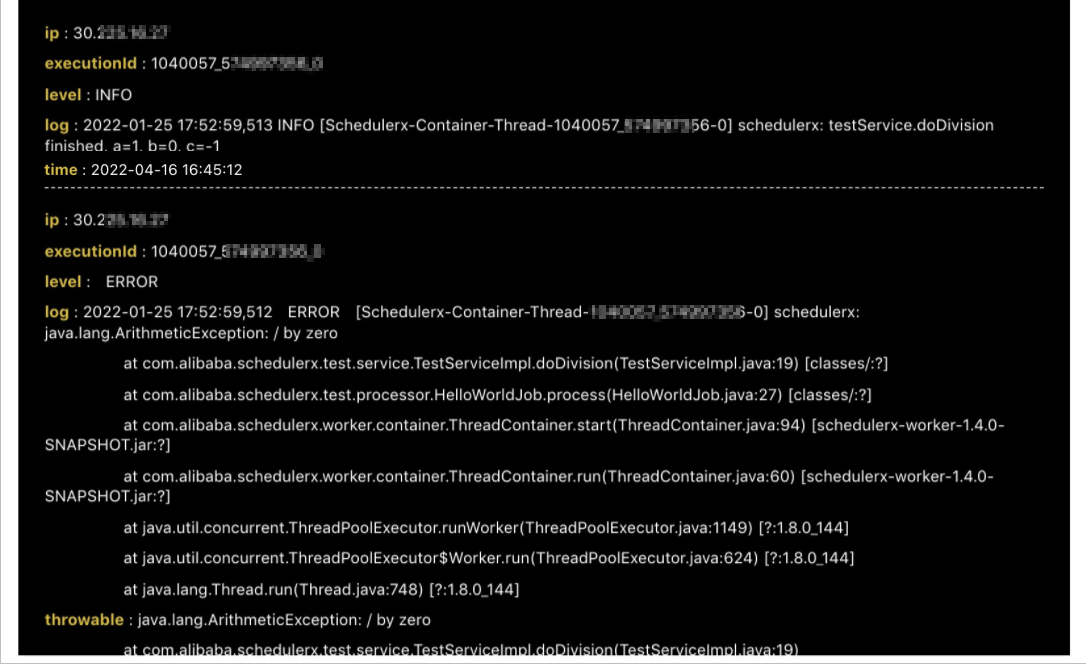
Diagnose a distributed job failure
Distributed jobs dispatch subtasks across multiple workers for batch processing. When a subtask fails, search the logs to pinpoint the failed task and its cause.
Create a map job processor that dispatches messages. In this example,
msg_23is deliberately set to fail:package com.hxm.test.processor; import java.util.ArrayList; import java.util.List; import com.alibaba.schedulerx.worker.domain.JobContext; import com.alibaba.schedulerx.worker.processor.MapJobProcessor; import com.alibaba.schedulerx.worker.processor.ProcessResult; import org.apache.logging.log4j.LogManager; import org.apache.logging.log4j.Logger; public class TestMapJobProcessor extends MapJobProcessor { private static final Logger LOGGER = LogManager.getLogger("schedulerx"); @Override public ProcessResult process(JobContext context) throws Exception { String taskName = context.getTaskName(); String parameter = context.getJobParameters(); int dispatchNum = Integer.valueOf(parameter); if (isRootTask(context)) { LOGGER.info("start root task"); List<String> msgList = new ArrayList<>(); for (int i = 0; i <= dispatchNum; i++) { msgList.add("msg_" + i); } return map(msgList, "Level1Dispatch"); } else if (taskName.equals("Level1Dispatch")) { String task = (String)context.getTask(); if (task.equals("msg_23")) { LOGGER.error("msg={}, failed", task); return new ProcessResult(false); } else { LOGGER.info("msg={}, success", task); } return new ProcessResult(true); } return new ProcessResult(false); } }Configure the job in the SchedulerX console and trigger it.
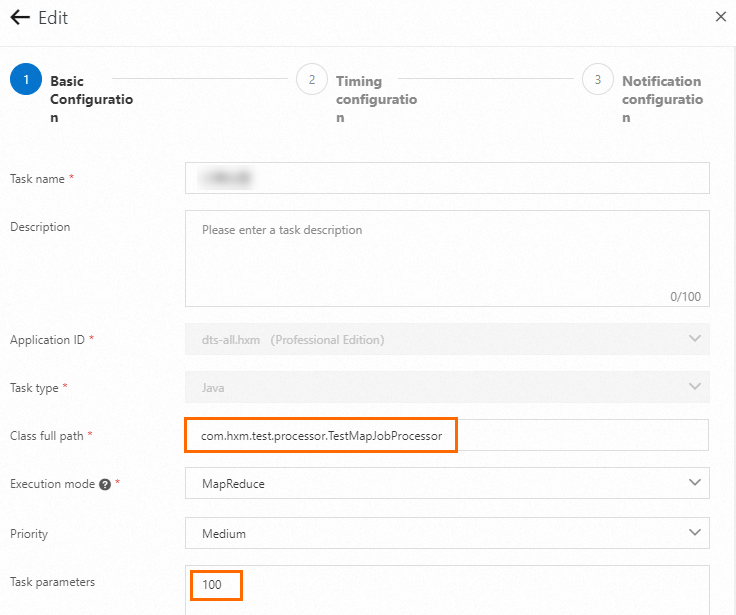
Open the log viewer. For instructions, see Step 3: View job logs.
Search for keywords such as
failedto locate the failed subtask (msg_23) and the root cause.