SASE collects workflow data for your organization, providing a comprehensive overview of your approval workflows and their details.
Prerequisites
You have configured an approval workflow. For more information, see Configure an approval workflow.
View workflow statistics
Log on to the Secure Access Service Edge console.
-
In the left-side navigation pane, choose .
-
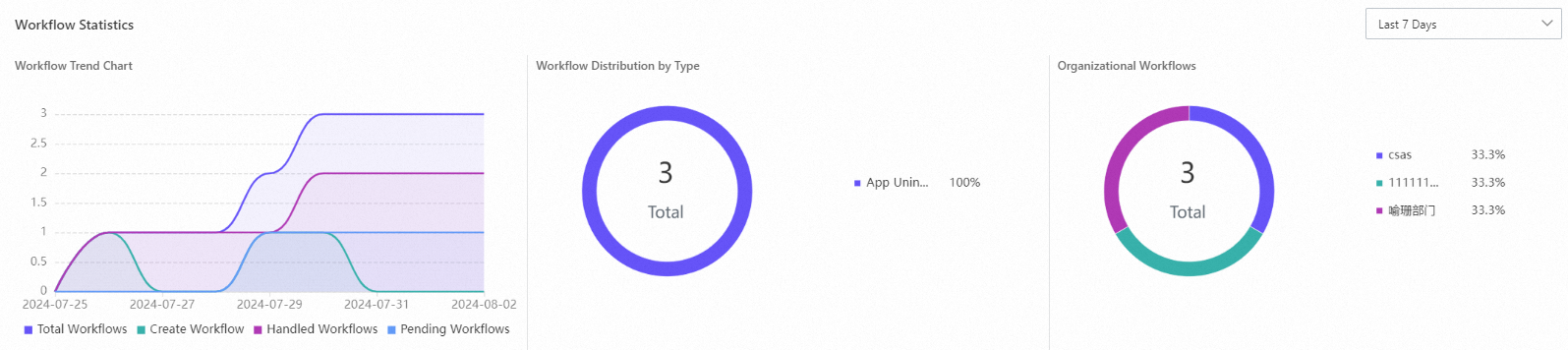
The workflow statistics section shows data for the last 24 hours, last 7 days, and last 30 days, including trend charts, workflow distribution by type, and workflow counts by organization.
View workflow processing status
SASE lists in-progress and completed workflows. You can search for specific workflows to view their details.
You can filter the workflow list by workflow type and initiator. The table includes columns for instance ID, workflow name, workflow type, start time, initiator, department, approval step, and due date. The Actions column contains the Details, Batch Approve, and Batch Reject buttons.
Approve a workflow
On the Processing tab, click Approve or Reject to approve or reject the selected workflows.