Serverless App Engine (SAE) applications use Kubernetes Service (K8s Service) to access internal services. By default, SAE relies on Alibaba Cloud’s built-in DNS resolution service. To resolve internal domain names managed by external DNS systems, configure PrivateZone forwarding rules. This topic describes how to use PrivateZone forwarding rules to support both K8s Service internal resolution and targeted forwarding to external DNS systems, enabling hybrid DNS resolution for your business.
Solution overview
Scenarios
This topic applies to scenarios where SAE applications require both the built-in authoritative DNS resolution provided by PrivateZone and compatible resolution from external DNS systems.
K8s Service resolution: After you enable K8s Service for an SAE application, you can access internal services using a
K8s Servicename, such asdemo.test.svc.cluster.local.cn-hangzhou. This relies on authoritative DNS records automatically generated by PrivateZone.Internal domain name resolution: To resolve domain names managed by self-built or third-party DNS systems, such as
www.example.com, you must configure PrivateZone forwarding rules. SAE’s default DNS policy does not resolve internal domain names. Forwarding rules direct DNS queries for specific domains, such aswww.example.com, to external DNS servers. This enables consistent resolution for both internal and external domain names.
Operation flow

External DNS server resolution process

Prerequisites
Set up a DNS service in your existing business system.
Because multiple methods exist for setting up a DNS service—such as deploying it on ECS or installing CoreDNS components in container services—this example does not cover the setup process.
1. Enable K8s Service for SAE application
This topic covers only key steps. For full configuration details, see Use a K8s ServiceName to configure application service access.
On the Deploy Application page of the target SAE application, go to the Service Registration And Discovery section. Enable Kubernetes Service-based Service Registration And Discovery, and then configure the Port, Container Port, and Protocol.
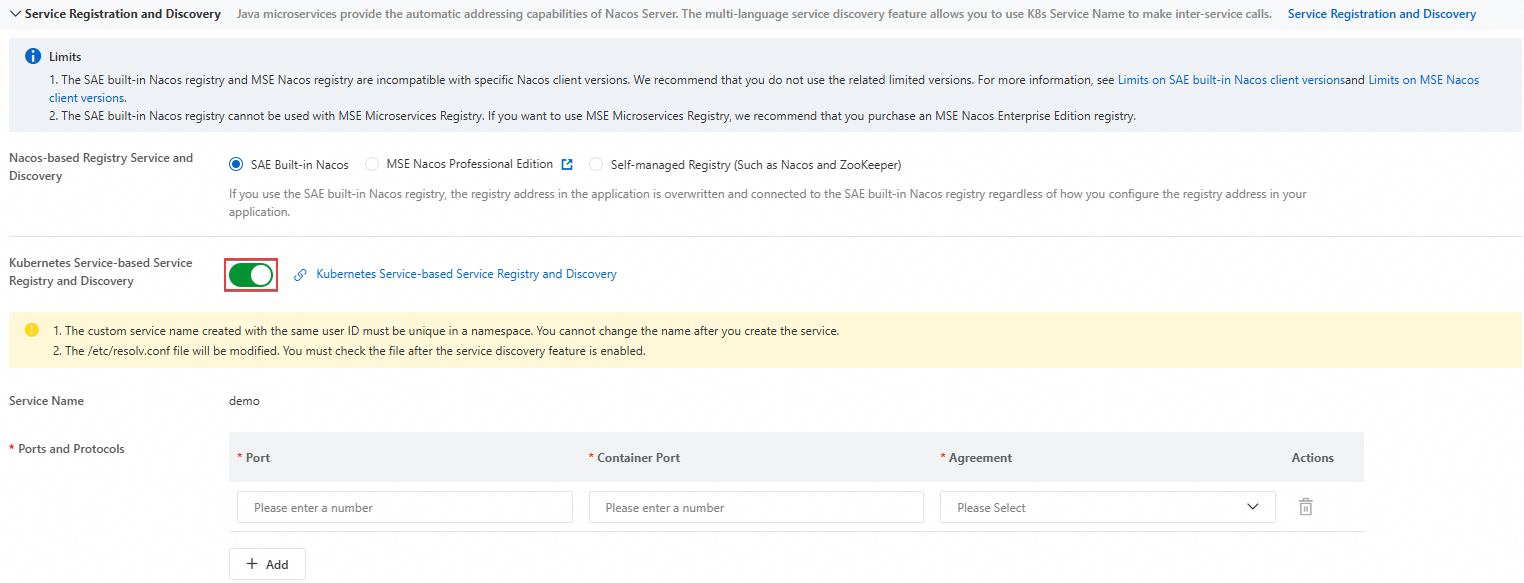
After you enable K8s Service, the system adds a DNS record to internal DNS resolution (PrivateZone). You can view this record on the Built-in Authoritative Module tab in the Alibaba Cloud DNS console
On the Application Information tab of the Basic Information page, locate the Application Access Settings section. On the Kubernetes Service-based Access tab, copy the access address.
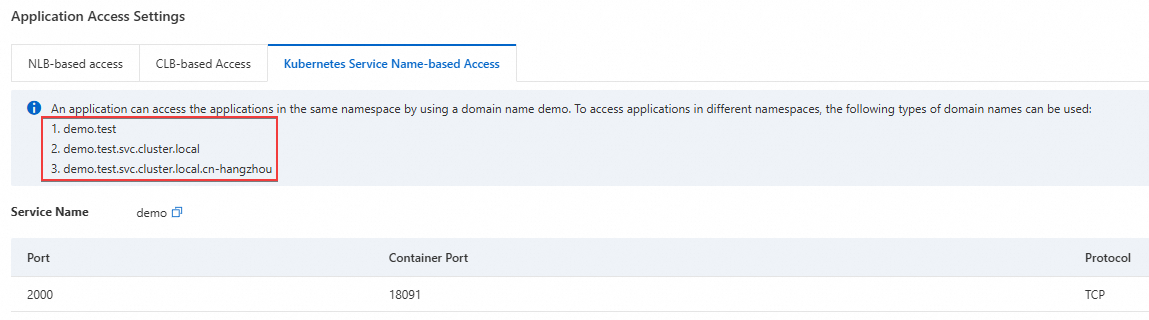
2. Test resolution results before configuration
Use Webshell to log on to the instance of the target SAE application. Then run the nslookup or dig command to resolve the target domain name.
In this example, the domain name resolved by the external DNS server iswww.example.com, and its internal IP address is192.168.2.54.
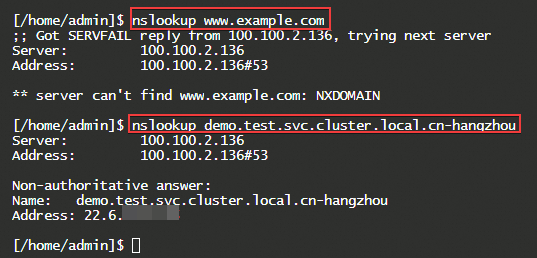
The forward DNS lookup results are as follows:
The domain name cannot be resolved to the IP address of the external DNS system.
NoteComplete the following steps to forward resolution requests to the external DNS system.
The record value for the K8s Service access address resolves successfully. You can verify this record on the Built-in Authoritative Module tab in the Alibaba Cloud DNS console.
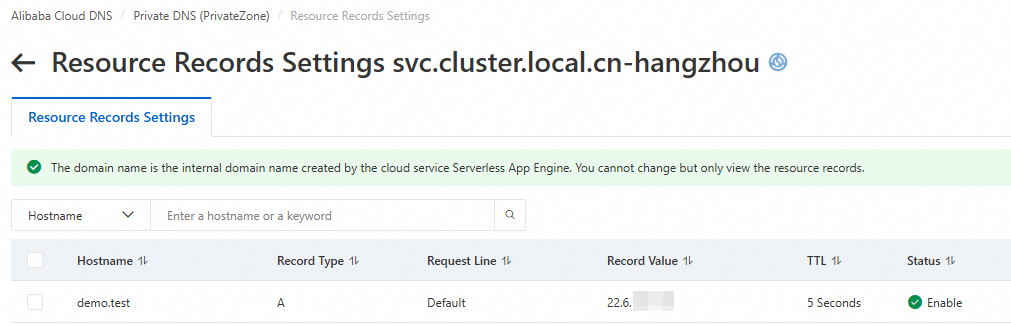
3. Create an outbound endpoint
Log on to the Alibaba Cloud DNS console.
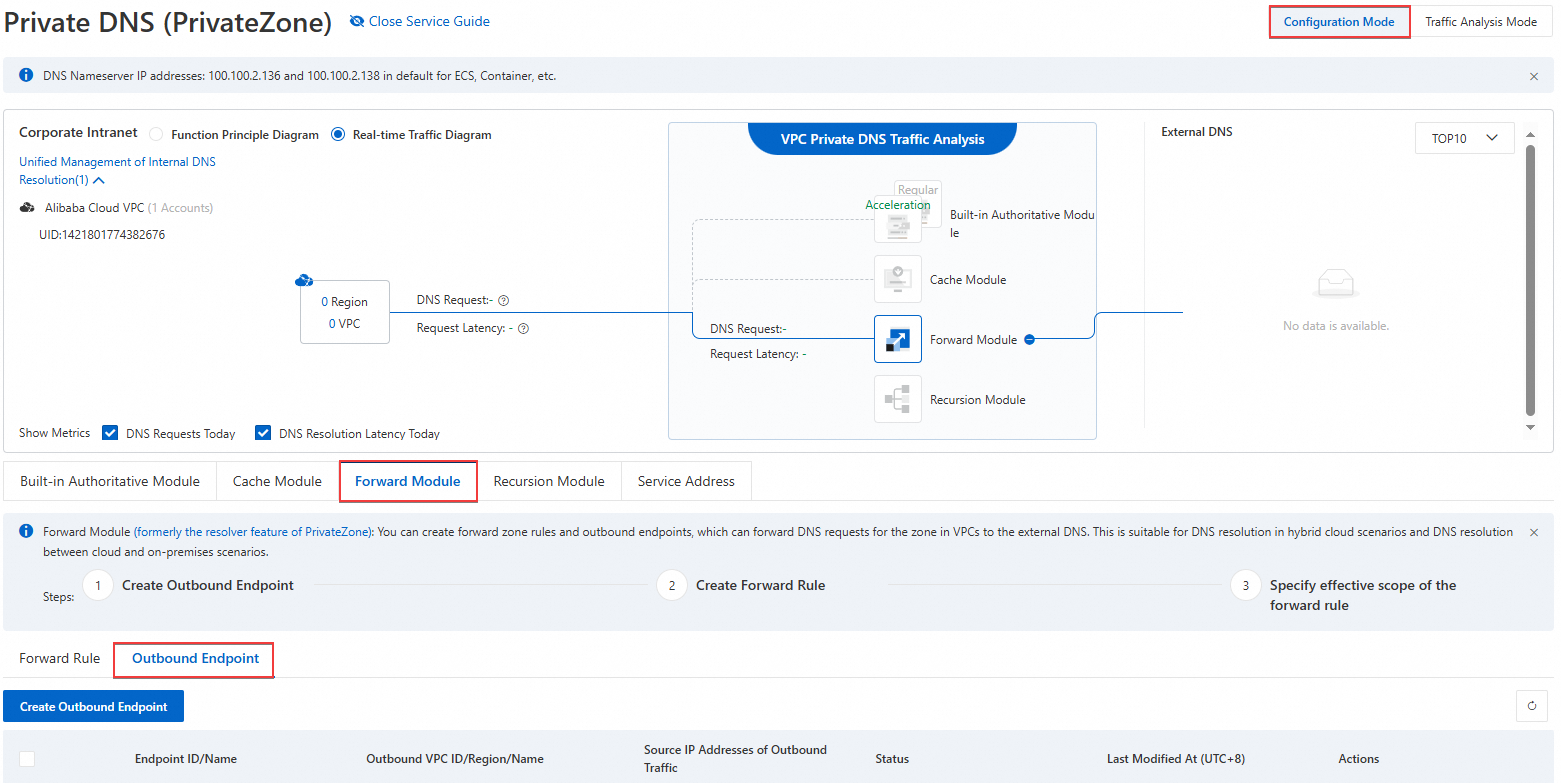
In the left navigation pane, click Private DNS (PrivateZone). In the upper-right corner of the page, select Management Configuration Mode, and then click Forwarding Management.
On the Forward Management page, select the Outbound Endpoint tab, and then click Create Outbound Endpoint.
In the Create Outbound Endpoint dialog box, configure the Endpoint Name, Outbound VPC, Security Group, and Source IP Address Of Outbound Traffic, and then click OK.
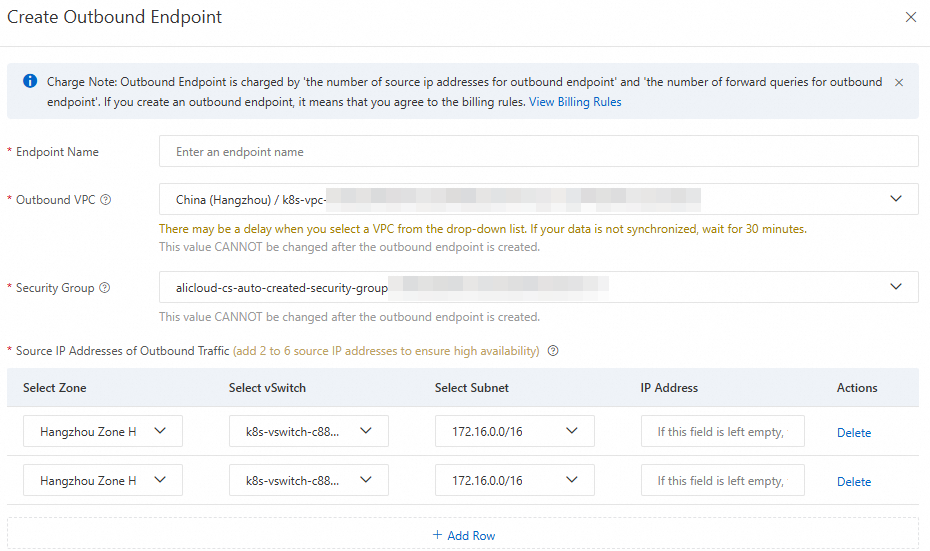
Endpoint name: The name of the endpoint. Specify a name that meets your business requirements.
Outbound VPC: All outbound DNS query traffic from Forwarding Management will be routed through this VPC.
ImportantAfter you create an outbound endpoint, you cannot modify the Outbound VPC to prevent accidental changes that may interrupt online traffic.
Security Group: The security group rules apply to the outbound VPC.
ImportantEnsure port 53 is open for outbound traffic in the security group. Inbound rules do not affect forwarding.
Only non-managed security groups are supported.
Source IP Address of Outbound Traffic: Select available IP addresses from the subnet in the available area.
ImportantTo ensure high availability, the Resolver requires at least two outbound source IP addresses. We recommend distributing them across different zones. A maximum of six outbound source IP addresses is allowed.
If no IP address is specified, the system assigns one automatically.
If the external DNS server has a public IP address, configure an Internet NAT gateway so the IP address can access the Internet.
4. Configure forwarding rules and effective scope
4.1 Configure forwarding rules
Go to the Private DNS (PrivateZone) page. On the Forward Module tab, click Forwarding Rules, and then click Create Forwarding Rule.
In the Create Forwarding Rule panel, configure the parameters, and then click OK.
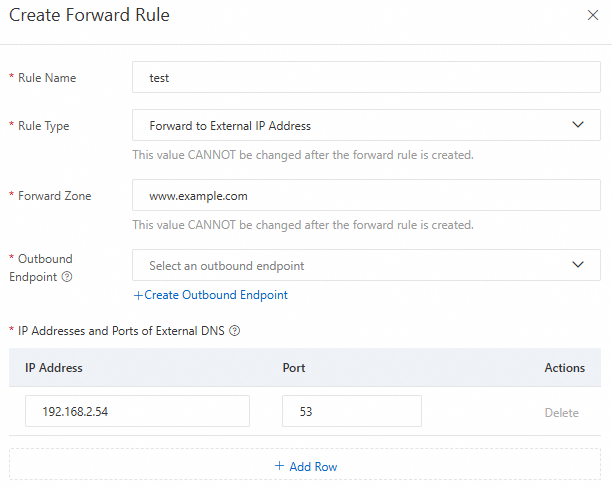
Rule Name: Enter a descriptive name for the rule.
Rule Type: Only forwarding to external IP addresses is supported.
Forwarding Domain (Zone): Enter the domain name (zone) to forward for resolution.
ImportantYou can forward all domain names (root domain) by entering a period:
..You can forward top-level domains. For example, enter:
com,cn, ortop.If a DNS query matches multiple forwarding domains—such as
example.com,com, and.—the longest matching zone takes precedence. In this case, the query matchesexample.com.
Outbound Endpoint: Select the outbound endpoint created in the previous step.
IP Address and Port of External DNS System: Enter the IP address and port of the target DNS server. You can add up to six entries. Both private and public IP addresses are supported.
ImportantThe following IP address ranges are reserved by the system and cannot be used as external DNS server addresses:
100.100.2.136~100.100.2.138, 100.100.2.116~100.100.2.118.If the external DNS server has a public IP address and the ECS instances in your outbound endpoint VPC do not have public IP addresses, activate NAT Gateway and configure private SNAT entry for NAT Gateway.
4.2 Configure the effective scope of forwarding rules
In the Actions column of the created forwarding rule, click Effective Scope Of Forwarding Rule. In the Effective Scope Of Forward Zone panel, select the VPC where the forwarding rule applies, and then click OK.
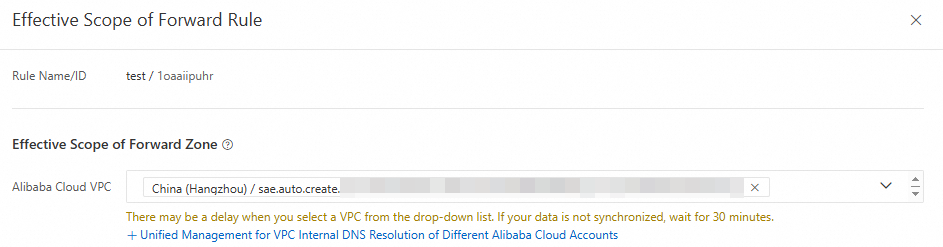
The VPC you select must be the same VPC where the target SAE application is deployed.
You can associate a forwarding rule only with a VPC located in the same region as the outbound endpoint specified for the rule.
When multiple forwarding rules apply to the same VPC, their forwarding domains must be unique.
When a forwarding rule and a built-in authoritative domain name share the same effective scope, their forwarding domains may match. In such cases, domain name resolution requests in the associated VPC are processed first by the built-in authority.
Cross-account VPC association is supported. For more information, see Associate VPCs across accounts.
5. Verify resolution results
Use Webshell to log on to the instance of the target SAE application. Then run the nslookup or dig command to resolve the target domain name.
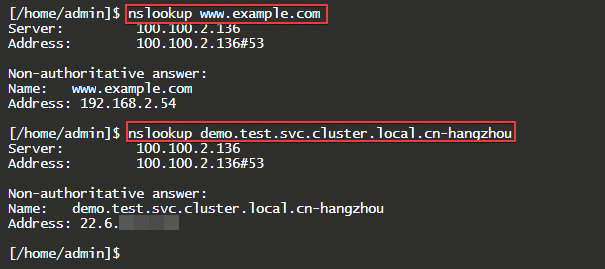
The forward DNS lookup results show that:
The system successfully resolved the IP address of the external DNS system.
The record value for the K8s Service access address resolves successfully.
This confirms that DNS Forwarding Management is configured correctly.