Serverless App Engine (SAE) is an easy-to-use, fully managed, and highly elastic platform that hosts applications with zero code modification. With SAE, you do not need to manage the underlying Infrastructure as a Service (IaaS) or Kubernetes. You can deploy online applications, written in any programming language to SAE in seconds from source code, a code package, or a Docker image. SAE automatically scales application instances and charges you based on usage. It also provides out-of-the-box capabilities such as logging, monitoring, and Server Load Balancer.
Service architecture
SAE architecture is shown in the following figure. For more information, see Terms.
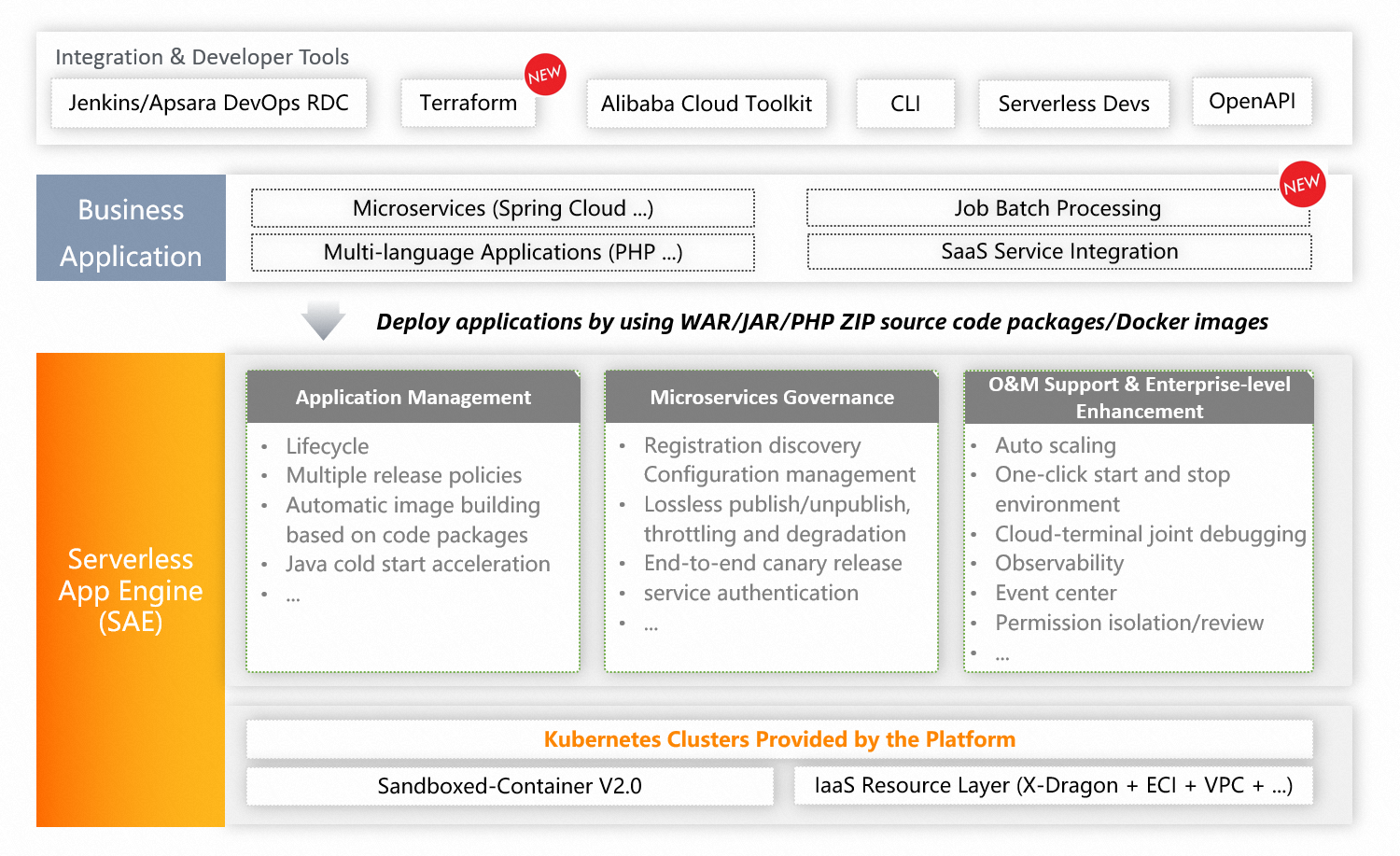
SAE is built on Kubernetes to combine the serverless architecture with microservices frameworks.
SAE supports various microservices frameworks, such as Spring Cloud, Dubbo, and HSF. It also supports multiple deployment channels, such as the UI, Apsara Devops, and plug-ins, and various deployment methods, such as WAR packages, JAR packages, ZIP packages, and images. SAE works with multiple programming languages, including Java, PHP, and Python.
Features
Feature | Description |
Full lifecycle management for applications | SAE provides full lifecycle management for applications, from creation to runtime. You can use multiple release policies, such as phased release and canary release. You can also use traffic-based canary releases that take effect in seconds. The release process is observable and can be rolled back. |
Platform engineering capabilities | You can deploy SAE applications in seconds from a source code repository or from WAR or JAR packages. SAE supports automatic continuous delivery (CD). It also provides capabilities such as application templates, a command-line interface (CLI), a component library, and a cost manager to help developers deliver applications quickly and efficiently. |
Non-intrusive microservice administration | You can migrate Spring Cloud and Dubbo applications to SAE with zero code modification. SAE provides capabilities such as service registration and discovery, environment isolation, configuration management, throttling and degradation, graceful application startup and shutdown, service authentication, and end-to-end canary release. |
High elasticity | SAE can perform auto scaling within seconds. You can configure multiple elastic policies and metrics in the console, such as CPU, memory, QPS, RT, TCP connections, and SLB QPS. |
Application cold start acceleration | SAE supports cold start acceleration that lets you start Java applications in seconds. This reduces system resource consumption and improves the efficiency of application deployment, scaling, and runtime. |
One-click start and stop for development and staging environments | Large and medium-sized enterprises often have multiple environments where resources can be wasted by idle application instances in staging environments. To address this, SAE provides logically isolated runtime environments. You can start and stop development and staging environments with a single click to save hardware costs. |
Non-intrusive application monitoring | Based on eBPF technology, SAE provides non-intrusive application monitoring and alerting for applications written in any language or framework. It monitors Layer 7 inbound traffic and provides application-level and trace-level monitoring for Java applications to help you quickly locate and diagnose issues. |
Remote debugging and cloud-terminal joint debugging | SAE provides remote debugging to diagnose applications deployed in SAE. It also offers cloud-terminal joint debugging for microservices. This feature lets you subscribe to local services and register them with the built-in registry in SAE. Local services and cloud-based SAE services can then call each other. |
Billing
For more information about billing for SAE, see Billing overview.
Related links
Document | Description |
Describes the scenarios where you can use SAE, including application hosting, microservices model transformation, elastic scaling, and continuous integration and delivery. | |
Describes the features of SAE and how to use SAE. This document helps you quickly get started with SAE and provides tutorials for different practices. | |
If you have any feedback or questions, join the SAE DingTalk user group to contact us. |