SAE deeply integrates the microservices governance capabilities of MSE, allowing you to manage your applications more efficiently. This topic describes how to enable microservices governance in different scenarios and configure graceful start and shutdown.
Function introduction
Introduction to microservices governance
Serverless App Engine (SAE) provides powerful microservices governance capabilities through seamless integration with Microservices Engine (MSE). It supports service discovery and configuration management along with features such as graceful start and shutdown, traffic governance, system protection, grayscale messaging, full link tracing, intelligent circuit breaking, downgrading policies, and same-zone priority. These capabilities significantly improve service response speed and stability while simplifying architecture operations and maintenance. With these capabilities, MSE ensures that your microservice applications run efficiently and stably.
Introduction to graceful start and shutdown
This topic only introduces the graceful start and shutdown features. For information about other microservices governance features and their configuration, see Microservices governance.
Graceful start
For online applications, operations such as release, scale-out, scale-in, and restart are inevitable. SAE provides the graceful start feature to protect applications during these operations. In a microservice architecture, a provider service can be called by consumers as soon as it is registered with the registry. However, the provider may still need further initialization, such as initializing database connection pools. Therefore, we recommend enabling the graceful start feature for microservice applications with high traffic volumes.
Graceful shutdown
When updating an online application, you must ensure service continuity during the period when the application is stopped and restarted. Due to the calling characteristics of microservice applications, when a provider instance is directly taken offline under high concurrency, consumer instances cannot detect the status of downstream instances in real time. This causes requests to continue being forwarded to offline instances, resulting in request errors and traffic loss. To ensure that your application can be shut down without affecting your business when you deploy, stop, roll back, scale in, or reset the application, you can configure the graceful shutdown feature.
Prerequisites
This feature is applicable only to Java applications.
You need to activate MSE Professional Edition for microservices governance.
ImportantWhen you use the microservices governance feature of MSE in SAE, MSE will generate separate charges.
Access methods
The access methods vary in different scenarios:
Create an application
Log on to the SAE console. In the left-side navigation pane, choose . Select the destination region and namespace, and then click Create Application.
On the Application Basic Information wizard page, configure the parameters and click Next: Advanced Settings.
Modify a running application
WarningAfter you redeploy an application, the application is restarted. To prevent unpredictable errors such as business interruptions, we recommend that you deploy applications during off-peak hours.
Log on to the SAE console. In the left-side navigation pane, choose . Select the destination region and namespace, and then click the name of the target application.
On the Basic Information page of the application, click Deploy Application.
Modify a stopped application
Log on to the SAE console. In the left-side navigation pane, choose . Select the destination region and namespace, and then click the name of the target application.
On the Basic Information page of the application, click Modify Application Configuration.
Find and expand the Microservices Governance section, and follow these steps to configure.
Enable microservices governance and configure graceful start and shutdown
Enable microservices governance
In the Microservices Governance section, turn on the microservices governance feature.

After the microservices governance feature is enabled, the system automatically injects a built-in Agent into each instance of the application. This Agent uses approximately 0.2 cores and 200 MB of resources. Please plan your resources accordingly.
Configure graceful start and shutdown
Configure graceful start
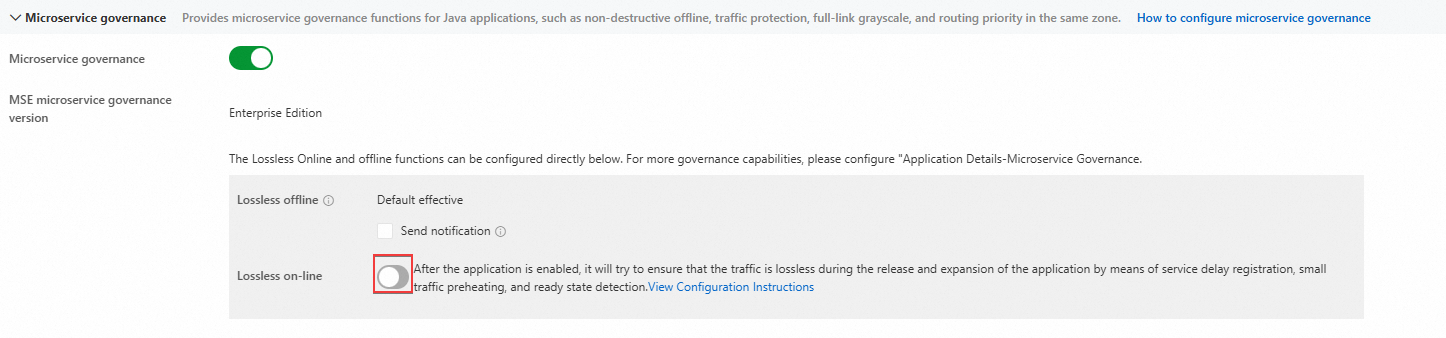
After enabling the Microservices Governance feature, you can configure the graceful start feature in the Microservices Governance section.
Enable the graceful start feature.
Configure the Warm-up Duration and Delayed Registration duration.
Parameter
Description
Warm-up Duration (seconds)
The traffic warm-up mechanism ensures that when a new node joins, the microservice invocation traffic initially allocated to the node is maintained at a low level and gradually increases over time. This design helps mitigate the weak processing capability of Java applications during cold start, preventing significant increases in overall response time (RT). The warm-up process automatically ends after the preset duration, after which the node will normally handle full traffic.
Delayed Registration
The registration delay time can postpone the service registration time by a specified duration. If your application has time-consuming asynchronous resource loading processes after startup, you can adjust the service registration behavior of newly online nodes through this parameter to delay when they receive invocation requests.
ImportantWhen the delayed registration duration is not 0, you must configure readiness probe in the application deployment, with the access path set to
/healthand the port set to 54199. This ensures that Kubernetes only considers the service ready after it is fully registered with the registry. This measure effectively prevents a sudden drop in incoming traffic due to service consumers not finding available service providers. It is crucial not to set theLivenessProbeto the same path/health, as doing so may cause an infinite loop of application restarts.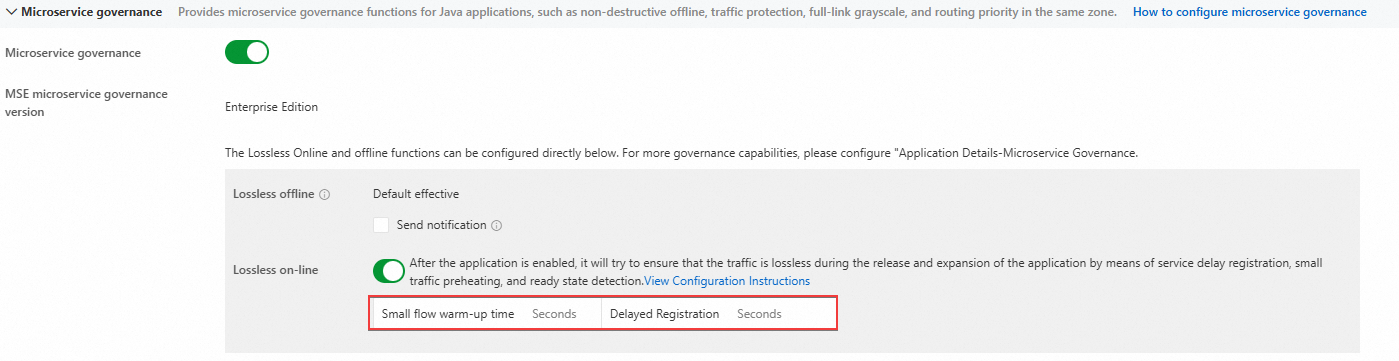
Configure graceful shutdown
When the microservices governance feature is enabled, the graceful shutdown feature is enabled by default.
Graceful shutdown ensures that traffic is drained from nodes being taken offline during service releases, scale-ins, restarts, and other scenarios, allowing in-flight requests to complete and preventing errors caused by service shutdown.