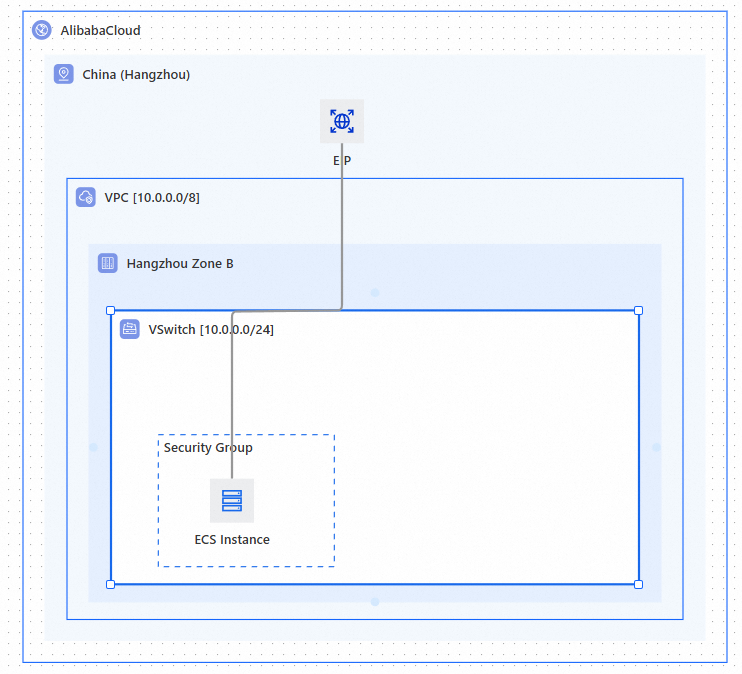
ROSTemplateFormatVersion: '2015-09-01'
Parameters:
  Zone:
    Type: String
    AssociationProperty: ALIYUN::ECS::Instance::ZoneId
    AssociationPropertyMetadata:
      WithAvailableResource: true
      DefaultValueStrategy: first
    Label:
      en: VSwitch Availability Zone
    Default: cn-beijing-f
Resources:
  VPC:
    Type: ALIYUN::ECS::VPC
    Properties:
      CidrBlock: 10.0.0.0/8
      EnableIpv6: false
  VSwitch:
    Type: ALIYUN::ECS::VSwitch
    Properties:
      ZoneId:
        Ref: Zone
      VpcId:
        Ref: VPC
      CidrBlock: 10.0.0.0/24
  SecurityGroup:
    Type: ALIYUN::ECS::SecurityGroup
    Properties:
      VpcId:
        Ref: VPC
  ECSInstance:
    Type: ALIYUN::ECS::Instance
    Properties:
      VSwitchId:
        Ref: VSwitch
      ZoneId:
        Ref: Zone
      VpcId:
        Ref: VPC
      SecurityGroupIds:
        - Ref: SecurityGroup
      SystemDiskSize: 40
      InstanceChargeType: PostPaid
      AllocatePublicIP: false
      IoOptimized: optimized
      ImageId: aliyun_3_x64_20G_qboot_alibase_20230727.vhd
      SystemDiskCategory: cloud_efficiency
      InstanceType: ecs.t5-lc2m1.nano
  EIP:
    Type: ALIYUN::VPC::EIP
    Properties:
      Isp: BGP
      DeletionProtection: false
      Netmode: public
      InstanceChargeType: PayAsYouGo
      InternetChargeType: PayByBandwidth
      Bandwidth: 5
  EIPAssociation:
    Type: ALIYUN::VPC::EIPAssociation
    Properties:
      AllocationId:
        Ref: EIP
      InstanceId:
        Ref: ECSInstance
      Mode: NAT
Metadata:
  ALIYUN::ROS::Composer:
    67cb9fc3:
      Rect:
        - 632
        - 588
        - -184
        - -217
        - 0
        - 0
      ResT: Composer::ROSParameter::AlibabaCloud
      Label: AlibabaCloud
    67cb9fc4:
      Parent: 67cb9fc3
      Rect:
        - 598
        - 523
        - -164
        - -172
        - 1
        - 0
      Reg: cn-beijing
      ResT: Composer::ROSParameter::Region
      Label: region
    4ce1a0a6:
      Res:
        - Zone
      Parent: fe688e94
      Rect:
        - 520
        - 320
        - -124
        - -9
        - 3
        - 0
      ResT: Composer::ROSParameter::Zone
      Label: zone
    fe688e94:
      Res:
        - VPC
      Parent: 67cb9fc4
      Rect:
        - 560
        - 400
        - -144
        - -69
        - 2
        - 0
      Label: VPC
    a8e63de3:
      Res:
        - VSwitch
      Parent: 4ce1a0a6
      Rect:
        - 480
        - 240
        - -104
        - 51
        - 4
        - 0
      Label: VSwitch
    d6a407f2:
      Res:
        - SecurityGroup
      Parent: fe688e94
      Rect:
        - 160
        - 120
        - 30
        - 145
        - 10
        - 0
      Label: security group
    6d7f85e4:
      Res:
        - ECSInstance
      Parent: a8e63de3
      Rect:
        - 40
        - 40
        - 90
        - 185
        - 11
        - 0
      Layer:
        - d6a407f2
      Label: ECS instance
    69c24097:
      Res:
        - EIP
        - EIPAssociation
      Parent: 67cb9fc4
      Rect:
        - 40
        - 40
        - 90
        - -150
        - 2
        - 0
      Label: elastic IP address
    52dd50ee-a0c0-4d13-a3e3-df80fb4c4aa9:
      Parent: 67cb9fc4
      Edge:
        - 69c24097
        - 6d7f85e4
      Line: 0:0:0:#969696:0
 icon in the upper-left corner. In the drop-down menu, click Import Template Content.