Use Resource Directory to manage multiple accounts and share VPCs across your organization.
Challenges
As enterprises scale on the cloud, a single account cannot meet requirements for business isolation, division, and billing flexibility. The multi-account mode addresses these needs but introduces new challenges:
-
Management of multiple accounts
Multiple isolated Alibaba Cloud accounts lack centralized management.
-
Communication among multiple accounts
Cloud Enterprise Network (CEN) connects VPCs across accounts, but as complexity grows, additional issues arise:
-
Complex network O&M due to isolated deployment of network resources
Network resources spread across accounts make centralized management difficult.
-
Increased costs due to frequent network resource configurations
Repeated VPC configurations across accounts increase O&M and instance costs.
-
Increased network complexity due to an increasing number of VPCs
Deploying more VPCs increases network complexity and may hit resource quota limits, such as the maximum number of VPCs attached to a CEN instance.
-
Solution
Alibaba Cloud provides Resource Directory for multi-account management, and Resource Sharing with VPC sharing for cross-account connectivity.
-
Use Resource Directory to manage multiple accounts
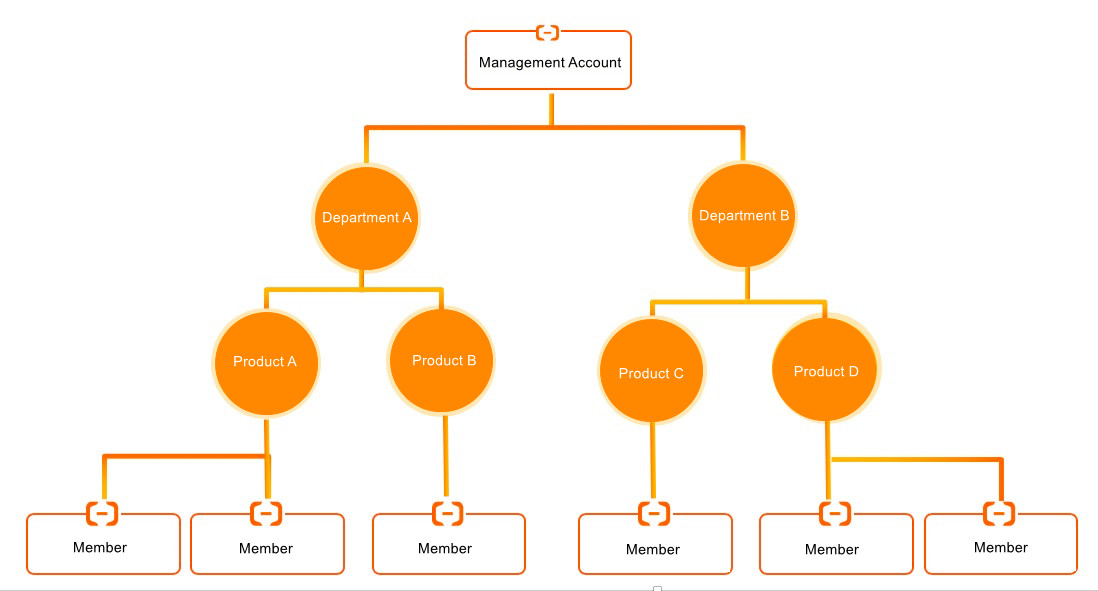
Resource Directory lets you organize accounts into folders that mirror your enterprise structure, establish multi-level relationships among accounts and resources, and centrally manage finance, security, audit, and compliance. For more information, see Resource Directory.
-
Use Resource Sharing to share resources with members within the same resource directory
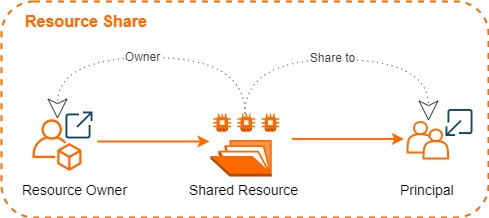
Resource Sharing lets you share resources with one or more members in your resource directory by creating a resource share and adding resources and members to it. For more information, see What is resource sharing?.
Term
Description
resource share
A Resource Sharing instance identified by a unique ID and Alibaba Cloud Resource Name (ARN). Each resource share consists of a resource owner, principals, and shared resources.
resource owner
The account that initiates resource sharing and owns the shared resources.
principal
An account or entity invited to use shared resources, with specific permissions on those resources.
NotePermissions on shared resources are determined by the owning Alibaba Cloud service. For example, VPC defines the permissions on shared vSwitches. Permissions related to VPC sharing.
shared resource
A resource from an Alibaba Cloud service. For more information about the types of resources that can be shared, see Supported services for Resource Sharing.
resource sharing
The mechanism for sharing resources with all directory members, members in a specific folder, or a specific member. Enable resource sharing within a resource directory.
-
Share a VPC with members within the same resource directory
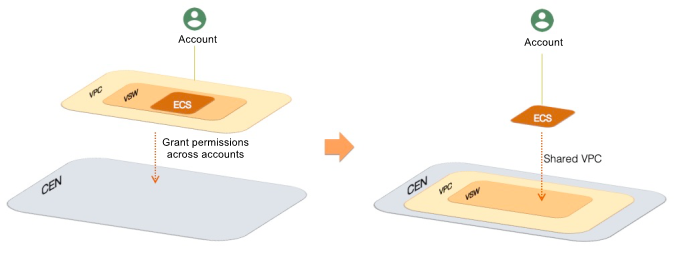
Share vSwitches in a VPC owned by one member (resource owner) with other members (principals) in the same resource directory. Principals can then create ECS instances, SLB instances, ApsaraDB RDS instances, and other resources in the shared VPC. All resources within the shared VPC can communicate with each other. For more information, see Shared VPC.
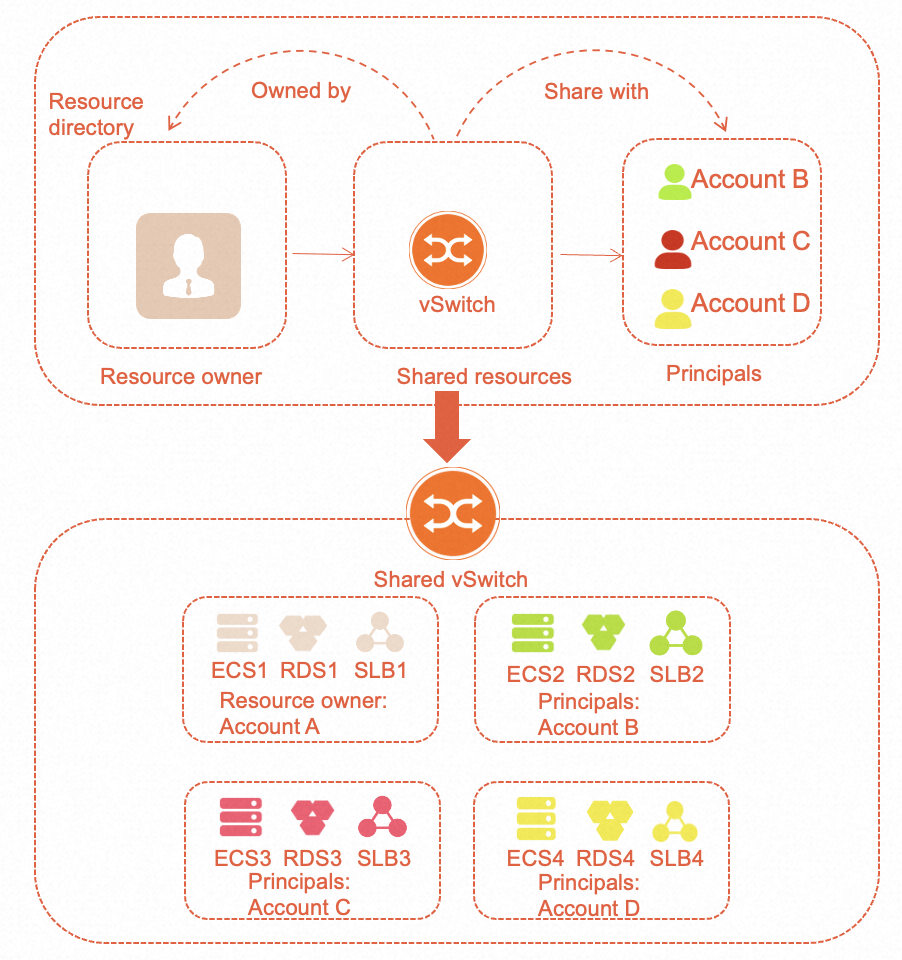
The following figure shows how VPC sharing works.
-
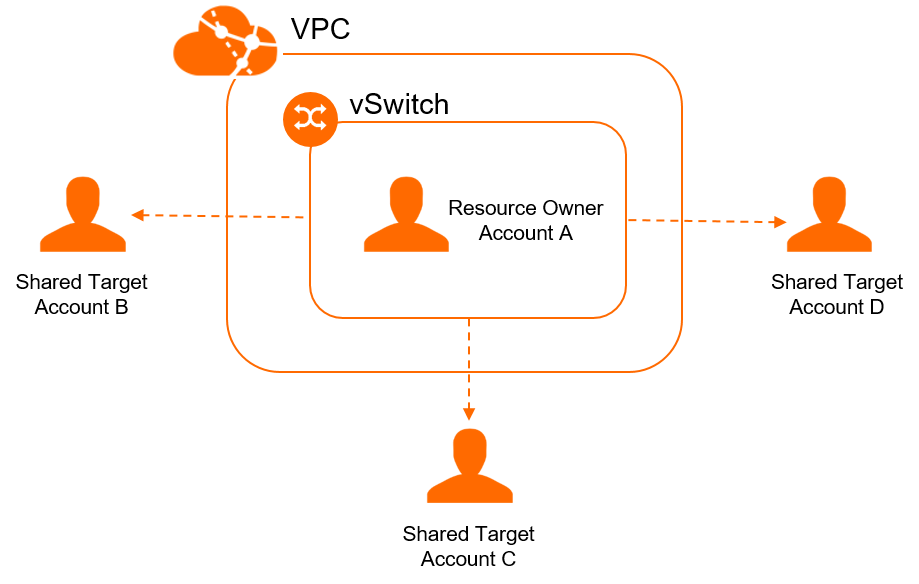
vSwitch sharing among multiple accounts
Share a vSwitch in a VPC with multiple accounts, eliminating the need for a separate VPC per account.
-
Permissions of the vSwitch owner and principals
Resource
vSwitch owner
vSwitch participant
Cloud resources (such as ECS and ApsaraDB for RDS instances)
Each account can only view and manage the resources it creates. They cannot access resources created by other accounts.
Security groups
Each account can only view and manage the security groups it creates. They cannot access security groups created by other accounts.
Elastic network interfaces (ENIs)
Can call the DescribeNetworkInterfaces operation to view ENIs created by participants, but cannot manage them.
You can only view and manage the ENIs that you create.
VPC, vSwitch, route table, network ACL, and secondary CIDR block
All permissions
View-only
Reserved CIDR blocks
All permissions
No permissions
IPv6 gateway
All permissions
-
Assign or unassign private IPv6 addresses for resources such as ECS instances, ENIs, and NLB instances.
-
Can view IPv6 addresses within your own account.
-
You can manage public bandwidth for IPv6 addresses in your account, including enabling or disabling bandwidth and setting or deleting egress-only rules. You are billed for this public bandwidth usage.
Flow logs
-
Can create VPC-level and vSwitch-level flow logs. These flow logs apply only to ENIs owned by the vSwitch owner.
-
Can create ENI-level flow logs. These flow logs apply only to ENIs owned by the vSwitch owner.
Can create only ENI-level flow logs. These flow logs apply only to ENIs owned by the vSwitch participant.
NAT gateway, VPN gateway, Cloud Enterprise Network, VPC peering connection
All permissions
You cannot view or manage these network resources but can use them to connect to networks outside the VPC.
Tag
Tagging is unaffected by sharing. Both the vSwitch owner and vSwitch participants can tag their own resources. These tags are independent and not visible to other accounts.
-
-
Isolation
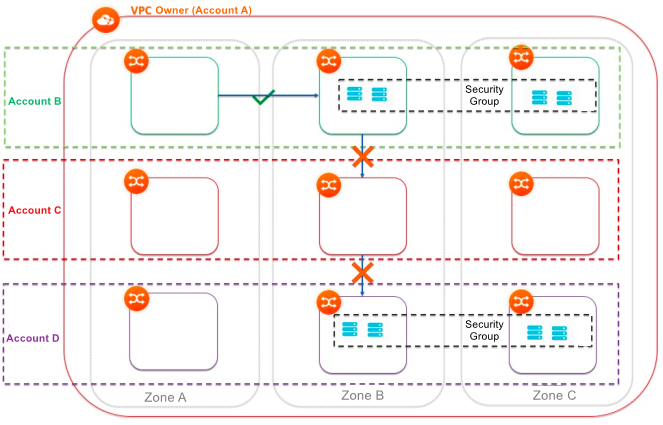
Shared vSwitches in the same VPC communicate with each other by default. To isolate them, use one of the following methods:
-
Configure a network access control list (ACL) to isolate vSwitches.
-
Configure a security group to isolate instances within vSwitches. You can use security groups from other accounts.
 Note
NoteACL rules isolate instances across different vSwitches. To isolate instances within the same vSwitch, use security group rules. You can reference security groups from other accounts. To isolate networks between vSwitches and accounts, configure source and destination IP addresses in security groups.
-
-
Benefits
The solution has the following benefits:
-
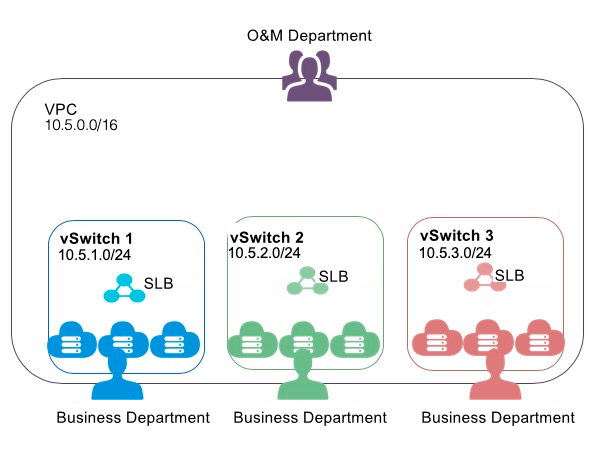
The O&M department centrally plans, configures, and manages VPCs, and shares vSwitches with the business department.
-
The business department can view and manage only resources within shared vSwitches, and create or delete resources such as cloud instances and databases as needed.
-
A unified network architecture and security policy lets the business department focus on business requirements.
-
Network and security capabilities are delivered as a service to the business department, standardizing O&M and improving enterprise-wide IT efficiency.