Share your resources across Alibaba Cloud accounts and access resources that other accounts share with you.
Scenarios
Enterprises with multiple Alibaba Cloud accounts can purchase resources centrally in one account and share them with other accounts.
-
Share resources directly between two Alibaba Cloud accounts.
-
If the enterprise uses a resource directory, it can share resources based on the directory structure.
-
Share resources of a directory member with an external Alibaba Cloud account. For example, share resources with a third-party account for auditing.
-
Share resources of a directory member with all directory members, members in a specific folder, or a specific member. For example, share a vSwitch in a virtual private cloud (VPC) with all members of a business line to establish network connections.
-
Benefits
-
Low costs: Create resources centrally and share them across accounts instead of duplicating resources in each account.
-
Centralized management: Manage shared resources from a single account. Configure security policies and use Cloud Config and ActionTrail to audit configurations and operations.
-
Consistent experience: All resources use a unified sharing mechanism, so you do not need to learn different sharing methods for each resource type.
Terms
|
Term |
Description |
|
resource share |
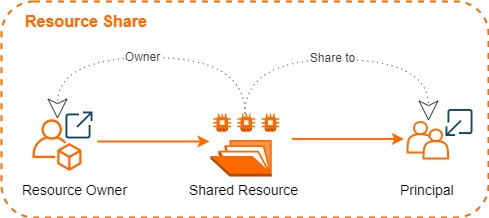
A Resource Sharing instance identified by a unique ID and Alibaba Cloud Resource Name (ARN). Each resource share consists of a resource owner, principals, and shared resources. |
|
resource owner |
The account that initiates resource sharing and owns the shared resources. |
|
principal |
An account or entity invited to use shared resources, with specific permissions on those resources. Note
Permissions on shared resources are determined by the owning Alibaba Cloud service. For example, VPC defines the permissions on shared vSwitches. Permissions related to VPC sharing. |
|
shared resource |
A resource from an Alibaba Cloud service. For more information about the types of resources that can be shared, see Supported services for Resource Sharing. |
|
resource sharing |
The mechanism for sharing resources with all directory members, members in a specific folder, or a specific member. Enable resource sharing within a resource directory. |
Sharing methods
|
Method |
Description |
References |
|
Share resources with any account |
A resource owner can share resources with any principal, regardless of whether the owner or principal belongs to a resource directory.
|
|
|
Share resources within a resource directory |
A management account or directory member can share resources with all directory members, members in a specific folder, or a specific member. |
Supported services
For more information, see Supported services for Resource Sharing.
Limits
|
Item |
Upper limit |
Adjustable |
|
Resource shares per account |
1,000 |
|
|
Shared resources per account |
1,000 |
Regional vs. global resource sharing
When you create a resource share, you must specify a region. Resource Sharing supports both regional and global resources.
|
Resource type |
Difference |
|
Region-specific resource |
Regional resources reside in a specific region. To share a regional resource, create the resource share in the same region. For example, to share a vSwitch in the China (Hangzhou) region, create a resource share in the China (Hangzhou) region. |
|
Global resource |
Global resources can be accessed in all regions without specifying a region. To share a global resource, create the resource share in the China (Shanghai) region. For example, ROS templates are global resources. To share an ROS template, create a resource share in the China (Shanghai) region. This region requirement applies only to Resource Sharing and does not affect how shared ROS templates are accessed. |
Billing
You can use this service without activating it.
This service is free of charge. However, if you share resources of Alibaba Cloud services that are not free of charge, you are charged for the resources based on the billing methods of the services.