This topic describes how to use Alibaba Cloud CLI to call the API operations of Resource Group. In this example, the CreateResourceGroup operation of Resource Group is called to create a resource group.
Background information
Alibaba Cloud CLI is a general-purpose command-line tool that is developed based on APIs. You can use Alibaba Cloud CLI to implement automatic management and maintenance of resource groups. For more information, see What is Alibaba Cloud CLI?
Step 1: Install Alibaba Cloud CLI
You must install Alibaba Cloud CLI before you can use Alibaba Cloud CLI. You can install Alibaba Cloud CLI on Windows, Linux, and macOS operating systems. Select an installation package of Alibaba Cloud CLI based on the operating system of your device. For more information, see the following topics:
Alibaba Cloud CLI is pre-installed in Cloud Shell. Cloud Shell automatically configures an identity credential for you. You can use Cloud Shell to debug the commands that you want to run in Alibaba Cloud CLI. For more information, see What is Cloud Shell?
Step 2: Configure Alibaba Cloud CLI
An Alibaba Cloud account has permissions to manage and access the APIs of all Alibaba Cloud services. If you use an Alibaba Cloud account to call API operations, security risks may arise. We recommend that you create a Resource Access Management (RAM) identity, grant the required permissions to the RAM identity based on the principle of least privilege, and then use the RAM identity to call API operations. For more information about permission policies that are supported by Resource Group, see Use resource groups as a RAM user and Resource group authorization.
Before you use Alibaba Cloud CLI, you must specify information, such as identity credentials and a region ID, in Alibaba Cloud CLI. Alibaba Cloud CLI supports various identity credentials. For more information, see Credential types. In this example, AccessKey credentials are used.
Procedure:
Create a RAM user and create an AccessKey pair for the RAM user. For more information, see Create a RAM user and Create an AccessKey pair.
Grant the required permissions to the RAM user. In this example, the RAM user needs to be granted the permissions on the
CreateResourceGroupoperation of Resource Group.Create a custom policy that contains the permissions on the
CreateResourceGroupoperation of Resource Group. The following code shows the policy document. For more information, see Create a custom policy.{ "Version": "1", "Statement": [ { "Effect": "Allow", "Action": "ram:CreateResourceGroup", "Resource": "*" } ] }Attach the custom policy to the RAM user. For more information, see Grant permissions to a RAM user.
Obtain the ID of the region that you want to use. Alibaba Cloud CLI uses the region ID that you specify to initiate API calls. For more information about the regions supported by Resource Group, see Endpoints.
NoteWhen you use Alibaba Cloud CLI, you can use the
--regionoption to specify the region from which you want to initiate a call. If you specify this option, Alibaba Cloud CLI ignores the region information in the default credential configurations and environment variable settings. For more information, see Command-line options.Use the AccessKey pair of the RAM user and the obtained region ID to configure identity credentials in the
AkProfileconfiguration file. For more information, see Configuration examples.
Step 3: Generate a CLI command
Go to the CreateResourceGroup debugging page in OpenAPI Portal.
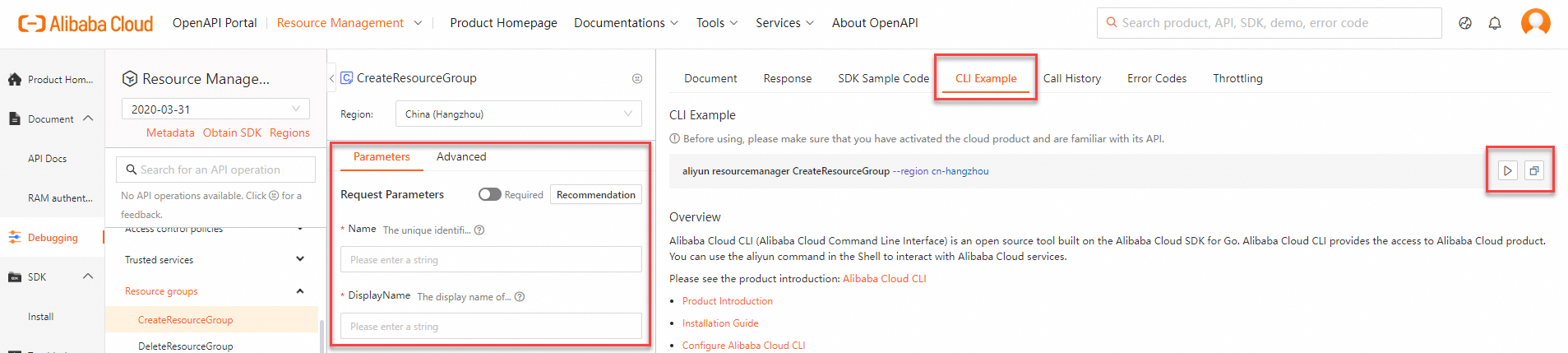
On the Parameters tab, configure the request parameters. Then, click the CLI Example tab to view the generated sample CLI command.
Copy the CLI command or debug the CLI command in Cloud Shell.
Click the
 icon to start Cloud Shell and debug the CLI command in Cloud Shell.
 Click the
 icon to copy the CLI command to the clipboard. You can paste the CLI command into your local shell to run the CLI command.
NoteWhen you paste the CLI command into your local shell for debugging, take note of the parameter formats. For information about the parameter formats required by Alibaba Cloud CLI, see Parameter formats.
By default, OpenAPI Explorer adds the
--regionoption to the generated CLI command. When you copy the command to your local shell, Alibaba Cloud CLI ignores the region information in the default identity credential configurations and environment variable settings, and preferentially runs the command in the region specified by the option. You can delete or retain the option based on your business requirements.
Step 4: Call the API operations of Resource Group
For information about the Resource Group API operations that can be called in Alibaba Cloud CLI, see List of operations by function.
In this example, the CreateResourceGroup operation of Resource Group is called in Alibaba Cloud CLI to create a resource group within the current account.
Run the following command:
aliyun resourcemanager CreateResourceGroup --Name 'cli-test-project' --DisplayName 'cli-test-project'View the command output.
{ "RequestId": "04F0F334-1335-436C-A1D7-6C044FE73368", "ResourceGroup": { "DisplayName": "cli-test-project", "Status": "Creating", "RegionStatuses": { "RegionStatus": [ { "Status": "Creating", "RegionId": "cn-qingdao" } ] }, "AccountId": "151266687691****", "Name": "cli-test-project", "CreateDate": "2021-06-05T14:39:13+08:00", "Id": "rg-9gLOoK****" } }NoteIf an error message is returned after you call an API operation of Resource Group, check whether the request parameters and the values of the request parameters are valid based on the returned error code.
You can also perform self-service diagnostics based on the returned request ID or SDK error information on the OpenAPI Troubleshoot page.