Use an access control policy with an Allow statement to whitelist the Alibaba Cloud services your enterprise can purchase and use, standardizing cloud service consumption across your organization.
Scenarios
During cloud migration, an enterprise typically selects a set of cloud services based on business needs and signs a bulk purchase agreement with the provider. To maximize cost savings, the enterprise restricts users to purchasing only whitelisted services.
A service whitelist also prevents intentional or unintentional security violations by limiting which services users can access.
Solution comparison
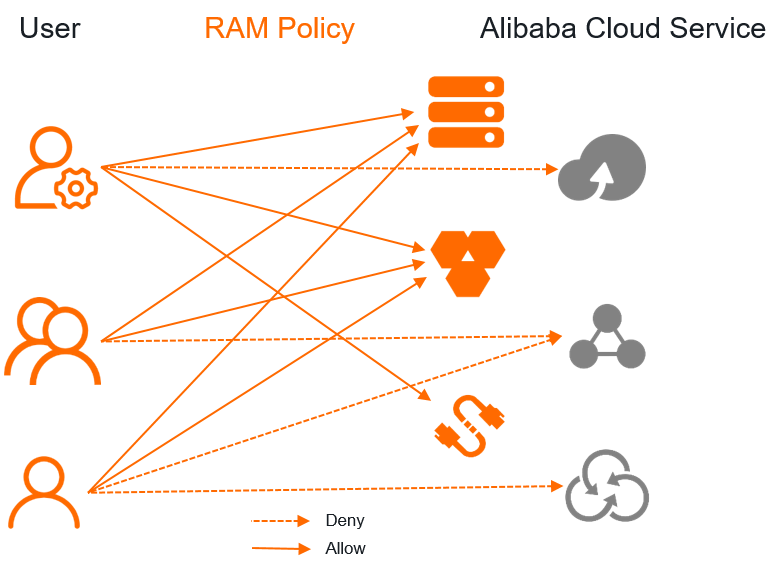
Old solution: Use RAM policies to grant the permissions on specific Alibaba Cloud services to users
This approach requires granting permissions to each user individually. It works for simple scenarios but does not scale when you manage many users or complex permission requirements. Limitations include:
-
Per-user authorization does not scale. Complexity grows with the number of users and resources.
Each user requires individual permission grants across different resources and network environments. Adding, removing, or updating a user requires manual policy changes. If the service whitelist changes, you must update policies attached to every user.
-
Differentiated access (allow some users, deny others) requires complex RAM policies.
Factors such as resource region, business environment, and project scope add complexity. For example, restricting purchases to specific regions or granting full access to specific roles requires intricate policy configurations.
-
Authorization and compliance control are coupled, creating security risks.
Permission administrators must coordinate with compliance administrators when adjusting permissions. Changes to business permissions can unintentionally affect compliance settings, and vice versa. This coupling increases the risk of misconfigurations.
New solution (recommended): Use an access control policy that contains an Allow statement to manage permissions
Resource Management provides access control policies for managing permissions. Set the Effect element to Allow to resolve the preceding issues. Example policy:
{
  "Statement":[
    {
      "Effect": "Allow",
      "Action":[
                "ecs:*",
                "rds:*"
      ],
      "Resource": [
                "acs:*:*cn-beijing*:*:*",
                "acs:*:*cn-shanghai*:*:*"
      ]
    },
    {
      "Effect": "Allow",
      "Action": "*",
      "Resource": "*",
      "Condition": {
          "StringLike": {
                    "acs:PrincipalARN": [
                    "acs:ram:*:*:role/a-project-admin-*"
                       ]
                  }
            }
      }
  ],
  "Version": "1"

}
This policy defines:
-
Only ECS and ApsaraDB RDS resources in the China (Beijing) and China (Shanghai) regions can be purchased and used.
-
The RAM role
a-project-admin-*has full permissions on all Alibaba Cloud services.
Benefits of access control policies:
-
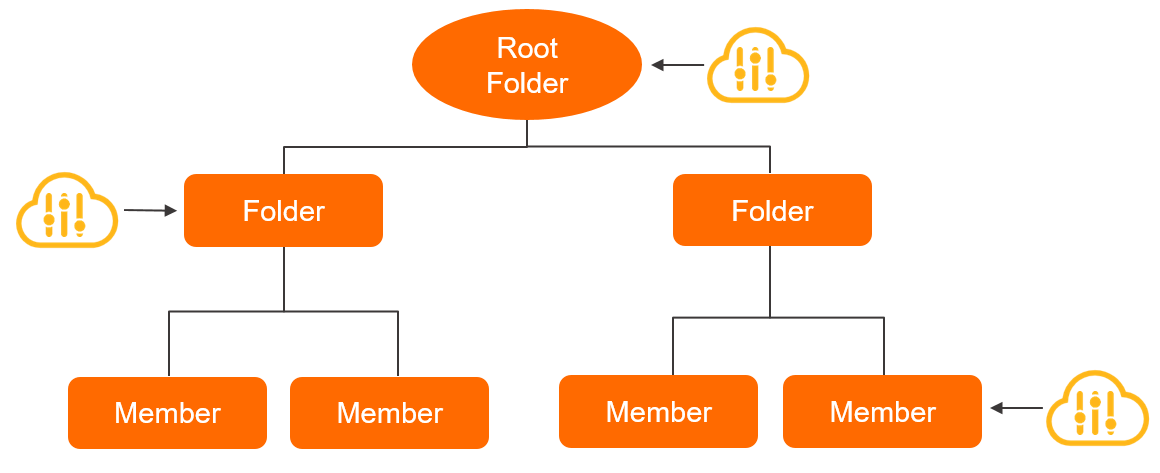
Policies attached to a folder are inherited by all subfolders.
When you attach a control policy to a folder, it applies to all members in the folder, its subfolders, and all RAM users and roles within those members. To change the service whitelist, update the single policy.
 Important
Control policies apply to all RAM principals (users and roles) within a member account but do not apply to the owner of that account or any principals in the management account of the Resource Directory.
-
A control policy defines permission boundaries without granting permissions. It works together with RAM policies attached to users.
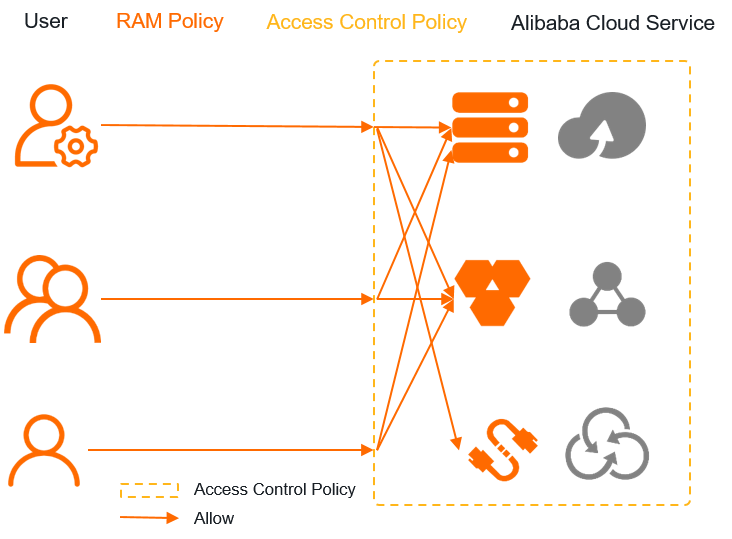
For example, if a user has RAM permissions for ECS and EIP, and the above control policy applies:
-
The user can access ECS in the China (Beijing) and China (Shanghai) regions.
The user has ECS permissions, and the control policy allows ECS in these regions. Both conditions are met.
-
The user cannot access EIP.
Although the user has EIP permissions, the control policy does not allow EIP access.
-
The user cannot access ApsaraDB RDS.
The control policy allows ApsaraDB RDS, but the user lacks RAM permissions for it.
-
-
Control policies and RAM policies are managed separately but enforced together.
Use RAM policies to grant permissions and control policies to define boundaries. This decouples authorization from compliance control, reducing security risks. A control policy serves as the top-level compliance principle that all business-level access rules must follow.
Implement a control policy
To use a control policy, enable the Control Policy feature, create a custom policy, and attach it to a folder or member. Enable the Control Policy feature, Create a custom access control policy, Attach a custom access control policy.
Before applying a custom control policy, complete these prerequisites:
-
Add the Allow statement
sts:AssumeRoleto the custom access control policy.We recommend logging on to members as a RAM user via STS tokens for management operations. Add the
sts:AssumeRoleAllow statement to ensure you can log on to a member. Updated policy example:{ "Statement":[ { "Effect": "Allow", "Action":[ "ecs:*", "rds:*" ], "Resource": [ "acs:*:*cn-beijing*:*:*", "acs:*:*cn-shanghai*:*:*" ] }, { "Effect": "Allow", "Action": "*", "Resource": "*", "Condition": { "StringLike": { "acs:PrincipalARN": [ "acs:ram:*:*:role/a-project-admin-*" ] } } }, { "Effect": "Allow", "Action":[ "sts:AssumeRole" ], "Resource": "*" } ], "Version": "1" } -
Detach the system access control policy
FullAliyunAccessfrom the folder to which the custom access control policy is attached.When the Control Policy feature is enabled, the system attaches
FullAliyunAccessto every folder and member by default, allowing all operations. After you attach a custom Allow-type policy to a folder, detachFullAliyunAccessfrom that folder so the custom policy takes effect. How it works.
Allow vs. Deny statements
To deny all services except ECS and ApsaraDB RDS with a Deny statement, you must enumerate every other service — a complex and error-prone approach. An Allow statement simplifies this by whitelisting only the permitted services.
Use a Deny statement when you need to block a small number of specific actions. For example, to deny purchases in the China (Hong Kong) and China (Guangzhou) regions:
{
      "Effect": "Deny",
      "Action":[
                "*"
      ],
      "Resource": [
                "acs:*:*cn-hongkong*:*:*",
                "acs:*:*cn-guangzhou*:*:*"
      ]
}
Choose Allow or Deny statements based on your requirements to keep the policy concise.
You can combine Allow and Deny statements in one policy. Ensure they do not conflict — if they do, Deny takes precedence. When multiple policies are attached to a folder or member, the system evaluates all policies. If any Deny statement matches the request, access is denied immediately.