Resource Directory (RD) lets you organize multiple Alibaba Cloud accounts into a hierarchical structure for centralized management of resources, permissions, and billing.
Use cases
Build a hierarchical structure that mirrors your business, then centrally manage accounts and resources across networking, billing, permissions, security, and auditing.
-
Business environment-based creation of organizational structures
Map your branches, departments, or projects to a cloud-based organizational structure.
-
Centralized management of all Alibaba Cloud accounts and resources
Consolidate multiple Alibaba Cloud accounts into one resource directory for unified management.
-
Centralized management of bills and invoices
Designate a member account for consolidated billing across all accounts.
-
Implementation of permission and compliance requirements
Apply RAM policies and Resource Directory access control policies to enforce fine-grained permissions across accounts and folders.
-
Integration with a variety of enterprise-level Alibaba Cloud applications
Integrate with Alibaba Cloud finance, auditing, security, and network services to manage all accounts from a single structure.
Key concepts
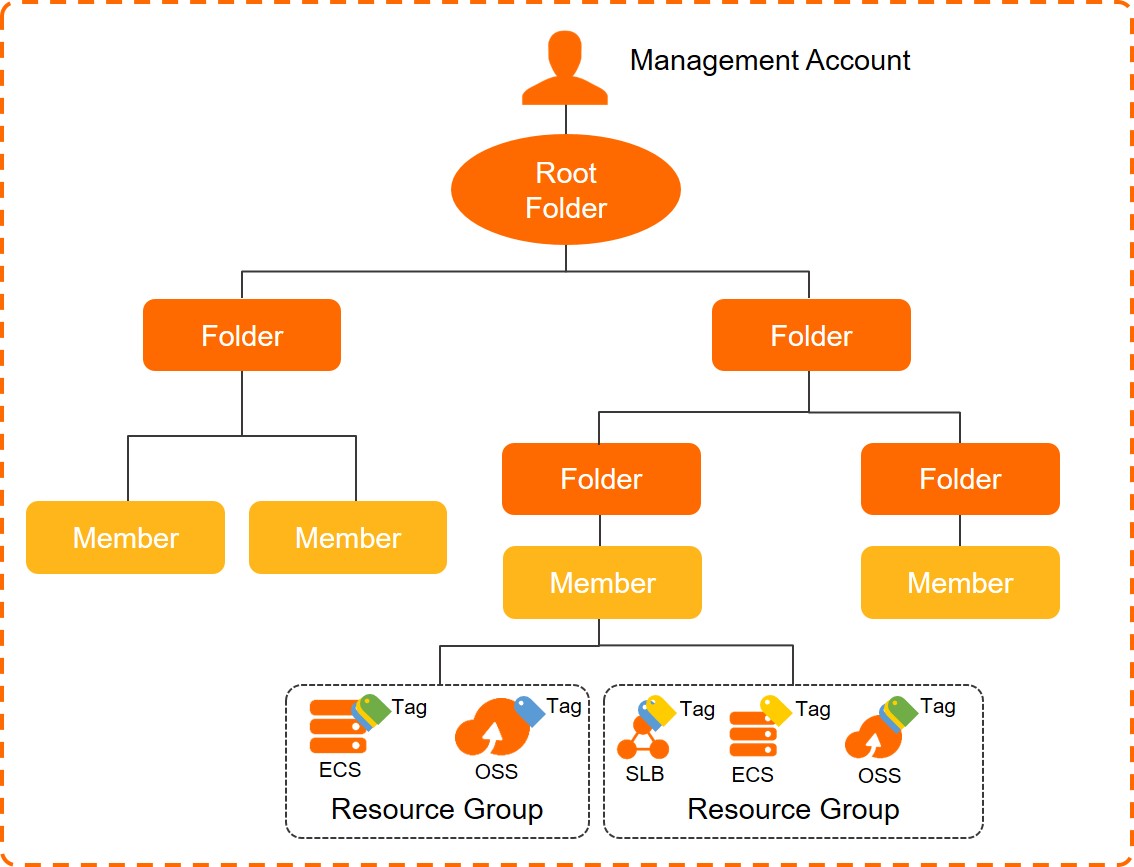
|
Term |
Description |
|
management account |
An Alibaba Cloud account that has passed enterprise verification and enabled a resource directory. The management account is the super administrator with full permissions over the resource directory, all folders, and all members. Each resource directory has exactly one management account. Security best practices:
Note
The management account does not belong to the resource directory and is not subject to its access control policies. |
|
Root folder |
The top-level folder in a resource directory. All other folders are organized beneath it. |
|
folder |
An organizational unit representing a branch, business line, or project. Folders contain members and subfolders, forming a tree. |
|
member |
An account in a resource directory. Members are either resource accounts (created in the directory to isolate project or application resources) or cloud accounts (existing Alibaba Cloud accounts invited to join).
|
|
RDPath |
A path that identifies a folder or member's location in the directory. An RDPath consists of the resource directory ID, all parent folder IDs, and the entity ID. Formats:
You can find the RDPath in View the basic information of a folder or View the detailed information of a member. |
|
access control policy |
Defines permission boundaries for folders or members. Access control policies do not grant permissions — they restrict what RAM can grant. You must still use RAM to assign permissions to member accounts. For more information about access control policies, see Overview. |
|
trusted service |
An Alibaba Cloud service integrated with Resource Directory that can access the directory structure and member information. Use the management account or a delegated administrator account to manage the trusted service. For example, Cloud Config lets you view resources, configuration history, and compliance status of all members. For more information about trusted services, see Overview of trusted services. |
|
delegated administrator account |
A member designated by the management account to manage a specific trusted service on behalf of the organization. The delegated administrator can access directory information (structure and members) within the trusted service and manage related business. This separates organization management (handled by the management account) from service-specific management, improving security. For information about how to add or remove a delegated administrator account, see Manage delegated administrator accounts. |
Get started
-
Log on to the Resource Management console with an account eligible to be the management account.
-
Enable a resource directory.
For more information, see Enable Resource Directory.
-
Create folders to build your organizational structure.
For more information, see Create a folder.
-
Create members or invite existing Alibaba Cloud accounts to join the resource directory, then move them to the appropriate folders.
For more information, see Create a member, Invite an Alibaba Cloud account, and Move a member.
Limits
|
Item |
Upper limit |
Adjustable |
Remarks |
|
Resource directories per Alibaba Cloud account |
1 |
N/A |
Members of a resource directory cannot create their own resource directories. |
|
Root folders per resource directory |
1 |
N/A |
N/A |
|
Folders per resource directory |
100 |
Excludes the Root folder. |
|
|
Folder nesting levels |
5 |
N/A |
Excludes the Root folder. |
|
Members per resource directory |
50 |
N/A |
|
|
Valid invitations per day |
20 |
Excludes accepted invitations. |
|
|
Validity period of an invitation |
14 days |
N/A |
N/A |
|
Security verification codes per day for binding a phone number to a member |
100 |
N/A |
N/A |
|
Custom access control policies per resource directory |
1,500 |
N/A |
N/A |
|
Custom access control policies per folder or member |
10 |
N/A |
|
|
Characters per custom access control policy |
4,096 |
N/A |
N/A |
|
Member deletions per 30-day window |
A 30-calendar-day period starts from the first deletion task. Limits per period:
|
N/A |
|
|
Contacts per resource directory |
10 |
N/A |
Billing
This service is free of charge. You can use it immediately after you activate it.
If you enable trusted services that are not free of charge or use a member to activate Alibaba Cloud services, you are charged for the services based on their billing methods.