Resource Directory, Resource Group, and tags address different resource management needs. Learn how they differ in scope, isolation level, and authentication method so you can choose the right combination.
Key differences
|
Service |
Scenario |
Resource isolation |
Management level |
Cross-account |
|
Resource Directory |
Best for multi-account environments. Resource Directory lets you build a corporate hierarchy and centrally manage accounts and resources across multiple Alibaba Cloud accounts. |
Isolates resources at the account level. |
Account level. |
Resource groups and tags created within one member cannot be used by other members. |
|
Resource Group |
Best for single-account environments. When a single Alibaba Cloud account serves multiple teams or projects with RAM users, resource groups let you isolate resources and manage permissions:
|
Isolates resources by using RAM identities and permission policies. |
Resource level. |
Resource groups created in one Alibaba Cloud account cannot be used by other accounts. |
|
tag |
Best for single-account environments. When a single Alibaba Cloud account serves multiple teams with RAM users, tags help manage resources efficiently:
|
Resource level. |
Tags created in one Alibaba Cloud account cannot be used by other accounts. |
How they work together
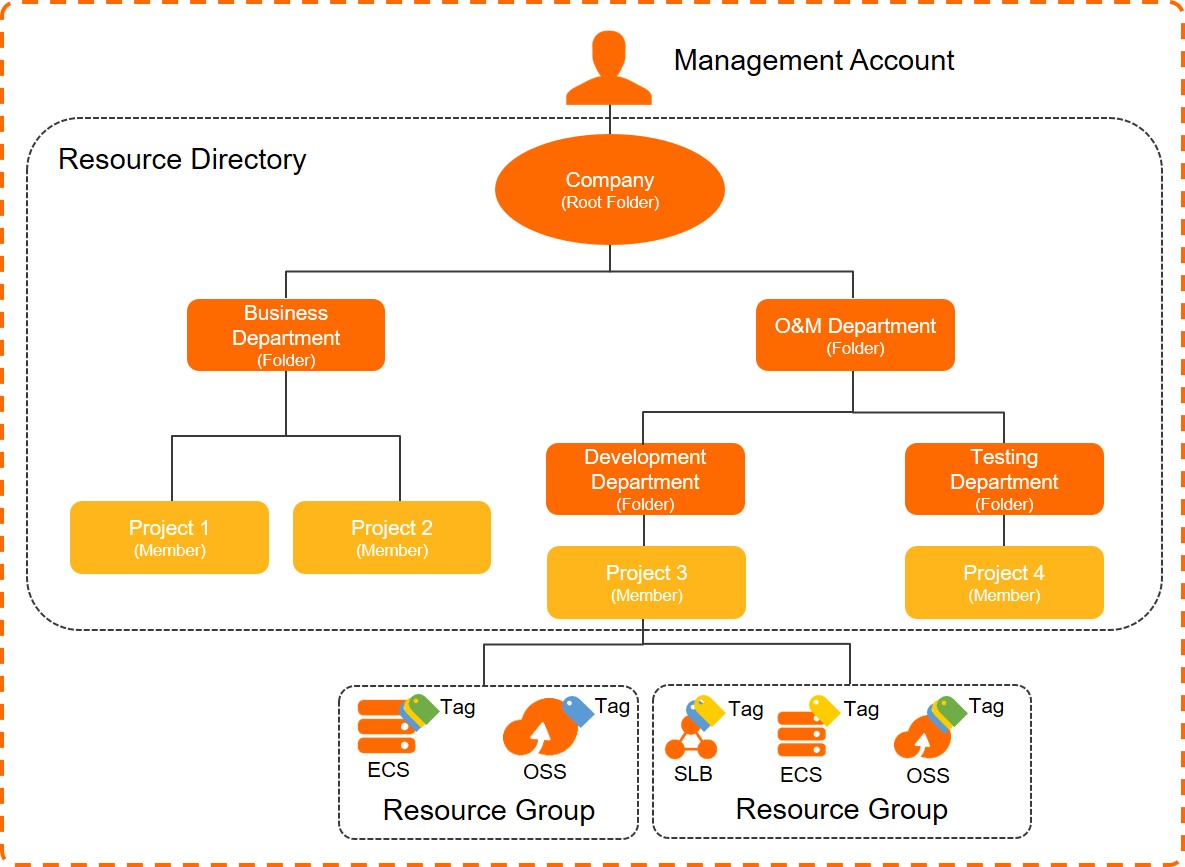
These three services are complementary. Think of your enterprise as a tree: Resource Directory forms the trunk and branches (organizational hierarchy), while Resource Group and tags organize the leaves (individual resources).
Resource group vs. tag authentication
Both Resource Group and tags provide finer-grained access control than account-level permissions.
|
Authentication method |
Scenario |
Supported services |
Example |
|
Resource Group |
Add resources to a resource group and grant permissions based on that group. You can use system policies for simplicity or custom policies for finer control. |
||
|
tag |
Attach tags to resources and grant permissions based on those tags. You must specify the authorized tags in the Condition element of a custom policy. This approach is more flexible but has a steeper learning curve. |
Go to the Tag-related capabilities page in the Tag console. In the Tag-based authorization column of the Tag-related Capability Items tab, find the resource types that are marked as Supported. |
|