When you manage ECI resources across teams or environments, listing individual resource IDs in every RAM policy doesn't scale. With tag-based access control—also known as attribute-based access control (ABAC)—a single policy governs every resource carrying the required tag, eliminating per-resource policy updates.
This document shows how to configure a RAM policy that restricts a RAM user to ECI resources tagged with env:test, and explains how ECI evaluates tag conditions for each operation type.
The following diagram shows how tag-based authentication works.
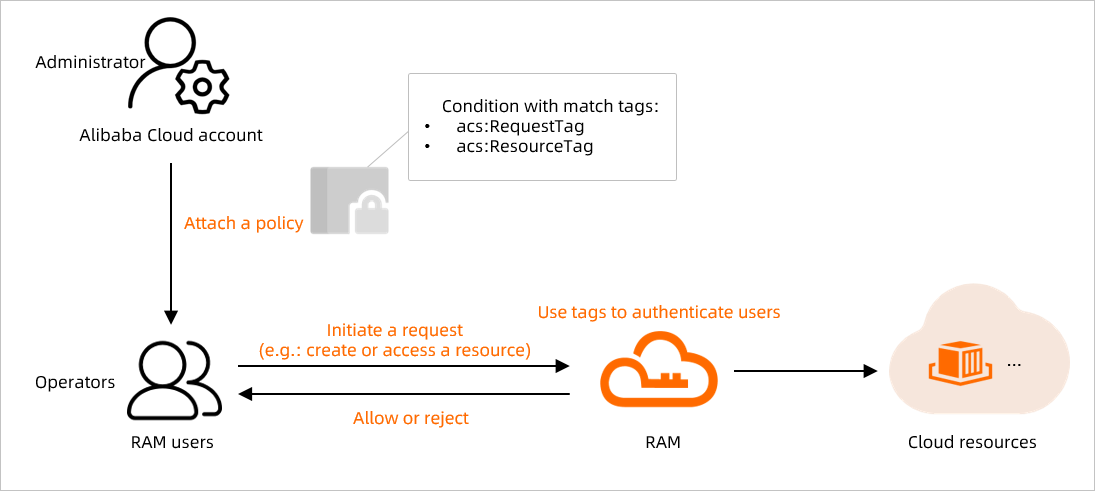
Tags can be bound to elastic container instances, image caches, and virtual nodes. Tags can only be attached when you create or update a resource. For more information, see Use tags to manage elastic container instances.
How it works
ECI supports two tag condition keys for RAM policies:
|
Condition Key |
What It Checks |
When to Use It |
|
|
The tag included in the API request itself |
API operations that accept tag parameters (for example, create operations) |
|
|
The tag already attached to the target resource |
API operations that require a resource ID (for example, update, delete, and other lifecycle operations) |
Which key applies depends on whether the API operation accepts a resource ID, a tag, or both. See Authentication logic by operation type for a full breakdown.
Configuration example
This example grants a RAM user access only to ECI resources tagged with env:test.
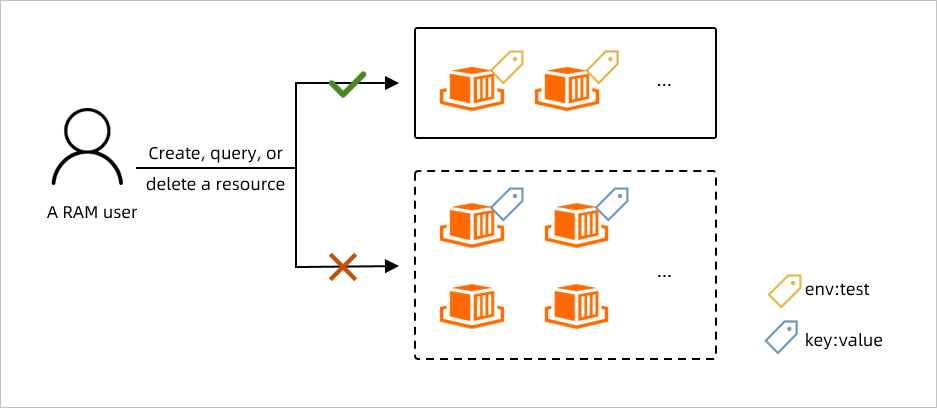
The policy covers three requirements:
|
Requirement |
Permitted Action |
|
Create |
The RAM user can create ECI resources only if the |
|
Operate |
The RAM user can perform any operation on ECI resources that already have the |
|
View |
The RAM user can list or describe only ECI resources tagged with |
Step 1: Create a custom policy and attach it to the RAM user
-
Log on to the RAM console with your Alibaba Cloud account.
-
In the left-side navigation pane, choose Permissions > Policies.
-
On the Policies page, click Create Policy.
-
Click the Import Policy tab. In the dialog box, select System Policy from the Policy Template drop-down list, search for
AliyunECIFullAccessin the Filter templates box, select the policy, and click Import.AliyunECIFullAccessis the default policy for ECI. It grants permissions to operate ECI resources, query dependencies such as security groups and virtual private clouds (VPCs), and create the ECI service-linked role. -
Click the JSON Editor tab and replace the policy document with the following: The policy maps each requirement to a specific condition key:
-
acs:RequestTagchecks the tag sent in the request (used for create and describe operations). -
acs:ResourceTagchecks the tag already on the target resource (used for operate operations).
Each statement includes
Effect,Action,Resource, and optionallyCondition. For more information, see Policy structure and syntax and Policy elements.Requirement
Action
Condition Key
Condition Value
Create with tag
eci:Create*acs:RequestTag/envtestOperate tagged resources
eci:*acs:ResourceTag/envtestView tagged resources
eci:Describe*acs:RequestTag/envtest{ "Version": "1", "Statement": [ { "Effect": "Allow", "Action": "eci:Create*", "Resource": "*", "Condition": { "StringEquals": { "acs:RequestTag/env": "test" } } }, { "Effect": "Allow", "Action": "eci:*", "Resource": "*", "Condition": { "StringEquals": { "acs:ResourceTag/env": "test" } } }, { "Effect": "Allow", "Action": "eci:Describe*", "Resource": "*", "Condition": { "StringEquals": { "acs:RequestTag/env": "test" } } }, { "Action": ["ecs:DescribeSecurityGroups"], "Resource": "*", "Effect": "Allow" }, { "Action": [ "vpc:DescribeVSwitches", "vpc:DescribeVpcs", "vpc:DescribeEipAddresses" ], "Resource": "*", "Effect": "Allow" }, { "Action": "ram:CreateServiceLinkedRole", "Resource": "*", "Effect": "Allow", "Condition": { "StringEquals": { "ram:ServiceName": [ "eci.aliyuncs.com", "vnode.eci.aliyuncs.com" ] } } } ] } -
-
Click Next to edit policy information, enter a name for the policy, and click OK.
-
Attach the policy to the RAM user:
-
In the left-side navigation pane, choose Identities > Users.
-
If you don't have a RAM user yet, create one. For more information, see Create a RAM user.
-
Attach the custom policy to the RAM user. For more information, see Manage RAM user permissions.
The policy above covers API-based access. If the RAM user also needs console access, attach additional policies. For more information, see Grant permissions to RAM users.
-
Step 2: Verify the policy
Log on to the OpenAPI Explorer console as the RAM user and test each operation:
Operation | Scenario | Expected Result |
Create | Request includes the | Succeeds |
Create | Request has no tag, or a different tag | Fails — permission denied |
Delete | Target instance has the | Succeeds |
Delete | Target instance does not have the | Fails — permission denied |
Query | Specify an instance ID (instance has | Returns the instance |
Query | Specify an instance ID (instance has | Returns the instance |
Query | Specify an instance ID (instance does not have | Returns empty result |
Query | Specify only the | Returns all instances with |
Query | No instance ID and no tag specified | Returns empty result |
Authentication logic by operation type
After a tag-based policy is attached to a RAM user, ECI evaluates each API request against the relevant condition. The condition used depends on the operation type.
Operation Type | Example Operations | Resource ID Required | Condition Evaluated | Authentication Rules |
Create |
| No |
| Succeeds if the request includes a tag matching the policy condition. Fails if no tag or a non-matching tag is included. |
Query |
| ID or tag required |
| Succeeds if: the resource's tag matches |
Update |
| Yes |
| Succeeds if the resource's tag matches |
Other lifecycle |
| Yes |
| Succeeds if the resource's tag matches |
For query operations, authentication failure returns an empty result rather than an error.
What's next
To bind tags to ECI resources, see Use tags to manage elastic container instances.
To learn more about RAM policy structure, see Policy structure and syntax.