An AccessKey pair is a long-term credential for programmatic access to Alibaba Cloud APIs. You can create an AccessKey pair for a RAM user or an Alibaba Cloud account.
What is an AccessKey pair?
An AccessKey pair consists of an AccessKey ID and an AccessKey secret, used together to authenticate programmatic requests to Alibaba Cloud.
-
AccessKey ID: The public, unique identifier for your AccessKey pair.
-
AccessKey secret: The private key used to sign API requests. The signature verifies the authenticity and integrity of the request. You must keep your AccessKey secret strictly confidential.
To reduce the risk of a leak, the AccessKey secret is displayed only once upon creation and cannot be retrieved.
How to use an AccessKey pair
Use an AccessKey pair to call Alibaba Cloud APIs through the CLI, SDKs, or Terraform.
Alibaba Cloud also provides more secure alternatives based on temporary security credentials (STS tokens). For details, see Application development scenarios.
If you must use an AccessKey pair, see the following best practice: Properly store and use unavoidable AccessKey pairs.
How an AccessKey pair works
Resource Access Management (RAM) generates the AccessKey ID and AccessKey secret algorithmically. Alibaba Cloud encrypts them during both storage and transmission.
When an application sends a request, it includes the AccessKey ID and a signature derived from the AccessKey secret. Alibaba Cloud uses these to authenticate the sender and verify request integrity. For more information about the signature mechanism that Alibaba Cloud uses, see Request body and signature mechanism for V3.
AccessKey types
AccessKey pairs fall into two types based on ownership:
-
Alibaba Cloud account AccessKey pair (Not recommended)
This AccessKey pair belongs to the Alibaba Cloud account. By default, it has full permissions on all resources under the account. If compromised, the security risk is extremely high. We strongly recommend that you do not create or use an AccessKey pair for your Alibaba Cloud account.
-
RAM user AccessKey pair (Recommended)
This AccessKey pair belongs to a RAM user, which you must create first. The AccessKey pair inherits the RAM user's permissions, enabling least-privilege access management. As a best practice, assign a separate RAM user and AccessKey pair for each independent application. This prevents excessive permissions and reduces the blast radius if credentials are compromised.
Permission requirements
An Alibaba Cloud account has unrestricted permissions, so avoid using it to create AccessKey pairs in production. Instead, use a RAM user with appropriate permissions to create and manage AccessKey pairs (except those belonging to the Alibaba Cloud account).
-
You can grant the
AliyunRAMFullAccess(RAM administrator) system policy to an administrator to allow them to create and manage AccessKey pairs for RAM users. -
You can also enable the Allow users to manage AccessKey option in the global security settings of RAM to allow users to manage their own AccessKey pairs. For more information, see Manage security settings for RAM users.
NoteEnabling this setting means that all RAM users can manage their own AccessKey pairs, including creating, disabling, and deleting them, unless an administrator attaches a policy that explicitly denies these operations.
We do not recommend enabling this setting in a production environment. To allow a specific user to manage their own AccessKey pair, we recommend using a custom policy and setting the
Resourceelement to the user's own identity. See the following example policies:Create AccessKey
{
  "Version": "1",
  "Statement": [
    {
      "Effect": "Allow",
      "Action": [
        "ram:CreateAccessKey",
        "ram:ListAccessKeys"
      ],
      "Resource": "acs:ram:*:ACCOUNT_ID:user/USER_NAME"
    }
  ]
}
Manage AccessKey
{
  "Version": "1",
  "Statement": [
    {
      "Effect": "Allow",
      "Action": [
        "ram:CreateAccessKey",
        "ram:ListAccessKeys",
        "ram:UpdateAccessKey",
        "ram:DeleteAccessKey",
        "ram:GetAccessKeyLastUsed",
        "ram:ListAccessKeysInRecycleBin"
      ],
      "Resource": "acs:ram:*:ACCOUNT_ID:user/USER_NAME"
    }
  ]
}
Create an AccessKey for a RAM user
Complete the following steps as a RAM administrator (a user with the AliyunRAMFullAccess policy). If you have no RAM users in your account, see Create a RAM user.
The steps for a RAM user to create their own AccessKey pair are the same as those for creating an AccessKey pair for an Alibaba Cloud account. Before a RAM user can create their own AccessKey pair, the Alibaba Cloud account owner must enable the Allow users to manage AccessKey option. Otherwise, the RAM user cannot see the option to create a key. For more information, see Manage security settings for RAM users.
Console
-
Log on to the RAM console. In the left-side navigation pane, choose .
-
In the user list, find the RAM User and click their username.
-
On the Credential tab, in the AccessKey section, click Create AccessKey.
NoteEach RAM user can have a maximum of two AccessKey pairs. One is for active use, and a second for rotation.
-
In the dialog box that appears, read the use cases and recommendations. Follow the recommendations to choose a more appropriate credential solution. If you must create an AccessKey pair, select a use case, select the I confirm that it is necessary to create an AccessKey checkbox, and then click Continue. The use case you select does not affect the created AccessKey pair.
-
Complete the security verification as prompted.
-
In the Create AccessKey dialog box, save the AccessKey ID and AccessKey secret, and then click OK.
(Optional) Configure an AccessKey network ACL policy: You can restrict the source IP addresses of API requests that use this AccessKey pair. This helps improve security by ensuring that the AccessKey pair is used only from trusted network environments. We recommend that you click Configure network access policy to define the trusted network environments for this AccessKey pair. For more information, see Configure an AccessKey network ACL policy for a RAM user.
In the security recommendations, you can also set the maximum idle time for the AccessKey pair (recommended: auto-disable after 90 days of inactivity). Click Go to Settings to configure.
ImportantTo reduce the risk of a leak, the AccessKey secret is displayed only once upon creation and cannot be retrieved.
API
Call the CreateAccessKey operation and specify the following parameter:
-
UserPrincipalName: The logon name of the RAM user, for example, test@example.onaliyun.com. You can find the logon name in the RAM console.
To reduce the risk of a leak, the AccessKey secret is returned only in the response of the CreateAccessKey operation. It cannot be retrieved again.
Create an Alibaba Cloud account AccessKey (Not recommended)
Unless absolutely necessary, we strongly recommend that you do not create or use an AccessKey pair for your Alibaba Cloud account. Before you proceed, evaluate whether you can use a RAM user's AccessKey pair instead.
-
Log on to the Alibaba Cloud console with your Alibaba Cloud account.
-
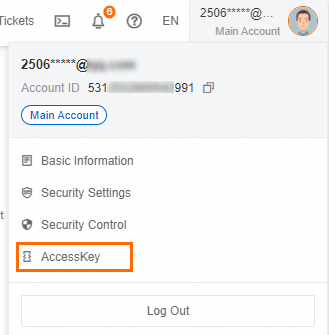
Hover over your profile picture in the upper-right corner and click AccessKey.
-
In the We do not recommend that you use the AccessKey of your Alibaba Cloud account dialog box, read the risks of creating an AccessKey pair for your Alibaba Cloud account. If you must proceed, select the I am aware of the security risks of using a main account AccessKey. checkbox, and then click Continue to use the AccessKey of my Alibaba Cloud account.
-
On the AccessKey page, click Create AccessKey.
NoteAn Alibaba Cloud account can have a maximum of two AccessKey pairs. One is for active use, and a second for rotation.
-
In the Create Main Account AccessKey dialog box, review the risks and limitations again. If you are sure you want to create the AccessKey pair, select the I am aware of the security risks of using a main account AccessKey. checkbox, and then click Continue to use the AccessKey of my Alibaba Cloud account.
-
In the Create AccessKey dialog box, save the AccessKey ID and AccessKey secret. Then, select the I have saved the AccessKey Secret checkbox and click OK.
(Recommended) Configure an AccessKey network ACL policy: You can restrict the source IP addresses of API requests that use this AccessKey pair. This helps improve security by ensuring that the AccessKey pair is used only from trusted network environments. We recommend that you click Configure network access policy to define the trusted network environments for this AccessKey pair. For more information, see Configure an AccessKey network ACL policy for an Alibaba Cloud account.
ImportantTo reduce the risk of a leak, the AccessKey secret for an Alibaba Cloud account is displayed only upon creation and cannot be retrieved.