TairSearch is an in-house data structure for full-text search that uses Elasticsearch-compatible syntax. This topic explains how the bool query works and demonstrates common compound query patterns using must, must_not, and should clauses.
How it works
A bool query combines multiple conditions using clause types, each with distinct logical behavior:
| Clause | Logic equivalent | Behavior |
|---|---|---|
must | AND | All conditions must match. Documents that also match should clauses receive a higher relevance score, which affects their ranking in results. |
must_not | NOT | Documents matching any of these conditions are excluded from results. |
should | OR | Conditions are optional. When should is the only clause type, minimum_should_match defaults to 1 (at least one must match). When combined with must or must_not, minimum_should_match defaults to 0 (should clauses become optional score boosters). |
Clause evaluation follows this priority order: must_not > must > should.
Bool queries, as well as any other query types, can be nested inside a bool query to express complex logic such as (A AND B) OR C.
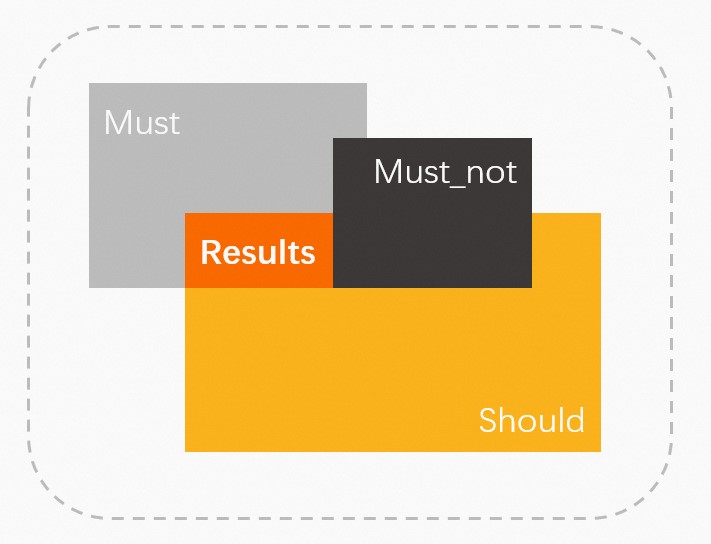
For the full TairSearch command reference, see Search.
Run compound queries
The following examples demonstrate four common bool query patterns. All examples use the same index and document data.
Step 1: Create an index
TFT.CREATEINDEX key '{
    "mappings": {
        "properties": {
            "A": { "type": "keyword" },
            "B": { "type": "keyword" },
            "C": { "type": "keyword" }
        }
    }
}'
Step 2: Add a document
TFT.ADDDOC key '{
    "A": "a",
    "B": "b",
    "C": "c"
}'