The Redis OSS-compatible instances of Tair (Redis OSS-compatible) feature automatic scaling and a pay-as-you-go billing model. These instances automatically scale to ensure service stability during peak traffic without impacting your business, significantly reducing operational complexity. You are billed only for the resources you use, helping you control costs effectively.
Architecture
Tair Serverless KV Redis OSS-compatible instances use a distributed cluster architecture that is compatible with Redis Open-Source Edition 6.0. For more information, see Supported commands for Redis OSS-compatible instances. The following figure shows the architecture and describes the components.

Component | Description |
Data shard (Partition) | An instance consists of multiple data shards. Data distribution among shards is compatible with Redis Cluster by using slots. Each data shard uses a high availability architecture with one master node and multiple replicas deployed on different machines. Each shard has at least one replica. |
High availability (HA) | If a master node fails, the system automatically fails over to a replica within 30 seconds to ensure high availability and data reliability. |
Serverless capabilities
When you create and use a Tair Serverless KV Redis OSS-compatible instance, you do not need to configure instance specifications. The instance automatically adapts to your application's requirements for RCU (read capacity unit), WCU (write capacity unit), and storage usage by automatically scaling based on the workload. These resources are defined as follows:
Storage capacity: The space used for data storage. It ranges from 0 to 25 TB and scales automatically with usage, so you do not need to provision capacity in advance.
RCU: The smallest unit for a read operation. One RCU represents a single client read of up to 4 KB of data. If a read operation is smaller than 4 KB, it is counted as one RCU. If it exceeds 4 KB, the number of RCUs is calculated by dividing its size by 4 KB and rounding up to the next whole number. The formula is: RCU = ⌈Size of a single read / 4 KB⌉.
WCU: The smallest unit for a write operation. One WCU represents a single client write of up to 512 B of data. If a write operation is smaller than 512 B, it is counted as one WCU. If it exceeds 512 B, the number of WCUs is calculated by dividing its size by 512 B and rounding up to the next whole number. The formula is: WCU = ⌈Size of a single write / 512 B⌉.
Initial performance and automatic scaling
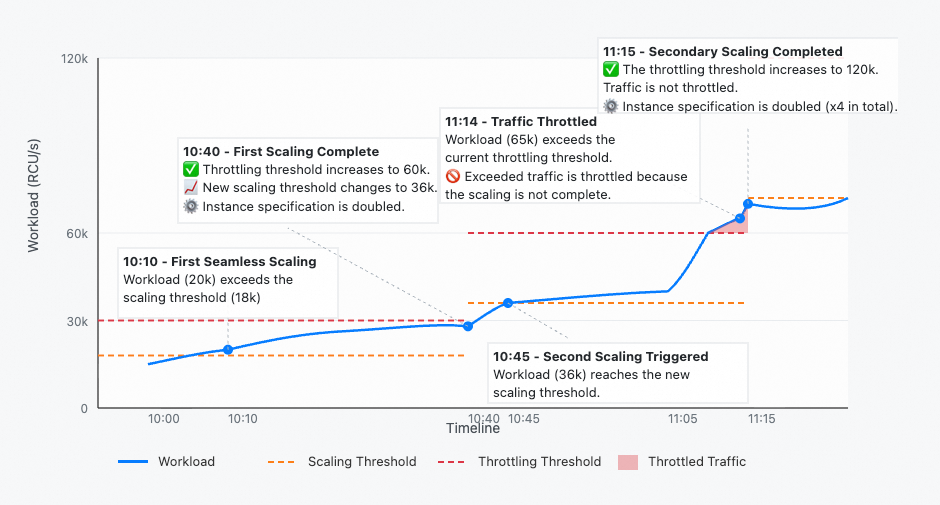
A Tair Serverless KV Redis OSS-compatible instance has an initial peak performance (throttling threshold) of 30,000 RCU/s and 20,000 WCU/s. When traffic exceeds 60% of the peak performance, the instance starts to scale out. During the scale-out process, requests that exceed the original peak performance are throttled. After the scale-out completes, the peak performance doubles. If the traffic continues to exceed 60% of the new peak, the instance automatically scales out again.
Tair Serverless KV guarantees that each scale-out task completes within 30 minutes.
When instance traffic exceeds the throttling threshold, the excess requests are throttled. By default, the system queues requests, which is consistent with the behavior of a standard Redis instance. You can also configure the system to return an error. For more information, see Client-side throttling.
Instance limits
Maximum capacity: 25 TB.
Maximum bandwidth: The maximum inbound and outbound bandwidth is 16 Gbit/s (2 GB/s) for each. They are measured independently.
Maximum connections: 400,000.
Maximum throughput: 7,680,000 RCU/s and 5,120,000 WCU/s.
Hot key throughput: 30,000 RCU/s and 20,000 WCU/s.
Billing
The fees for a Tair Serverless KV instance consist of two parts: compute resource fees (for RCUs and WCUs) and storage capacity fees. For more information, see Tair Serverless KV billing.
Get started with Tair Serverless KV
Create and release Tair Serverless KV Redis-compatible instances
Performance monitoring
The performance monitoring feature for Tair Serverless KV instances provides metrics such as usage, traffic, latency, number of requests, key statistics, and hit rate. You can query monitoring data from the past month for a specified time period. This helps you understand the instance's performance and operational status, and troubleshoot performance issues.
Backup and recovery
Tair Serverless KV instances support the following backup and recovery solutions.
Category | Solution | Description |
Data backup | An instance automatically backs up data based on the default policy. You can modify the automatic backup policy or initiate a manual backup based on your business requirements. | |
Data recovery | You can create a new instance from a specified backup set. The data in the new instance is identical to the data in the backup set. This can be used for scenarios such as data recovery, rapid service deployment, or data validation. |
FAQ
Q: After my instance scales out, my traffic drops quickly. Do I need to pay for the scaled-up performance?
A: No. Fees are based only on the usage of capacity units (CUs) and storage, not on the provisioned backend resources. For example, if the current performance limit of an instance is 30,000 RCU/s and the traffic is 200 RCU/s, you are billed only for 200 RCU/s and the current storage capacity. The instance automatically scales in after the request load remains at a low level for a period of time.
Q: Is the data in Tair Serverless KV persistent?
A: Yes. Data in Tair Serverless KV is persisted to disk in real time. Compared to traditional Redis, Tair Serverless KV is more suitable for use as a persistent database.