The cloud migration feature of ApsaraDB RDS for PostgreSQL allows you to migrate data from a self-managed PostgreSQL instance that is deployed on an Elastic Compute Service (ECS) instance or in a data center to an ApsaraDB RDS for PostgreSQL instance. This topic describes how to update the pg_hba.conf file of the self-managed PostgreSQL instance before a cloud migration to grant access from the CIDR block of the virtual private cloud (VPC) to which the ApsaraDB RDS for PostgreSQL instance belongs.
Procedure
In this topic, the self-managed PostgreSQL instance and the ApsaraDB RDS for PostgreSQL instance run PostgreSQL 13 in the CentOS 7 operating system.
Log on to the server on which the self-managed PostgreSQL instance resides.
Find the pg_hba.conf file.
NoteOnly the root user can run the following command.
find / -name pg_hba.confThe following or similar command output is displayed:
/var/lib/pgsql/13/data/pg_hba.confGo to the directory in which the pg_hba.conf file is stored.
cd /var/lib/pgsql/13/data/Run the
vim pg_hba.confcommand to enable the edit mode and add the following content to the pg_hba.conf file.# Migrate data over an internal network. host all migratetest 172.21.XX.XX/16 md5 host replication migratetest 172.21.XX.XX/16 md5The content contains the following parameters:
migratetest: the account that is used to migrate data. For more information, see Create an account for cloud migration on a self-managed PostgreSQL instance.172.21.XX.XX/16: the CIDR block of the VPC to which the ApsaraDB RDS for PostgreSQL instance belongs.Log on to the ApsaraDB RDS console and go to the Instances page. In the top navigation bar, select the region in which the RDS instance resides. Then, find the RDS instance and click the instance ID.
In the left-side navigation pane, click Database Connection. On the page that appears, check the Network Type parameter to obtain the VPC CIDR block.
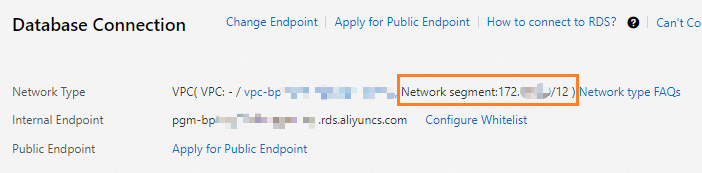
Connect to the self-managed PostgreSQL instance and reload its configuration.
SELECT pg_reload_conf();Sample output:
 pg_reload_conf
----------------
 t
(1 row)
What to do next
Configure the firewall of the server on which a self-managed PostgreSQL instance resides