When you no longer need an ApsaraDB RDS for PostgreSQL instance, you can release a pay-as-you-go or serverless instance, or unsubscribe from a subscription instance. This topic covers prerequisites, step-by-step procedures for the ApsaraDB RDS console and API, and answers to common questions.
Except for the situations described in Data retention after release or unsubscription, all data on the instance is permanently deleted immediately after you release or unsubscribe. Back up the instance and download the backup files before proceeding. For more information, see Enable the automatic backup feature and Download backup files.
Prerequisites
Before you begin, make sure that:
Your Alibaba Cloud account has no overdue payment. Settle any outstanding balance before proceeding.
If the instance you want to release or unsubscribe from is the last read-only instance of a primary instance, disable the database proxy feature for the primary instance first.
If the instance is a pay-as-you-go instance in the Suspended state, restart the instance before you release it. Alternatively, call the DeleteDBInstance API operation directly.
Data retention after release or unsubscription
The following instances are moved to the recycle bin after release or unsubscription, where you can unlock and rebuild them:
Unsubscribed or expired subscription instances
Released pay-as-you-go instances
Released serverless instances
If the cross-region backup feature is enabled and the retention period has not elapsed, the cross-region backup files are retained after the instance is released. For more information, see Use the cross-region backup feature.
Potential impacts
| Impact | Details |
|---|---|
| Instance visibility and billing | After release or unsubscription, the instance is removed from the ApsaraDB RDS console and no further fees are charged. |
| Read-only instances | Releasing or unsubscribing from a primary instance automatically deletes all associated read-only instances (both subscription and pay-as-you-go). Payments for subscription read-only instances are refunded. |
| Rebuild eligibility | If the primary instance has been running for more than seven days, you can rebuild it in the recycle bin. For more information, see Manage RDS instances in the recycle bin. |
Release or unsubscribe from a primary instance
Release a pay-as-you-go or serverless primary instance
Log on to the ApsaraDB RDS console. In the left-side navigation pane, click Instances. In the top navigation bar, select the region where the instance resides.
Release the instance using one of the following methods:
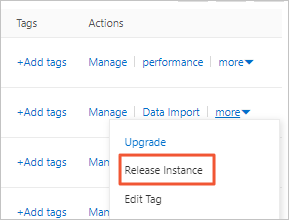
Method 1: Find the instance and choose More > Release Instance in the Actions column.
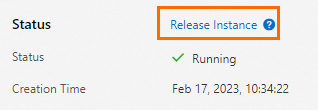
Method 2: Find the instance and click the instance ID. In the Status section of the Basic Information page, click Release Instance.
In the message that appears, click OK.
Unsubscribe from a subscription primary instance
Use one of the following methods to go to the Unsubscriptionssubmit a ticketsubmit a ticketsubmit a ticketsubmit a ticket page, then submit a ticket to apply for unsubscription.
Unsubscriptions page
Go to the Unsubscriptions page. Then, submit a ticket to apply for unsubscribing from a subscription RDS instance.
Go to the Unsubscriptions page. Then, submit a ticket to apply for unsubscribing from a subscription RDS instance.
Go directly to the Unsubscriptions page and submit a ticket.
Basic Information page
Log on to the ApsaraDB RDS console. In the left-side navigation pane, click Instances. In the top navigation bar, select the region where the instance resides.
Find the instance and click the instance ID. In the Status section of the Basic Information page, click Cancellation of Instance Subscription to go to the Unsubscriptions page. Submit a ticket to apply for unsubscription.
Instance details page
Log on to the ApsaraDB RDS console. In the left-side navigation pane, click Instances. In the top navigation bar, select the region where the instance resides.
Find the instance. In the Actions column, choose More > Cancellation of Instance Subscription. In the dialog box that appears, click OK to go to the Unsubscriptions page. Submit a ticket to apply for unsubscription.
Release or unsubscribe from a read-only instance
Release a pay-as-you-go read-only instance
Log on to the ApsaraDB RDS console. In the left-side navigation pane, click Instances. In the top navigation bar, select the region where the instance resides.
Release the instance using one of the following methods:
Method 1: Find the read-only instance and choose More > Release Instance in the Actions column.
Method 2: Find the read-only instance and click the instance ID. On the Basic Information page, click Release Instance.
In the message that appears, click OK.
Unsubscribe from a subscription read-only instance
Use the same methods as for a subscription primary instance: go to the Unsubscriptions page using any of the three entry points described in Unsubscribe from a subscription primary instance, then submit a ticket to apply for unsubscription.
Automatic deletion when the primary instance is released
Releasing or unsubscribing from a primary instance automatically deletes all associated read-only instances. Payments for subscription read-only instances are refunded.
API reference
| Operation | Description |
|---|---|
| DeleteDBInstance | Releases a pay-as-you-go or serverless instance. Cannot be used to unsubscribe from a subscription instance. |
FAQ
Will my workloads be interrupted if I release or unsubscribe from a read-only instance?
Yes. Take the following steps to minimize disruption before releasing:
If the database proxy feature is enabled, set the read weight of the read-only instance to 0 before releasing it. For more information, see Configure the read and write attributes and the read weight of a database proxy endpoint. Note that cached connections to the released instance remain valid until they are closed; establish new connections to route reads to other read-only instances.
If the database proxy feature is not enabled, update your application code to replace the connection settings for the released instance with those of another read-only instance or the primary instance.
I cannot find Release Instance in the console. Why?
The instance is likely a subscription instance. Subscription instances cannot be released — only unsubscribed from. Follow the steps in Unsubscribe from a subscription primary instance or Unsubscribe from a subscription read-only instance.