ApsaraDB RDS for PostgreSQL uses a role-based access control (RBAC) model to manage database permissions. This topic walks through setting up a three-tier permission model — owner, read-write role, and read-only role — suitable for project- or team-level access management.
How it works
In PostgreSQL, roles and users are the same object type. The distinction is functional:
-
Roles hold permissions but cannot log in.
-
Users are roles with the
WITH LOGINattribute. Their effective permissions equal their own logon permission plus the permissions of all roles granted to them.
When you update a role's permissions, all users assigned to that role inherit the change automatically. No re-grant is needed.
Every RDS instance includes a privileged account named dbsuperuser. This account has full permissions on the instance and is intended for database administrators only.
Permission model
The recommended three-tier model for a project or team uses the following entities:
| Entity | Type | Permissions on tables | Permissions on stored procedures |
|---|---|---|---|
rdspg_owner |
Owner (user with full DDL) | DDL (CREATE, DROP, ALTER) + DQL (SELECT) + DML (UPDATE, INSERT, DELETE) | DDL (CREATE, DROP, ALTER) + DQL (SELECT) + call stored procedures |
rdspg_role_readwrite |
Role | DQL (SELECT) + DML (UPDATE, INSERT, DELETE) | DQL (SELECT) + call stored procedures; DDL operations inside stored procedures return a permission error |
rdspg_role_readonly |
Role | DQL (SELECT) only | DQL (SELECT) + call stored procedures; DDL operations inside stored procedures return a permission error |
Application users inherit permissions through role assignment:
-
rdspg_readwrite— inheritsrdspg_role_readwritepermissions + logon -
rdspg_readonly— inheritsrdspg_role_readonlypermissions + logon
For finer-grained control, create additional roles based on your requirements.
Do not place tables in thepublicschema. By default, all users have the CREATE permission and the USAGE permission on thepublicschema.
Prerequisites
Before you begin, make sure you have:
-
An ApsaraDB RDS for PostgreSQL instance
-
Access to the
dbsuperuserprivileged account -
A connection to the instance via a command-line tool (see Connect to an ApsaraDB RDS for PostgreSQL instance)
Set up permissions for a project
The following example sets up permissions for a project named rdspg with two schemas: rdspg and rdspg_1. Run all commands as dbsuperuser.
Step 1: Create the owner and roles
-- Create the owner. Replace the password with a strong password.
CREATE USER rdspg_owner WITH LOGIN PASSWORD 'asdfy181BASDfadasdbfas';

-- Create the read-write and read-only roles (no login).
CREATE ROLE rdspg_role_readwrite;
CREATE ROLE rdspg_role_readonly;

-- Grant DQL + DML permissions on tables created by rdspg_owner to rdspg_role_readwrite.
ALTER DEFAULT PRIVILEGES FOR ROLE rdspg_owner GRANT ALL ON TABLES TO rdspg_role_readwrite;

-- Grant DQL + DML permissions on sequences created by rdspg_owner to rdspg_role_readwrite.
ALTER DEFAULT PRIVILEGES FOR ROLE rdspg_owner GRANT ALL ON SEQUENCES TO rdspg_role_readwrite;

-- Grant DQL-only permission on tables created by rdspg_owner to rdspg_role_readonly.
ALTER DEFAULT PRIVILEGES FOR ROLE rdspg_owner GRANT SELECT ON TABLES TO rdspg_role_readonly;
ALTER DEFAULT PRIVILEGES applies to all objects rdspg_owner creates in the future. Existing objects require a separate GRANT.
Step 2: Create application users
-- Read-write user: inherits DQL + DML permissions from rdspg_role_readwrite.
CREATE USER rdspg_readwrite WITH LOGIN PASSWORD 'dfandfnapSDhf23hbEfabf';
GRANT rdspg_role_readwrite TO rdspg_readwrite;

-- Read-only user: inherits DQL-only permission from rdspg_role_readonly.
CREATE USER rdspg_readonly WITH LOGIN PASSWORD 'F89h912badSHfadsd01zlk';
GRANT rdspg_role_readonly TO rdspg_readonly;
Step 3: Create a schema and grant access
-- Set rdspg_owner as the owner of the rdspg schema.
CREATE SCHEMA rdspg AUTHORIZATION rdspg_owner;

-- Grant schema access to both roles.
GRANT USAGE ON SCHEMA rdspg TO rdspg_role_readwrite;
GRANT USAGE ON SCHEMA rdspg TO rdspg_role_readonly;rdspg_readwriteandrdspg_readonlyinherit schema access through their roles. No direct grant to these users is needed.
Apply the principle of least privilege
Use rdspg_readonly as the default user for application connections. Switch to rdspg_readwrite only when a write operation is required. This approach enables read/write splitting at the application layer without proxy middleware overhead.
If no read-only RDS instance is attached to your RDS instance, we recommend that you grant read permissions to one client and grant read and write permissions to the other client. Configure your Java Database Connectivity (JDBC) connections as follows:
| Client | User | JDBC URL |
|---|---|---|
| Read-only client | rdspg_readonly |
the endpoint of read-only RDS instance 1,the endpoint of read-only RDS instance 2,the endpoint of your RDS instance |
| Read-write client | rdspg_readwrite |
the endpoint of your RDS instance |
Extend the permission model
Add more schemas
To add a second schema (rdspg_1) to the same project:
CREATE SCHEMA rdspg_1 AUTHORIZATION rdspg_owner;

-- Grant the access permission on the rdspg_2 schema to roles.
-- Grant the permissions to perform DDL CREATE, DROP, and ALTER operations on tables in the rdspg_1 schema.
GRANT USAGE ON SCHEMA rdspg_1 TO rdspg_role_readwrite;
GRANT USAGE ON SCHEMA rdspg_1 TO rdspg_role_readonly;
All users assigned to these roles inherit the new schema access automatically.
Grant cross-project access
To give employee_readwrite (a user in the employee project) read access to the rdspg project:
-- Grant rdspg_role_readonly permissions to employee_readwrite.
GRANT rdspg_role_readonly TO employee_readwrite;
Verify permissions
Using \du
Connect to your instance and run \du to list roles and role memberships:
postgres=> \du
                         List of roles
 Role name              | Attributes    | Member of
------------------------+---------------+----------------------------------------------
 rdspg_owner            | ...           | {}
 rdspg_role_readwrite   | Cannot login  | {}
 rdspg_role_readonly    | Cannot login  | {}
 rdspg_readwrite        | ...           | {rdspg_role_readwrite}
 rdspg_readonly         | ...           | {rdspg_role_readonly}
 employee_readwrite      | ...           | {rdspg_role_readonly,employee_role_readwrite}
The Member of column for employee_readwrite shows both rdspg_role_readonly and employee_role_readwrite, confirming that cross-project read access is active.
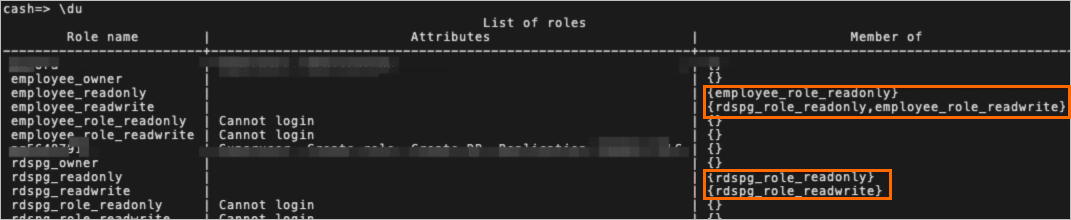
Using SQL
For a full audit of all roles and their memberships:
SELECT r.rolname, r.rolsuper, r.rolinherit,
  r.rolcreaterole, r.rolcreatedb, r.rolcanlogin,
  r.rolconnlimit, r.rolvaliduntil,
  ARRAY(SELECT b.rolname
        FROM pg_catalog.pg_auth_members m
        JOIN pg_catalog.pg_roles b ON (m.roleid = b.oid)
        WHERE m.member = r.oid) as memberof
, r.rolreplication
, r.rolbypassrls
FROM pg_catalog.pg_roles r
WHERE r.rolname !~ '^pg_'
ORDER BY 1;
Permission examples
DDL operations by rdspg_owner
rdspg_owner holds full DDL permissions in any schema it owns:
CREATE TABLE rdspg.test(id bigserial primary key, name text);
CREATE INDEX idx_test_name on rdspg.test(name);
DML and DQL by rdspg_readwrite
rdspg_readwrite can read and write data but cannot modify the schema:
INSERT INTO rdspg.test (name) VALUES('name0'),('name1');
SELECT id,name FROM rdspg.test LIMIT 1;

-- DDL is blocked:
CREATE TABLE rdspg.test2(id int);
ERROR:  permission denied for schema rdspg

DROP TABLE rdspg.test;
ERROR:  must be owner of table test

ALTER TABLE rdspg.test ADD id2 int;
ERROR:  must be owner of table test

CREATE INDEX idx_test_name on rdspg.test(name);
ERROR:  must be owner of table test
DQL only by rdspg_readonly
rdspg_readonly can query but not modify data:
INSERT INTO rdspg.test (name) VALUES('name0'),('name1');
ERROR:  permission denied for table test

SELECT id,name FROM rdspg.test LIMIT 1;
 id | name
----+-------
  1 | name0
(1 row)