When disk I/O becomes a bottleneck for your ApsaraDB RDS for PostgreSQL instance, the I/O acceleration feature routes temporary tables and files to high-speed cache disks, improving complex query performance by up to 100%. The feature is free and requires no application changes.
How it works

General ESSDs (Enterprise SSDs) use a three-tier storage architecture with high-speed cache disks as an intermediate layer between memory and ESSD storage. The I/O acceleration feature directs temporary data to this cache layer.
Without I/O acceleration, all data — including temporary tables and files generated during query execution — is stored on cloud disks. With I/O acceleration enabled, the query executor separates data by type:
-
Non-temporary data (regular tables, views): read from cloud disks into memory for processing, as usual.
-
Temporary data (temporary tables and files): read and written directly on cache disks.
ApsaraDB RDS for PostgreSQL uses the rds_temp_tablespace tablespace to represent the cache disk layer. Temporary objects — those created without an explicit tablespace assignment — are automatically placed in rds_temp_tablespace once you set the temp_tablespaces parameter.
Cache disk contents are not durable. Data stored in rds_temp_tablespace is lost during instance spec changes or other data migration operations. Do not store non-temporary database objects in this tablespace.
Use cases
I/O acceleration is most effective when queries generate large volumes of temporary data that exceed available memory:
-
Sorting, grouping, aggregation, and joins: operations that spill intermediate results to disk.
-
Recursive queries using common table expressions (CTEs): CTEs that materialize large intermediate result sets.
-
Ad hoc queries without supporting indexes: complex filters or aggregations that require full scans.
-
Analytic queries on large tables or multiple tables: reporting and analytics workloads with high I/O demands.
-
Workloads that use temporary tables: any application logic that explicitly creates temporary tables.
Prerequisites
Before you enable I/O acceleration, make sure your instance meets all of the following requirements:
| Requirement | Value |
|---|---|
| Billing method | Subscription or pay-as-you-go |
| PostgreSQL version | 11 or later |
| Minor engine version | 20231030 or later |
| Edition | RDS High-availability Edition |
| Product type | Standard product type |
| Storage type | General ESSDs |
| Instance family | General-purpose instance family |
The instance must also reside in one of the following regions and zones:
| Region | Zone |
|---|---|
| China (Chengdu) | Zone B |
| China (Beijing) | Zone I |
| China (Shanghai) | Zone M |
| Zone N | |
| China (Hangzhou) | Zone J |
After enabling I/O Acceleration on the buy page, confirm availability in the Zone and Network of Primary Node section.
Enable I/O acceleration
Enabling or disabling I/O acceleration causes a service interruption of approximately 30 seconds. Perform this operation during off-peak hours.
Option 1: Enable when creating an instance (recommended)
When creating an RDS instance, configure the parameters to meet the prerequisites listed above, then turn on I/O Acceleration.

Option 2: Enable on an existing instance
-
Go to the Instances page. In the top navigation bar, select the region where the instance resides, then click the instance ID.
-
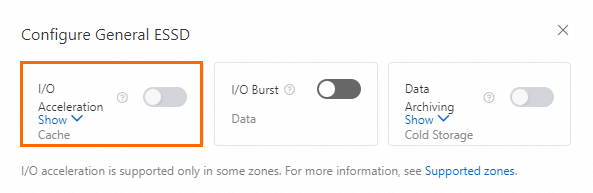
In the Basic Information section, click Configure General ESSD to the right of Storage Type.
-
In the dialog box, turn on I/O Acceleration.
Set the temp_tablespaces parameter
After enabling I/O acceleration, the rds_temp_tablespace tablespace is created automatically. Set the temp_tablespaces parameter to rds_temp_tablespace so temporary objects use cache disks by default.
For instructions on modifying parameters, see Modify the parameters of an ApsaraDB RDS for PostgreSQL instance.
To apply the setting for the current session only, run:
SET temp_tablespace TO 'rds_temp_tablespace';To revert to cloud disks, set temp_tablespaces to ''.
Verify the configuration
Connect to the instance (see Connect to an ApsaraDB RDS for PostgreSQL instance), then run the following statements:
-- Create a regular table
CREATE TABLE test_table (di INT);

-- Create a temporary table
CREATE TEMPORARY TABLE test_temp_table (id INT);

-- Query which tablespace each table uses
SELECT
    c.relname AS table_name,
    COALESCE(t.spcname, 'pg_default') AS tablespace_name
FROM
    pg_class c
JOIN
    pg_namespace n ON c.relnamespace = n.oid
LEFT JOIN
    pg_tablespace t ON c.reltablespace = t.oid
WHERE
    c.relkind = 'r'
    AND c.relname IN ('test_table', 'test_temp_table');
Expected output:
    table_name    |   tablespace_name
------------------+---------------------
 test_table       | pg_default
 test_temp_table  | rds_temp_tablespace
(2 rows)
test_temp_table appearing in rds_temp_tablespace confirms that I/O acceleration is active.
Usage notes
-
Cache disk space is allocated based on your instance type. If the cache fills up, the error
ERROR: could not write to file "pg_tblspc/xxxx": No space left on deviceis reported for statements that write temporary data. SQL statements operating on non-temporary data are not affected. -
Data in
rds_temp_tablespaceis not durable. It is lost during instance spec changes or other data migration operations.
Troubleshooting
ERROR: No space left on device
This error means the rds_temp_tablespace tablespace is full. Address it in the following order:
-
Terminate the current session and reconnect. The instance clears temporary files when a session ends. Re-run the statement after reconnecting.
-
Fall back to cloud disks by setting
temp_tablespacesto''. This removes the cache disk limit but also removes the performance benefit of I/O acceleration.
What's next
-
For all storage types supported by ApsaraDB RDS for PostgreSQL, see Storage types.
-
For an overview of general ESSDs and their three-tier architecture, see General ESSDs.
-
If your workloads have unpredictable peak IOPS demands, consider enabling I/O burst in addition to I/O acceleration.