Starting from September 1, 2024, ApsaraDB RDS for MySQL supports RDS instances that run RDS Cluster Edition or RDS High-availability Edition with read-only instances to upgrade from MySQL 5.7 to MySQL 8.0.
Effective date
September 1, 2024
Billing rules
Upgrading major engine versions is free of charge.
Change details
ApsaraDB RDS for MySQL supports RDS instances that run RDS Cluster Edition or RDS High-availability Edition with read-only instances to upgrade from MySQL 5.7 to MySQL 8.0.
The following table describes the policies to upgrade the major engine version.
Engine | Instance type | RDS edition | Upgrade policy |
MySQL | Primary instance | Basic Edition | Direct upgrade |
High-availability Edition without read-only instances | Upgrade after the precheck is passed | ||
High availability Edition with read-only instances | Upgrade after the precheck is passed | ||
Cluster Edition | Direct upgrade |
Feature entry
RDS instances on RDS Cluster Edition
Go to the Instances page. In the top navigation bar, select the region in which the RDS instance resides. Then, find the RDS instance and click the ID of the instance.
In the Configuration Information section of the Basic Information page, click Upgrade Major Engine Version.
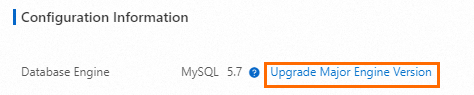
RDS instances on RDS High-availability Edition with read-only instances
Go to the Instances page. In the top navigation bar, select the region in which the RDS instance resides. Then, find the RDS instance and click the ID of the instance.
In the left-side navigation pane, click Major Version Upgrade.
References
For more information, see Upgrade Database Version.