Task Center lets you track the progress of running tasks and review historical task details for your ApsaraDB RDS instances. For tasks that involve a switchover — such as changing instance specifications or upgrading the engine version — you can also reschedule their execution time directly from this page.
Task Center is supported for ApsaraDB RDS for MySQL, PostgreSQL, and SQL Server. Task history is available for the last 30 days only.
Supported tasks and operations
The following tables list the tasks that appear in Task Center and the operations available, organized by database engine.
ApsaraDB RDS for MySQL
Tasks that appear in Task Center
| Task | Local disk | Cloud disk |
|---|---|---|
| Create an instance | Supported | Supported |
| Modify the parameters of an instance | Supported | Supported |
| Change the configuration of an instance | Supported | Supported |
| Restart an instance | Supported | Supported |
| Clone an instance | Supported | Supported |
| Update the minor engine version of an instance | Supported | Supported |
| Change an account | Supported | Supported |
| Change the specifications of an instance | Supported | Supported |
| Create a read-only instance | Supported | Supported |
| Start an instance | N/A | Supported |
| Suspend an instance | N/A | Supported |
| Change the network type of an instance | Supported | Supported |
| Manually back up an instance | Supported | Supported |
| Add a cluster node | Supported | Supported |
| Delete a cluster node | Supported | Supported |
| Upgrade the major engine version of an instance | Supported | N/A |
| Migrate an instance | Supported | Supported |
| Enable SSL encryption | Supported | Supported |
| Enable Transparent Data Encryption (TDE) | Supported | N/A |
| Create a privileged account and a standard account | Supported | Supported |
| Change the data replication mode | Supported | Supported |
| Change the category and performance level (PL) of a cloud disk | N/A | Supported |
| Change the endpoint of an instance | Supported | Supported |
| Upload snapshot backups to OSS | N/A | Supported |
| Restore individual databases and tables | Not supported | Supported |
Operations available in Task Center
| Operation | Local disk | Cloud disk |
|---|---|---|
| View the progress of the current task and details of historical tasks | Supported | Supported |
| Change the switching time for a task from the preset point in time to Execute now | Supported | Supported |
| Specify the switching time for a task | Supported | Supported |
Task Center lets you change the switching time to Execute now or Execute at specified time for the following tasks:
-
Change the specifications of an instance
-
Change the type of a cloud disk
-
Update the minor engine version of an instance
-
Upgrade the major engine version of an instance
-
Migrate an instance
-
Enable SSL encryption
-
Enable TDE
ApsaraDB RDS for PostgreSQL
Tasks that appear in Task Center
| Task | Cloud disk |
|---|---|
| Create an instance | Supported |
| Create a read-only instance | Supported |
| Clone an instance | Supported |
| Perform cloud migration with a few clicks | Supported |
| Upgrade the major engine version of an instance | Supported |
| Update the minor engine version of an instance | Supported |
| Restart an instance | Supported |
| Modify the parameters of an instance | Supported |
| Start an instance | Supported |
| Suspend an instance | Supported |
| Manually back up an instance | Supported |
| Migrate an instance | Supported |
| Change the specifications of an instance | Supported |
| Enable SSL encryption | Supported |
| Enable TDE | Supported |
| Create an account | Supported |
| Apply for a public endpoint for an instance | Supported |
| Delete the public endpoint of an instance | Supported |
| Change the endpoint of an instance | Supported |
| Perform a primary/secondary switchover | Supported |
| Change a vSwitch | Supported |
| Upload snapshot backups to OSS | Supported |
| Restore individual databases and tables | Supported |
Operations available in Task Center
| Operation | Cloud disk |
|---|---|
| View the progress of the current task and details of historical tasks | Supported |
| Change the switching time for a task from the preset point in time to Execute now | Supported |
| Specify the switching time for a task | Supported |
Task Center lets you change the switching time to Execute now or Execute at specified time for the following tasks:
-
Update the minor engine version of an instance
-
Migrate an instance
-
Change the specifications of an instance
-
Perform a primary/secondary switchover
ApsaraDB RDS for SQL Server
Tasks that appear in Task Center
| Task | Cloud disk | Local disk |
|---|---|---|
| Create an instance | Supported | Not supported |
| Create a read-only instance | Supported | Not supported |
| Clone an instance | Not supported | Not supported |
| Perform cloud migration with a few clicks | Not supported | Not supported |
| Upgrade the major engine version of an instance | Not supported | Not supported |
| Update the minor engine version of an instance | Not supported | Not supported |
| Restart an instance | Supported | Not supported |
| Modify the parameters of an instance | Not supported | Not supported |
| Start an instance | Not supported | Not supported |
| Manually back up an instance | Supported | Supported |
| Suspend an instance | Not supported | Not supported |
| Migrate an instance | Not supported | Not supported |
| Change the specifications of an instance | Supported | Not supported |
| Enable SSL encryption | Not supported | Not supported |
| Enable TDE | Not supported | Not supported |
| Create an account | Not supported | Not supported |
| Apply for a public endpoint for an instance | Not supported | Not supported |
| Delete the public endpoint of an instance | Not supported | Not supported |
| Change the endpoint of an instance | Not supported | Not supported |
| Perform a primary/secondary switchover | Supported | Not supported |
| Change a vSwitch | Not supported | Not supported |
Operations available in Task Center
| Operation | Cloud disk | Local disk |
|---|---|---|
| View the progress of the current task and details of historical tasks | Supported | Not supported |
| Change the switching time for a task from the preset point in time to Execute now | Not supported | Not supported |
| Specify the switching time for a task | Not supported | Not supported |
View and manage tasks
Step 1: Open Task Center
Use either of the following methods:
-
In the ApsaraDB RDS console, click Tasks in the left-side navigation pane.
-
From an instance details page:
-
Go to the Instances page. In the top navigation bar, select the region where the instance resides. Find the instance and click its ID.
-
In the upper-right corner, click the
 icon.
icon.
-
Step 2: Find a task
Filter tasks by start time, end time, task status, or keyword. The keyword can be a task ID or a resource ID. Click Details in the Actions column to view full task information.

Step 3: Change the switching time (optional)
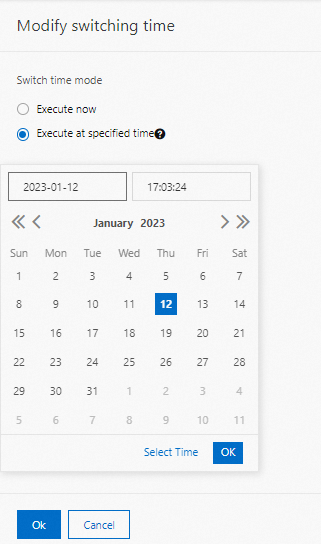
If a task's status is Pending Schedule, click Modify switching time in the Actions column.
-
Select Execute now to run the switchover immediately.
-
Select Execute at specified time, specify a point in time, and click OK to schedule the switchover for later.
FAQ
Why does my task progress appear stuck?
Task progress is shown as a percentage and does not change linearly. The rate depends on the task type, data volume, current workloads, and host resources. If the percentage stays the same for an extended period, a time-intensive backend operation is likely running — such as data migration, backup, download, or a major engine version upgrade. Wait for the operation to complete.
Why doesn't my task appear in Task Center after I perform an operation?
Two reasons are possible: the operation is not supported by Task Center (check the supported task tables above), or the task was created before Task Center was released. Tasks generated before Task Center became available are not shown.
Can I cancel a running task?
No. Running tasks cannot be cancelled because they may involve backend operations — such as data migration, switchover, or refund — that cannot be safely interrupted.