ApsaraDB RDS for MySQL uses logical replication. After a transaction executes on the primary instance, its binlog events are sent to a replica, which then applies them to ensure data consistency. In this architecture, however, long-running large transactions can cause significant replication latency on the replica. To address this issue, ApsaraDB RDS for MySQL introduces a real-time application feature for large transactions. This feature allows the replica to start executing a large transaction while it is still running on the primary instance. By executing the transaction on both instances simultaneously, this feature nearly eliminates the resulting replication latency and ensures high availability for your instance.
How it works
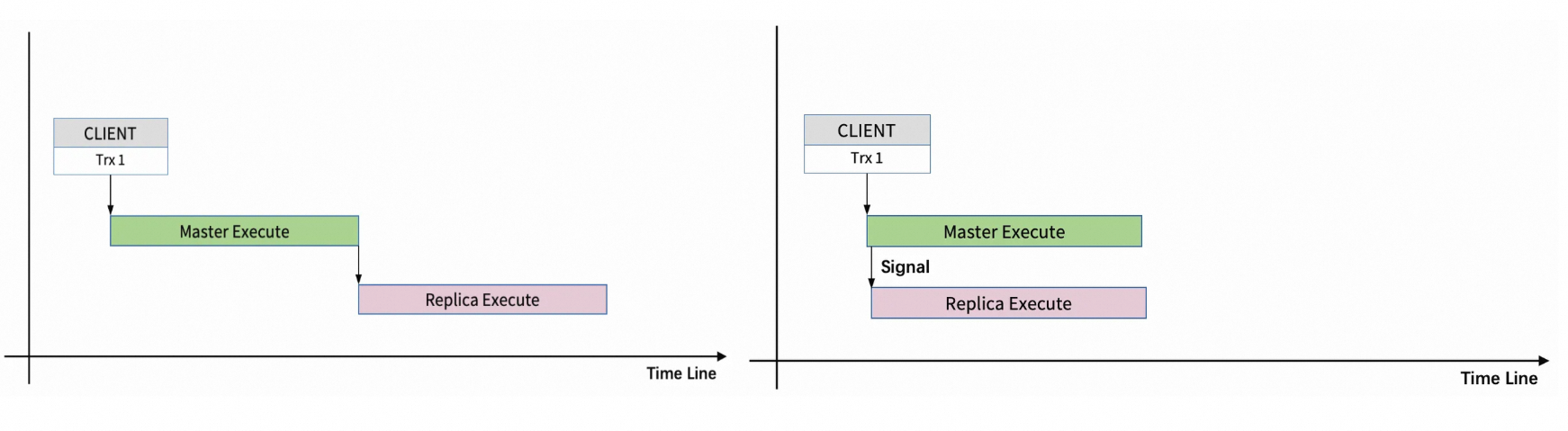
Replication latency for large transactions (left diagram): In MySQL, the replica only begins to apply a large transaction after it has been committed on the primary instance. This means the transaction's execution time on the replica becomes the replication latency. During this period, other transactions that are committed on the primary instance cannot be applied on the replica, which delays data updates.
Real-time application optimization for large transactions (right diagram): The core optimization is to execute the large transaction on the replica and primary instance simultaneously. When the large transaction is committed on the primary instance, it is also committed on the replica. When the large transaction is rolled back on the primary instance, it is also rolled back on the replica.
Prerequisites
To use the real-time application feature for large transactions, your instance must meet the following requirement:
-
Database engine version: MySQL 8.0 with a minor engine version of 20260228 or later. If your instance does not meet this requirement, you can upgrade the minor engine version or upgrade the database engine version.
Procedure
Go to the Instances page. In the top navigation bar, select the region in which the RDS instance resides. Then, find the RDS instance and click the ID of the instance.
-
In the left-side navigation pane, click Parameters.
-
On the Editable Parameters tab, search for and configure the following parameters:
-
Enable the real-time application feature for large transactions:
-
Set
loose_binlog_realtime_apply_long_trx_enabledtoON. -
Set
loose_binlog_realtime_transmit_source_enabledtoON. -
Set
loose_binlog_realtime_transmit_replica_enabledtoON.
-
-
Other required parameters:
Parameter
Description
Recommended value
loose_binlog_realtime_replica_long_transaction_limit_sizeSpecifies the size threshold for a transaction to trigger real-time replication. When the binlog events generated by a transaction exceed this value, this feature is automatically activated.
64 MB
loose_binlog_realtime_enable_log_messagSpecifies whether to write real-time replication logs to the error log. We recommend enabling this parameter.
ONloose_binlog_realtime_apply_workers
Controls the number of Brr Worker threads for real-time replication.
8
-
-
Click OK, and then click Submit Parameters. In the dialog box that appears, choose when to apply the changes. Parameter changes take effect immediately without requiring an instance restart.
Optimization results
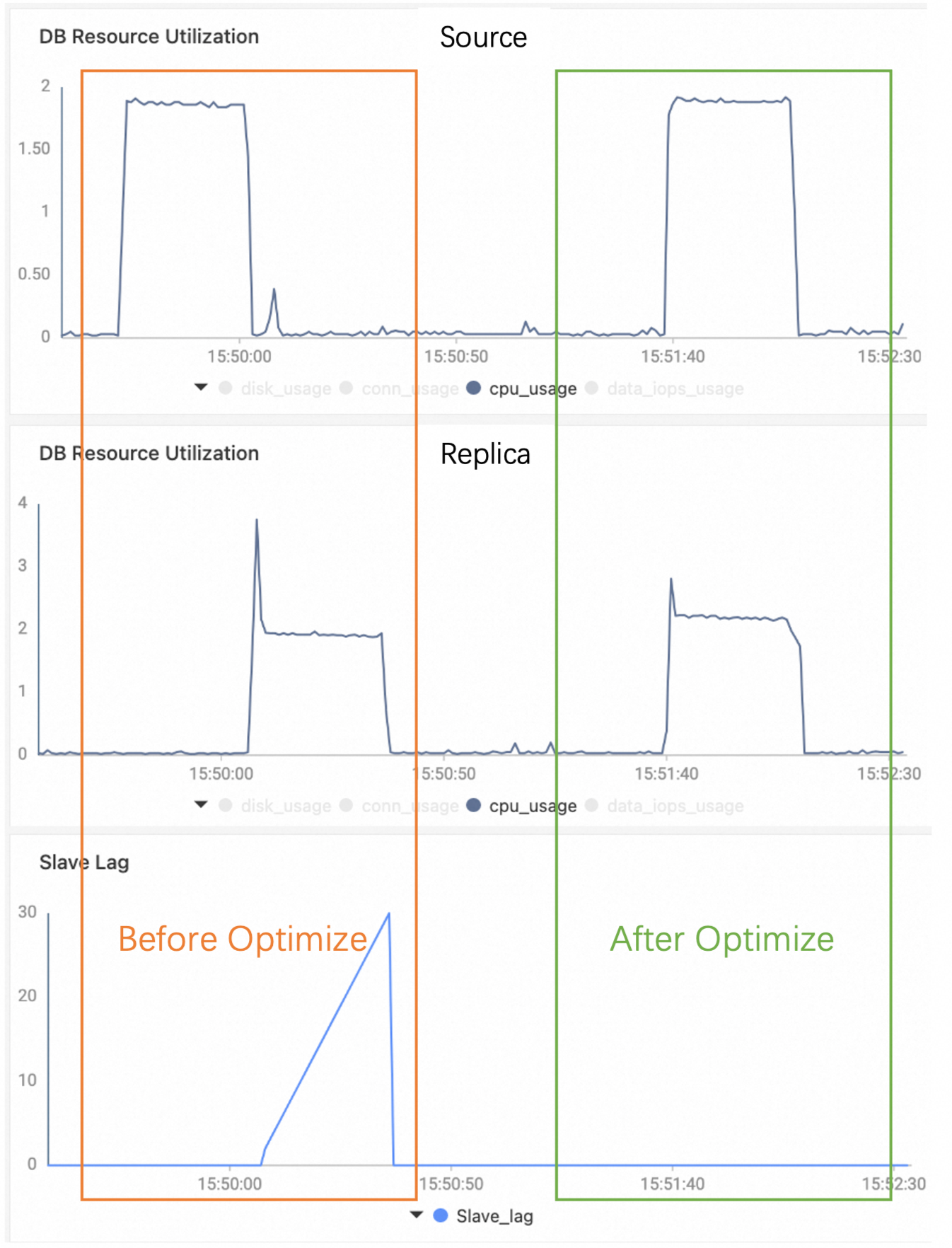
The following example shows the effect of this feature on a data import transaction that involves 5 million rows on the primary instance:
-
Before optimization: The transaction executes on the primary instance first. After it is committed, it is applied on the replica. The replication latency equals the transaction's execution time.
-
After optimization: The transaction executes on the primary instance and the replica simultaneously, eliminating replication latency.