All Products
Search
Document Center

ApsaraDB RDS:How to delete the ONLY_FULL_GROUP_BY parameter value of an RDS MySQL instance

Last Updated:Nov 23, 2025

This topic describes how to delete the sql_mode parameter value ONLY_FULL_GROUP_BY in an RDS MySQL instance.

Background information

MySQL prompt: 1055 (42000): SELECT list is not in GROUP BY clause and contains nonaggregated column

Procedure

  1. Log on to the RDS instance console, select a region at the top, and then click the target instance ID.

  2. In the left-side navigation pane, click Parameters.

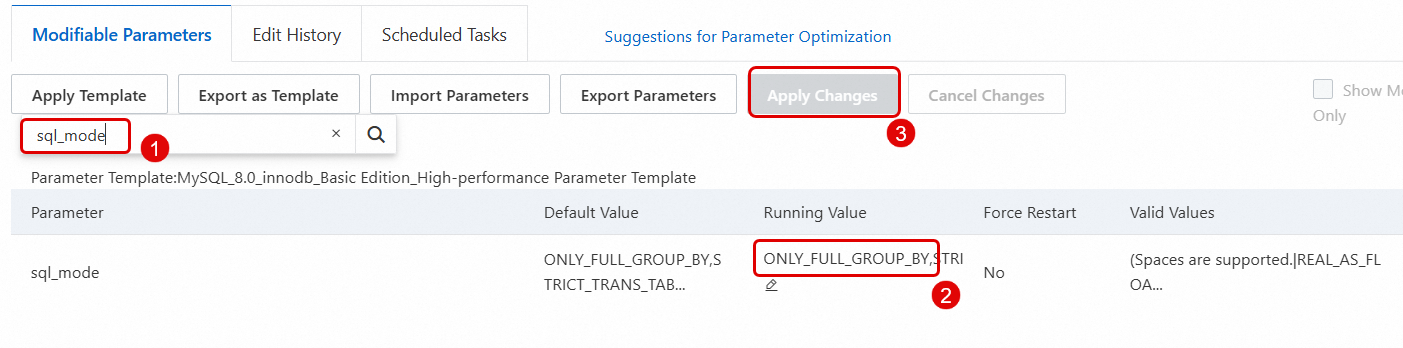
  3. Find the sql_mode parameter, click the edit button in the sql_mode parameter's Running Value column, and delete the ONLY_FULL_GROUP_BY value.

  4. Click OK to apply the modified configuration.
    image

  5. Log on to the RDS MySQL database through DMS, and execute the following SQL statement to confirm that the ONLY_FULL_GROUP_BY parameter is not included.

    select @@global.sql_mode

Applicable to

RDS MySQL