Problem description
The following error message is displayed when I execute SQL statements on my ApsaraDB RDS for MySQL instance:
1055(42000): SELECT list is not in GROUP BY clause and contains nonaggregated columnCauses and solutions
The error occurs because the sql_mode parameter is modified.
Cause 1: The user modifies the sql_mode parameter and causes the GROUP BY syntax to be invalid
Cause: The user adds
ONLY_FULL_GROUP_BYto the value of the sql_mode parameter. As a result, the syntax of the GROUP BY clause does not comply with the standards.Solution: Log on to the ApsaraDB RDS console, select the region, and then click the ID of your RDS instance. On the Parameters page, delete
ONLY_FULL_GROUP_BYfrom the value of thesql_modeparameter to ignore the strict check on the GROUP BY clause. For more information, see Modify instance parameters.
Cause 2: The driver on the business side modifies the sql_mode parameter and causes an error for the GROUP BY clause
Cause: The driver on the business side changes the value of the
sql_modeparameter. For example, when the ADO.NET driver on the business side changes the value of thesql_modeparameter, an error occurs for the GROUP BY clause.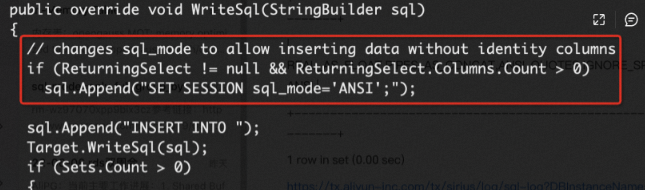
If the value of an auto-increment column needs to be returned by the INSERT statement, the driver automatically changes the value of the
sql_modeparameter for the current session before the INSERT statement is executed, but does not restore thesql_modeparameter to the original value after the INSERT statement is executed. If the current session continues to be used, an error occurs when the SELECT statement that contains the GROUP BY clause is executed.Solution: If the ADO.NET driver is used, add a statement in the business code to restore the
sql_modeparameter to the original value after you execute the INSERT statement and before you run the query.SET session sql_mode = default;