Online DDL lets you run data definition language (DDL) operations—such as creating indexes or modifying columns—on large tables without blocking concurrent data manipulation language (DML) operations or SELECT queries. This feature is available on ApsaraDB RDS for MySQL 5.6.
After upgrading from MySQL 5.5 to MySQL 5.6, the first DDL operation on a table may fail because the table uses an older format. Run the following command to convert the table format before proceeding:
ALTER TABLE <table_name> ENGINE=InnoDB;How it works
When you run an Online DDL operation, InnoDB uses one of two execution methods:
-
In-place: Modifies the table structure directly without creating a full copy. Consumes less disk space and I/O than the table-copy method.
-
Table-copy: Creates a temporary copy of the table with the new structure, then replaces the original. Consumes more disk space and I/O.
Two options control the behavior:
| Option | Controls | Recommended value |
|---|---|---|
ALGORITHM |
Execution method (in-place vs. table-copy) | INPLACE |
LOCK |
Whether concurrent DML is allowed during the operation | NONE |
ApsaraDB RDS for MySQL defaults to ALGORITHM=INPLACE and LOCK=NONE, so you generally do not need to set them explicitly. Set them explicitly only when you want to verify that a specific DDL operation supports these settings—if it does not, the statement returns an error immediately rather than silently falling back to a more restrictive method.
Example: add an index with explicit options
ALTER TABLE area ALGORITHM=INPLACE, LOCK=NONE, ADD INDEX idx_fa (father);Example: error when INPLACE is not supported
ALTER TABLE area_bak ALGORITHM=INPLACE, MODIFY father TEXT;

-- ERROR 1846 (0A000): ALGORITHM=INPLACE is not supported.
-- Reason: Cannot change column type INPLACE. Try ALGORITHM=COPY.
Example: error when LOCK=NONE is not supported
ALTER TABLE area ALGORITHM=COPY, LOCK=NONE, CONVERT TO CHARACTER SET utf8mb4;

-- ERROR 1846 (0A000): LOCK=NONE is not supported.
-- Reason: COPY algorithm requires a lock. Try LOCK=SHARED.
Run DDL operations during off-peak hours to minimize impact on your workload. For MySQL 5.5 instances that do not support Online DDL, use the Percona pt-online-schema-change tool as an alternative.
Supported operations
The following tables list Online DDL support by operation category. In-place and Table-copy refer to whether the operation supports the respective ALGORITHM value. Concurrent DML and Concurrent queries indicate whether those operations are permitted while the DDL runs.
Operations are grouped by risk level:
-
Low risk: Supports in-place execution and concurrent DML. You can run these during business hours with minimal impact.
-
High risk: Requires table-copy or blocks concurrent DML. Run these during off-peak hours and plan for increased I/O and disk usage.
Index operations
| DDL operation | In-place | Table-copy | Concurrent DML | Concurrent queries | Risk | Notes |
|---|---|---|---|---|---|---|
| Create a common index | Yes | No | Yes | Yes | Low | |
| Create a full-text index | Yes | No | No | Yes | High | The first full-text index on a table must use the table-copy method. Subsequent full-text indexes can use in-place. |
| Drop an index | Yes | No | Yes | Yes | Low | Modifies table metadata only. |
Primary key operations
| DDL operation | In-place | Table-copy | Concurrent DML | Concurrent queries | Risk | Notes |
|---|---|---|---|---|---|---|
| Add a primary key | Yes | Yes | Yes | Yes | High | INPLACE reorganizes table data and increases overhead. If the column is set to NOT NULL, INPLACE is not supported. |
| Drop a primary key and add a new one | Yes | Yes | Yes | Yes | High | INPLACE is only supported when both the drop and the add are in a single ALTER TABLE statement. INPLACE reorganizes table data and increases overhead. |
| Drop a primary key | No | Yes | No | Yes | High |
Column operations
| DDL operation | In-place | Table-copy | Concurrent DML | Concurrent queries | Risk | Notes |
|---|---|---|---|---|---|---|
| Add a column | Yes | Yes | Yes | Yes | High | If the column is AUTO_INCREMENT, concurrent DML is not permitted. INPLACE reorganizes table data and increases overhead. |
| Drop a column | Yes | Yes | Yes | Yes | High | INPLACE reorganizes table data and increases overhead. |
| Rename a column | Yes | No | Yes | Yes | Low | Only when the rename does not change the data type. |
| Modify column data type | No | Yes | No | Yes | High | |
| Reorder columns | Yes | Yes | Yes | Yes | High | INPLACE reorganizes table data and increases overhead. |
| Set a column default value | Yes | No | Yes | Yes | Low | Modifies table metadata only. |
| Set an AUTO_INCREMENT column default value | Yes | No | Yes | Yes | Low | Modifies table metadata only. |
| Set a column to NULL | Yes | Yes | Yes | Yes | High | INPLACE reorganizes table data and increases overhead. |
| Set a column to NOT NULL | Yes | Yes | Yes | Yes | High | Requires SQL_MODE set to STRICT_ALL_TABLES or STRICT_TRANS_TABLES, and the column must contain no NULL values. INPLACE reorganizes table data and increases overhead. |
Foreign key operations
| DDL operation | In-place | Table-copy | Concurrent DML | Concurrent queries | Risk | Notes |
|---|---|---|---|---|---|---|
| Add a foreign key constraint | Yes | No | Yes | Yes | Low | Run SET foreign_key_checks=0; before the operation to skip the table-copy requirement. |
| Drop a foreign key constraint | Yes | No | Yes | Yes | Low | Compatible with both foreign_key_checks states. |
Table-level operations
| DDL operation | In-place | Table-copy | Concurrent DML | Concurrent queries | Risk | Notes |
|---|---|---|---|---|---|---|
| Optimize a table | Yes | Yes | Yes | Yes | High | If the table has a full-text index, INPLACE is not supported. |
Rebuild a table (FORCE) |
Yes | Yes | Yes | Yes | High | If the table has a full-text index, INPLACE is not supported. |
Rebuild a table (ALTER TABLE ... ENGINE=InnoDB) |
Yes | Yes | Yes | Yes | High | If the table has a full-text index, INPLACE is not supported. |
Modify Row_Format |
Yes | Yes | Yes | Yes | High | INPLACE reorganizes table data and increases overhead. |
Modify Key_Block_Size |
Yes | Yes | Yes | Yes | High | INPLACE reorganizes table data and increases overhead. |
| Convert character set | No | Yes | No | Yes | High | If the new character set uses a different encoding, the table must be rebuilt. |
| Set character set | No | Yes | No | Yes | High | If the new character set uses a different encoding, the table must be rebuilt. |
| Set persistent statistics | Yes | No | Yes | Yes | Low | Modifies table metadata only. |
Column definitions:
-
In-place: Controlled by the
ALGORITHMoption. UsingINPLACEconsumes less disk space and I/O thanCOPY. -
Table-copy: Controlled by the
ALGORITHMoption. UsingCOPYconsumes more disk space and I/O thanINPLACE. -
Concurrent DML: Controlled by the
LOCKoption. -
Concurrent queries: In most cases, SELECT queries are permitted regardless of the DDL operation.
Even when ALGORITHM=INPLACE is specified, some operations (such as adding a column) still internally reorganize the table. The in-place method is not equivalent to a metadata-only change in these cases. DDL operations acquire a metadata lock on the target table. If a long-running transaction holds the lock, your DDL operation waits. To identify and release blocking metadata locks, see Use DMS to release metadata locks.
Troubleshooting
Error 1799: modification log exceeded
Symptom
ALTER TABLE rd_order_rec ADD INDEX idx_cr_time_detail (cr_time, detail);

ERROR 1799(HY000): Creating index 'idx_cr_time_detail' required more than
'innodb_online_alter_log_max_size' bytes of modification log. Please try again.
Cause
During a DDL operation, InnoDB records concurrent DML changes in a temporary log file. The log starts at the size defined by innodb_sort_buffer_size and can grow up to innodb_online_alter_log_max_size. If concurrent DML activity fills the log before the DDL completes, the operation fails and rolls back all uncommitted concurrent DML changes.
Solution
Increase innodb_online_alter_log_max_size in the ApsaraDB RDS console to allow larger log files. For MySQL 5.6 and 5.7 instances, modify this parameter under Parameters in the console. For details, see Modify instance parameters.
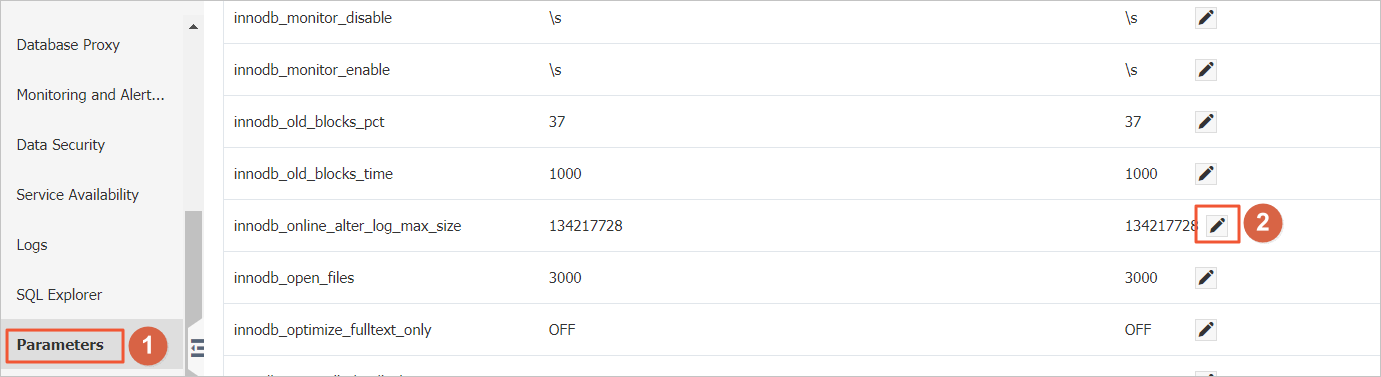
A larger innodb_online_alter_log_max_size value allows more concurrent DML during the DDL operation but increases the time the DDL needs to apply the logged changes at the end.