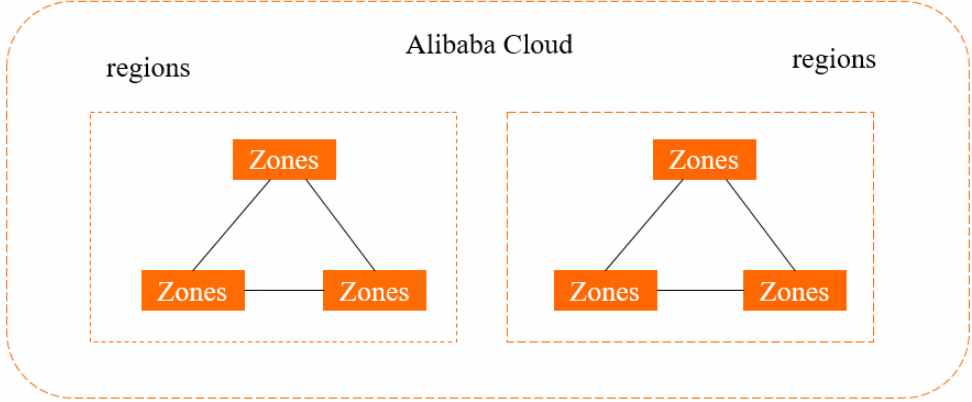
A region is a physical data center. A zone is an independent physical area within a region, with its own power supply and network infrastructure. Instances in the same zone have lower network latency than instances in different zones.
The following figure shows the relationship between regions and zones.
Two rules apply to all RDS instances:
-
Region: Fixed at creation. You cannot change an RDS instance's region after it is created.
-
Zone: Changeable. You can migrate an RDS instance to a different zone within the same region.
Can an ECS instance and an RDS instance in different regions or Alibaba Cloud accounts communicate? Are there traffic charges?
It depends on whether you use a public or internal network connection.
Public endpoint (internet)
Connect to the RDS instance's public endpoint. Alibaba Cloud does not charge for inbound or outbound internet traffic on the RDS instance side.
Internal network
Direct internal network connections are not available across regions or Alibaba Cloud accounts — virtual private clouds (VPCs) are isolated by default. To connect across regions or accounts over an internal network, use one of the following options:
| Option | Cost | Configuration effort | Best for |
|---|---|---|---|
| VPC peering connection | Low | Complex | Simple scenarios with a small number of VPCs |
| Cloud Enterprise Network (CEN) instance | High | Simple | Complex scenarios with a large number of VPCs |
Can instances in different zones of the same region communicate over an internal network?
Yes. Instances in different zones of the same region can communicate over an internal network using internal endpoints. For details, see View and change the internal and public endpoints and ports.
To connect an Elastic Compute Service (ECS) instance to an RDS instance over an internal network, all three conditions must be met:
-
The ECS instance and RDS instance belong to the same Alibaba Cloud account and use the same network type.
-
If both instances are in VPCs, they must be in the same VPC.
-
The private IP address of the ECS instance is added to an IP address whitelist of the RDS instance. For details, see Configure a whitelist.
Can I change the region of my RDS instance?
No. The region is fixed when you create the instance. To move your data to a different region, follow these steps:
-
Create a new RDS instance in the destination region and zone.
-
Use Data Transmission Service (DTS) to migrate data from the original instance to the new instance.
-
Verify that your workloads run as expected on the new instance.
Can I change the zone of my RDS instance?
Yes. To migrate your instance to a different zone within the same region, follow the instructions in Migrate an ApsaraDB RDS for MySQL instance across zones.
Zones within the same region are functionally equivalent. A zone migration is rarely necessary unless you have a specific requirement.
Single-zone or multi-zone deployment?
Zones in the same region are independent physical areas that are accessible to each other over an internal network. If a zone is faulty, other zones are not affected. If your application requires high disaster recovery capabilities, we recommend that you use the multi-zone deployment method.
For setup instructions, see Create an ApsaraDB RDS for MySQL instance.